

7 Best CRM for Marketing Agencies (Free & Paid)

Running a small or mid-sized marketing agency? Finding the right CRM for you needs has always been painful.
Most CRMs are built for big corporations with sales teams. You need something that handles your monthly retainers AND project work without requiring a month to set up or looking so basic that your clients lose confidence.
Maybe you’re stuck tracking communications in your head, drowning in scattered invoices, or bouncing between platforms trying to find decent integration. You’re tired of choosing between powerful-but-complicated tools or simple-but-inadequate systems that can’t grow with you.
I’ve tested over 40 CRMs and found 7 that actually work for agencies like yours. No complexity. Just tools that help you grow instead of slowing you down.
What actually is a Marketing Agency CRM?
A CRM for marketing agency is specialized software that centralizes client management, project workflows, and communication in one platform. Unlike traditional sales-focused CRMs, it’s built for agencies managing ongoing campaigns, multiple projects, and long-term client relationships, connecting your sales pipeline directly to service delivery and billing.
What an ideal CRM for a Marketing Agency should include:
Not every CRM claiming to help agencies actually delivers. They must have some certain special features that not only helps a marketing agency in their day to day workflow, but also regularly impacts their growth in a positive manner.
Before compiling the list we have set some threshold features to distinguish the ideal CRMs for marketing agencies from the hundreds other options in the market. Here’s the list of those features that we considered as must have.
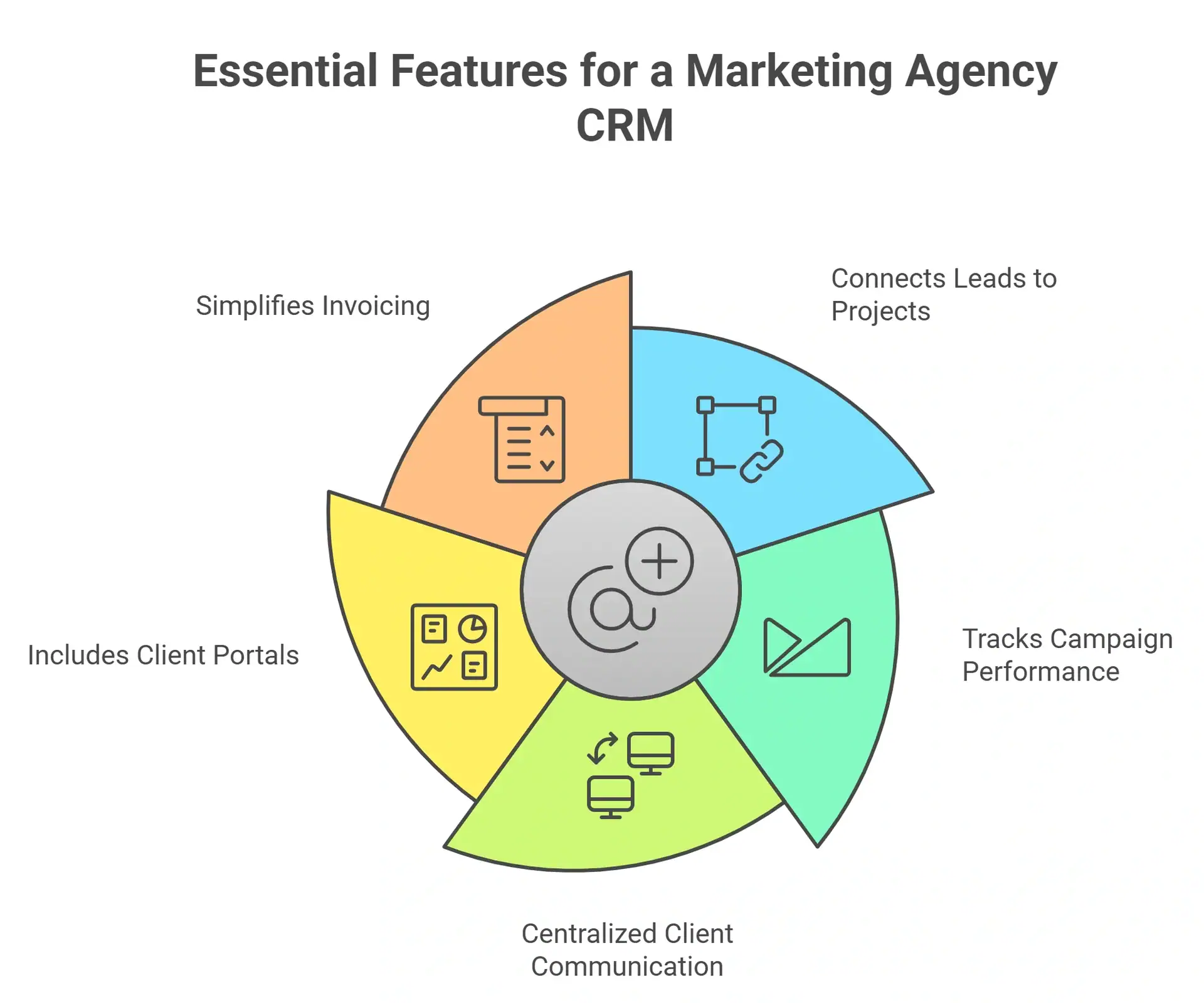
- Connects leads to projects: When a deal closes, client context should directly flow into your delivery workflow. No copy-pasting should be needed.
- Tracks campaign performance: It should link projects to specific clients so you know which clients are profitable and which are draining resources.
- Centralized client communication: Every email, task, and meeting note should live in one place, not scattered across inboxes.
- Includes client portals: White-labeled dashboards where clients view progress, approve deliverables, and access files without flooding your inbox.
- Simplified invoicing: It should be able generate invoices tied to specific projects and track payments.
7 Best Marketing Agency CRM
After setting up the list of threshold features, we analyzed more than 40+ tools that were suggested by regular CRM users in forums like Reddit and Quora. Then we analyzed that side by side to curate a list that we consider the list of ‘7 best CRM for marketing agencies’.
| Name | Key Features | Pricing Model (for 5 users) | Best For |
|---|---|---|---|
| OneSuite | Integrated CRM, Projects, Client Portal, Invoicing, Proposal all-in-one | Flat rate $29/month | Complete Client Lifecycle Management |
| Productive | Project Management, Time tracking | From $55/month | Hourly billing agencies |
| Monday.com | Visual workflows, strong automation | From $70/month | Visual project management |
| Dubsado | Client communication, invoicing | From $100/month | Freelancers, small creative teams |
| Scoro | CRM, quoting, project management | From $130/month | Agencies needing end-to-end PSA |
| Nimble | Social Media Heavy Activities, CRM, Contact Enrichment | From $149.5/month | Social Media focused agencies |
| Zoho CRM | Modular CRM, Sales Automation | Free (3-user, basic feature); Paid, from $100/month | Budget-conscious, modular stack |
1. OneSuite (Best Value for money CRM dedicatedly made for agencies)
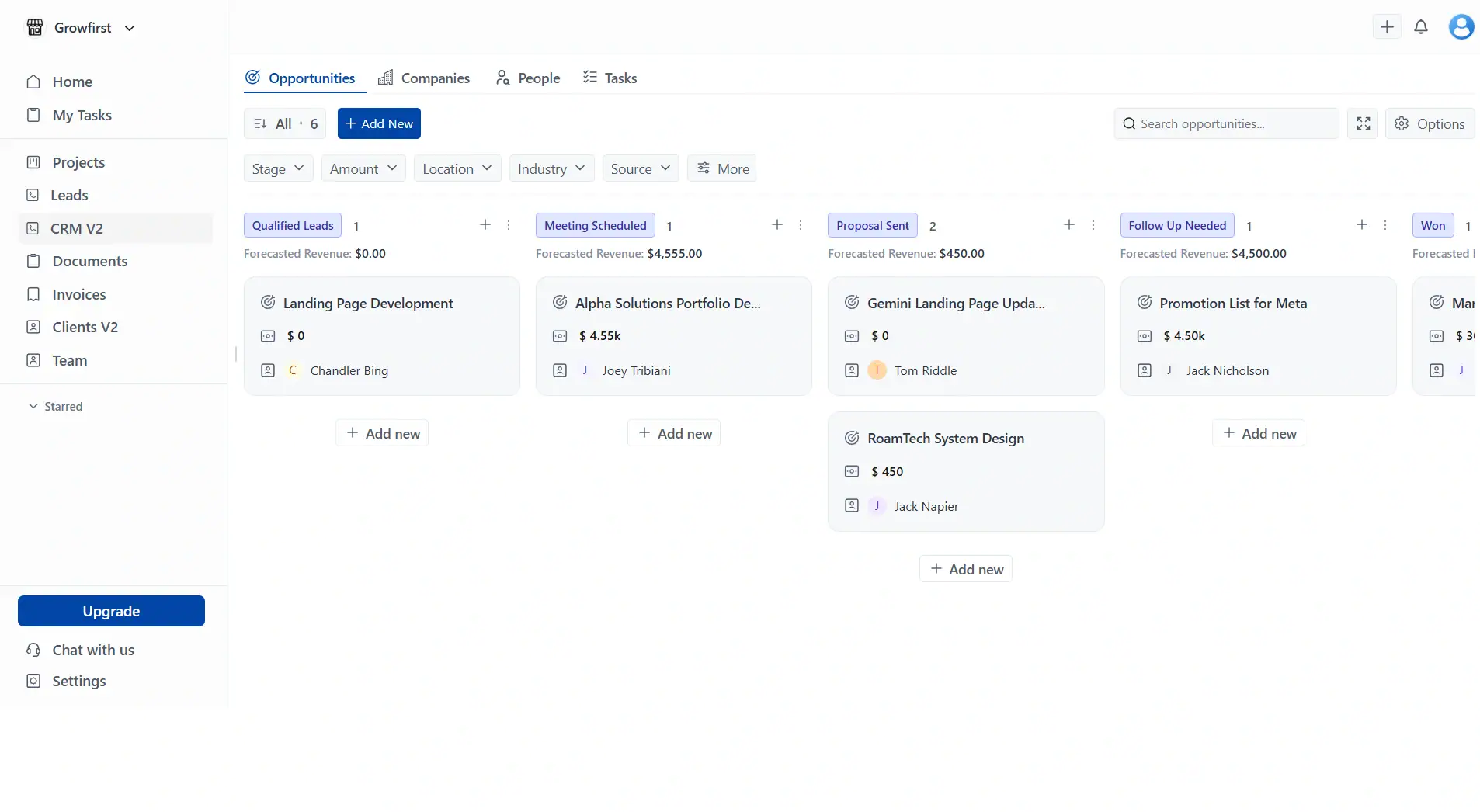
OneSuite‘s biggest win is how the modules actually talk to each other. When a lead converts to a client, their entire history flows into projects automatically. No re-entering data. No syncing errors.
Lead → Proposal → Contract→ Project→ Billing→ Upsell
The white-label portal makes 3-person agencies look enterprise. I’ve seen teams cut setup time from weeks to 2 days because everything just works together. With the $29/month (for 5 users) flat-rate pricing, OneSuite is the most affordable CRM for marketing agencies out there
Key Features:
- Fully white-labeled CRM to manage contacts and company data
- One-click lead conversion, preserving all data seamlessly
- 360-degree client profiles with projects, contracts, invoices, and proposals
- Gmail/Outlook email integration within client profiles
- Connected client portal for real-time project and invoice updates
- Flexible project management with Kanban boards, task templates, and labels
- Invoicing and payments with recurring options, multi-currency, and tracking
Pricing (less than $6 per user/month):
- Freelancer: $29/month(for 5 users)
- Solopreneur: $59/month (for 10 users)
- Growing Agency: $149/month (for 30 users)
Note: OneSuite offers a 14-day free trial with full feature access. No credit card required upfront.
✅ Pros |
❌ Cons |
|
CRM + Projects + Invoicing + Client portal + Proposals in one login |
Newer platform, means less mature than big players like Monday or HubSpot |
|
Quick setup with an easy-to-learn to learn interface. |
Fewer third-party integrations than enterprise tools. |
|
Professional branded client portal and real-time project updates. |
Not ideal if you need heavy marketing automation features and complex features. |
|
Quick and Responsive Support from real humans. No per-user fees, so scaling your team doesn’t destroy your budget |
User Feedback
✌️ The developer team has thought about every aspect of a team’s day to day need. While using the app, I never felt like I am missing anything. On top of that, there are some features that even changed the way our company is being managed now. Kudos to the devs.
–Raabit H.
👎 initially, the individual project could not save files. That has been updated now
–Carlos C.
2. Productive( Best for agencies that calculate everything hourly)
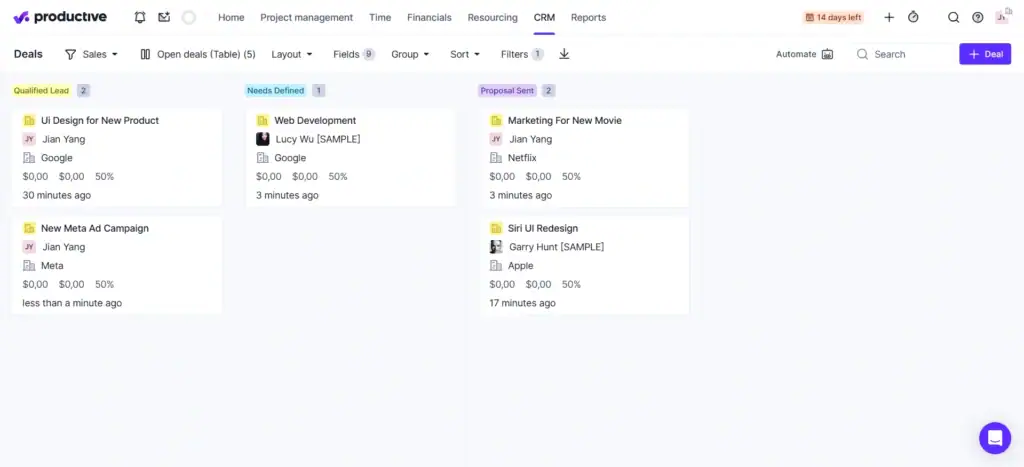
Productive’s killer feature isn’t time tracking. It’s real-time profitability. You see which clients are bleeding money during the project, not 3 months later when it’s too late. The resource heatmaps saved one agency I tested from overbooking their lead designer by 40 hours in a single month.
But here’s the catch: expect a week-long learning curve. If you don’t bill hourly, most features become overkill. Worth it if margins matter more than simplicity.
Key Features:
- Real-time project profitability tracking
- Time tracking with billing-ready logs
- Resource management and team optimization
- Integrated team and client collaboration
- Automated invoicing from tracked time
Pricing:
- Essential: $9/user/month, Core project management and time tracking
- Professional: $24/user/month, adds resource planning and financial reports
- Ultimate: $32/user/month, Advanced features, and dedicated support
✅ Pros |
❌ Cons |
|
Complete suite combining PM, time tracking, and financial reporting |
Steeper learning curve: More complex than OneSuite or Pipedrive; |
|
Robust profitability tracking: Tracks employee costs, overhead, and margins |
Higher cost at scale: Per-user pricing adds up for larger teams |
|
Recurring Invoices |
Advanced features require training to use effectively |
|
Strong profitability tracking for agencies billing by the hour |
CRM features lacks advanced automation and marketing features |
|
Lack of seamless integration between some modules |
|
User Feedback
✌️ I like that Productive suits my personal preferences on how I want to register my hours and set up my home screen. I know my colleagues prefer to use it differently than me, so the amount of customizability is enjoyable.
–Harald B.
👎 Configuring particular reports can be difficult, especially when you have to think about what specific data field is going to give you the answers you need.
–Jess T.
3. Scoro (Best for Mid-Sized Agencies Needing Financial & Resource Planning)
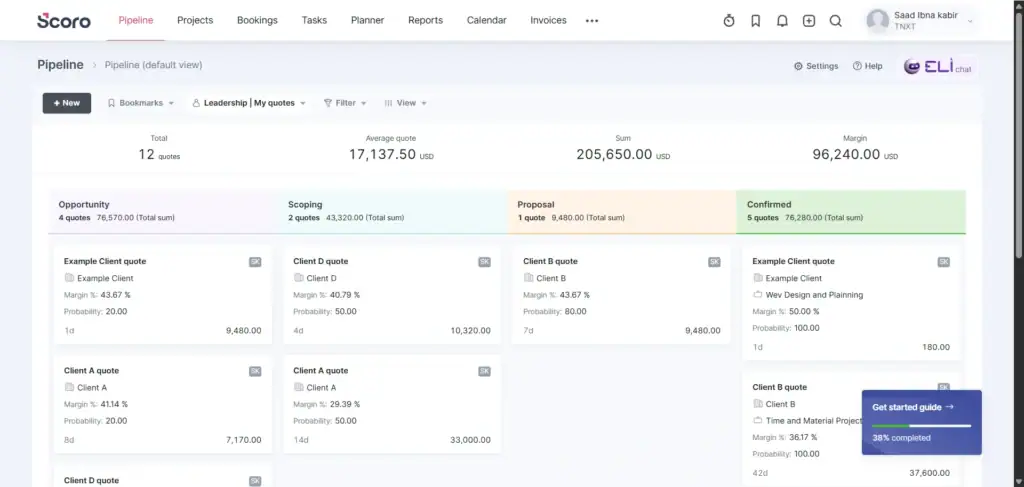
Scoro’s quote-to-project automation is unmatched. Assign roles, set costs, convert to a live project in one click. The financial forecasting rivals enterprise tools at half the price. But the support seems terrible (according to some reviews), and the UI feels like it was designed by executives, not designers.
Then you’ll need a dedicated ops person for setup. Only worth the $130-315/month minimum if you’re 15-50 people and financial visibility directly impacts your bottom line.
Key Features
- CRM and pipeline management
- Detailed project estimation with role-based costing
- Live project dashboards with budget and to all
- Team/resource availability forecasting
- Financial and profitability analytics
Pricing:
Core: $23.90 per user/month
Growth: $38.90 per user/month
Performance: $59.90 per user/month
Note: Though there are multiple plans here. But only “Performance” has X-factor features like Planner and Timesheet, and Revenue Recognition and Forecast available to be used.
✅ Pros |
❌ Cons |
|
Real-time profitability tracking surpasses most competitors. |
The complex interface takes 1-2 weeks to master |
|
Heatmaps and utilization forecasts prevent overbooking and underutilization |
Too expensive if you want their best and key functions |
|
Customizable dashboards tracking KPIs across sales, projects, and financials |
Too complex if you just need basic CRM + project management |
User Feedback
✌️ Before Scoro, my “system” was a colorful, scary mix of Google Calendar, a spreadsheet for due dates, and a CRM that only told half the story. Scoro didn’t just replace those tools; it forced me to be a better, more accountable professional.
–Abhishek Y.
👎 While the interface is clean and functional, it can sometimes feel a little dense, especially for team members who just need to log time or update a single task. The high customization options mean that if your Admin doesn’t hide the irrelevant data, the screen can look cluttered.
–Jishna N.
4. Dubsado (Best for Branded Client Experience & Workflow Automation)
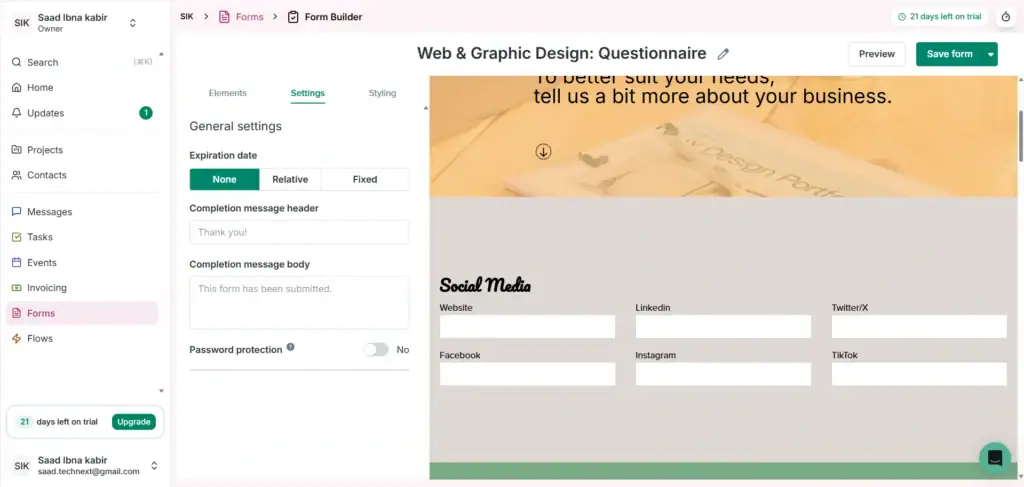
Dubsado’s automation workflows feel like having a virtual assistant. Client books a call → contract sent → deposit requested → onboarding email triggered all without touching it. The branded experience is legitimately impressive; clients think you’re way bigger than you are.
But setup is painful (budget 2-3 weeks or hire help at $500-2K). Payment freezing issues are real; multiple users have reported Dubsado of holding funds without explanation.
Key Features:
- Fully white-labeled client experience to match the brand identity
- Customizable client onboarding workflows and templates
- Built-in invoicing, Stripe/PayPal integration
- Proposals, contracts, and e-signature support
- Scheduling with clients in real time
Pricing:
Starter: $20 per user/month (Basic Features)
Premier: $40 per user/month(All Premium Features)
✅ Pros |
❌ Cons |
|
Highly adaptable automations for agencies |
Building from a blank canvas can be overwhelming; many hire setup assistants |
|
Best free trial structure for proper evaluation with a maximum of 3 clients |
$25/month for 4-10 extra users gets expensive fast |
|
Pre-built contracts, proposals, and forms save setup time |
Some users claimed that Dubsado has frozen payments for new clients without explanation |
|
Partial Branded Experience |
|
✌️It’s easy to use and very reliable. I really love the workflow feature best because it makes it easy to outline the work that needs to get done and have an internal and external timeline.
–Dr. Omotola t.
👎 I’m not happy with the scheduler and I wish that multiple calendars could be connected so a team’s availabilities could be managed. I also can’t believe there is no auto save option on forms.
–Jess T.
5. Monday CRM(Best for Visual Workflows)
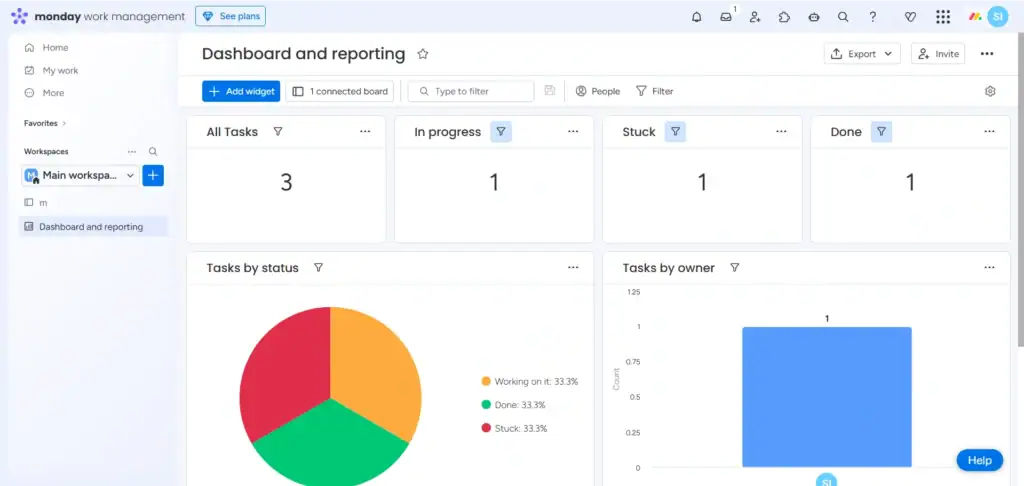
Monday’s boards are gorgeous, the UI that makes your team want to use the CRM. Drag-and-drop everything, color-coded pipelines, automations that feel like magic. But here’s what kills it: CRM is a paid add-on ($12+/user extra), and customization becomes a rabbit hole.
I watched a 10-person agency spend 3 weeks just configuring workflows. No white-label portal either. Best for creative teams who prioritize aesthetics over all-in-one simplicity.
Key Features:
- Visual work management with Kanban boards and timelines
- Customizable CRM and lead pipeline builder
- Custom automation workflows
- Time tracking and resource management
- Integrations with Google Workspace, Slack, and more
Pricing (CRM Plans):
- Basic CRM: $12/user/month
- Standard CRM: $17/user/month integrations
- Pro CRM: $28/user/month
Note: CRM plans are separate from Monday’s work management plans. Most agencies need both, which increases total cost. And Most of its special features require expensive subscriptions.
✅ Pros |
❌ Cons |
|
Beautiful and intuitive visual interface |
Monday CRM is a separate add-on, is costs extra |
|
Highly customizable for agency needs |
Per-user pricing adds up to a 10-person team costing $120-200/month |
|
Strong automations reduce manual work |
No White Label Client Portal |
|
Mobile apps for on-the-go observations |
Feature Overload can become overwhelming for small teams |
User Feedback
✌️ I’ve been using Monday CRM primarily for sales tracking, client management, and communications, and it’s been a solid tool for keeping everything organized and accessible in one place.
–Cynthia F.
👎 What i dislike about Monday CRM is that it can be pricey, some features are only in higher plans, and is has a learning curve/ it may also get slow with large data, and the mobile app and email tools feel limited compared to dedicated CRMs
–Jay Mark P.
6. Nimble (Best for Relationship-Driven Social Selling)
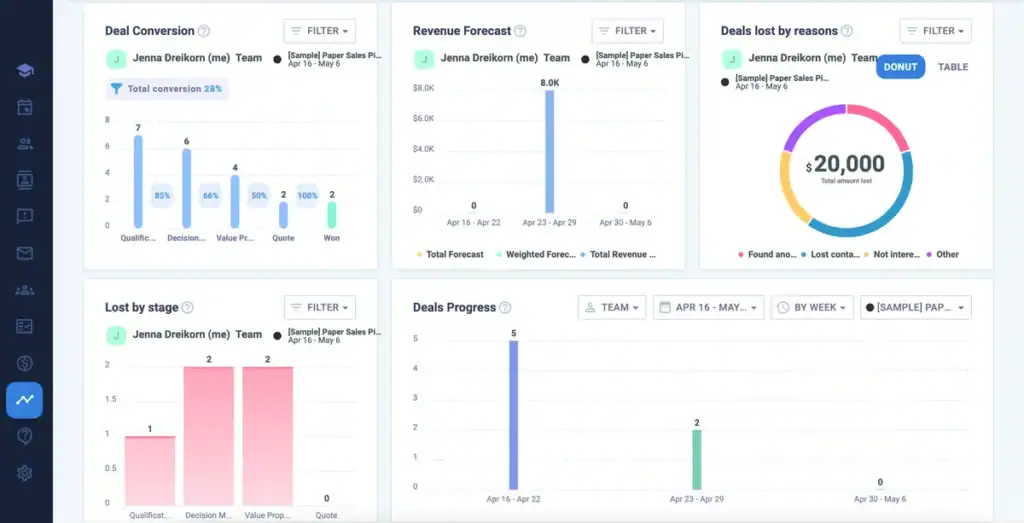
Nimble’s Prospector extension is borderline cheating for LinkedIn outreach. See a prospect → one click → full profile with email, socials, company data in your CRM. The social enrichment alone saves 5+ hours weekly on research.
But project management is basically non-existent, and at $24.90/user, you’re paying a premium for what’s essentially a fancy contact manager. Only makes sense if 80% of your leads come from social selling.
Key Features
- Contact management with social profile enrichment
- Social platform and email integrations
- Visual sales and deal pipelines
- Task creation, reminders, and tracking
- Basic email and communication tracking
✅ Pros |
❌ Cons |
|
Strong social media integrations |
Basic project management: No native task boards or project tracking |
|
Simple, intuitive contact management |
No dedicated Client Portal |
|
The Nimble Prospector Chrome extension makes lead capture effortless |
Basic project management: No native task boards or project tracking |
|
Unified inbox: Email from Gmail, Outlook, and social DMs all in one view |
Very costly compared to others |
✌️ I was amazed at all the features of this CRM. Not just to have an organized place for all my contacts, but being able to create Workflows for my employees. I build Webforms and utilize as an application and testing process for new candidates.
–George B.
👎Way more features than there needs to be. Makes it a little too complicated.
–Verified User from G2
7. Zoho CRM (Best Modular CRM Option)
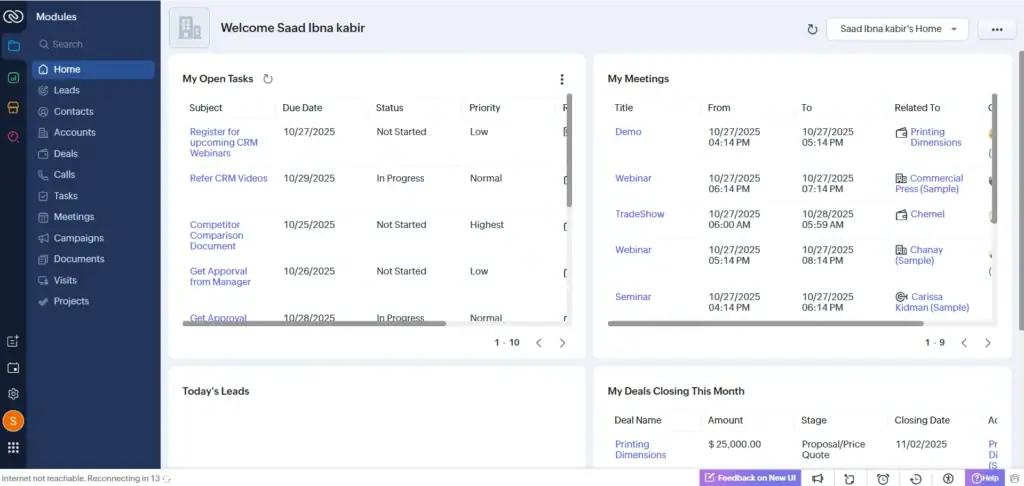
Zoho’s free plan (3 users, 500 records) is genuinely usable, and paid tiers at $14/user beat everyone on price. But the UI looks like 2015 never ended. Setup requires patience. I’ve seen agencies take 2 weeks just figuring out the modular system.
Customization options are overwhelming (300+ settings to configure). Good for bootstrapped agencies who can tolerate dated software. Not good if you value time over money.
Key Features
- Contact management, deal tracking, sales pipeline, activity logging in a complete CRM approach
- Workflow rules, lead scoring, automated follow-ups, mass email campaigns
- Comes with customizable modules, you can add custom fields, layouts, and modules to match your workflow
Pricing:
- Free Plan: $0 (3 users, 500 records) – Basic CRM, email integration, mobile apps
- Standard: $20/user/month – Workflow automation, mass emails, custom modules (up to 1,000 records)
- Professional: $35/user/month – Lead scoring, advanced automation, inventory management
- Enterprise: $50/user/month – AI assistant (Zia), advanced analytics, multi-user portals
- Ultimate: $65/user/month – Enhanced storage, custom functions, advanced BI
✅ Pros |
❌ Cons |
|
Forever-free plan: 3 users, 500 records, basic CRM features at $0 (genuinely useful, not a trial) |
Tools for projects and invoicing cost extra money |
|
Part of a Massive ecosystem: Connect to 45+ Zoho apps for projects, invoicing, marketing, HR, and more |
The dated UI makes you feels like software from 2015 (functional but not beautiful like Monday or OneSuite) |
|
Good Mobile Apps: Manage deals and contacts on the go |
Basic project management: No native task boards or project tracking |
|
Customization can be overwhelming: So many options, it’s hard to know where to start |
✌️ It is a powerful tool with extensive customisation options. The best part is it is affordable and fits all sort of business whether it is small or large. It is easy to use and comes up with easy integration with other zoho tools.
–Mohit S.
👎Way more features than there needs to be. Makes it a little too complicated.
–Verified User from G2
Your Next Steps
The right CRM isn’t about features. it’s about workflow fit. A complicated, expensive tool that doesn’t match how you work will hurt your business.
OneSuite solves the core agency problem that multiple tools that seem disconnected. But while using OneSuite your sales team captures client details, campaign preferences, and budgets in the CRM. When deals close, account managers instantly see goals, timelines, and notes no digging through emails or Slack. The white-labeled portal makes you look professional.
Flat-rate pricing means growing your team doesn’t spike costs like per-user tools.
Choose Nimble if social selling is your priority. Pick Productive for hourly profitability tracking. Consider Scoro if you need complex financial dashboards and can handle the learning curve.
For most agencies seeking value, simplicity, and integration, OneSuite wins.
FAQs:
1. Do marketing agencies need a CRM or project management software?
Both. The best agency CRMs combine sales tracking with project delivery to prevent data silos. All-in-one platforms like Dubsado, OneSuite, and Productive eliminate the need for separate tools. If you use standalone CRMs like Pipedrive or Nimble, you’ll need to add project management software like Asana or ClickUp separately.
2. Do I need a white-label client portal?
Not essential, but it’s a massive professional advantage. Clients perceive agencies with branded portals (example, youragency.com/portal) as more established and organized than agencies relying on email updates.
3. Which CRM is best for hourly billing agencies?
Productive wins hands-down for hourly billing with real-time profitability tracking, time tracking, and resource planning. It shows project margins during execution, not after invoicing.
4. Can OneSuite integrate with other tools, too?
Yes, despite being an all-in-one business management software, OneSuite supports integrations through its REST API, enabling users to connect with other tools and platforms. It also integrates with Pabbly Connect, allowing for seamless automation with various apps.
Additionally, OneSuite offers payment method integrations with Stripe, PayPal, RazorPay, and QuickPay for easy online transactions. More integrations are under development to further expand OneSuite’s functionality.
Find a Better Way to Grow
OneSuite streamlines projects, clients, and payments in one place, making growth hassle-free.