

9 Best CRMs for Solopreneurs in 2026 (Free + Paid)

You’re a solopreneur, right?
Let’s assume you just closed a sales call with a potential client who seems genuinely interested. You promised to send a proposal by Friday. Fast forward three days, and you realize you never saved their contact details properly.
Was it in that email thread? Your phone notes? That napkin you scribbled on during lunch?
Meanwhile, another lead went cold because you forgot to follow up.
Sound familiar? You are not alone.
You are not disorganized either. You are running everything solo, and the tools you use were never designed to communicate with each other.
People at this point will ask you to go for a CRM, which is a good suggestion. But not all CRM will suit your needs. As a solopreneur, you need something that is designed specifically for you and your needs.
And here in this post, we will show you exactly how a Solopreneur CRM should work, what to look for, and finally, the top 9 tools that actually fit an ideal solopreneur workflow.
Key Takeaways
- Solopreneurs waste hours chasing scattered leads across email, notes, and DMs. A CRM centralizes contacts for instant access.
- Missed follow-ups kill deals. So, prioritize action-driven CRMs with reminders and pipelines over enterprise-level bloat.
- Setup and onboarding must be easy. As the setup time and the learning curve of most CRMs waste time
- If you don’t have a budget, try HubSpot free, but expect a steep learning curve and costly premium plans once you grow.
- OneSuite excels as the best all-in-one CRM (pipeline + projects + invoicing + portal) at unbeatable $29/mo pricing.
- Streak is best for Gmail Power Users. But it may clutter your mail
The Real Challenges Solopreneurs Face Without a CRM
Running a solo business means wearing every hat. You are the salesperson, project manager, accountant, customer support rep, and janitor all rolled into one. When you are doing everything yourself, small inefficiencies compound fast.
Scattered Client Data Everywhere:
When your leads come in from multiple channels. Email inquiries, Instagram DMs, referrals via text. Without a central system, you end up with contact information spread across your phone, email, notes, and random files. A CRM organises this chaos so you actually know where to find things.
No Time for Tool Setup
You’re already overwhelmed with tasks. Spending hours learning a tool (and teaching it to teammates) isn’t efficient. Solopreneur CRMs win with instant setup, no steep learning curve.
Subscription Fatigue
Every tool costs $15, $29, or $49 per month. Individually, they seem reasonable. But when you are paying for lead management, scheduling, invoicing, project management, client portal, and cloud storage separately, you are suddenly spending $300+ monthly on software.
Missed Follow-Ups Kill Opportunities
Without automation or reminders, hot leads tend to cool off quickly. You make a mental note to follow up on Tuesday. Tuesday arrives, you get busy, and you completely forget. By the time you remember a week later, they’ve hired someone else.
Why Some Solopreneurs Avoid CRMs
If CRMs solve so many problems, why do solopreneurs avoid them? After deep research and interviews in online forums like Reddit and Quora, we have identified these key factors behind.
- Feature bloat: Enterprise CRMs pack in territory management, team workflows, and complex analytics you will never touch. For someone managing 20 to 50 clients solo, these features create confusion instead of clarity.
- Punishing pricing: Per-user models make you pay enterprise rates as a solo operator. Essential features like automation get locked behind expensive tiers.
- Setup nightmare: The traditional enterprises use jargon like ‘robust customisations,’ but in reality, it refers to a complex and time-consuming setup process. Yes, it may work for them, but for small agencies, it’s just a waste of time.
What to Look for in a CRM for Solopreneurs
1. Setup Takes Minutes, Not Days: They should have a simple onboarding and clear guidance for beginners. If it requires a 50-page manual or hours of tutorials, skip it.
2. Essential Features Without the Bloat: Contact management, visual pipeline, task reminders, email integration, and invoicing are non-negotiable. Automation and simple reporting are wins if available. Everything else should be optional. Remember, we don’t want any bloats.
3. Fair Pricing That Does Not Punish Growth: Look for pricing or plans that scale reasonably, not per-user models that make solo operators subsidise enterprise customers. Avoid platforms that charge extra for basic features.
4. Integrates With Tools You Already Use. Native integrations with your email, calendar, and payment processor beat Zapier workarounds. The fewer apps you juggle, the better
5. Your Data Stays Yours. Confirm you can export data anytime. Some platforms lock you in with proprietary formats. Others make switching easy if needed.
The 9 Best CRMs for Solopreneurs in 2025
To write this article, I went to various public forums and review sites like G2, Capterra, along YouTube for software recommendations. And then I tested at least 30+ CRMs to curate this list.
Each tool here solves at least one specific pain point. If you choose one from here, we would suggest you choose a CRM that matches or meets your style.
| Name | Starting Price | Key Strengths | Main Limitations |
|---|---|---|---|
| OneSuite | $29/mo | All-in-one: CRM, PM, proposals, invoicing, client portal; fast setup; unbeatable value | Newer; limited integrations |
| Bigin by Zoho | $9/mo | Budget pipeline focus; simple interface | Basic features: no client portal |
| HubSpot CRM | Free | Free unlimited users; strong inbound tools | Expensive upgrades; steep curve |
| Less Annoying | $15/mo | Zero learning curve; simple basics | No mobile app; limited automation |
| OnePageCRM | $15/mo | Follow-up reminders; action-driven | Restrictive structure |
| Streak | $59/mo | Gmail-native; email tracking | Gmail-only; clutters inbox |
| Capsule | Free (limited) | Clean UI; visual pipelines | Limited automation on free |
| Privyr | $30/mo | Mobile-first; messaging lead capture | Basic desktop; narrow focus |
| Folk | $25/mo | Flexible, Notion-like customization | Learning curve; fewer integrations |
1. OneSuite: Best All-in-One CRM for Solopreneurs that hate wasting time
In a market full of CRMs, OneSuite is not trying to be just another one. It is built to solve the bigger problems solopreneurs actually complain about: software clutter and workflows that do not connect.
Why OneSuite Ranks at #1
Most solopreneurs do not just need a typical CRM. They need something that talks to their project, proposals that turn into contracts with e-signatures. And invoicing is connected to the client portal.
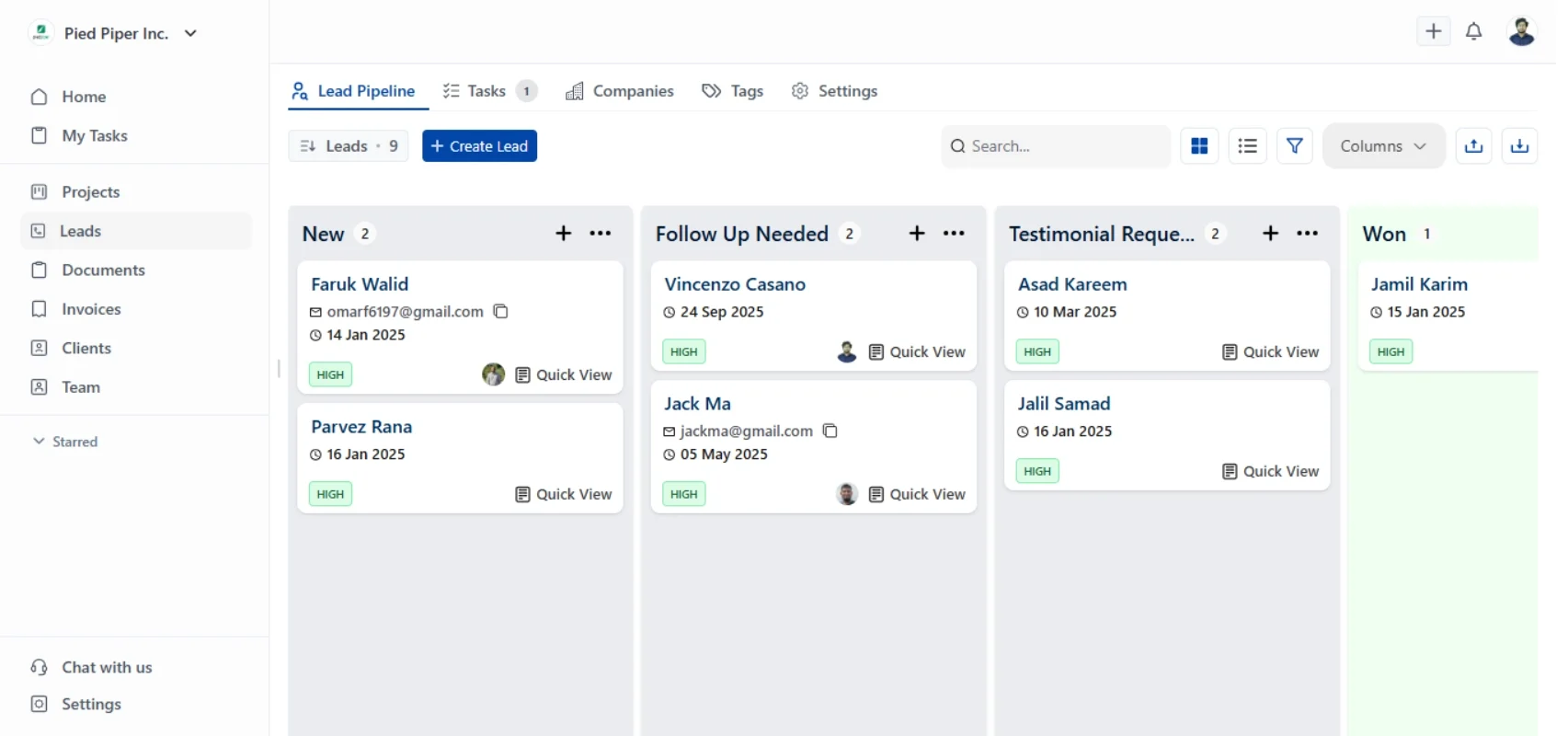
OneSuite puts all of this under one login. Lead pipeline, CRM, project boards, client portal, proposals with e-signatures, and invoicing with payment processing. Everything connects because it is designed as one system, not a patchwork of integrations.
How it works
A lead comes in, and you move them through your pipeline stages. When they are ready to close, you generate a proposal directly using the templates. They sign digitally. The deal converts into a project with tasks and timelines. You deliver the work through the client portal.
When it is done, you send an invoice that pulls from the project details. They pay through Stripe or PayPal. And if they need more work, the upsell opportunity is already tracked.
Lead → Proposal → Contract→ Project→ Billing→ Upsell
Have you noticed? This is not a feature list. This is how your business actually flows, and OneSuite mirrors that in reality.
Key Features
- Visual lead pipeline with drag-and-drop stages
- Contact management with full interaction history
- Project management with tasks, deadlines, and client collaboration
- A branded client portal where clients access everything in one place
- Proposal builder with templates and e-signature capability
- Invoicing with payment processing and automatic reminders
Pricing:
- Freelancers: $29/month(5 members)
- Solopreneur: $59/month (for 10 members)
- Growing Agency: $149/month (for 35 members)
Note: OneSuite offers a 14-day free trial with full feature access. No credit card required upfront.
Pros & Cons:
|
✅ Pros |
❌ Cons |
|
True all-in-one (CRM + PM + Invoicing + Client Portal) |
Relatively Newer platform |
|
Unbeatable pricing plan: $49/mo replaces $250+/mo in tools |
No advanced marketing automation |
|
Clean, intuitive UX for clients to figure out in hours |
Limited integrations (currently ~10-15 apps) |
|
Fast setup (agencies onboarding in hours, not days) |
No native time tracking (need third-party tool) |
|
Excellent support (responsive, helpful) |
Smaller community (fewer templates/tutorials available) |
User Feedback:
✌️ OneSuite keeps exceeding expectations!
Each update improves usability and performance, and the customer service is responsive, knowledgeable, and genuinely invested in my success.
– Jacquelyn L.
👎 For the task, there is no option to track the time. it has to be entered manually. They have an extension to import leads, but time check-in, checkout an important function are missing.
– Ashokkumar K.
2. Bigin by Zoho: Best Budget-Friendly Pipeline CRM
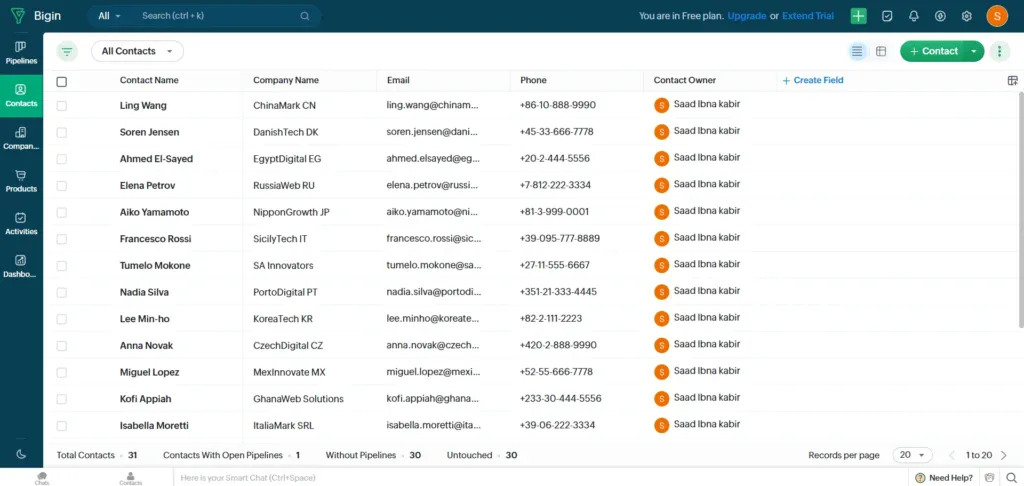
Bigin is considered Zoho’s answer to solopreneurs who found Zoho CRM too complex, stripping away enterprise bloat to focus purely on pipeline management and basic contact tracking. The best thing about Bigin is its unbeatable price point at $9 per user per month, while still delivering solid pipeline functionality.
However, this simplicity comes with trade-offs, such as limited automation capabilities compared to full-scale CRMs, basic reporting that lacks depth, and a built-in client portal is missing, which can be very helpful for a solopreneur.
Key Features:
- Multiple pipeline views for different services or products
- Contact and deal management
- Email integration and activity tracking
- Mobile app for on-the-go updates
- Basic workflow automation
- Telephony integration for calling directly from the platform
Pricing:
- Free Edition: $0 single user
- Express: $9/user/month (limited features)
- Premier: $15/user/month (billed annually—5 pipelines, 100,000 records, advanced automations, multiple currencies, more custom fields)
- Begin: $21/user/month
PROS & CONS:
|
✅ Pros |
❌ Cons |
|
Clean, simple interface |
Limited features compared to full Zoho CRM |
|
Multiple pipelines for different workflows ( not in the free plan ) |
Basic automation capabilities |
|
Mobile accessibility & great mobile app |
Limited customisations and integrations compared to larger CRM suites |
|
Integrates with Zoho and several key 3rd parties |
Some users report integration issues |
User Feedback:
✌️ It offers exactly the right set of functionalities to track our daily activities, and my team found it extremely easy to use. The support has also been outstanding.
– A K V.
👎The cost is not directly proportional to the benefit, and in fact, at some point unable to justify the increase.
– Vidyashankar G.
3. HubSpot CRM: Best Free CRM for Inbound Marketing
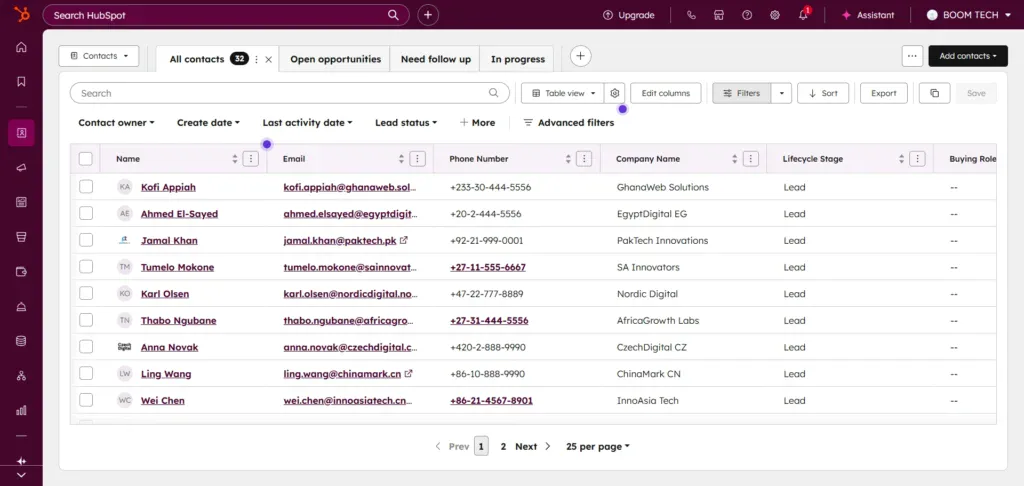
HubSpot built its reputation on inbound marketing, and its free CRM reflects that heritage with an impressive suite of tools that cost absolutely nothing for unlimited contacts and users. The best thing about HubSpot is that it offers the strongest free plan in the market.
But the truth is that once you outgrow the free tier and need advanced features like workflow automation, custom reporting, or additional marketing contacts, costs climb steeply with multiple hub subscriptions that can quickly reach $800+ per month, making it one of the more expensive options for growing solopreneurs.
Key Features:
- Contact, company, and deal management
- Visual sales pipelines with automation
- Powerful reporting dashboards (custom reporting in paid plans)
- Seamless integrations: Gmail, Outlook, Slack, Salesforce, and more
- Forms and landing pages
- Live chat widget
Pricing:
- Free Tools: $0/month( up to 2 members )
- Starter: $9/seat/month (annual) or $15/seat/month (monthly)
- Professional: $1,300/month for 5 seats (annual) or $1,450/month (monthly)
- Enterprise: $4,700/month for 7 seats (annual)
Pros & Cons:
|
✅ Pros |
❌ Cons |
|
Free for unlimited users with robust core CRM features |
Though free initially but it is designed to upsell you to the paid plans |
|
Offers features in the free plan that are not offered by any other in the market |
Once you hit the limits, you have to buy the paid plans |
|
AI features for automation, chatbots, and insights |
The paid plans are comparatively very high compared to other services like OneSuite |
|
Strong onboarding, documentation, and academy resources |
The learning curve is also really steep compared to other minimal options |
User Feedback:
✌️ I appreciate that it provides a space where we can centralize all of our company data. It allows us to create dashboards, manage staff information, monitor processes, and connect various work tools.
– Leonidas P. ( in G2 )
👎HubSpot evolves a lot; however, some workflows that were available on a Pro Sales Hub are now not available anymore. The “Leads” module is really confusing. It’s now evolving for Enterprises and has started to be more complicated to use for a small structure.
– Verified user review in G2
4. Less Annoying CRM: Best for True Simplicity
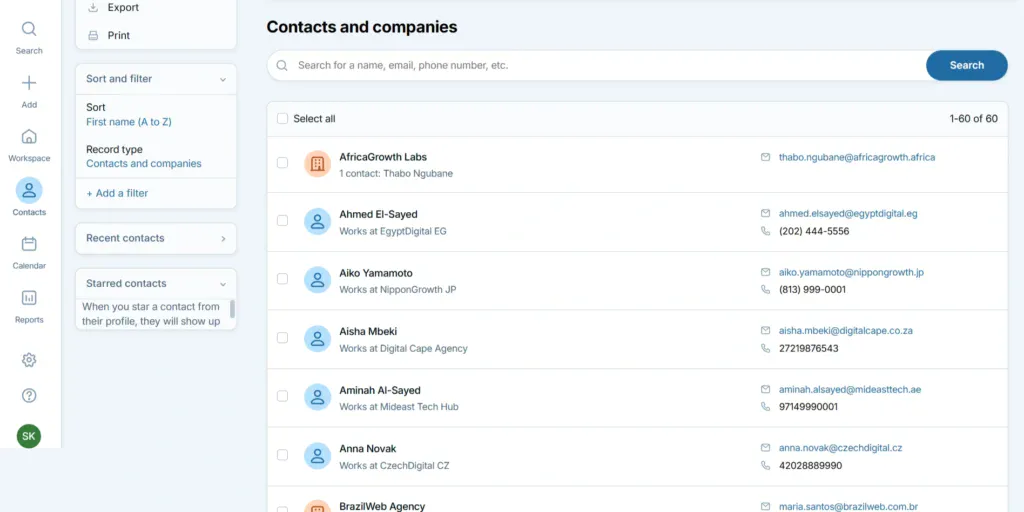
Less Annoying CRM lives up to its name by eliminating unnecessary complexity and focusing exclusively on doing basic CRM functions extremely well without any bloat. The best thing about this platform is its zero learning curve, combined with transparent flat pricing at $15 per user per month.
But this radical simplicity means sacrificing features that other CRMs consider standard, including no mobile app (browser-only access), very limited automation capabilities, basic reporting with no advanced analytics, and fewer integrations compared to competitors.
Key Features
- Contact and lead management
- Notes and file attachments
- Built-in email logging; Gmail, Outlook integration
- Basic reporting and sales forecasting
- Sales pipeline management and visualisation
Pricing
Simple Price Plan for no confusion: $15/user/month + taxes
Pros & Cons:
|
✅ Pros |
❌ Cons |
|
Easy learning curve |
No native mobile app (relies on mobile-friendly web access) |
|
Highly rated for customer support |
Lacks advanced marketing automation and AI features |
|
No Confusing Pricing Tiers, Simplest Plan |
The paid plans are comparatively very high compared to other services like OneSuite. |
|
Unlimited contacts, pipelines, and custom fields |
Third-party integrations are limited (mainly via Zapier/open API) |
|
Intuitive, straightforward interface |
No built-in email marketing or advanced analytics |
User Feedback:
✌️ I use Less Annoying CRM in a team to keep track of applications for various short-term programs. It helps us have one organized hub that multiple people can log into, which keeps us more organized and prevents things from falling through the cracks.
– Verified user review in G2
👎Good at the Basics. Not so good at anything really advanced
– Sam C.
5. OnePageCRM: Best for Follow-Up Focused Solopreneurs
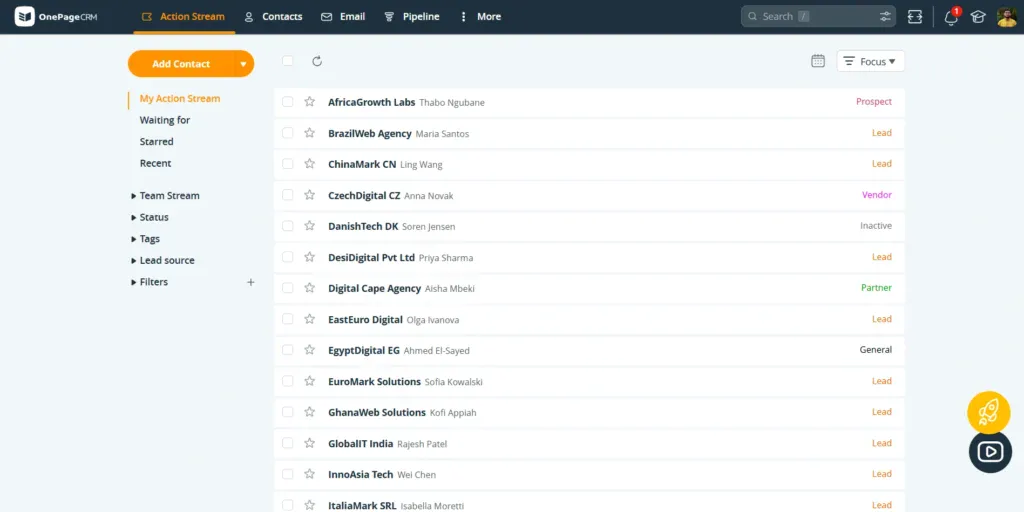
OnePageCRM built its entire system around one philosophy that turns your CRM from a passive database into an active to-do list that constantly pushes you forward. It has an action-driven interface that acts more like a giant to-do list, always reminding you about the follow-ups.
But the action-first structure, while powerful for some workflows, can feel restrictive if you want more flexibility in how you organise your pipeline, and the platform offers limited customisation options, basic reporting capabilities, and a learning curve to adapt to its unique next-action methodology that not everyone finds intuitive.
Key Features:
- Action-driven interface with the next action always visible
- Contact management with interaction history
- Sales pipeline with deal tracking
- Built-in calling and emailing
- Browser extension for capturing leads
Pricing
Professional: $ 15 User/Month
Business: $ 29 User/Month
Pros & Cons
|
✅ Pros |
❌ Cons |
|
Action Stream helps prioritise and track every follow-up |
Limited advanced workflow or automation capabilities |
|
Clean, focused interface |
Some integrations require extra setup or rely on Zapier/third parties |
|
Affordable pricing plans/discounts for annual billing |
Lacks some reporting and analytics found in larger platforms |
|
Full email sync, bulk email send, and templates |
Integration catalogue is good for SMBs, but limited for enterprises |
|
Fast onboarding |
Can’t handle Complex Set-up Operations |
User Feedback:
✌️ OnePageCRM fits my principle perfectly: maximum simplicity. I have a customer-centric sales department, which means that contacts, to-do lists, and memos are the most important things.
– Rainer B. ( in G2 )
👎HubSpot evolves a lot; however, some workflows that were available on a Pro Sales Hub are now not available. The “Leads” module is really confusing. It’s now evolving for Enterprises and has started to be more complicated to use for a small structure.
– Verified user review in G2
6. Streak: Best for Gmail Power Users
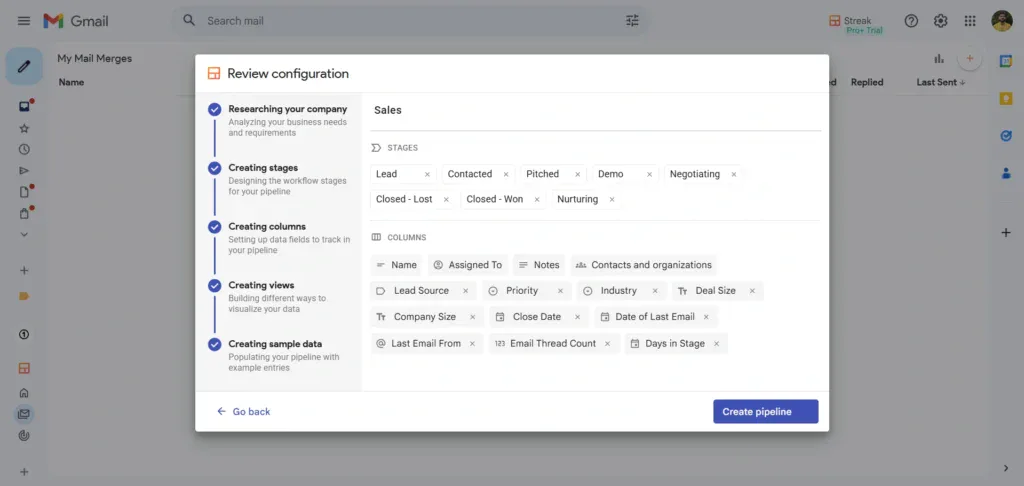
Streak is not a standalone CRM, but rather it acts like a symbiote living entirely inside Gmail as a browser extension. Letting you add CRM functionality without ever leaving your inbox, where you already spend most of your day.
However, it only works if you use Gmail and can heavily clutter your Gmail interface, which may lead to more harm.
Basically, it’s like the Venom and Eddie Brock relationship from the comics. Though the symbiote gives you powers, it can harm you in more ways than you know if not aware.
Key Features
- Fully integrated into the Gmail interface
- Pipeline management with customizable stages
- Email tracking and scheduling
- Shared pipelines/boxes for team collaboration
- Task and activity tracking
Pricing
Pro: $59 per user/month
Pro+: $89 per user/month
Enterprise: $159 per user/month
Pros & Cons
|
✅ Pros |
❌ Cons |
|
You can manage CRM without leaving your inbox |
Largely confined to the Gmail/Google Workspace ecosystem |
|
Collaboration tools: shared pipelines, email sharing, notes |
Limited out-of-the-box functionality for teams using non-Gmail email |
|
Email tracking, scheduling, and mail merge are built in |
Clutters your Gmail |
|
Works well for email-heavy businesses |
Limited pipeline visualisation |
Real User Feedback
✌️ I have been using Streak for a long time now, and it has made email tracking very easy for us. With the way it gets integrated with Gmail, it helps us track and view all emails sent to Clients and candidates
– Maithili M. ( in G2 )
👎When pipelines get bigger or more complex, the reporting options feel limited. I often want more customization or a deeper analytics view. It is not a blocker, but it is the first place where the product feels constrained.
– Verified user review in G2
7. Capsule CRM: Best Clean Interface with Pipeline
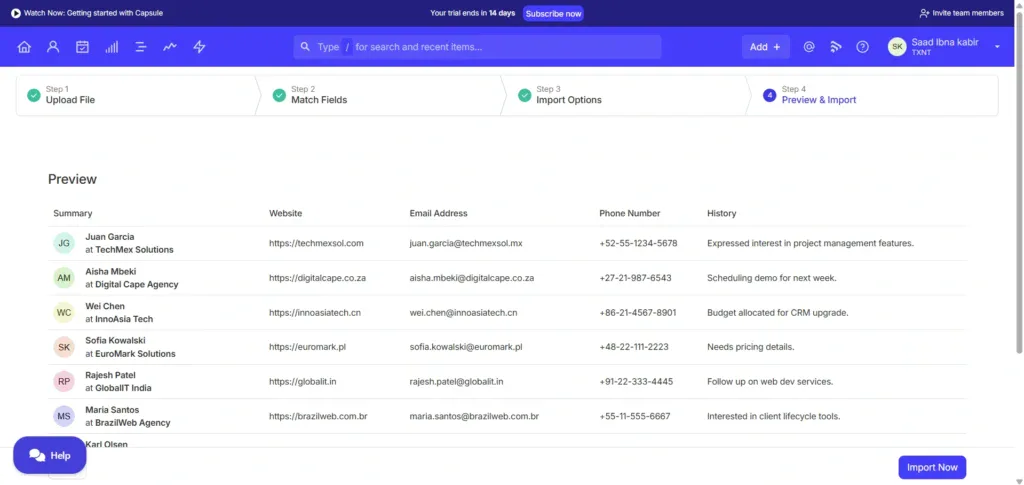
Capsule CRM focuses on being beautiful and simple, offering solid contact management paired with visual pipeline tracking in an interface that feels modern, uncluttered, and genuinely pleasant to use daily.
But automation features on lower-tier plans are quite limited compared to competitors; the reporting tools, data-driven decision making, and advanced capabilities require upgrading to higher-priced tiers at $38-60 per user monthly, which narrows the affordability advantage.
Key Features
- Contact and organisation management
- Sales pipeline with customizable stages
- Task and calendar management
- Email integration and tracking
Pricing:
- Free: 2 users, 250 contacts
- Starter: $21/user/month (basic CRM, 1 pipeline, core features)
- Growth: $38/user/month (reporting, advanced features, shared pipelines, mail merge)
- Advanced: $60/user/month (full suite, advanced integrations, priority support)
Pros & Cons
|
✅ Pros |
❌ Cons |
|
Beautiful, intuitive interface |
Limited advanced/custom workflow features |
|
Easy to learn and use |
Some integrations require extra setup |
|
Good contact management |
The free plan is quite restricted |
|
Reasonable pricing |
Some features require higher tiers |
Real User Feedback
✌️ I appreciate how Capsule CRM has significantly improved our efficiency by centralizing all our client information and sales data, making it much easier to navigate than our previous Excel spreadsheets
– Rob A. ( in G2 )
👎I dislike that when saving an email to the system, all of the images on the email get saved as well. This leads to an inconvenient experience when I want to find a file attached to an email, as I have to sift through numerous images from the emails. The prevalence of images in emails makes this issue particularly bothersome.
– Tracy M.
8. Privyr: Best Mobile-First CRM for Instant Lead
Privyr was built specifically for solopreneurs who sell on the go and capture leads through messaging apps like WhatsApp, SMS, Facebook Messenger, and Instagram DMs rather than traditional email channels.
However, the desktop web interface feels secondary and basic compared to the mobile app. The platform is primarily focused on lead capture and messaging rather than full CRM capabilities like advanced reporting or complex pipeline management.
Key Features
- One-tap lead capture from messaging apps
- Automated lead qualification
- WhatsApp and SMS integration
- Task and follow-up reminders
- Pipeline management

Pricing
Starts at $30 per month. 14-day free trial available.
Pros & Cons
|
✅ Pros |
❌ Cons |
|
Good mobile experience |
The desktop interface is basic |
|
Instant lead capture from messaging apps |
Limited advanced CRM features |
|
Great for WhatsApp-heavy businesses |
Primarily focused on lead capture |
|
Simple and focused |
Fewer integrations than larger platforms |
Real User Feedback
✌️Privyr has quickly become part of my daily routine. I use it throughout the day to manage and follow up with leads from Facebook and my website, all from my phone. It was very easy to set up, and I was replying to new leads within minutes of signing up without needing any technical setup or training.
– Ivan C. ( in G2 )
👎The service used to be great but the quality has declined significantly over the last few months, today I had no option but to deal with their AI, something I detest. The interface, once user-friendly, has now become cluttered and less intuitive.
– Ray S.
9. Folk CRM: Best Modern, Flexible Relationship Management
Folk CRM takes a fresh approach to contact management by combining CRM functionality with a flexible Notion-like database structure that adapts to how your brain actually works rather than forcing predefined workflows.
Folk has a smaller user base and ecosystem compared to established competitors, offers fewer native integrations, which may require workarounds, comes with no free plan (only a 14-day trial), and the flexibility that makes it powerful also creates a learning curve for customisation that can feel overwhelming.
Key Features
- Customizable contact database
- Multiple pipeline views
- Email integration and enrichment
- Chrome extension for capturing contacts
- Collaboration features

Pricing:
- Standard: $25/member/month
- Premium: $50/member/month
- Custom: $100/member/month
Pros & Cons
|
✅ Pros |
❌ Cons |
|
Highly customizable fields and views |
Newer platform with a smaller user base |
|
Modern, clean interface |
Learning curve for customisation |
|
Contact enrichment included |
Fewer native integrations |
|
Flexible for different workflows |
It can feel overwhelming if you want a simple structure |
Real User Feedback
✌️Folk is truly one of the easiest and most valuable tools I have encountered in my sales career. What makes it stand out? The 1-click LI integration seamlessly pulls in accurate data, which has significantly enhanced my outreach efforts. I can then sequence prospects directly within either the web or desktop app, making it feel as though I have a dedicated enrichment and sales prospecting partner working in the background to support my side hustles.
– Jordan H. ( in G2 )
👎When emails are sent through Folk CRM, it does not automatically show as sent in email account such as outlook. Also, the plugin is GREAT, but would be beneficial if the Linkedin extension was integrated more in an IOS feature
– Jacob S.
Your Next Steps
The best CRM is the one you will actually use every single day. It does not matter how many features a tool has if you never open it. If the interface frustrates you or the setup feels overwhelming, you may want to look for something different.
Start by identifying your top pain points at this moment. Discover which of these nine tools best suits you.
Then commit to a two-week test. Actually use it for real work, not just poking around the demo. Track how much time it saves you. Notice if it feels natural or like a chore. Check if you find yourself reaching for the old spreadsheet or actually trusting the new system.
If you live inside Gmail and email is your primary channel, Streak makes perfect sense. You never leave your inbox, and CRM features appear right where you already work.
If budget is your primary constraint, look at Bigin by Zoho and OneSuite at around $9 per month, or HubSpot’s free plan.
If forgotten follow-ups cost you deals: OnePageCRM’s action-first approach ensures you always know what needs to happen next with every contact.
If you capture leads mainly through WhatsApp, SMS, or messaging apps, Privyr is purpose-built for mobile-first lead capture and instant organization.
If you just want simple and easy without any learning curve, OneSuite and Less Annoying CRM deliver exactly that. Nothing fancy, but it works perfectly for basic contact and pipeline management.
But if your biggest problem is tool overload and disconnected workflows, start with OneSuite. You get CRM, project management, proposals, invoicing, and a client portal in one system. No integration headaches, no data syncing issues, and one monthly price instead of five separate subscriptions. that too, starting from only less than $6 per user
Think about which pain point costs you the most time or money right now. That is your starting point.
FAQs
Do I really need a CRM if I am just one person?
Yes, but maybe not what you think of as a traditional CRM. You need a system to organize contacts, track follow-ups, and manage your pipeline. Whether that is a full CRM or a simpler tool depends on your business complexity. If you have more than 10 active clients or leads at any time, a CRM saves you time and prevents lost opportunities.
What is the most affordable CRM for solopreneurs?
OneSuite starts at less $6 per month, along with Bigin by Zoho at $9 per month, making them the most affordable paid options. HubSpot offers a completely free plan, though it has limitations when you grow.
Can I use free CRM tools and still run a professional business?
Absolutely. HubSpot’s free CRM, Streak’s free plan, and Capsule’s free tier (up to 2 users) all provide enough functionality to run a professional operation. The key is ensuring the free plan includes the specific features you need, not just accepting limitations because it is free.
How long does it take to set up a CRM?
With solopreneur-focused CRMs, you should be up and running in under an hour. Tools like Less Annoying CRM and Streak can be set up in 15 to 30 minutes. More comprehensive platforms like OneSuite or HubSpot might take a few hours if you are importing data and customizing workflows, but not the days or weeks that enterprise CRMs require.
Should I choose an all-in-one platform or best-of-breed tools?
This depends on your tolerance for managing integrations. All-in-one platforms like OneSuite eliminate integration headaches but might not be perfect at every function. Best-of-breed tools excel at specific tasks but require you to connect them yourself and manage multiple subscriptions. Most solopreneurs prefer an all-in-one to reduce complexity.
Find a Better Way to Grow
OneSuite streamlines projects, clients, and payments in one place, making growth hassle-free.