
Best Project Management Software with Invoicing: 7 Picks for 2026

June 11, 2026
Last Sunday, some friends and I met at a cafe. During our conversation, we ended up in an hour-long debate on how separating invoicing from PM tools could be economic suicide for new businesses like ours. The gap doesn’t just leak context — it leaks a significant amount of revenue, mostly because not every billable task gets tracked back to an invoice.
According to Wellingtone’s State of Project Management Report, only 36% of organizations consistently deliver projects on time. For freelancers and small agencies, the problem isn’t just project execution; it’s that the tool managing the work and the tool managing the billing don’t talk to each other.
The global project management software market is projected to reach $10.51 billion in 2026, growing at a 14.9% CAGR (The Business Research Company, 2025). But sheer market size doesn’t mean every tool in it handles invoicing well. Most don’t.
This guide covers the 7 best project management tools with invoicing in 2026: five with native billing built in, two that connect to external invoicing apps. We explain what each does well, what it doesn’t, and which type of team belongs on it
- Only 36% of organizations consistently deliver projects on time (Wellingtone, 2026). For service businesses, disconnected PM and billing tools are a major contributor.
- 29% of freelance invoices are paid late (Bonsai), and U.S. small businesses with outstanding invoices are owed an average of $17,500 (Intuit QuickBooks, 2025).
- 29% of agencies report frequent discrepancies in their invoices (Endava), mostly because billing data lives apart from project data.
- Native invoicing closes that gap by feeding time logs straight into invoices, with no re-entry and no billing lag.
- OneSuite leads this ranking for combining CRM, projects, time tracking, and invoicing on a flat-rate plan instead of per-seat pricing.
Native vs. Integrated Invoicing: Which Should You Choose?
Five of the seven tools here have native invoicing, meaning you can generate and send an invoice without leaving the platform. Two use integrations: ClickUp connects to Harvest, Zoho Invoice, or Xero; Monday.com connects to QuickBooks or FreshBooks.
Native invoicing wins when your team is under 50 people, and the same people managing projects are also handling billing. Your project data and invoice data live in the same database, which means no re-entering client details, no hunting for logged hours, and no billing lag.
Integrated works if you’re already committed to a specific accounting platform and don’t want to move your books. The tradeoff is two logins, two subscriptions, and two sources of truth for your project finances.
7 Best PM Tools with Invoicing (2026)
How We Ranked These Tools
We scored each tool on five criteria: invoicing depth (native vs. integrated), project management capabilities, client experience features, value for money, and fit for freelancers and small agencies. Native invoicing and the project-to-payment workflow carried the most weight, because that’s where most teams leak revenue.
1. OneSuite [NATIVE]: Best All-in-One for Agencies and Freelancers
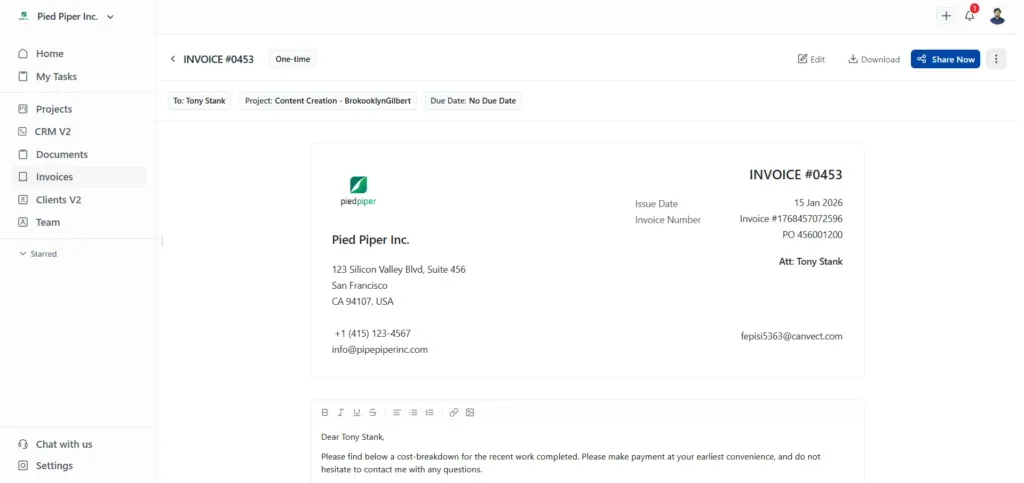
OneSuite is built for service businesses that have stitched five tools together. When you finish a project in OneSuite, the hours you logged are already attached to the client, which is already attached to the deal in your pipeline. Your invoice is one click away. No context switching, no re-entering data, no billing lag.
That connected workflow is the core value proposition. When you log hours in OneSuite, they are associated with the project, which in turn is linked to the client, ultimately connecting to the invoice. Most tools make you rebuild that chain manually every billing cycle.
OneSuite also takes a different pricing approach from most competitors. Instead of charging per seat, it uses flat-rate tiers. A 12-person agency on the Solopreneur plan pays $59/month total. A comparable setup on per-seat alternatives typically runs $180 to $300/month before you’ve added invoicing.
Key Features
- Visual project workspaces with task management, deadlines, and team assignments
- Lead pipeline with Kanban deal tracking and one-click lead-to-client conversion
- Native time tracking with a billable/non-billable toggle that feeds directly into invoices
- Multi-gateway invoicing supporting 135+ currencies, Stripe, PayPal, RazorPay, and QuickPay
- White-label client portal with eIDAS-compliant eSignatures and integrated approvals
Pricing
- Freelancer: $29/mo — 5 members, 3,000 leads, 10GB storage
- Solopreneur: $59/mo (most popular) — 12 members, 10,000 leads, 30GB storage
- Growing Agency: $149/mo — 35 members, unlimited leads, 60GB storage
- Enterprise: Custom — self-hosted zero-trust option available
Pros
Cons
User FeedBack
🟢
I have been using it for approximately 5 months to manage my clients’ projects and to assign tasks to my employees. I like how easy and intuitive it is, as you don’t need to explain to your employees where to find their assignments and documents. It is very functional.
– Pedro C.
🔴
As any app that is in their early phase of development, Onesuite has some bugs that needs to be ironed out. But none of that them were breaking the operations. They are mostly UI related and I am already seeing them fixing them one be one.
– Raabit H.
2. Teamwork [NATIVE]: Best for Client-Facing Agencies
Teamwork was built specifically for agencies that manage work on behalf of clients, and it shows. Client portals, project templates by service type, approval workflows, and proofing tools are core features, not add-ons. Native invoicing is included from the Basics plan at $9.99/user/month on annual billing.
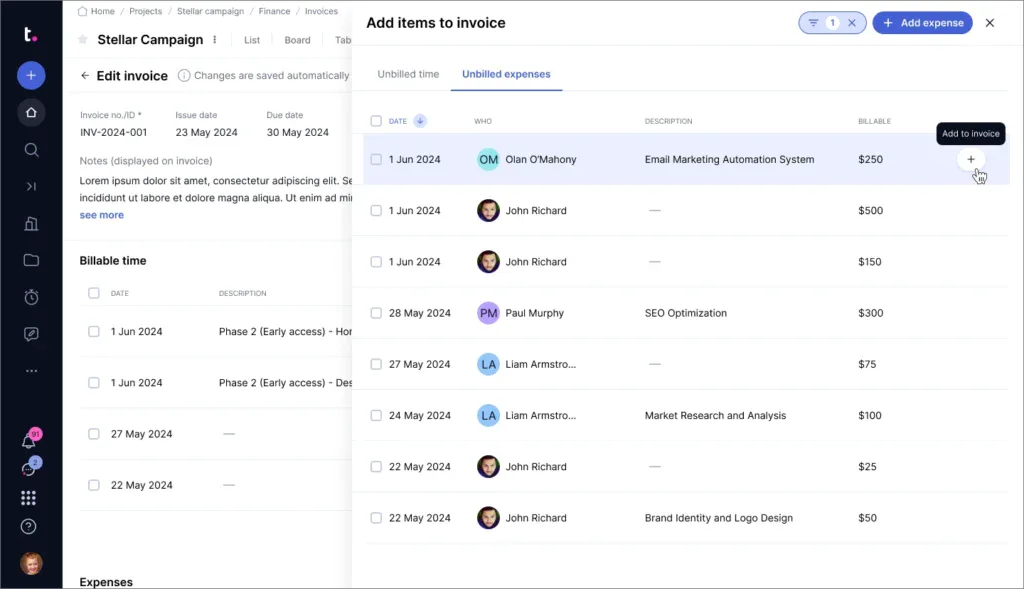
The billing workflow lets you create invoices directly from tracked time and expenses within a project. You can set billing rates per person or project, attach timesheets, and send everything to the client in a format that connects the work to the cost. For agencies running retainers, that audit trail matters.
When Teamwork works, it’s a genuinely powerful agency operating system. When it doesn’t, the breadth of features makes onboarding take longer than simpler tools on this list. New teams often need a few weeks before the full workflow clicks.
Key Features
- Project templates built around agency service types (retainers, campaigns, sprints)
- Native invoicing from tracked time and expenses, starting on the Basics plan
- Client portal with file sharing, approvals, and proofing
- Gantt charts, milestones, and workload planning
- Budget tracking, profitability reporting, and billable utilization
Pricing
- Free: $0 — up to 5 users, basic project management
- Basics: $13.99/user/mo — PM plus native invoicing
- Accelerate: $29.99/user/mo — adds advanced invoicing with margins, tax, and discounts
- Scale/Enterprise: Custom pricing
Pros
Cons
User Feedback
🟢
Teamwork has been a reliable and user-friendly platform for managing projects and collaborating across teams. The interface is clean and intuitive, making it easy for both new and experienced users to navigate tasks, monitor updates, and coordinate work efficiently without a steep learning curve.
– Abhishek D.
🔴
The interface is complex and UI adjustments happen somewhat regularly. Predictably, this is good when I like the changes and bad when I don’t. Some features I use often can become buried under layers of menus, or made to require a long and challenging hover-interaction.
– Anonymous User from Capterra
3. Bonsai [NATIVE]: Best for Freelancers Who Bill Hourly
Bonsai is the freelancer-first option on this list. In January 2026, Zoom announced it would acquire Bonsai, an endorsement of the platform’s reach into the freelance market. The deal hasn’t closed yet; Bonsai continues operating independently and will remain standalone post-close.
Bonsai’s workflow connects proposals, contracts, e-signatures, time tracking, and invoicing in a single tool. For a freelancer who works hourly or project-based, that covers everything from pitching to collecting payment. One important caveat: invoicing requires the Essentials plan at $25/user/month. The Basic plan ($15/user/month) includes time tracking and tasks, but not billing.
Key Features
- Proposals with e-signatures and automated payment schedules (Essentials+)
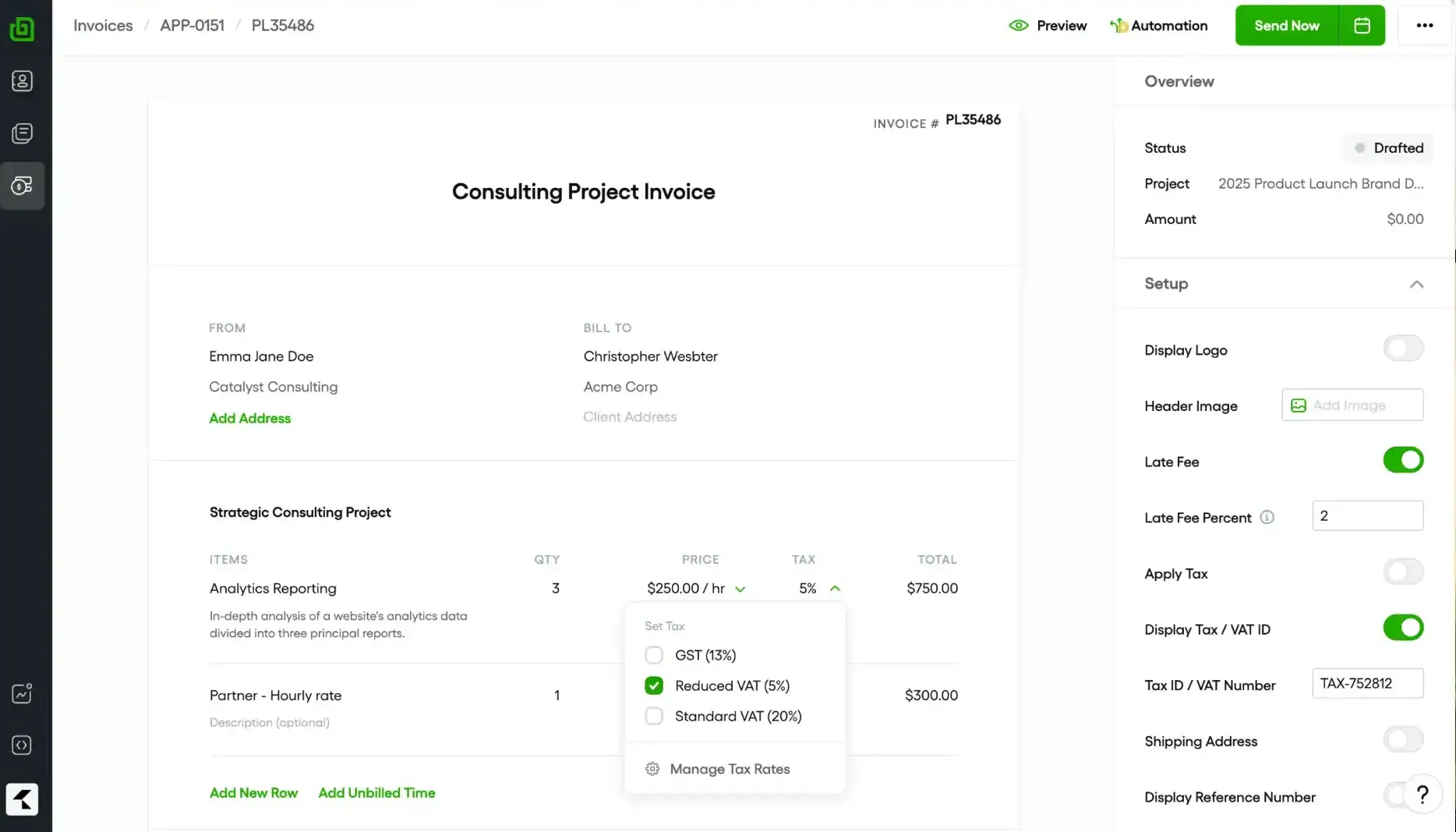
- Native invoicing with recurring billing and multiple payment gateways (Essentials+)
- Built-in time tracker with billable rate management
- Client profiles, pipeline view, and contact management
Pricing
- Basic: $15/user/mo – time tracking, tasks, projects, basic CRM (invoicing not included)
- Essentials: $25/user/mo – adds invoicing, proposals, contracts, e-signatures, client portal
- Premium: $39/user/mo – Gantt View, Deals pipeline, Client tasks & messaging
- Elite: $59/user/mo – Everything in Premium plus: Custom permissions, Add markup to expenses, Custom data import
Pros
Cons
User Feedback
🟢
What we like best about Bonsai is that it is basically a one-stop shop! Bonsai has everything that we are looking for with our company, Invoicing, security and the electronic signatures which we are very excited for.
– Bryanna O.
🔴
Pricing can climb as you add teammates or advanced features. Project management is fine for simple tasks but it is not as deep as a dedicated tool. Report customization is limited and invoice layouts do not offer a lot of design freedom. Multi currency and tax settings may require manual tweaks if you work across regions.
– Katie S.
4. Flowlu [NATIVE]: Best Free Starting Point
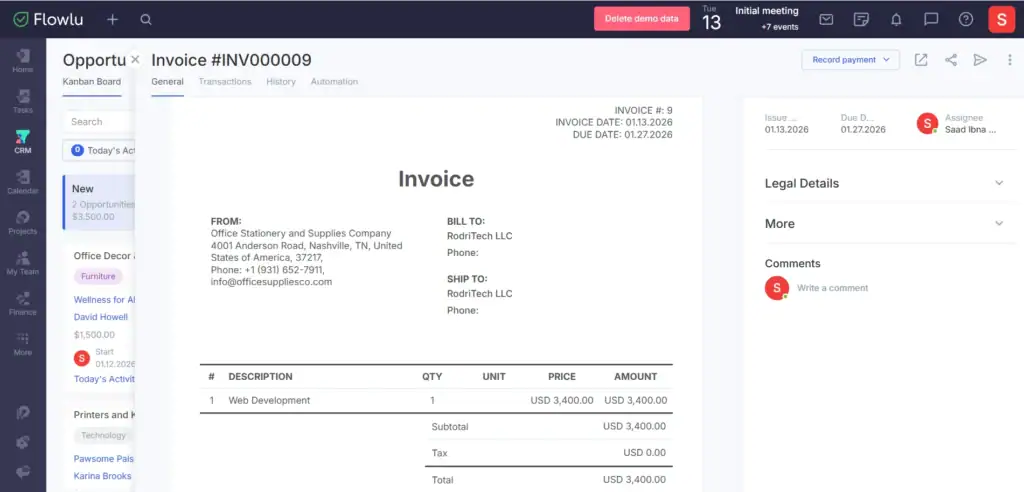
Flowlu is the quiet overachiever on this list. Its free tier gives two users access to real project management, native invoicing, time tracking, and a basic CRM features most tools lock behind paid plans. If you’re starting and can’t justify a monthly SaaS bill, Flowlu is the most generous free starting point available.
Paid tiers add billable rates, recurring invoices, multi-currency support, and more granular financial reporting. For teams that have grown past the two-person free limit, the Essential plan at $12/user/month keeps costs low while unlocking client-facing payment workflows.
Key Features
- Free tier for 2 users with full PM, invoicing, time tracking, and a basic CRM
- Agile sprints, Gantt charts, and project workspaces
- Native invoicing with online payments, templates, and late payment reminders (Essential+)
- Recurring invoices and multi-currency support on Advanced+
- Built-in client portal and knowledge base
Pricing
- Free: $0 — 2 users, includes invoices, estimates, and payment tracking
- Essential: $12/user/mo — adds online payments, templates, and late reminders
- Advanced: $22/user/mo — adds recurring invoices, multi-currency, and multi-org
- Ultimate: Custom
Pros
Cons
User Feedback
🟢
What we like best about Bonsai is that it is basically a one stop shop! Bonsai has everything that we are looking for with our company, Invoicing, security and the electronic signatures which we are very excited for.
– Bryanna O.
🔴
Pricing can climb as you add teammates or advanced features. Project management is fine for simple tasks but it is not as deep as a dedicated tool. Report customization is limited and invoice layouts do not offer a lot of design freedom. Multi currency and tax settings may require manual tweaks if you work across regions.
– Katie S.
5. Plutio [NATIVE]: Best for Solo Operators
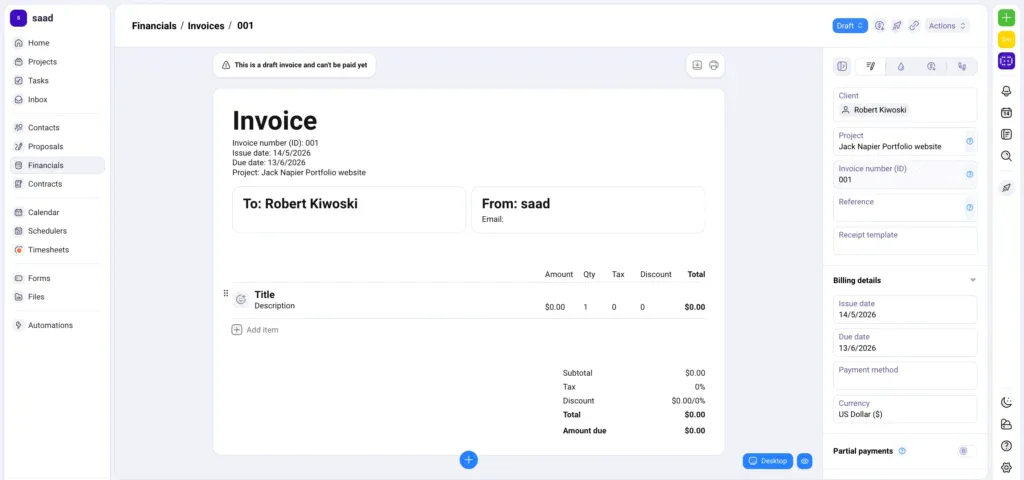
Plutio takes the same philosophy as Bonsai — bundle everything a freelancer needs in one tool — and prices it as a flat monthly fee instead of per user. At $19/month on the Core plan, you get projects, invoicing, contracts, proposals, time tracking, and a client portal. No features gated to higher tiers.
When Plutio works, it’s the most cost-efficient all-in-one for solo freelancers. When it doesn’t, the CRM is lightweight, reporting is basic, and the mobile app trails the desktop experience.
Key Features
- Native invoicing on every plan, including Core
- Unlimited projects, contracts, and proposals on all tiers
- Native time tracking with billable toggle and weekly timesheets
- White-label client portal with custom domain (Pro+)
- Built-in scheduler (Calendly-style) on all plans
Pricing
- Core: $19/mo — solo operator, up to 9 active clients, all features included
- Pro: $49/mo — unlimited clients, 30 team contributors, API access
- Max: $199/mo — unlimited contributors, full white-label
Pros
Cons
User Feedback
🟢
From project management and client communication to invoicing, proposals, scheduling, and time tracking, it really simplifies the chaos of juggling multiple apps. I’ve used the platform for years to manage projects, send proposales and invoices, and manage client subscriptions.
– Mark D.
🔴
Sadly, Plutio displays false advertising when it comes to their “automations” features displayed all over their website. Not only are the majority of the platform’s workspaces completely disconnected, having no consistent task synchronization across different data tables, but the there is no internal automation tool that allows the configuration of triggering specific actions
– Preston B.
6. ClickUp [INTEGRATED, Harvest/Zoho Invoice]: Best PM Hub with External Billing
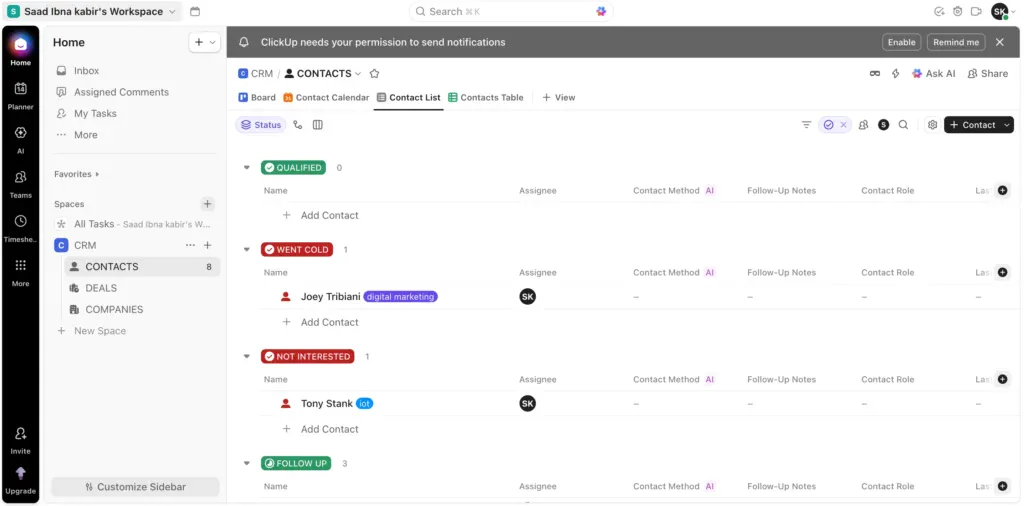
ClickUp is the most feature-dense project management platform on this list, and it doesn’t have native invoicing. What it does have is an extensive integration marketplace: connect Harvest, Zoho Invoice, InvoiceBerry, or Xero, and your project data flows into your billing tool.
That setup works well if your team is already committed to a specific invoicing or accounting platform, or if billing is handled by a finance team using dedicated tools. ClickUp stays in its lane – managing projects, tasks, goals, and workload — without trying to be your accountant.
What ClickUp does best is flexibility. You can build almost any workflow imaginable: custom fields, automations, 15+ project views, and AI-powered task management. For PM-first teams that already have a billing system they love, ClickUp is the most powerful hub to build around.
Key Features
- Free forever plan with unlimited tasks and members
- 15+ project views: Kanban, Gantt, list, calendar, mindmap, and more
- Native goals and workload management
- 1,000+ integrations,, including Harvest, Zoho Invoice, InvoiceBerry, and Xero
- ClickUp Brain AI assistant for task summaries and automation building
Pricing
- Free Forever: $0 — unlimited tasks and members
- Unlimited: $10/user/mo — removes limits, adds integrations and dashboards
- Business: $19/user/mo — advanced automations, time tracking, goals
- Enterprise: Custom
Pros
Cons
User Feedback
🟢
Honestly, what I like most about ClickUp is that it doesn’t force my team into a rigid way of working, it adapts to us. The combination of Spaces, Folders and Lists with the different views (I switch between board and Gantt all the time) makes it easy to organize everything from a quick sprint to broader project planning.
– Pedro A.
🔴
One thing you managed really well, but one problem is that you didn’t mention how to use it. I also faced an issue because I don’t know how to use some features. I suggest you make videos for every feature so people can easily learn how to use them. Also, please create a section where people can find and watch these videos to learn.
– Awais S.
7. Monday.com [INTEGRATED, QuickBooks/FreshBooks]: Best for Visual Project Teams
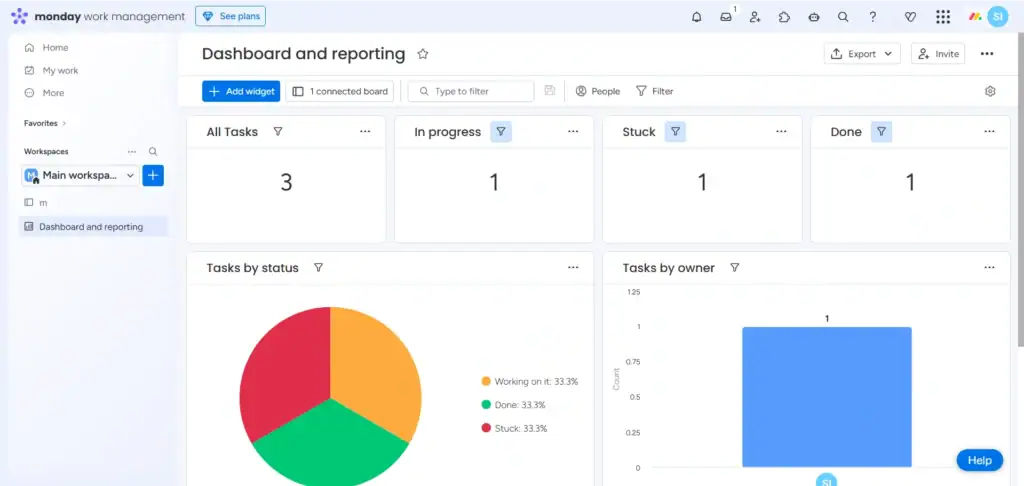
Monday.com is a visual-first project management platform with a drag-and-drop board interface that most teams find intuitive without formal training. It doesn’t have native invoicing but integrates with QuickBooks, FreshBooks, and Zoho Invoice through its marketplace.
For teams that want clean visual project tracking without giving up their existing accounting software, Monday.com offers a comfortable middle ground. The automation builder, triggered by status changes, deadlines, or form submissions, is one of the more polished implementations in this category.
Key Features
- Visual boards, Gantt, timeline, and calendar views with drag-and-drop scheduling
- No-code automation builder with 200+ pre-built templates
- Integrations with QuickBooks, FreshBooks, and Zoho Invoice for billing workflows
- Client portals and guest access on Standard+ plans
- Workload management and capacity planning on Pro+
Pricing
- Free: $0 — up to 2 seats, basic boards
- Basic: ~$12/seat/mo — unlimited boards, 5GB storage (3-seat minimum)
- Standard: ~$14/seat/mo — automations, integrations, guest access
- Pro: ~$24/seat/mo — time tracking, formula columns, private boards
- Enterprise: Custom
Pros
Cons
🟢
Honestly, what I like most about ClickUp is that it doesn’t force my team into a rigid way of working, it adapts to us. The combination of Spaces, Folders and Lists with the different views (I switch between board and Gantt all the time) makes it easy to organize everything from a quick sprint to broader project planning.
– Pedro A.
🔴
One thing you managed really well, but one problem is that you didn’t mention how to use it. I also faced an issue because I don’t know how to use some features. I suggest you make videos for every feature so people can easily learn how to use them. Also, please create a section where people can find and watch these videos to learn.
– Awais S.
Which PM Tool with Invoicing Is Right for You?
Skip the analysis paralysis. Here’s a decision guide by scenario:
- Solo freelancer needing proposals, contracts, and billing in one app: Bonsai (Essentials, $25/user/month) or Plutio (Core, flat $19/month)
- 5 to 35 person agency wanting CRM + projects + invoicing without per-seat fees: OneSuite — flat-rate, all-in-one
- Client-facing agency with proofing, approvals, and retainer billing: Teamwork
- Starting and need a capable free plan: Flowlu (free for 2 users, invoicing included)
- PM-first team already using QuickBooks or Xero: ClickUp (integrate your existing invoicing tool)
- Visual project teams not focused on native billing: Monday.com
The rule of thumb: if the same people managing project work are also handling client billing, go native(eg. OneSuite). Integrated only wins when a dedicated finance team is already locked into their own accounting platform and won’t change.
The Bottom Line
Project management software and invoicing tools are typically sold, billed, and maintained separately — and that gap costs freelancers and agencies real money. The 29% of freelance invoices that go unpaid on time don’t always happen because clients are dishonest. They happen because billing is slow, disconnected from the work that justified the invoice, and easy to let slip through the cracks.
The five native options here — OneSuite, Teamwork, Bonsai, Flowlu, and Plutio — close that gap. OneSuite is the strongest pick for agencies and freelancers who want flat-rate pricing and a single tool for CRM, projects, and billing. Teamwork wins for larger client-facing agencies with complex retainer billing. Bonsai and Plutio are the right fits for freelancers and solo operators who need everything in one place from day one.
Try OneSuite free for 14 days, no credit card required
FAQs
Does ClickUp have invoicing?
No. ClickUp has no native invoicing in 2026 — billing requires connecting to Harvest, Zoho Invoice, or Xero through their marketplace. For invoicing built into the same tool as your projects, OneSuite, Teamwork, Bonsai, Flowlu, and Plutio are the five native options.
Does Asana have invoicing?
No. Asana has no native billing or invoicing features — you’d connect to Harvest, QuickBooks, or a similar tool for billing. The PM platforms with native invoicing in 2026 are OneSuite, Teamwork, Bonsai, Flowlu, and Plutio.
Can I invoice from Monday.com?
No. Monday.com has no native invoicing — it integrates with QuickBooks, FreshBooks, and Zoho Invoice. For everything in one login, the native-invoicing alternatives are OneSuite, Teamwork, Bonsai, Flowlu, and Plutio.
What’s the cheapest PM tool with invoicing?
Flowlu’s free plan — 2 users, includes invoicing, time tracking, and a basic CRM. Past 2 users, Plutio Core ($19/month flat) is the cheapest because it doesn’t charge per seat. OneSuite Freelancer at $29/month covers 5 users and adds a full CRM, beating per-seat tools once you hit 3 people.
OneSuite vs Bonsai – which is better?
Depends on team size and geography. Bonsai is per-user ($25/mo) and built for US solo freelancers strongest 1099 and tax tracking. OneSuite is flat-rate ($29 for 5 users, $59 for 12, $149 for 35) and built for small agencies needing CRM, projects, time tracking, and invoicing without per-seat costs. Solo US freelancer = Bonsai. Team of 3+ or non-US = OneSuite.
What’s a good HoneyBook alternative with real project management?
HoneyBook is strong on CRM, contracts, and client experience but light on project management, no Gantt, no team workload, no sprint views. OneSuite is the closest replacement for agency owners who want HoneyBook’s all-in-one feel plus actual project workspaces, task management, and team collaboration. Bonsai is the closer fit for solo freelancers leaving HoneyBook over per-user pricing.
Native vs integrated invoicing – what’s the difference?
Active means billing lives inside your PM tool: log hours → click Invoice → send. Integrated means your PM tool ships data to a separate billing app you maintain. Native wins for teams under 50 where the same people manage work and billing, OneSuite, Teamwork, Bonsai, Flowlu, Plutio. Integrated wins when a dedicated finance team already owns the accounting stack — ClickUp + Xero, Monday + QuickBooks.
Start exploring OneSuite today
No credit card is required