
6 Best Harvest Alternatives for Time Tracking in 2026

September 5, 2026
Harvest was acquired by Bending Spoons in 2025, and its pricing has changed significantly. Instead of a simple per-seat subscription, the new Teams and Enterprise plans combine seat-based pricing with usage-based Flex billing.
That means your monthly cost is no longer determined by team size alone. As your projects, clients, tasks, invoices, and invoiced revenue grow beyond the included limits, your costs can increase as well. For agencies and service businesses with growing workloads, that can make monthly expenses harder to predict.
As costs rise with usage, some users are facing unexpectedly high bills and starting to look for alternatives with more predictable pricing and better value.
Just got hit at renewal? Some Harvest accounts jumped from $12/month to over $1,900/month under the new usage-based billing. See the full price increase breakdown - plus a migration discount for switchers →
If you’re considering a switch, this guide can help. I tested 18 leading time tracking tools and selected the six best Harvest alternatives for 2026, covering everything from simple time trackers to all-in-one platforms with project management, invoicing, and client management.
Harvest Review 2026: Pricing, Limitations, and Why Teams Switch
“The pricing change was IT for us to leave, weren’t even power users just couple of projects, a few people tracking time but once we saw how quickly the usage fees could pile up across different features made 0 sense to continue with harvest.”
– From Reddit
That’s how a Harvest user put it on Reddit. And this sentiment comes up repeatedly across forums and review platforms.
What Harvest Costs in 2026
Harvest’s free plan looks generous until you realize it’s capped at one seat. After that, it’s $9 per seat per month but only if you commit annually. Monthly billing costs more, and either way, there’s no flat-rate ceiling. A 10-person team is $90 a month just for time tracking.
What Harvest Does Well
To be fair, Harvest is good at what it was built for. The browser extension drops a timer right inside GitHub, Jira, and Asana, invoicing is quick, and the reports give you a solid read on budget and utilization. For a freelancer or a small team, it genuinely works.
Where Harvest Falls Short
The gaps show up once you try to do more than track time:
- No Kanban or project management views
- No client portal for approvals or hour visibility
- No CRM for managing leads or retainers
- Per-seat pricing with no flat-rate option as you grow
- Reporting and invoice customization is limited
The tool was built to do one thing. The problem is most teams in 2026 need more than one thing and Harvest’s pricing doesn’t get friendlier the more you need it to.
How the Best Harvest Alternatives Compare in 2026
Not every Harvest alternative solves the same problem. Some are cleaner time trackers, some add project management, and a few replace your entire tool stack. Here’s how they stack up at a glance.
| Tool | Pricing | Best For | Replaces |
|---|---|---|---|
| OneSuite | $9/seat/month | Freelancers, Agencies & growing teams | Time tracker + PM + CRM + client portal + invoicing |
| Toggl Track | $9/seat/month | Freelancers & remote teams | Time tracker |
| Clockify | $6.99/seat/month | Budget-conscious teams | Time tracker + basic reporting |
| Hubstaff | $4.99/seat/month | Distributed & field teams | Time tracker + GPS + monitoring |
| TimeCamp | $3.49/seat/month | Teams needing attendance tracking | Time tracker + attendance + basic invoicing |
| Everhour | $8.50/seat/month | Teams inside Asana or Jira | Time tracker + budget tracking |
6 Best Harvest Alternatives in 2026: Full Breakdown
Each tool below covers a different gap Harvest leaves open. Here’s what they do, what they cost, and who they’re actually built for.
1. OneSuite – Best Harvest Alternative for Agencies
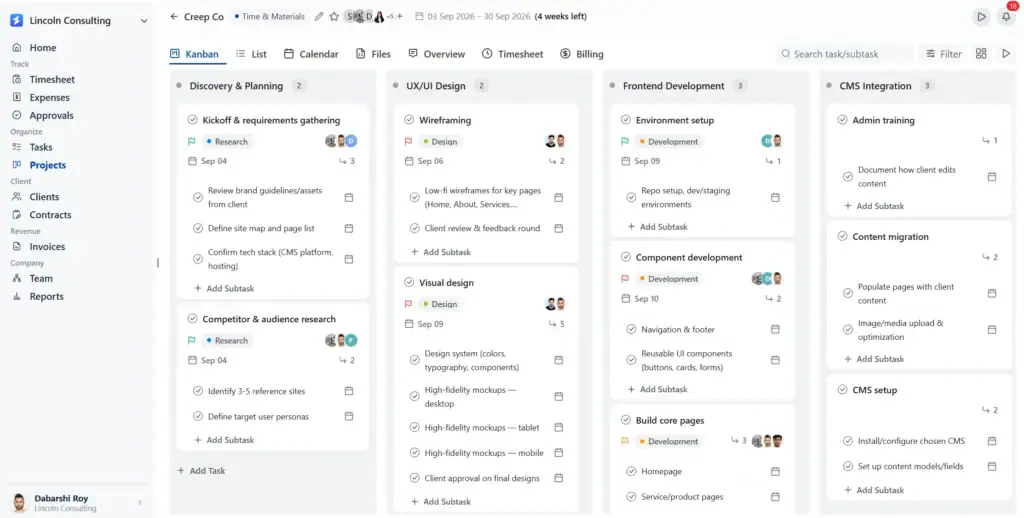
If you’re a Harvest refugee, OneSuite is the best possible alternative to land on. It gives you the same time tracking and billing workflow you already know, plus project management, expenses, CRM, and a client portal in one platform.
No relearning your job. Just an all-in-one setup for managing client work from project setup to billing. Projects, tasks, time, expenses, rates, budgets, invoices, and reporting all connect in a single workflow.
Time Tracking Built Around Projects:
OneSuite keeps time tracking connected to the work your team is actually doing. Team members can track time from their timesheet or start a timer directly against a project → work type → task → subtask.
You can mark entries as billable or non-billable and apply the appropriate team or project billing rate. Managers can then review and approve submitted timesheets before they move into the billing workflow.
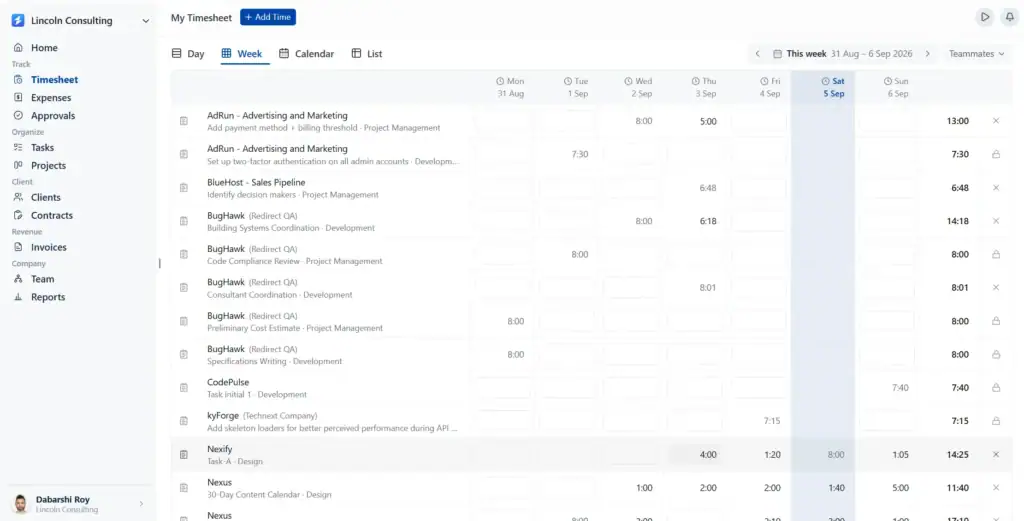
This gives agencies visibility into:
- Billable vs. non-billable hours
- Hours logged against each project and task
- Revenue generated from tracked time
- Budget usage and remaining hours
- Team capacity and utilization
The key difference: time tracking isn’t isolated from project delivery. Every entry is tied back to the project and work being delivered.
Track Expenses Alongside Time:
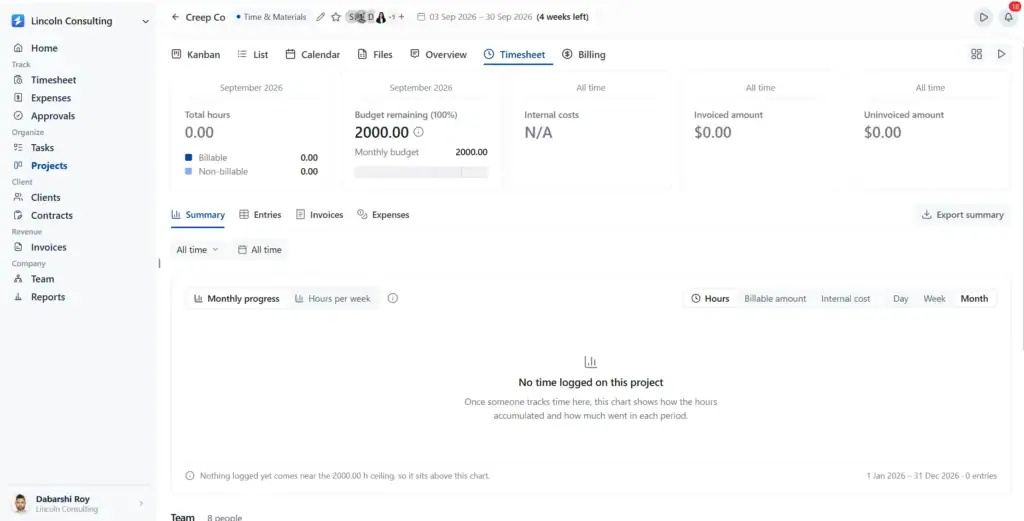
Project costs aren’t limited to employee hours. OneSuite lets teams record expenses against specific projects and mark them as billable or non-billable and reimbursable.
Expenses follow the same approval workflow as time entries, giving managers a chance to review costs before they are included in client billing.
So instead of tracking: Hours in one system + expenses somewhere else
you can manage: Time + Expenses → Approval → Client Billing
This makes it easier to see the actual cost and billable value of a project before sending an invoice.
Flexible Project Billing & Invoicing:
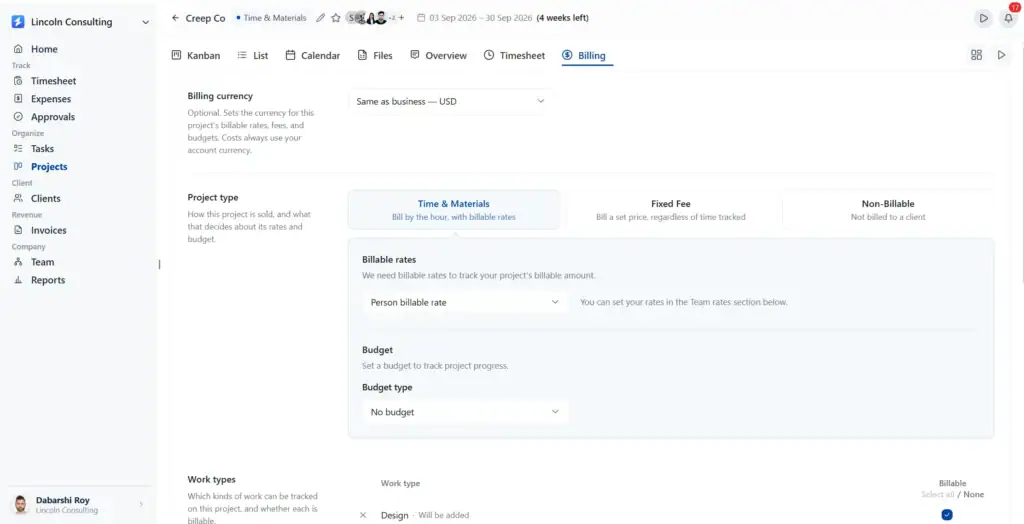
OneSuite supports three project billing types:
- Time & Materials. Bill clients based on the actual time and expenses recorded against the project.
- Fixed Fee. Manage projects against an agreed project fee rather than billing every hour.
- Non-Billable. Track internal, pro-bono, or other work without generating client charges.
Projects can also have billing rates, budgets, work types, and budget alert thresholds configured at the project level.
Once time and expenses are approved, they can be used to generate invoices, creating a connected path from tracked work to client billing.
The OneSuite Workflow:
Set up project → Assign billing type → Set rates & budget → Track time & expenses → Approve → Invoice → Report
OneSuite also includes CRM and a Client Portal, so client and lead information can live alongside the operational workflow instead of requiring another platform.
Pricing
- Monthly billing: $9 per user per month
- Annual billing: $7 per user per month
Every plan includes a 14-day free trial, white-glove onboarding, unlimited clients and projects, and a 30-day money-back guarantee. Annual billing saves 20%.
All plans include time tracking, invoicing, project management, CRM, proposals, and a client portal. No feature gating between plans, just seat limits.
Pros and Cons
User FeedBack
– Pedro C. G2 Review
👍
“I have been using it for approximately 5 months to manage my clients’ projects and to assign tasks to my employees. I like how easy and intuitive it is, as you don’t need to explain to your employees where to find their assignments and documents. It is very functional.”
– Raabit H. G2 Review
👎
“As any app that is in their early phase of development, Onesuite has some bugs that needs to be ironed out. But none of that them were breaking the operations. They are mostly UI related and I am already seeing them fixing them one be one.”
2. Toggl Track – Best for Freelancers and Remote Teams
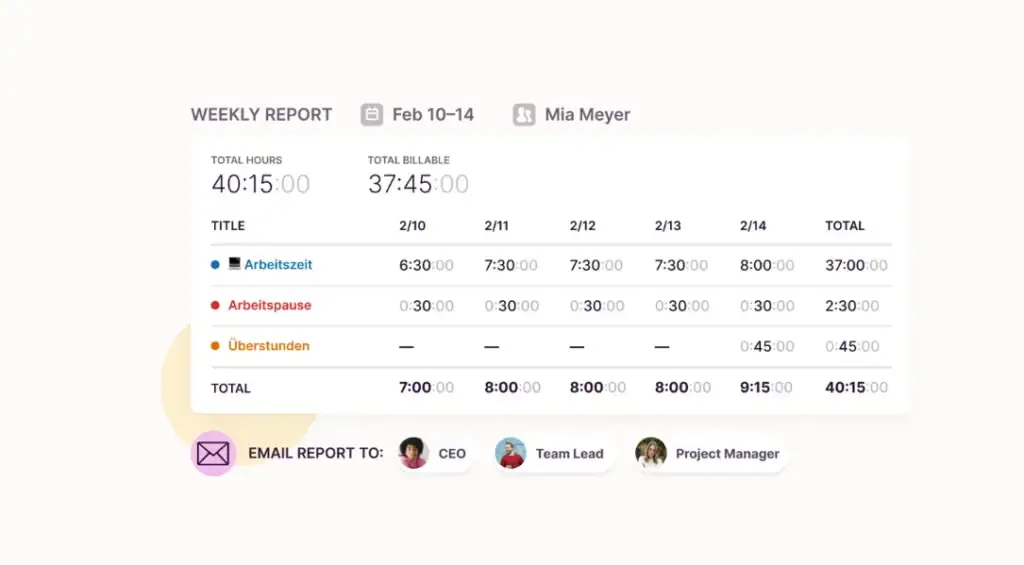
Toggl Track is one of the most recognized time trackers in the market, and for good reason. The interface is clean, the timer works across web, desktop, and mobile, and the browser extension integrates directly with tools like GitHub, Jira, and Asana.
Where it falls short is everything beyond time tracking. There is no project management, no invoicing, no client portal, just a very polished timer with solid reporting underneath it.
Best for: Freelancers and remote teams who want a dedicated time tracker without the complexity of an all-in-one platform.
Key Features
- One-click time tracking across web, desktop, and mobile apps
- Browser extension that drops a timer inside 100+ tools including GitHub, Jira, and Notion
- Project and task-level tracking with billable rate settings
- Team productivity and revenue reports
- Real-time project and task progress visibility
- Calendar view for visualizing tracked time
- Idle detection and tracking reminders
Pricing
- Free: $0/mo
- Starter: $9/user/mo
- Premium: $20/user/mo
- Enterprise: Custom Pricing
Pros & Cons
User FeedBack
👍
— Gustavo P, G2 Review
“Platform integration, metrics accuracy, and easy modification of tracked time without leaving traces.”
👎
— Justine R, G2 Review
“Interface is kind of bulky and not really intuitive to use. Took a lot of getting used to in order to properly track time, etc.”
3. Clockify – Best for Budget-Conscious Teams
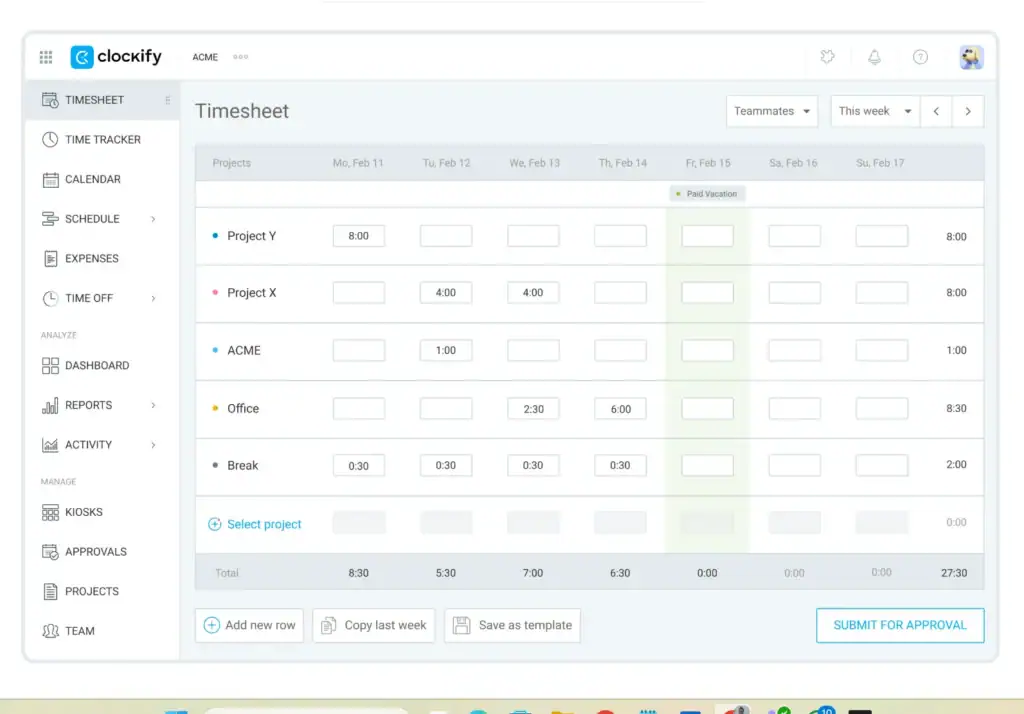
Clockify is the most generous free time tracker on this list. Unlimited users, unlimited projects, and core time tracking features at no cost, something no other tool in this comparison offers at scale.
The tradeoff is that the features that actually matter for billing, like invoicing, expenses, and budget tracking, sit behind paid plans. The free tier gets you in the door, but running a real client workflow costs more than the headline suggests.
Best for: Budget-conscious teams and growing businesses that need solid time tracking without committing to a high per-seat cost.
Key Features
- Unlimited time tracking across web, desktop, and mobile
- Project and task-level tracking with billable rates
- Invoicing and recurring invoices on paid plans
- Attendance, overtime, and time off tracking
- Budget and estimates with expense tracking
- Scheduling and forecasting on higher plans
- Reporting across time, labor cost, and profit
Pricing
- Free: $0/mo
- Standard: $6.99/seat/mo
- Pro: $9.99/seat/mo
- Enterprise: $14.99/seat/mo
Pros & Cons
User FeedBack
👍
— Oliver C, G2 Review
“Help me manage my time. And have a track record of my hours.”
👎
— Fawas N, G2 Review
“It is difficult to find the project status from development to testing to completion of the task or product”
4. Hubstaff – Best for Distributed and Field Teams
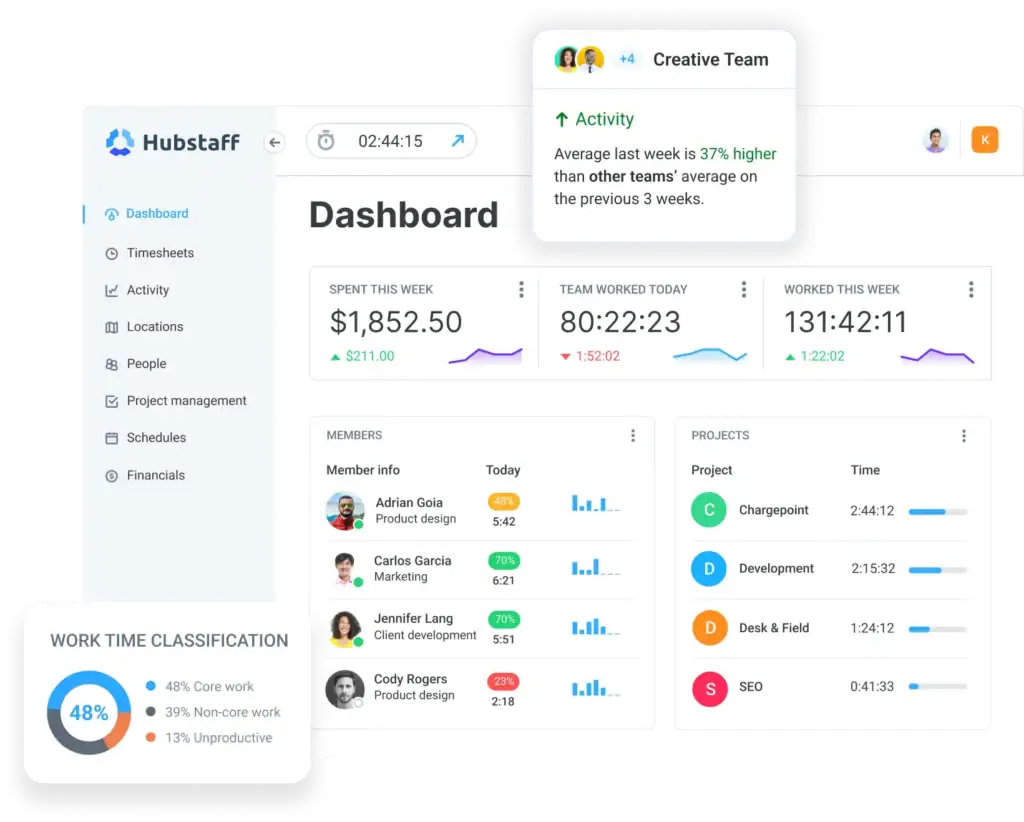
Hubstaff is built for teams that work outside an office. GPS tracking, screenshots, activity monitoring, and geofenced time tracking make it the go-to choice for construction crews, field service teams, and remote workforces that need proof of work alongside their timesheets.
Harvest has none of that. If your team is spread across locations and you need more than a running timer, Hubstaff is the more complete solution.
Best for: Distributed teams, field service businesses, and remote-first companies that need GPS tracking and workforce monitoring alongside time tracking.
Key Features
- GPS tracking and geofenced clock-in and clock-out
- Automatic screenshots and activity level monitoring
- Time tracking across web, desktop, and mobile
- Payroll and payment processing built in
- Scheduling and shift management
- Project budgets and cost tracking
- Reporting across time, activity, and labor costs
- Unlimited integrations on higher plans
Pricing
- Starter: $7/seat/mo
- Grow: $9/seat/mo
- Team: $12/seat/mo
- Enterprise: $25/seat/mo
2 seat minimum on all plans. Annual billing includes 2 months free.
Pros & Cons
User FeedBack
👍
— Siddharth A, G2 Review
“I really appreciate that Hubstaff is very easy to navigate, even for someone who isn’t deeply technical. Tracking time requires minimal effort, and it runs quietly in the background without interrupting workflow.”
👎
— Devin G, G2 Review
“2 different paid add-ons were added to my account without me ever clicking the button, requesting my authorization, or even sending me an email notification that my bill was changing. I was overcharged for 2 years for a feature I was not using and they refused to refund.”
5. TimeCamp – Best for Teams Needing Attendance and Billing in One Place
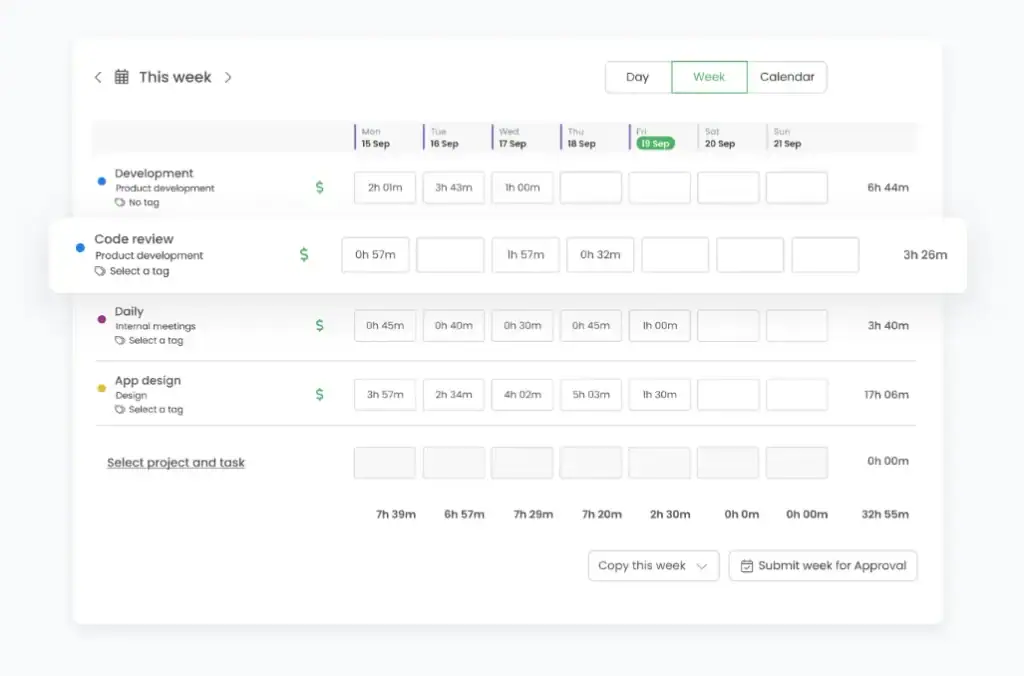
TimeCamp sits in an interesting spot on this list. It is one of the most affordable time trackers available, and it covers attendance, invoicing, and budget tracking at a price point that undercuts almost every competitor here.
What it lacks is depth on the project management and client-facing side. There is no client portal, no CRM, and no proposals. For teams that just need clean time and attendance records with basic billing, it gets the job done well.
Best for: Small teams and agencies that need time tracking, attendance management, and basic invoicing without paying a premium per seat.
Key Features
- Automatic and manual time tracking across web, desktop, and mobile
- Attendance tracking with time-off management
- Invoicing from tracked billable hours
- Budget and estimates with cost tracking
- Apps and website tracking on higher plans
- AI time tracker for automatic time capture
- Remote work detection and activity monitoring
- Excel and data export for reporting
Pricing
- Starter: $3.49/user/mo
- Premium: $4.99/user/mo
- Ultimate: $6.99/user/mo
- Enterprise: Custom pricing
Pros & Cons
User FeedBack
👍
— Yevgen G, G2 Review
“Bad syncronization between pc and phone apps. PC app timer updates once in five minutes, very misleading. Really hard to enter time manually in browser. Jumps randomly to the other digits, jumps to other part of the day. Very confusing. All of the problems are ignored for years”
👎
— Lorenzo r, G2 Review
“The phone part of the interface is a little slower to use and less natural so I find more difficutl to track activities which are not at the computer”
6. Everhour – Best for Teams Already Living Inside Asana or Jira
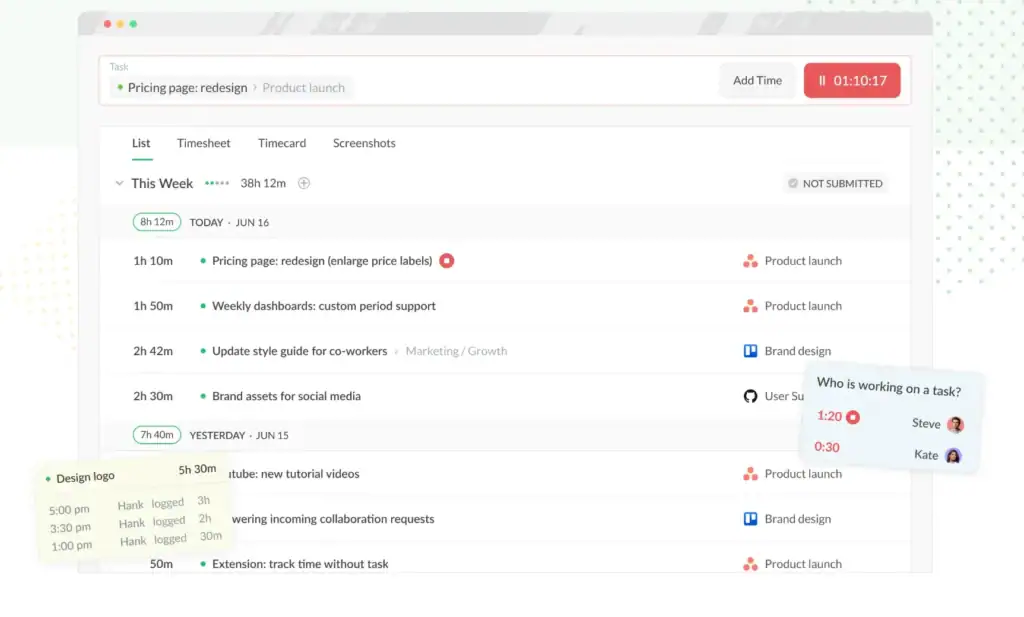
Everhour is not trying to replace your project management tool. It is built to sit inside it. The native integrations with Asana, Jira, Basecamp, and Notion let you track time directly from the tasks you are already working in, without switching tabs or logging into a separate app.
If your team runs everything in Asana and Harvest feels like a disconnected add-on, Everhour is the cleaner fix. It is not an all-in-one platform, but for integrated time tracking and budget visibility, it does the job better than most.
Best for: Teams already using Asana, Jira, or Basecamp who want time tracking and budget visibility without leaving their existing project management tool.
Key Features
- Native time tracking inside Asana, Jira, Basecamp, Notion, and ClickUp
- Project budgets with real-time burn tracking
- Billing, invoicing, and expense tracking on paid plans
- Team scheduling and capacity planning
- Reporting across time, cost, and project profitability
- SSO and advanced permissions on the Team plan
- Free plan available for up to 5 seats
Pricing
- Free: $0 (up to 5 seats)
- Team: $10/seat/month
- Custom: Custom (min 50 seats)
Annual billing saves around 15%. Team plan includes all features with unlimited seats.
Pros and Cons
User FeedBack
👍
— Sebastian T, G2 Review
“I like the simplicity of the interface. Also, the fact that I don’t need to download the software and just use it on my browser is very convenient for my team”
👎
— Ben S, G2 Review
“Virtually everything else about them is half baked. Their support is slow to respond and half the time their answers make no sense. It is expensive. Most of their integrations assume you have only a single installation so managing time cross multiple clients isn’t possible.”
Feature Comparison: Harvest vs Top Alternatives
The gap between a time tracker and a business tool is wider than it looks. Here is where each alternative sits.
| Feature | Harvest | OneSuite | Toggl Track | Clockify | Hubstaff | TimeCamp | Everhour |
|---|---|---|---|---|---|---|---|
| Time Tracking | ✅ | ✅ | ✅ | ✅ | ✅ | ✅ | ✅ |
| Project Management | ❌ | ✅ | ❌ | ⚠️ | ⚠️ | ❌ | ⚠️ |
| Client Portal | ❌ | ✅ | ❌ | ❌ | ❌ | ❌ | ❌ |
| CRM | ❌ | ✅ | ❌ | ❌ | ❌ | ❌ | ❌ |
| Invoicing | ✅ | ✅ | ❌ | ✅ | ✅ | ✅ | ✅ |
| Document and E-Signature | ❌ | ✅ | ❌ | ❌ | ❌ | ❌ | ❌ |
| Email Inbox | ❌ | ✅ | ❌ | ❌ | ❌ | ❌ | ❌ |
| GPS Tracking | ❌ | ❌ | ❌ | ❌ | ✅ | ❌ | ❌ |
The Right Way to Migrate Off Harvest
Before you cancel your Harvest account, export everything time entries, invoices, and client records are all downloadable as CSVs from the Reports section. Keep that data somewhere accessible even after you switch.
The cleanest way to migrate is to finish any open billing cycles in Harvest first. Close out unbilled hours, send outstanding invoices, and start fresh in your new tool at the beginning of a new month. Trying to split active projects across two platforms mid-cycle is where most migrations get messy.
Give your team one full billing cycle to run both tools in parallel before fully committing. It costs one extra month of Harvest but removes the risk of lost hours or billing gaps during the transition.
Pick the Right Harvest Alternative for Your Workflow
Harvest’s per-seat pricing is the first thing that breaks. The missing features are the second. Which one hurts more depends on where your team is right now.
A freelancer logging hours on three clients does not need a CRM. Toggl Track is cleaner and cheaper and does exactly what a solo operator needs.
A team on a tight budget tracking time across ten people does not need to pay $90 a month for it. Clockify covers the basics at a fraction of that cost.
A field crew clocking in from different locations every day needs GPS and monitoring, not just a browser timer. That is Hubstaff’s lane and it owns it.
A team already running projects in Asana does not need to rebuild their workflow from scratch. Everhour sits inside the tools they already use and adds time tracking on top.
But a five to thirty person agency paying for Harvest, a PM tool, a CRM, and a client portal separately is not dealing with a feature gap. It is dealing with a structural problem.
OneSuite is the fix. Everything under one login, one flat monthly rate, and a workflow where logged hours connect directly to the project, the client, and the invoice without any of the manual steps in between.
FAQs
Is Harvest still worth it in 2026?
For solo freelancers who only need time tracking and invoicing, yes. For teams that need project management and client management on top of it, the math stops making sense fast.
What is the difference between Harvest and OneSuite?
Harvest tracks time and sends invoices. OneSuite does that plus project management, CRM, proposals, and a client portal at a flat rate instead of per seat.
Is OneSuite Cheaper Than Harvest?
Yes, OneSuite costs as low as $9/user/month, whereas Harvest starts at $9/user/month and grows with number of projects, tasks, clients, invoices and amout of invoices, and OneSuite replaces your PM tool, CRM, and client portal on top of it.
Start exploring OneSuite today
No credit card is required