

7 Best Project Management Software with CRM for Freelancers and Agencies

Your new client just had a great sales call. They explained their budget constraints, deadline flexibility, and what didn’t work with their last agency.
Two days later, your project manager asks them all the same questions.
This happens because your CRM and project management tools don’t talk. Information gets trapped in silos. Your team looks disorganized, even when they’re not.
Most agencies try to fix this with integration tools. But APIs break, data doesn’t sync properly, and you’re still copying information manually. Plus, you’re paying for three platforms instead of one.
Project management software with CRM solves this. Your entire team sees the same client history, from first inquiry through final delivery.
And now, we’ll show you seven platforms that actually integrate both functions properly.
Understanding CRM and Project Management Software
Before we jump into specific tools, let’s clarify what we’re actually talking about.
If you are reading this, chances are you already know about CRM and Project Management Software.
Customer Relationship Management is a tool businesses use to manage client data, the sales pipeline, and customer communication.
And a Project management software, on the other hand, is used to plan, organize, and execute every step of a project efficiently.

And Why do We Need Project Management and CRM Together?
According to this PMI survey, insufficient resource allocation can make projects inefficient and prone to risks, but using a native CRM and project management integration solves this. One login, one source of truth.
When deals close in your CRM, they automatically become projects with a complete client context. No copying data, no sync errors, no drama.
Your delivery team immediately sees the budget, timeline, communication preferences, and any concerns from sales conversations. Everyone works from the same information.
You’re down to one subscription instead of three. Many integrated platforms cost less than standalone CRMs while providing both CRM and PM functionality, plus invoicing and client portals.
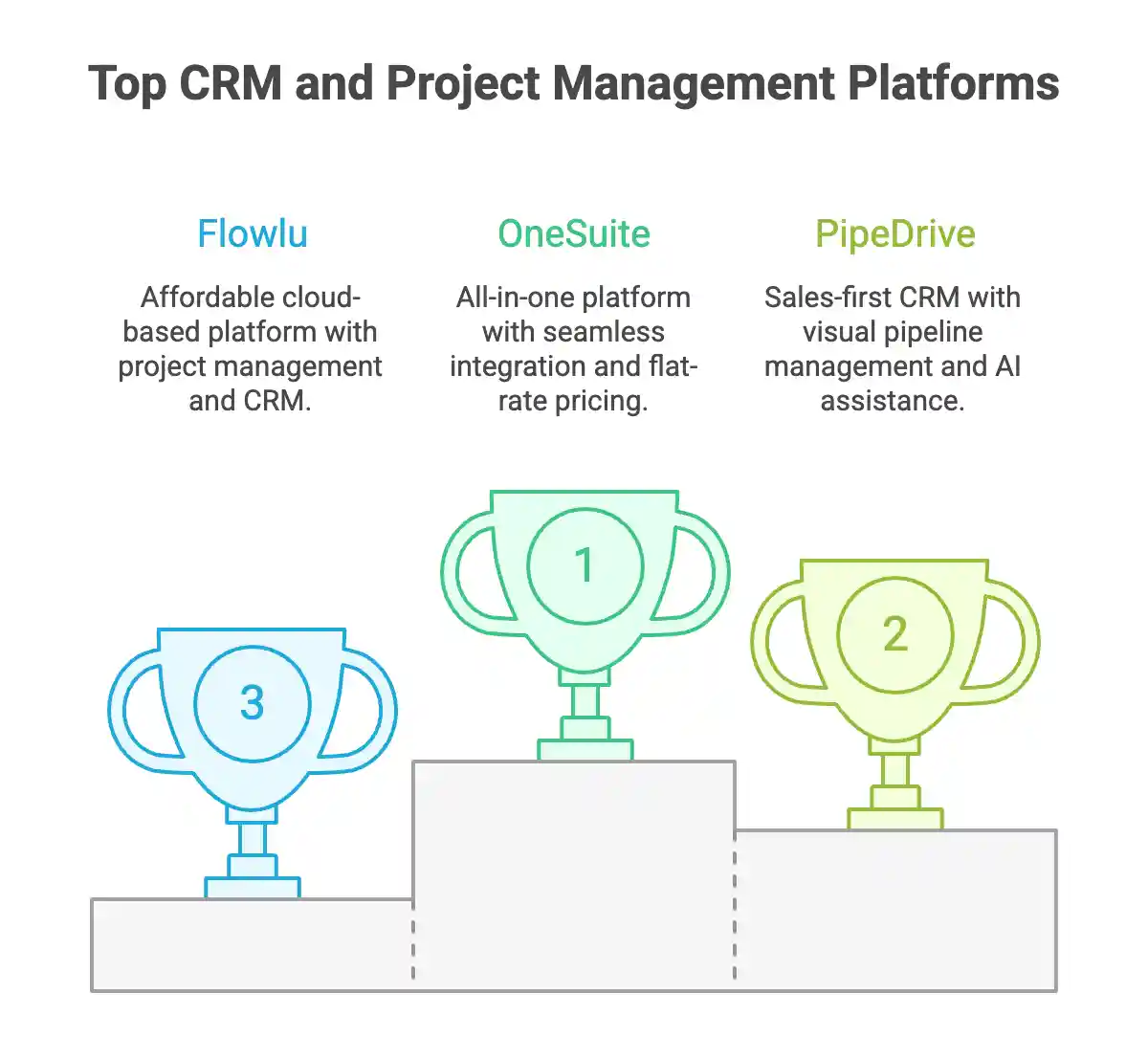
Best Project Management Software with CRM
We have tested over 25 platforms with Project Management Software and CRM capabilities. Then we have created this list, which is ideal for small businesses and freelancers. This list will be beneficial to beginners and pros who are tired of cluttered software filled with features you won’t use.
That’s why you won’t find names like HubSpot, Asana, or ClickUp, as they are either cluttered with tools or require tweaks to use some of these functions.
While creating this list, we have focused on software that has a simple and intuitive UI, dedicated PM, and CRM tools, and proper integration among these tools.
After extensive study, we have compiled this list of software you should consider before selecting the next tool for your work.
|
Platform |
Pricing Plan |
Native PM + CRM |
Client Portal |
|---|---|---|---|
|
OneSuite |
$29/month ( for 5 Users ) |
✅ Seamlessly integrated |
✅ Yes (with white label) |
|
Pipedrive |
$( 19+6.67 ) per user/ month |
⚠️ PM requires a paid add-on |
❌ No |
|
Flowlu |
$12 per user/month |
⚠️ Basic integration |
Limited |
|
Bitrix24 |
$49/month ( for 5 users ) |
⚠️ Separate modules (disconnected) |
✅ Yes |
|
Nimble |
$29.9 per user/month |
⚠️ Separate third-party modules needed |
❌ No |
|
Insightly |
$29 per user/month |
✅ Yes |
Limited |
|
Productive |
$27/month ( for 3 users) |
✅ Yes |
✅ Yes |
1. OneSuite (Best Value for money Project Management Software with CRM)
The biggest problem with CRMs is that they are not easy to understand for beginners. They are tough to navigate with a learning curve.
But OneSuite is a solution where, as soon as you log in, you understand most of its features and how to use them. It is not only easy to navigate, but its intuitive design makes most of its solutions talk to each other, so that you don’t have to use any complex automations and implementations.
OneSuite is an excellent all-in-one platform for small businesses and freelancers that combines features like CRM, proposal builder, project management, invoicing, and a client portal. It also has a document feature along with an e-signature.
CRM, project management, invoicing, and a client portal everything is seamlessly integrated, so there’s no need to juggle multiple apps. Features like Kanban and list views, pre-built templates, and real-time progress tracking make it easy to manage projects and collaborate with clients.
The branded portal keeps clients in the loop, letting them view updates, sign documents, and track progress all in one place.
It’s simple, focused, and built for growing service businesses, and not bloated with unnecessary enterprise tools.
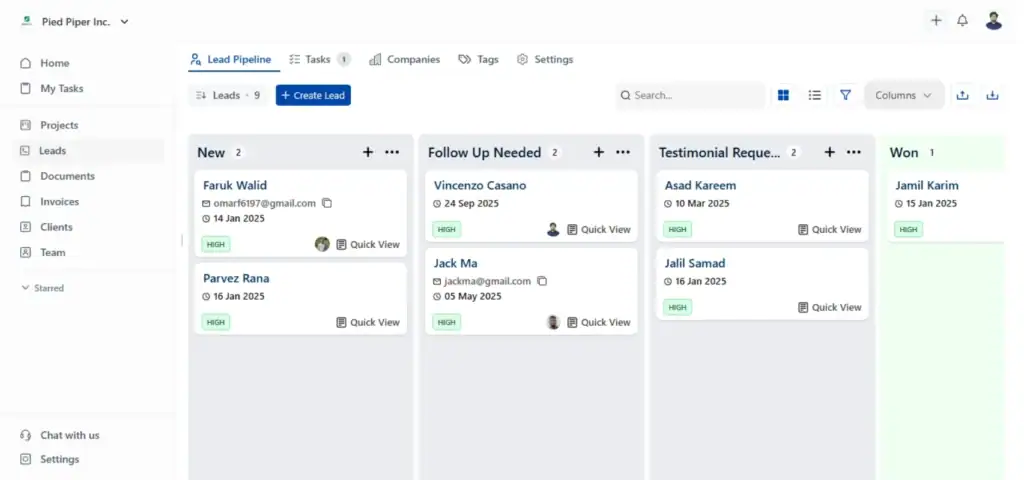
Key Features:
- Dynamic Lead Pipeline: Customizable lead pipeline with list and Kanban views. Includes a Gmail Chrome extension (Lead Grabber) for instant lead capture and visual tracking.
- Single Click Client Conversion: When a lead is won, converting them into a client is as simple as a single click (no manual data entry required).
- Project Management: Flexible task management with Kanban boards, list views, milestone tracking, time tracking, and pre-built templates for faster project setup.
- White Label Client Portal: Fully branded portal under your own domain, where clients can view project status, files, invoices, and communicate directly with your team.
- Proposals and E-signatures: Built-in proposal builder with e-signature support for streamlined contract management.
- Invoicing: Send invoices, track payments, and link financial records to specific projects and clients for accurate billing.
Pricing (Best aspect of OneSuite):
- Standard: $29/month(for 5 users)
- Business: $59/month (for 10 users)
- Agency: $149/month (for 30 users)
Note: OneSuite offers a 14-day free trial with full feature access. No credit card required upfront.
✅ Pros |
❌ Cons |
|
Flat-rate pricing for better growth, not per user. |
Newer platform, means less mature than big players like Monday or HubSpot |
|
Professional branded client portal and real-time project updates. |
Fewer third-party integrations than enterprise tools. |
|
Seamless integration of CRM, project management, invoicing, and client portal. |
Not ideal if you need heavy marketing automation features and complex features. |
|
Easy to use and quick to set up |
OneSuite’s User Feedback:
✌️ The developer team has thought about every aspect of a team’s day to day need. While using the app, I never felt like I am missing anything. On top of that, there are some features that even changed the way our company is being managed now. Kudos to the devs.
–Trusted Review on G2
👎 initially, the individual project could not save files. That has been updated now
–Trusted Review on G2

2. Pipedrive ( Best Visual Sales Pipeline with Optional Project Tools)
Pipedrive is a sales-first CRM that excels at visual pipeline management and deal tracking. Originally built for sales teams, it’s evolved to include basic project management capabilities, though these require add-ons. That means if you want to use its project management tool, you have to pay separately per user.
Where Pipedrive stands out is its visual sales pipeline and AI assistance for email generation and deal prioritization. The mobile app keeps you connected on the go, and integrations with Gmail, Slack, and Zoom make daily workflows smoother.
However, it doesn’t have project management included in the base plan; you might find yourself needing multiple add-ons, which can quickly inflate costs.

Key Features:
• Visual sales pipeline for intuitive deal tracking
• AI-powered email generation and prioritization tools
• Mobile CRM app for on-the-go updates
• Workflow automation capabilities
• Integrations with Gmail, Slack, Zoom, and more.
Pricing:
Lite: $14/user/month (billed annually) – Basic CRM only (no automations, email tracking, or live chat support)
Growth: $24/user/month – Adds email automation and follow-up sequences
Premium: $49/user/month – Includes AI tools, revenue forecasting, and e-signatures (Projects add-on included)
Ultimate: $69/user/month – Unlimited custom fields and advanced permission controls
Important Note: To access project management features on Lite or Growth plans, you’ll need to purchase the Projects add-on separately at $6.70/user/month (or $80.40/user/year).
Pros & Cons
✅ Pros |
❌ Cons |
|
Strong lead management and visual pipeline tracking |
Project management features require paid add-ons ($6.70/user/month extra) |
|
Customizable automation workflows for sales processes |
Advanced capabilities are locked behind higher-tier plans |
|
Reliable mobile experience for field teams |
E-signature functionality is only available in the Premium plan ($49/user/month) |
|
Affordable entry-level pricing for basic CRM needs |
Limited native project tools compared to all-in-one platforms like OneSuite |
✌️ I particularly appreciate the ease of use of Pipedrive and the clarity of its interface. The visual pipeline system allows for easy tracking of business opportunities and provides an overall view of ongoing activities.
–Chloé E.
👎 While Pipedrive’s automation is useful, setting up complex multi-step workflows can feel unintuitive. Users without technical experience might struggle to fully leverage its automation potential. Creating multi-step, conditional workflows can become cumbersome.
–Noah H.
3. Flowlu ( Budget Option with Basic CRM and Projects Features)
Flowlu is a cloud-based business management platform that attempts to centralize operations for small and midsize teams. It bundles project management, CRM, task tracking, invoicing, and collaboration tools into a single interface.
It offers a free plan (limited to 2 users only). The platform handles task management well with Gantt charts and resource tracking, and includes professional invoicing capabilities.
However, users frequently report a steep learning curve for complex operations and performance issues, with some features loading frustratingly slowly. The mobile app also lacks the full functionality of the web version, which can frustrate teams working remotely.
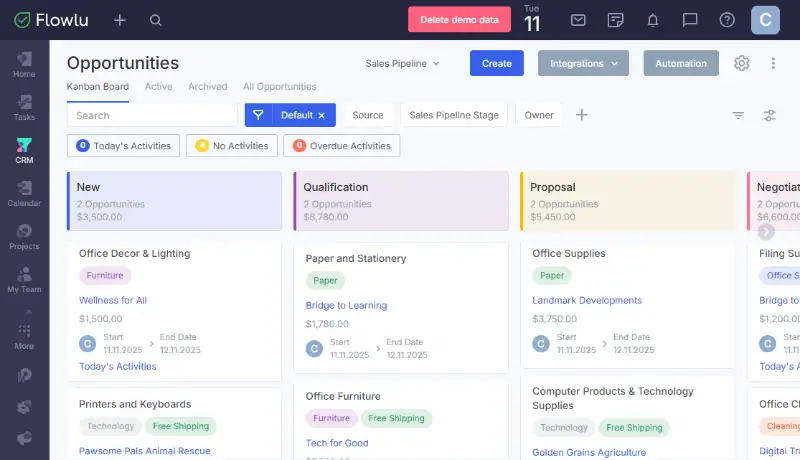
Key Features:
- Project management (task tracking, Gantt charts, time/resource management)
- CRM with sales automation & lead tracking
- Professional invoicing and payment tracking
- Collaboration tools
- Integrations (Google Drive, Slack, Zapier support)
- Mobile apps for iOS and Android (with very limited functionality)
Pricing:
- Free Plan: $0/per user/month for up to 2 users (basic features)
- Essential: $12/per user/month for up to 20 users
- Advanced: $22/per user/month for up to 40 users
- Ultimate: Custom pricing for enterprise teams
✅ Pros |
❌ Cons |
|
Strong task management capabilities |
Steep learning curve for advanced features |
|
User-friendly interface for basic operations |
Limited third-party integrations compared to competitors |
|
Free plan available (up to 2 users). |
The mobile app is significantly less functional than the web version |
|
Integrated CRM and project management in one platform |
Weak community support and documentation |
|
Limited workflow integration. |
|
✌️ Flowlu is one of the best business management platforms. We can manage many performances quickly like creating to-do lists, creating projects, managing CRM, managing teams, tracking finances, etc.
–Prem K.
👎 The platform’s robust nature is also its main challenge; there’s a lot to learn and get familiar with.
– Jordan M.
4. Bitrix24 (Best CRM Project Management with on-premise edition)
Bitrix24 is an all-in-one business management platform that brings together CRM, project management, communications, website building, and automation in one system. It’s designed to streamline operations and is suitable for businesses of any size, offering cloud-based and on-premise options.
While the platform’s playful UI looks inviting, it quickly becomes a maze of features that can paralyze teams trying to get started.
The free plan supports unlimited users (a rare offering), but lacks critical support, meaning you’re on your own figuring things out.
Even their premium plans have support issues. Real-time syncing issues across multiple windows and a notorious learning curve make this a tough sell for small agencies that need to hit the ground running.
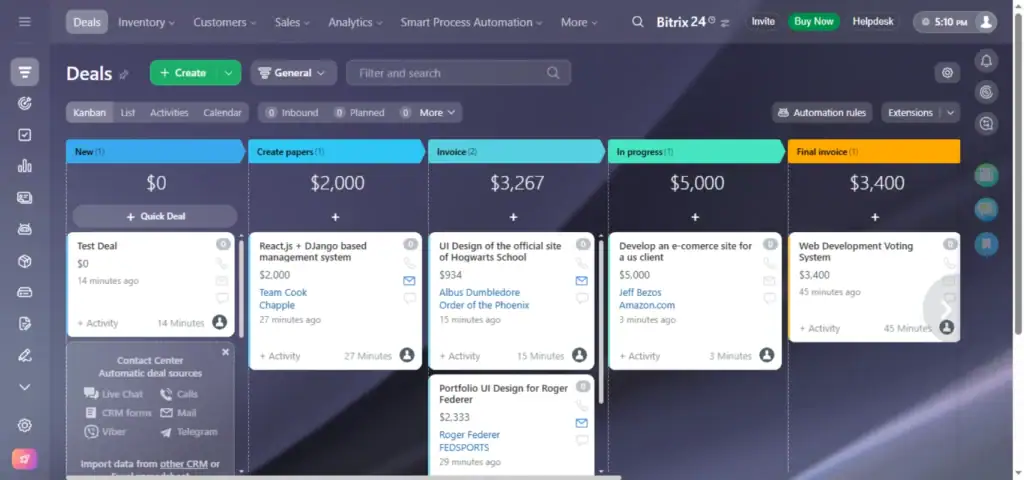
Key Features:
- CRM suite: Lead capture, sales pipelines, email & call logging
- Project management: Kanban, Gantt, and time tracking
- Collaboration: Group chat, video conferencing, shared calendars
- Unified contact center: Manage chat, calls, emails, and social media
- Website & e-commerce builder: Drag-and-drop editor
- Workflow automation and AI-powered insights
Pricing:
- Free: $0/month – Core tools, unlimited users (no support)
- Basic: $49/month (up to 5 users) – Adds online store and automation
- Standard: $99/month (up to 50 users) – Team collaboration features
- Professional: $199/month (up to 100 users) – Advanced CRM and HR tools
- Enterprise: $399/month (up to 250 users) – Multi-branch management and administration
✅ Pros |
❌ Cons |
|
Mobile apps for on-the-go |
Extremely steep learning curve—can overwhelm new users |
|
Customizable workflows |
The “Playful” UI becomes cluttered and confusing with so many features |
|
Combines multiple business tools, reducing reliance on separate apps |
Real-time sync doesn’t work properly when working on multiple windows |
|
Scalable for fast-growing organizations |
Very weak community support and documentation |
|
Limited workflow integration. |
|
|
Not ideal for teams wanting a quick setup and simplicity |
✌️ Bitrix24 is a very comprehensive all in one tool which brings together a lot of things under one roof like CRM, communication with the team, automation and even a contact center.
–Aritro B.
👎 Bitrix24 has ZERO support. Instead, they pass that obligation off to a network of partners who are mostly lying or falsely advertising to get your money and they offer a ZERO REFUND policy even if you were defrauded by one of their partners, they won’t help you.
– Cristopher C.
5. Nimble (Best for Microsoft 365 and Google Workspace Integration)
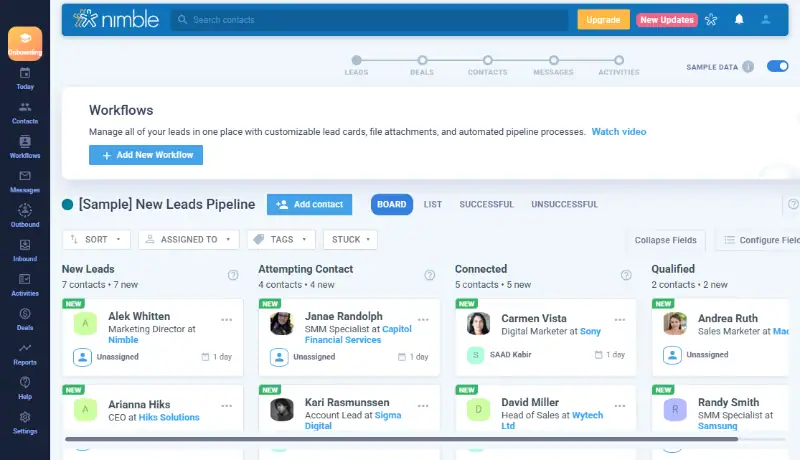
Nimble is a relationship-focused CRM that excels at unifying your contacts across Microsoft 365 and Google Workspace. It automatically enriches contact profiles with social media data, giving you a 360-degree view of your relationships.
The Kanban-style deal pipeline and workflow automation make it easy to manage sales processes, while group email marketing keeps communication streamlined.
However, it’s not built for complex sales operations or reporting needs. Contact and storage limits on all plans can also become restrictive as your business grows. There’s no free plan, but a 14-day trial and onboarding support help you test-drive the platform before committing.
Key Features:
- Microsoft 365 & Google Workspace integration
- Social profile matching and enrichment
- Kanban-style deal pipeline and reporting
- Workflows, automations, and group email marketing
- Contact management with data enrichment
✅ Pros |
❌ Cons |
|
Native forms for lead collection |
Very costly for SMBs |
|
Intuitive, easy-to-navigate interface |
Costly Compared to others |
|
Quick setup and onboarding process |
Contact and storage limits on all plans |
|
Excellent for unified contact management across Google and Microsoft platforms |
Not suitable for complex sales operations or advanced reporting |
|
Occasional integration issues with third-party apps |
|
✌️ II was amazed at all the features of this CRM. Not just to have an organized place for all my contacts, but being able to create Workflows for my employees. I build Webforms and utilize as an application and testing process for new candidates. I
–George B.
👎Way more features than there needs to be. Makes it a little too complicated.
–Verified User from G2
6. Insightly (CRM and PM Integration for large B2B Services)
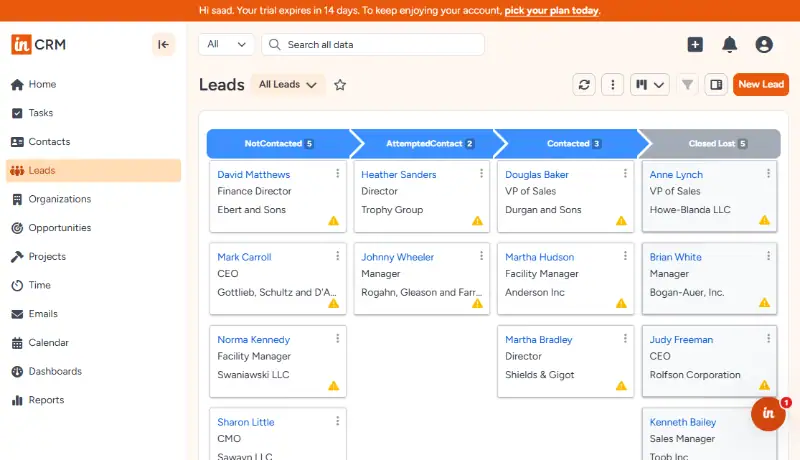
Insightly is a cloud-based CRM that bridges contact management, sales tracking, and project management in one platform. Its visual Kanban pipelines and customizable dashboards make it appealing for teams that want control over their workflows.
However, advanced features like AI summaries, workflow automation, and robust reporting are locked behind higher-tier plans. Customer support and mobile functionality are also limited on lower tiers, which can frustrate teams that need responsive help during onboarding.
Key Features:
- Contact and lead management with customizable fields
- Visual sales pipeline tracking (Kanban views)
- Project and task management with milestones
- Workflow automation (streamlines repetitive tasks)
- AI-powered features (like email summaries/replies)
Pricing:
- Plus: $29/user/month – Basic CRM and project tools
- Professional: $49/user/month – Adds workflow automation and advanced reporting
- Enterprise: $99/user/month – Full AI features, advanced permissions, and priority support
✅ Pros |
❌ Cons |
|
Strong project management tools alongside CRM |
Advanced features (AI, automation) locked to higher tiers |
|
Highly customizable dashboards and sales processes |
Limited customer support on entry-level plans |
|
Extensive integration library (250+ apps) |
Social media integration is minimal |
|
Combines CRM and project management seamlessly |
Mobile app functionality varies by plan |
|
Native connections with Gmail, Outlook, and Slack |
Occasional integration issues with third-party apps |
|
Steeper learning curve for maximizing customization options |
✌️The flexibility in being able to create your own custom fields, reports, templates, and dashboards. Very easy to use, after initial setup. Customer support has been excellent.
–Helen B.
👎 While the software allows for a ton of customization, it can be confusing at first to figure out exactly how to format the view to your liking. Because there are so many options available, it can take time to navigate how each page works and how to make changes.
–Jordan H.
7. Productive – Best End-to-End Solution for Agencies
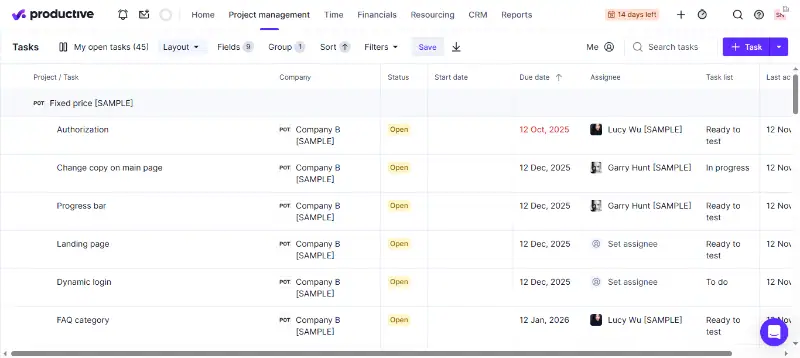
Productive is an end-to-end agency management platform built specifically for professional service businesses like agencies and consultancies. It goes beyond basic CRM and project management by adding resource planning, time tracking, and real-time financial reporting, all aimed at helping you understand profitability at a granular level.
However, the initial setup can be time-consuming, and the interface, while clean, has a learning curve, especially for beginners unfamiliar with agency-specific workflows. Integration between some tools also feels disconnected compared to seamlessly unified platforms like OneSuite.
Key Features
• Integrated project management with task collaboration and file sharing
• Time tracking with billable hours and invoicing
• Sales pipeline management and client deal tracking
• Real-time financial reporting and profitability insights
Pricing:
- Essential: $9/user/month, Core project management and time tracking
- Professional: $24/user/month, adds resource planning and financial reports
- Ultimate: $32/user/month, Advanced features, and dedicated support
✅ Pros |
❌ Cons |
|
Complete suite combining PM, time tracking, and financial reporting |
Initial setup and customization are time-consuming |
|
Simple, clean interface once you understand the workflow |
Steeper learning curve for beginners or small teams |
|
Fast and responsive customer support |
Advanced features require training to use effectively |
|
Strong profitability tracking for agencies billing by the hour |
Mobile app lacks full desktop functionality |
|
Lack of seamless integration between some modules |
|
✌️ I like that Productive suits my personal preferences on how I want to register my hours and set up my home screen. I know my colleagues prefer to use it differently than me, so the amount of customizability is enjoyable.
–Harald B.
👎 Configuring particular reports can be difficult, especially when you have to think about what specific data field is going to give you the answers you need.
–Jess T.
Your Next Steps
Remember the problem we talked about earlier?
Your sales team collects client preferences, but two days later, your project manager asks the same questions because the information was never transferred.
That’s the hidden cost of disconnected tools. It makes your team look unorganized, slows down your workflow, and erodes client trust. The platforms we discussed can fix these issues, but OneSuite stands out for a reason.
Onesuite doesn’t just solve this problem. It’s built specifically for freelancers and agencies like you who are tired of juggling multiple systems.
OneSuite puts everything under one roof: CRM, project management, client portals, invoicing, and e-signatures at one flat rate. No per-user fees. No paid add-ons for basic ops. No messy integrations. Just a smooth, connected workflow.
💡 Read Also: Top 9 CRM with client portals for agencies.
Ready to simplify your operations?
FAQs
1. What is CRM in Project Management Software?
CRM in project management software refers to an integrated platform that combines customer relationship management with project management tools.
Instead of using separate tools, this software handles your entire workflow from capturing leads to delivering completed projects. Examples include OneSuite, Productive, and Insightly, which offer native integration between CRM and PM features.
2. Can OneSuite integrate with other tools, too?
Yes, despite being an all-in-one business management software, OneSuite supports integrations through its REST API, enabling users to connect with other tools and platforms. It also integrates with Pabbly Connect, allowing for seamless automation with various apps.
Additionally, OneSuite offers payment method integrations with Stripe, PayPal, RazorPay, and QuickPay for easy online transactions. More integrations are under development to further expand OneSuite’s functionality.
3. Can I try OneSuite for free?
Yes, OneSuite offers a 14-day free trial without requiring any card information. You can explore all the features during the trial period before deciding to subscribe..
Find a Better Way to Grow
OneSuite streamlines projects, clients, and payments in one place, making growth hassle-free.