
7 Best Time Tracking Software for Developers in 2026

June 2, 2026
You finished the feature at 11 PM. You forgot to start the timer. Now it is Monday, the invoice is due, and you are trying to reconstruct four days of work from Git commits and Slack messages.
It is not a discipline problem. Most developers are meticulous about their code and approximate about their hours because the work pulls you in completely.
Nobody opens a timer before they open a terminal.
The tools were not built for you either. Most time tracking software exists for one of two audiences: managers monitoring distributed teams or productivity enthusiasts optimizing their mornings. Developers who bill clients by the hour sit in a gap neither category serves well. So you end up with something that either interrupts your flow every seven minutes or requires a manual reconstruction session every Monday morning before the invoice goes out.
Both options cost you money you already earned.
How I Evaluated These Time Tracking Tools for Developers
I did not judge these tools on feature count or interface polish. I looked at four things that matter specifically when your time log has to turn into a client invoice.
- Task-level logging: Time tracked against specific projects and tasks, not just a running clock
- Billable hour management: Clear separation of billable and non-billable entries before invoicing
- Invoice integration: Whether logged hours flow directly into a client invoice or require a separate tool
- Adoption friction: How much effort it takes for a dev team to use it consistently without it becoming another thing to manage
Every tool review below is built around these four criteria. If a tool does something exceptionally well or falls short on any of them, that is where the review will say so.
7 Best Time Tracking Software for Developers at a Glance
There is no single best time tracking tool for every developer. The right one depends on how you work, how you bill, and how much overhead you are willing to add to your process. This table gives you a quick look at all seven before we get into the details.
If one already looks right for your setup, the detailed reviews below will confirm it.
7 Best Time Tracking Software for Developers in 2026 — Detailed Reviews
I went through more than 15 tools, tested the most relevant ones hands-on, and cross-referenced G2 and Capterra reviews with real conversations with developers and agency teams. And I found these 7 time-tracking tools are the best fit for developers.
1. OneSuite
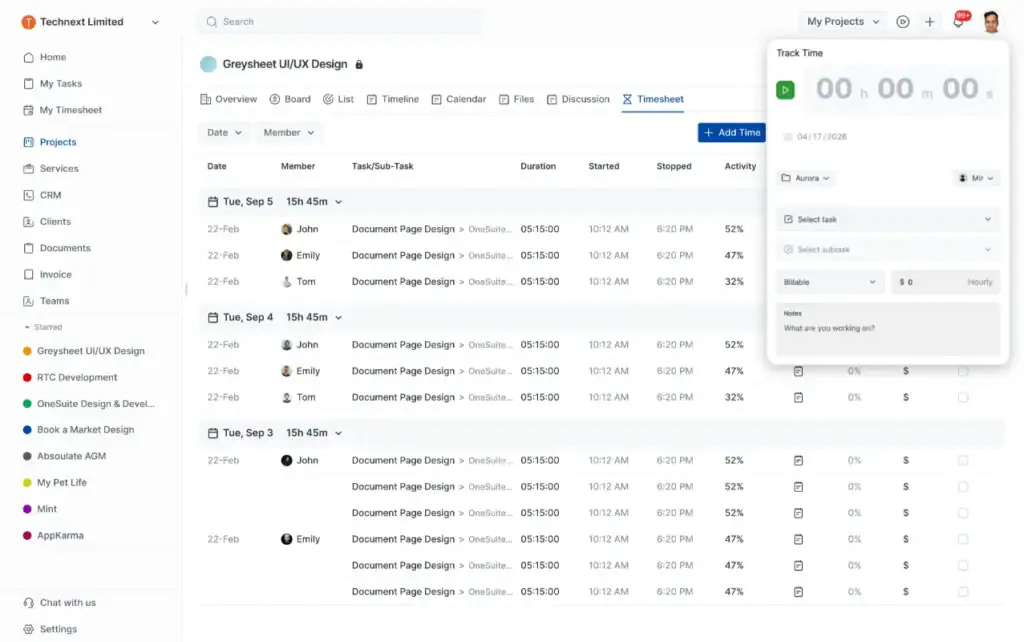
OneSuite is an all-in-one agency management platform that combines time tracking, CRM, project management, client invoicing, email inbox, and a white-label client portal under a single login.
For freelance developers and agency dev teams tracking billable hours across multiple clients, it covers everything a developer running a service business needs “from capturing a lead in the CRM pipeline to logging hours against a task and sending the final invoice” without switching tools. That is why it sits at the top.
Most time-tracking software for developers stops at the timesheet. OneSuite connects the full loop. Time logged against a task links directly to the project, then the project links to the client, and the client sees hours, progress, and invoice inside a branded portal under your domain.
For developers who have had clients push back on an invoice with no visible trail of work behind it, that transparency changes the conversation entirely. Also, onesuite offers the lowest price of $5.80/user/month compared to others.
Best for: Agency developers managing projects and client billing in one place
Key Features:
- Task-level time tracking: Start a timer directly from inside a project task, log work notes, set hourly rates, and mark entries as billable or non-billable, all without leaving the project view
- Timesheet approval and invoicing: Managers review and approve logged hours before billing, then generate invoices directly from approved entries with each task appearing as a line item
- Project management: Create projects, assign tasks, set deadlines, and track progress using Kanban board or List view with pre-built task templates for faster setup
- CRM with lead pipeline: Manage leads through a visual Kanban pipeline, capture leads directly from Gmail using the Lead Grabber Chrome extension, and convert them to clients without re-entering data
- White-label client portal: Give clients a branded portal under your own domain where they can view project updates, files, and invoices, and communicate directly with your team
- Invoicing and payments: Create invoices from templates or clone previous ones, track payment status in real time, send reminders for unpaid invoices, and accept payments via Stripe, PayPal, and RazorPay
- Email inbox: Connect Gmail or Outlook directly into OneSuite, send emails from within CRM records, use reusable templates with dynamic fields, and keep the full email history tied to each client
Pricing:
- Freelancer Plan: Starts at $29/month for 5 users
- Solopreneur Plan: Starts at $59/month for 10 users
- Growing Agency Plan: Starts at $149/month for 35 users
Pros and Cons:
What users say:
👍
— Jacquelyn L (G2 review)
“OneSuite keeps exceeding expectations! Each update improves usability and performance, and the customer service is responsive, knowledgeable, and genuinely invested in my success. The team here truly cares about its users, and that’s a super bonus!”
👎
carlos c. (G2 review)
“Initially the individual project could not save files. That has been updated now.”
2. Harvest
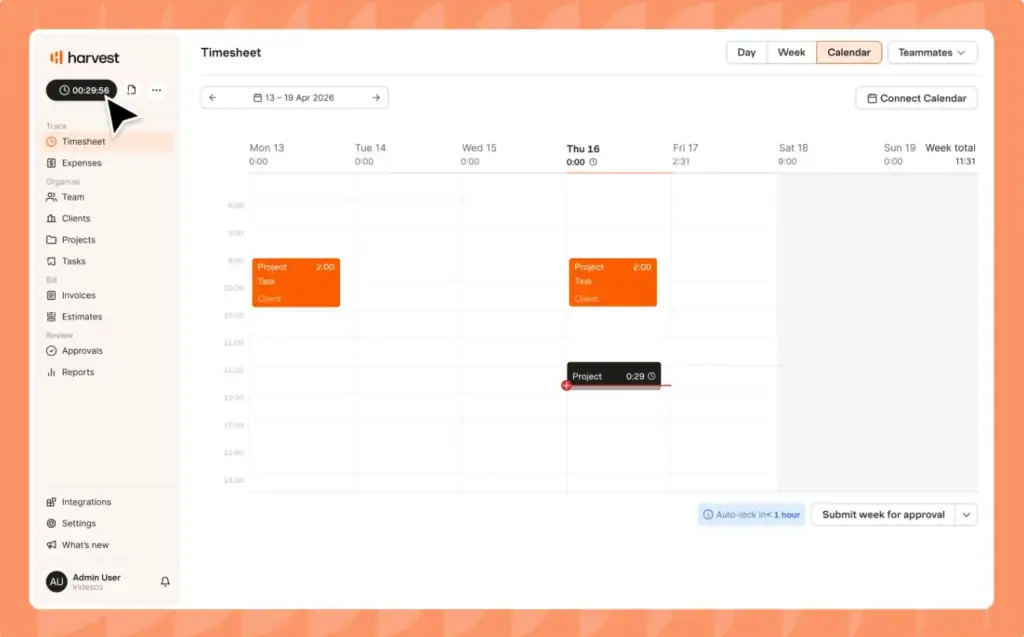
For years, Harvest has been the gold standard for freelancers and small agencies that bill by the hour. The interface is minimal, the invoicing workflow is genuinely seamless, and the Harvest Button browser extension adds a timer directly inside GitHub, Jira, and Asana. So you never have to leave your workflow to log time.
It is worth knowing that Harvest was recently acquired by Bending Spoons, so there may be some changes down the line worth keeping an eye on before committing.
Best for: Freelance developers who need the cleanest time-to-invoice workflow available
Key Features:
- The Harvest Button: A browser extension that adds a one-click timer inside GitHub, Jira, Asana, and Basecamp, logging time against the exact task you are working on without switching context
- Billable and non-billable hour tracking: Clear separation at the entry level with timesheet approval built into paid plans
- Native invoice generation: Tracked hours convert directly into a client invoice with Stripe and PayPal integration for online payment
- Budget alerts: Visual indicators when a project is approaching its hour or dollar budget, useful for fixed-price engagements
Pricing:
- Free Plan: $0 (1 seat, 2 projects)
- Team Plan: $9/user/month
- Enterprise Plan: $14/user/month
Pros and Cons:
What users say:
👍
Gints F (G2 review)
“Harvest handles time tracking, invoicing, reporting, and estimating, centralizing my financial data. It saves me from working in Excel and helps manage multiple companies effortlessly with ease of use.”
👎
Ankit D (G2 review)
“Lacks integration of AI and automation of time tracking. It offers very limited features.”
3. Toggl Track
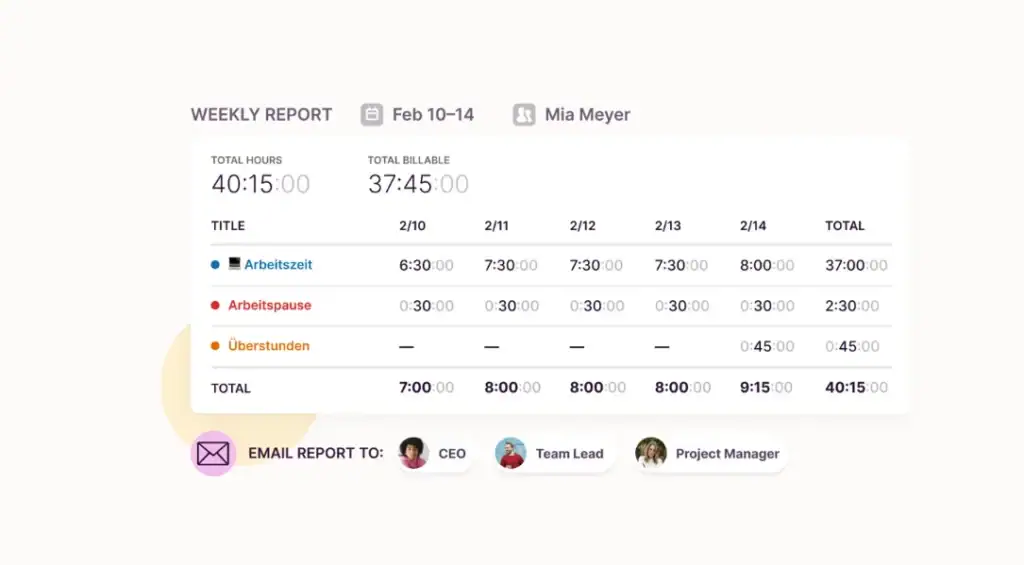
Toggl Track is the most widely used time tracker among freelancers and small teams, and for good reason. The one-click timer, clean interface, and browser extension that works inside over 100 tools make it the lowest-friction option on this list. For a solo developer logging hours across multiple clients, the free plan covers more than most will ever need.
The tradeoff is invoicing. Toggl Track does not generate invoices natively. You log the time, export the data, and bill from a separate tool. Not a problem if you already use FreshBooks or QuickBooks
Best for: Freelance developers who want frictionless time logging without paying for it
Key Features:
- One-click browser extension: Starts a timer from inside Jira, GitHub, Asana, Notion, and 100+ other tools without leaving your workflow
- Billable hour tracking: Mark entries as billable on all plans including free, with billable rate reporting on paid plans
- Idle detection: Prompts you when the timer is running but there is no computer activity, reducing accidental over-logging
- Keyword-based auto-tracking: Link keywords to projects on desktop apps so tracking starts automatically when a matching window is in the foreground
Pricing:
- Free Plan: $0 (unlimited users up to 5)
- Starter: $9/user/month
- Premium: $18 /user/month
- Enterprise: Custom Pricing
Pros and Cons:
What users say:
👍
Justine R (G2 review)
“It provides insights into how I’m spending my otherwise non-tracked time. For example, meetings are on my calendar so I can see how much meeting time is spent each week.”
👎
Agata S (G2 review)
“There is no advance form customization on lower tiers.”
4. Clockify
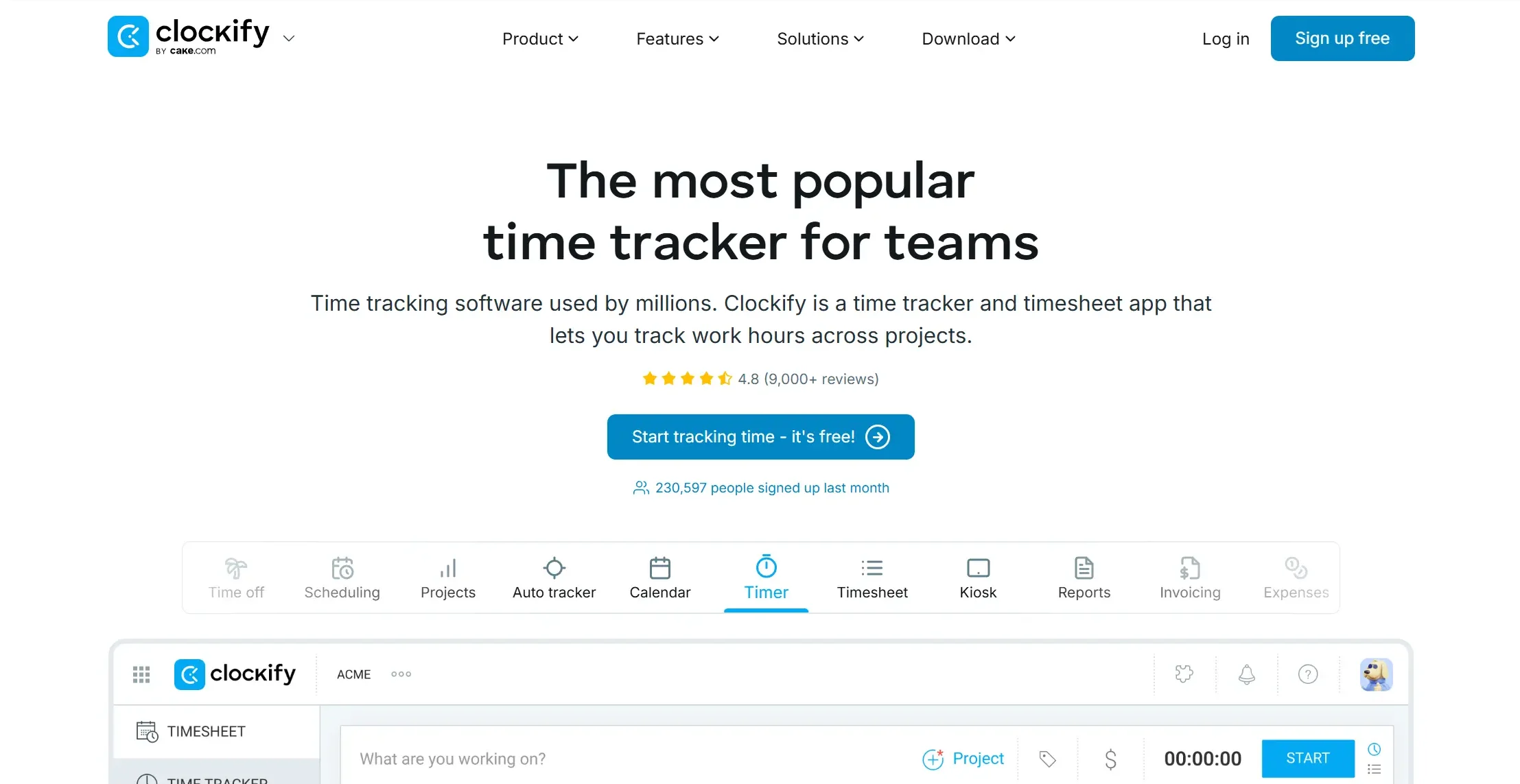
Clockify has the most generous free tier on this list. Unlimited users, unlimited projects, unlimited clients, no credit card, no expiry. For a small dev team just getting started with formal time tracking, that is a genuinely useful starting point.
The catch is invoicing. Timesheet approvals, task-level billing rates, and invoice generation are all locked behind the Standard plan at $5.49/user/month. The free tier tracks time well. It does not turn that time into a client invoice.
Best for: Small dev teams and freelancers who need billable hour tracking on a tight budget
Key Features:
- Unlimited free tracking: Unlimited users, projects, clients, and time entries on the free plan with no expiry
- Billable and non-billable hour separation: Available on all plans including free, with task-level billing rates on Standard and above
- Native invoicing: Generate invoices directly from tracked billable hours on the Standard plan, with QuickBooks integration for payroll and billing
- Timesheet approval workflow: Managers review and lock timesheets before billing on standard plan, preventing retroactive edits
Pricing:
- Free Plan: $0 (up to 5 users)
- Basic Plan: $3.99/user/month
- Standard Plan: $5.49 /user/month
- Pro Plan: $7.99 /user/month
- Enterprise Plan: $11.99/user/month
Pros and Cons:
What users say:
👍
Pete G (G2 review)
“Clockify allows us to constantly keep track of how much time is being spent on all clients, ensuring that minimum and maximum levels are monitored easily and efficiently”
👎
Abdul Kadir (G2 review)
“It is difficult to find the project status from development to testing to completion of the task or product”
5. Everhour
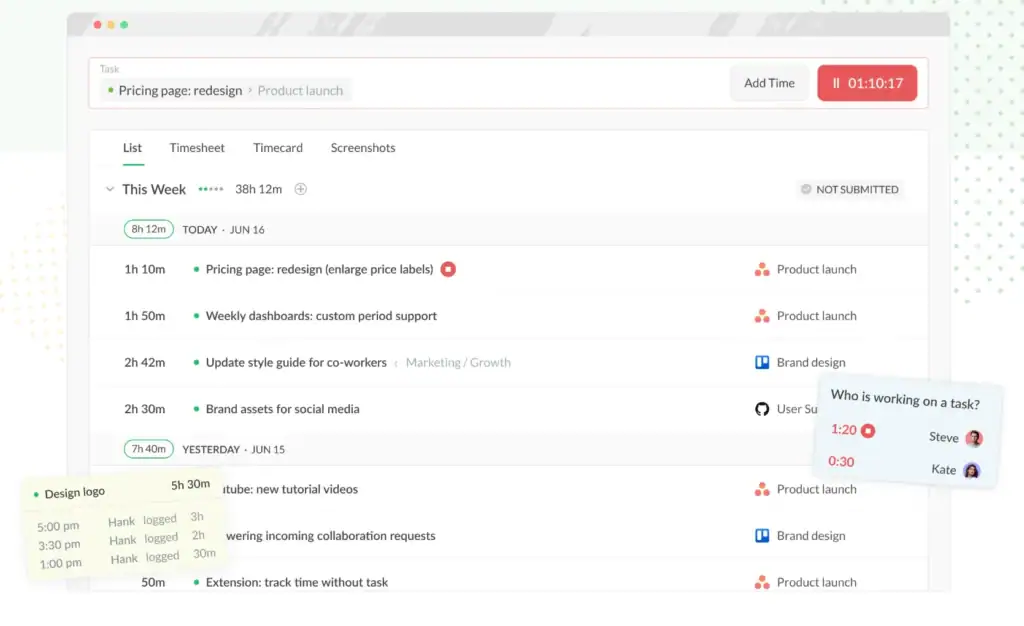
Everhour embeds directly inside Jira, GitHub, Asana, ClickUp, Basecamp, and Notion. Adding a timer, budget tracker, and billable rate field directly onto each task. You never have to leave your project management tool to log time.
The difference from Toggl’s browser extension approach is depth. Toggl adds a button. Everhour adds time estimates, budget tracking, billable rates, and reporting, all inside the tool your team is already using.
Best for: Dev teams already living inside Jira, GitHub, Asana, or ClickUp
Key Features:
- Native PM tool integration: Time tracking embedded directly inside Jira, GitHub, Asana, ClickUp, Basecamp, and Notion with task-level timers, estimates, and budget tracking
- Real-time budget tracking: Set time or monetary budgets per project with threshold alerts at configurable percentages, with the option to lock time entry once a budget is exceeded
- Billable and non-billable hour management: Task-level and user-level billing rates with full separation before invoicing
- Native invoice generation: Generate client invoices directly from tracked billable hours with QuickBooks and Xero integration for accounting
Pricing:
- Free Plan: $0 (up to 5 users)
- Team Plan: $8.50 /user/month
- Enterprise: Custom Pricing
Pros and Cons:
What users say:
👍
Sebastian T (G2 review)
“I like the simplicity of the interface. Also, the fact that I don’t need to download the software and just use it on my browser is very convenient for my team”
👎
Ben S (G2 review)
“Virtually everything else about them is half baked. Their support is slow to respond and half the time their answers make no sense. It is expensive. Most of their integrations assume you have only a single installation so managing time cross multiple clients isn’t possible.”
6. Hubstaff
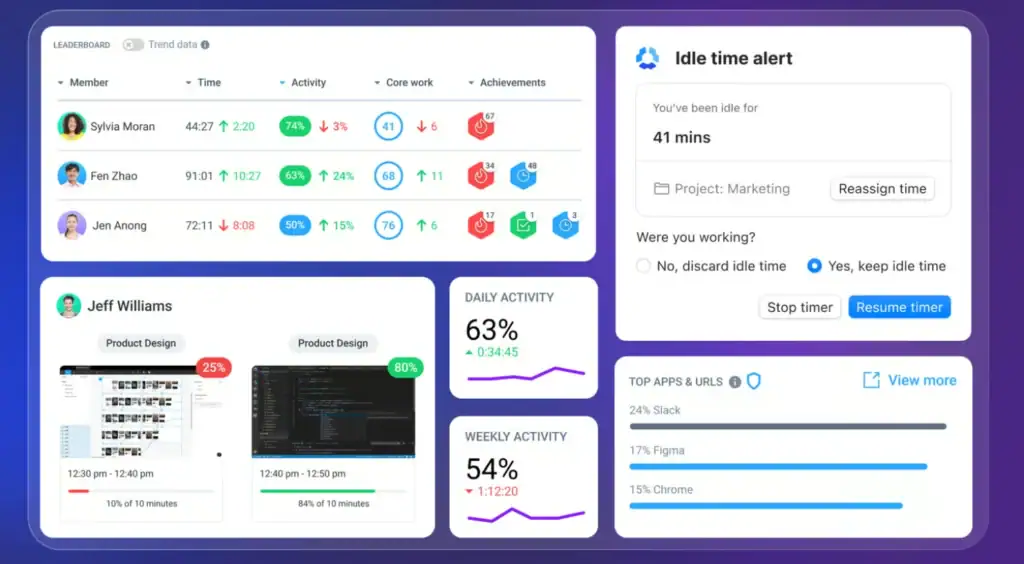
Hubstaff is the most complete billing tool on this list for remote agency dev teams. Automatic invoicing, payroll, budget alerts, client billing rates, and project cost management all built in and genuinely well executed. If a manager needs to know not just how many hours were logged but where those hours went, nothing here gives more visibility.
That visibility comes with a tradeoff. Hubstaff tracks screenshots, keyboard and mouse activity, and app usage by default, so have an honest conversation with your team about the monitoring model before rolling it out.
Best for: Remote agency dev teams where managers need billing visibility alongside work oversight
Key Features:
- Automatic time tracking: Desktop app tracks time without requiring a manual timer start, with idle detection that discards inactive periods automatically
- Client-level billing rates: Set different hourly rates per team member, per project, or per client with payroll and invoicing generated directly from tracked time
- Budget and hour limit alerts: Set total hour or dollar budgets per project with alerts before limits are hit and automatic notifications when they are exceeded
- Native invoice generation: Invoices generated directly from billable hours with QuickBooks, PayPal, Wise, and Deel integrations for payment processing
Pricing:
- Starter Plan: $4.99/seat/month (2-seat minimum)
- Grow Plan: $7/seat/month
- Team Plan: $10 /seat/month
- Enterprise Plan: $25/seat/month
Pros and Cons:
What users say:
👍
Sandra T (G2 review)
“I use Hubstaff to monitor work hours, track project time, and analyze productivity. It prevents losing track of time, boosts accountability, and offers simple reliable time tracking, activity levels, and reporting features to maintain focus and improve productivity.”
👎
Jennifer M (G2 review)
“Sometimes tracking can stop or lag which can be frustrating. Fixing this would improve the experience.”
7. Timely
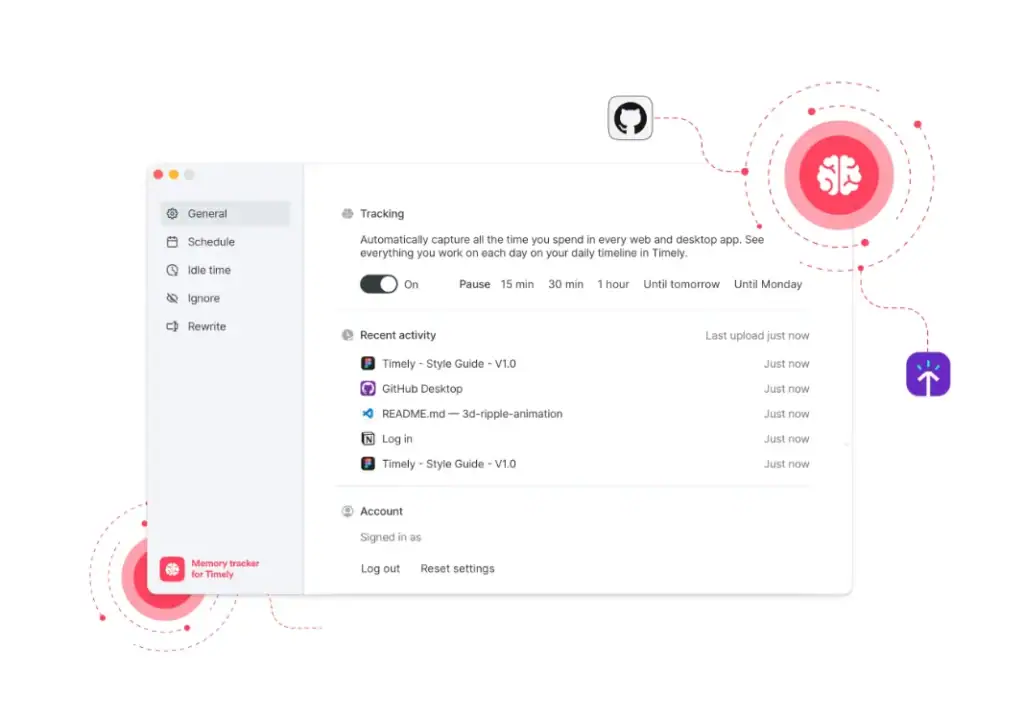
Timely runs in the background recording everything you work on. At the end of the day you drag the relevant blocks into a project and your timesheet is done. No timer to start, nothing to reconstruct on Monday morning. The tradeoff is no native invoicing and no free tier at $9/user/month.
Best for: Developers who keep forgetting to start the timer
Key Features:
- Automatic background tracking: Records every app, browser tab, document, and meeting throughout the day without any manual input, visible only to the user
- Memory timeline: A visual day-by-day timeline of all tracked activity that developers drag into projects to create time logs, with AI-assisted suggestions for categorisation
- Privacy by design: All tracked activity is visible only to the individual user; managers see only what the user has explicitly logged into a project, not the raw activity data
- Project budget tracking: Real-time budget dashboards showing hours logged against project estimates with team capacity visibility
Pricing:
- Starter Plan: $9/user/month (up to 3 users)
- Premium Plan: $16/user/month (up to 6 users)
- Enterprise Plan: $22/user/month
Pros and Cons:
What users say:
👍
Kim D (G2 review)
“I use Timely to track my activities, generate invoices, and audit time to see where I lose it. It’s been great for logging my time without thinking about it, helping me prove my work audits.”
👎
Al M (G2 review)
“The Google Calendar integration can occasionally go wrong. For a small number of people, it’s picking up appointments and reminders set by their colleagues, not them.”
A Few More Time Tracking Tools Worth Knowing
These three did not make the main list but are worth a quick mention depending on your situation.
- 7pace is the best option if your team works entirely inside Azure DevOps — it embeds directly into boards and work items with no context switching.
- Memtime is the tool I would recommend first to any developer who is not billing clients by the hour — fully automatic background tracking, no invoicing, pure flow state protection.
- WakaTime is for developers who want coding analytics rather than billing tools — IDE plugins for VS Code, JetBrains, and 20+ others track time automatically at the language and project level.
How to Choose the Best Time Tracking Software for Your Dev Workflow
Seven tools is still too many choices. Here is how I would narrow it down based on where you actually are.
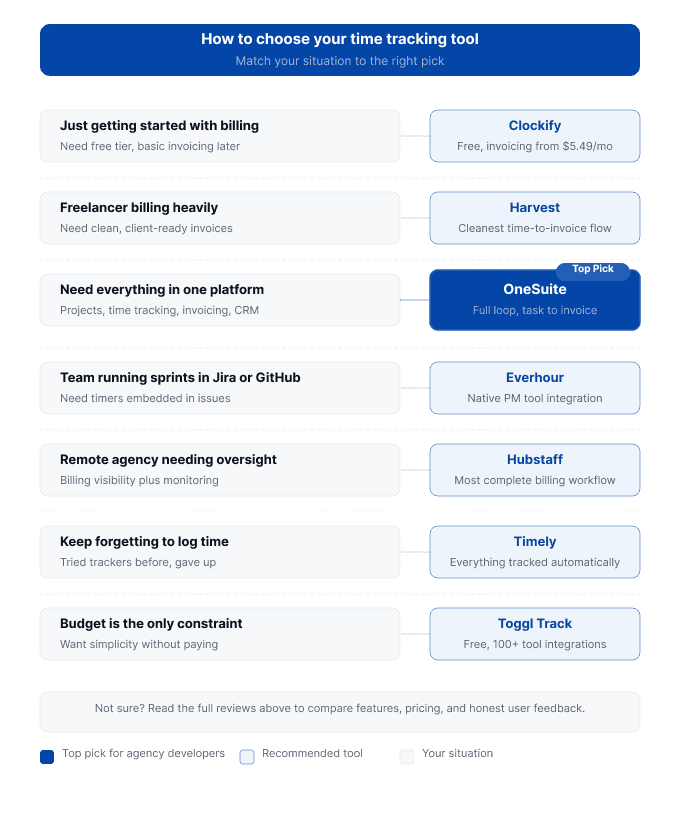
Just getting started with billing: Clockify, free tier covers unlimited projects and billable hour tagging. Standard plan at $5.49/user/month adds invoicing when you need it.
Freelancer who bills heavily and needs clean invoices: Harvest, with one caveat. The Bending Spoons acquisition introduced real pricing uncertainty at renewal. If that concerns you, Clockify Standard gets you most of the same workflow at a lower price.
Need time tracking, project management, and invoicing in one place: OneSuite. Flat $29/month for five users, direct path from logged hours to client invoice. Works best for longer client sessions. The 1-hour minimum makes it a poor fit for short tasks.
Dev team running sprints in Jira or managing issues in GitHub: Everhour, timers, estimates, budget tracking, and billable rates live inside the tools your team already uses. Learning curve is real but the integration depth is worth it.
Remote agency team that needs billing visibility and work oversight: Hubstaff, the most complete agency billing workflow on this list. Have an honest conversation with your team about the monitoring model before rolling it out. Tried time tracking before and kept forgetting to log: Timely, everything tracked automatically, nothing to reconstruct. No free tier at $9/user/month, but if forgotten timers have cost you money before, the math works out quickly.
Frequently Asked Questions About Developer Time Tracking Software
How secure is developer time tracking data?
Most reputable tools use encrypted data transfer and role-based access controls to keep your hours and billing data protected. OneSuite keeps time tracking inside the same workspace as your projects and invoices, so sensitive data never has to move between platforms.
What do I do when I forget to log a session?
Add time manually using your Git commit history, Jira activity log, or Slack timestamps to reconstruct what you worked on.
My Take: Why OneSuite Leads This List of Time Tracking Software for Developers
No tool on this list is universally the best, and I want to be honest about why I put OneSuite at the top.
OneSuite is not just a time tracking tool. It was built as a complete agency management platform, and that is exactly what makes it the most practical choice for developers billing clients by the hour. Every hour logged connects to a task, a project, a client, and a verified invoice without opening a second tool.
That said, OneSuite is not the right answer for every developer here. If you live in Jira or GitHub go with Everhour. If you keep forgetting to log, Timely removes that problem entirely.
Pick the tool that fits how your team actually works. That is the one that makes Monday mornings easier.
You can try out onesuite for free without any credit card. To start a free trial for 14 days, just visit here.
Start exploring OneSuite today
No credit card is required