
What Are Billable Hours? A Complete Guide for Freelancers and Agencies

August 25, 2026
Billable hours is a time-based billing method where clients pay for every hour logged on their deliverables. This is the core of how freelancers get paid and how agencies stay profitable.
When you’re working with one client on one project, tracking them is easy. When you’re managing multiple clients, different rates, and a team logging hours across five projects at once, it gets complicated fast.
This guide covers everything you need to know about billable hours: what they are, how they work, why they matter, and the mistakes that quietly drain your income.
What Are Billable Hours?
Billable hours are the hours you spend working on a client project that you can charge for at an agreed-upon rate. Any time you’re doing work that directly serves a client and was either included in the contract or pre-approved, that time is billable.
The concept is straightforward: you agree on a rate with your client, you log the hours you spend on their work, and you invoice them for those hours at the end of the billing period.
Billable hours are not the same as total hours worked. A typical workday includes a mix of client work and internal tasks. Only the client-facing portion “the hours that move their project forward” counts as billable.
Industries that rely heavily on billable hours include:
- Freelance design, development, and copywriting
- Marketing and creative agencies
- Consulting and strategy firms
- Law firms and accounting practices
- Architecture and engineering companies
The definition of billable hours stays consistent across these industries. What changes is how each business tracks, calculates, and invoices them.
Billable Hours vs Actual Hours: What Counts and What Does Not
Understanding the difference between billable and non-billable hours is where most freelancers and agencies struggle. The line isn’t always obvious, especially for tasks that feel client-related but technically aren’t.
Billable hours are any hours spent directly on client deliverables or client-requested activities. Here are some common examples:
- Working on client deliverables (design, development, writing, strategy)
- Client meetings and calls
- Revisions and feedback rounds
- Research done specifically for the client’s project
- Project management tasks directly tied to a client account
- Client emails and communication (if included in the contract)
- Travel to client sites (if agreed upon)
Non-billable hours are the hours your business needs to function but can’t be charged to any specific client. Examples include:
- Internal team meetings
- Business development and proposal writing
- Administrative work like invoicing and timesheets
- Professional development and training
- Marketing your own business
- Fixing internal errors or technical issues unrelated to client work
The gray areas are where disputes happen. A quick five-minute Slack message to a client might seem too small to log. An internal call about a client’s project feels billable but technically isn’t. The safest approach is to define these in your contract before the project starts. Spell out exactly what counts as billable and what doesn’t, so there’s no ambiguity when the invoice goes out.
Billable vs Non-Billable Quick Reference
- ✓ Working on client deliverables
- ✓ Client meetings and calls
- ✓ Revisions and feedback rounds
- ✓ Project-specific research
- ✓ Client emails (if agreed in contract)
- ✓ Travel to client site (if agreed)
- ✕ Internal team meetings
- ✕ Proposal and pitch writing
- ✕ Admin tasks and invoicing
- ✕ Staff training and development
- ✕ Marketing your own business
- ✕ Fixing internal errors
What Is a Billable Hours Chart or Timesheet?
A billable hours chart is a timesheet or report that organizes logged hours by team member, project, task, and date. It turns raw time logs into a clear picture of where every hour went.
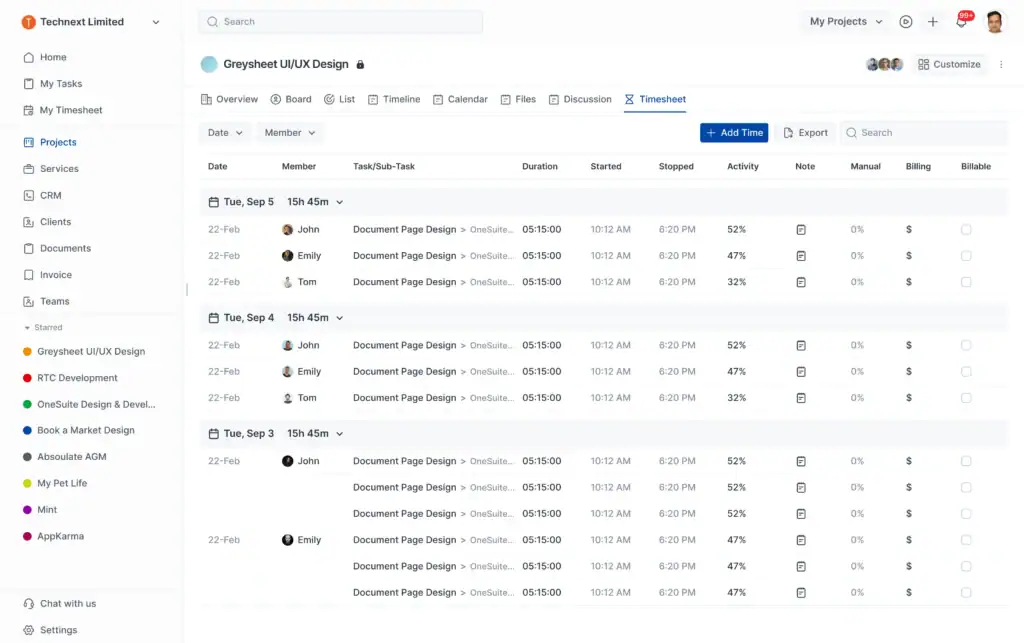
Agencies use a timesheet or billable hours chart to review all logged time before sending invoices, catch missing or duplicate entries, and monitor whether each person on the team is hitting their utilization target.
Here is a realistic example of what a billable hours chart looks like at the role level for a five-person agency:
One of the most common agency mistakes is applying one blanket utilization target across all roles. A designer and an account manager have very different workloads and responsibilities. Holding both to the same standard produces misleading performance data and creates unnecessary pressure on the wrong people.
Step-by-Step Process for Tracking Billable Hours
The mechanics of billable hours follow a simple cycle. Here’s how it works in practice:
1. Agree on a rate Before any work begins, you and the client agree on a billing rate. This could be an hourly rate, a role-based rate (different rates for different team members), or a blended rate for the whole project. This rate goes into the contract.
2. Log time as you work Every time a team member or freelancer works on a client task, they log the time. The most accurate way is to log in real time using a timer. Logging from memory at the end of the day leads to missed entries and underreporting.
3. Calculate the billable amount At the end of the billing period, you total the logged hours and apply the formula:
Billable Hours x Hourly Rate = Invoice Amount
Here is an example
If you worked 40 billable hours at $75 per hour:
40 x $75 = $3,000
If your agency has multiple team members at different rates:
4. Review and invoice Before sending the invoice, review all logged entries for accuracy. Remove any non-billable time that got mixed in. Then generate an itemized invoice that shows the client exactly what they’re paying for.
Most agencies use a billable hours chart or timesheet to organize this data by project, task, and team member before it goes into the invoice.
The Benefits of Tracking Billable Hours
Whether you are a solo freelancer or running a ten-person agency, tracking billable hours gives you the data you need to make smarter decisions every single day.
- Get Paid for Every Hour You Work: You stop relying on memory to bill clients and start invoicing based on exactly what you tracked throughout the project.
- See Exactly Where Your Time Goes: You get a clear breakdown of which clients and projects are eating up your hours every week.
- Send Faster, More Accurate Invoices: Since the hours are already logged, billing becomes a matter of reviewing and hitting send.
- Protect Yourself in Client Disputes: If a client ever questions a charge, you have timestamped records to back every line of your invoice.
- Catch Underperforming Projects Before They Hurt: You can see when hours are piling up on a fixed-fee job and correct before it turns into a loss.
- Price Future Projects with Real Data: Instead of guessing, you pull from actual hours on past projects and quote with confidence.
- Keep Team Utilization in Check: You can see at a glance who is overloaded, who has room, and whether the team is hitting a healthy billable rate.
- Build Client Trust with Transparent Billing: When clients can see exactly what they are paying for, it removes doubt and strengthens the relationship.
Every benefit on this list compounds over time. The longer you track, the better your estimates, the cleaner your invoices, and the stronger your client relationships get.
Utilization Rate and Realization Rate in Billable Hours
Tracking billable hours is only half the picture. The two metrics that tell you whether those hours are actually turning into profit are utilization rate and realization rate.
Utilization Rate
Utilization rate measures what percentage of a team member’s available hours are billed to clients.
Utilization Rate = (Billable Hours / Total Available Hours) x 100
Example: If a designer works 40 hours a week and bills 32 of them, their utilization rate is 80%.
Industry research shows that the average professional services firm only bills clients for 66.4% of their team’s available hours. That means out of a 40-hour week, nearly 14 hours are going to non-billable work.
This figure has been falling for four years straight and now sits below the 70% floor that SPI Research considers the minimum for sustainable profitability.
Realization rate
Realization rate measures how much of your logged billable time actually gets invoiced and collected.
Realization Rate = (Total Billed Fees / Total Billable Fees) x 100
Example: If you logged $10,000 worth of billable work but only invoiced $8,500 after write-downs and billing caps, your realization rate is 85%.
Here is why realization rate matters. Many firms focus entirely on utilization and ignore realization. The result is a team that looks busy on paper while quietly leaving 10 to 20% of potential revenue uncollected.
High utilization with low realization means your team is working hard but your billing process is leaking money. Tracking both metrics together is the only way to close that gap.
Billable Hours for Agencies
For agencies, billable hours work at the team level, not just the individual level. Managing multiple clients, multiple projects, and multiple people logging time across different rates at the same time adds a layer of complexity that solo freelancers do not have to deal with.
Let’s look at a realistic scenario for an agency.
A project manager at a ten-person agency is running a website redesign for a client with a $15,000 budget. The team includes a strategist, two designers, and a developer, each at different rates.
The project is estimated at 130 billable hours total. Midway through the project, the agency pulls its billable hours report and notices the designers have already logged 60 of their estimated 80 hours. They are on track, but the developer has only logged 15 of 40 estimated hours.
That tells the project manager they need to accelerate the development phase or the project will run over the deadline even though the budget is still intact.
This kind of visibility only exists when hours are tracked consistently and reviewed regularly. Without it, you find out you are in trouble at the end of the project, not the middle.
One thing agencies consistently underestimate is the administrative burden of reviewing and approving time entries. That work is not billable, but it takes real time. Fragmented tools that require manual entry across multiple systems make it worse.
Billable Hours for Freelancers
For freelancers, billable hours are simpler in structure but just as easy to get wrong. The biggest risk is underreporting.
Not logging small tasks, skipping short client calls, or forgetting to track time when switching between projects are the reasons most freelancers consistently earn less than their rate suggests.
Here is how billable hours actually look in practice for a full-time freelancer:
The gap between total hours worked and actual billable hours is real, and it is large. Realistic billable hours for a full-time freelancer are 20 to 30 per week, not 40.
The rest goes to admin, proposal writing, invoicing, marketing, and all the overhead of running a one-person business. If you are pricing your services based on 40 billable hours a week, you are significantly undercharging.
A few habits that protect freelancer income:
- Start a timer the moment you open a client file.
- Log every client call, even five-minute ones.
- Define what is billable in every contract before work starts.
- Invoice on a consistent schedule, weekly or monthly, not whenever you remember.
- Review your timesheet before sending the invoice, not after.
Managing client relationships adds to that overhead too. If you are still handling leads and follow-ups manually, our roundup of the best CRM tools for freelancers covers the options worth looking at.
How to Increase Your Billable Hours
The difference between a profitable agency and an overworked one often comes down to how well they protect their billable hours. Here is where most teams leak time and how to stop it.
Use Automated Time Tracking
The problem with manual timesheets is that they only capture what people remember to log. The tasks most likely to be forgotten are the small ones that add up to hours by the end of the week.
Monitor Utilization Weekly, Not Monthly
Monthly reports tell you what went wrong last month. A weekly utilization check gives you enough time to actually do something about it before a project runs over or a billing gap grows.
Tighten Your Contract Scope
When the scope is unclear, the client will always assume more is included than you intended. Spelling out exactly what is and is not billable before work begins removes the guesswork and the disputes.
Reduce Non-Billable Overhead
Every process you streamline internally is not just time saved. It is billable capacity recovered, and that directly shows up in your utilization rate and your revenue.
Challenges in Tracking Billable Hours
Even with good intentions and the right tools, tracking billable hours accurately is harder than it looks.
Inaccurate Time Logging: Logging time from memory at the end of the day means small tasks get forgotten, hours land on the wrong project, and the invoice no longer reflects the work that was actually done.
Administrative Burden: Reviewing and approving time entries across fragmented tools takes time that cannot be billed. And the more steps involved, the more people delay logging and the more errors slip through.
Untracked Billable Time: A five-minute client reply, a quick review call, or a short feedback round. Each one feels too small to log. But ten of those a week is close to a full unbilled hour. At $80 per hour, that is over $3,000 a year in revenue that was earned but never collected.
Multiple Billing Structures: Hourly, retainer, and fixed-price clients all have different tracking and invoicing requirements. Without a system built to handle all three, something will always fall through the cracks.
Common Individual Mistakes:
On top of these systemic issues, there are individual habits that quietly drain revenue.
- Logging time from memory instead of in real time
- Not defining billable scope in the contract before work starts
- Mixing billable and non-billable time in the same entry
- Not reviewing the timesheet before the invoice goes out
- Underpricing the hourly rate by ignoring the non-billable hours that come with every working week
How OneSuite Helps You Track Billable Hours
Most billing problems come from time logged too late, lost hours between tools, and invoices that do not reflect what was actually done. OneSuite fixes that by bringing time tracking, invoicing, and client management into one place.
Here is how OneSuite helps you maximize revenue through accurate billable time tracking.
Log time as work happens. Every entry is tagged to a client, project, and task automatically. No end-of-day reconstruction, no switching between tools.
Turn approved hours into invoices instantly. When the billing period ends, logged hours flow directly into an itemized invoice. So, no manual transfer, no reformatting, no missing hours.
Monitor utilization in real time. For agencies managing multiple clients, OneSuite shows who is on track, who is over capacity, and which projects are at risk before it is too late to act.
Cut admin overhead for freelancers. Logging, invoicing, and client communication happen in the same place. So, less time on admin, more time on work that actually gets billed.
Try OneSuite free for 14 days. No credit card required.
FAQs
What is an example of a billable hour?
A freelance designer spending two hours creating mockups for a client is a billable hour. A client call, a revision round, or research done specifically for that client’s project also counts as billable.
What are non-billable hours?
Non-billable hours are time spent on activities that support your business but can’t be charged to a client: internal meetings, admin tasks, proposal writing, and professional development.
How many billable hours in a year?
A standard full-time work year has 2,080 hours, but after accounting for non-billable time, most professionals realistically bill between 1,200 and 1,600 hours annually.
What is the difference between billable hours and hours worked?
Hours worked is the total time an employee or freelancer puts in. Billable hours is the portion of that time that can be charged to a client. The difference is non-billable time spent on internal or administrative tasks.
Start exploring OneSuite today
No credit card is required