
Free SaaS Agreement Template | Customize & Sign Online

June 10, 2026
Running a SaaS business means more than giving customers access to software. You need clear terms for subscriptions, payments, user access, customer data, support, renewals, intellectual property, and termination.
This free SaaS agreement template helps you create a professional contract for your software product without starting from scratch. You can customize it with your company details, pricing terms, service rules, data protection language, and signature fields, then send it online for approval or e-signature.
Use this template to set expectations clearly, protect your recurring software revenue, and give customers a simple agreement they can review and sign with confidence.
Download your Free SaaS Agreement Template
What Is a SaaS Agreement?
A SaaS agreement template is a reusable contract framework between a SaaS provider and a customer.
It explains how the software can be accessed and used, what subscription fees apply, who owns the customer data, how payments and renewals work, what support or service levels are included, and what legal limits protect both parties.
Unlike a basic website terms page, a SaaS agreement is built for subscription-based software. It covers important details such as user licenses, account access, acceptable use, data security, intellectual property rights, liability limits, termination rules, and service availability.
In simple terms, it helps the SaaS company protect its software, revenue, and responsibilities while helping the customer understand their rights, usage limits, data ownership, and obligations before using the platform.
Types of SaaS Agreements
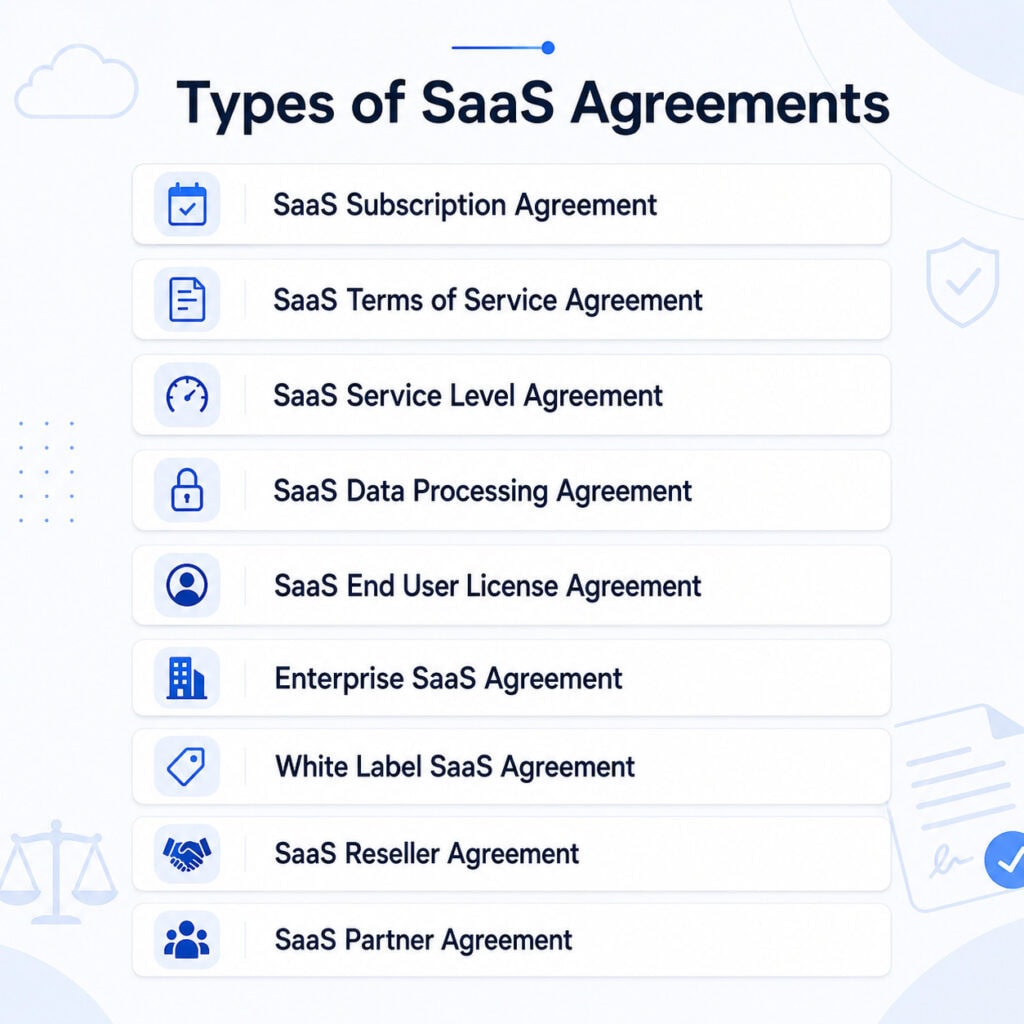
SaaS agreements are not always the same. The right agreement depends on how the software is sold, who uses it, how customer data is handled, and whether the product is offered directly, through partners, or under another brand.
Most SaaS businesses use one main agreement, but they may also need supporting documents such as a service level agreement, data processing agreement, reseller agreement, or end user license agreement. Understanding these types helps you choose the right template for your SaaS product, customer relationship, and legal risk.
What Should a SaaS Agreement Include?
A SaaS agreement should give both the provider and the customer a clear roadmap for using the software. It needs to explain access rights, subscription terms, payment rules, support expectations, data control, security duties, ownership rights, and what happens when the relationship ends.
Below are the main elements your SaaS agreement template should cover.
Contract Parties and Key Terms
Start with the legal names of the SaaS provider and the customer. Then define the main words used throughout the agreement, such as “Services,” “Software,” “Authorized Users,” “Customer Data,” “Documentation,” “Subscription Term,” and “Support Services.”
Strong definitions make the agreement easier to follow. They also prevent confusion when the same terms appear later in payment, access, data, and termination language.
Services, Software, and Documentation
Describe the SaaS product the customer will receive access to. Include the platform, core features, documentation, and any related services such as onboarding, setup, training, or technical support.
This helps the customer understand what is included in the subscription and what may require a separate fee or add-on.
User Access and Subscription Seats
Explain who may use the platform and how many users are allowed. A good SaaS template should cover authorized users, login credentials, account access, user subscriptions, and limits on sharing accounts.
For example, the customer may allow employees or approved team members to use the software, but not outside parties unless the agreement permits it.
Permitted Use and Restrictions
Set clear rules for how the software may be used. The customer should know whether the platform is limited to internal business use, client work, team collaboration, or another approved purpose.
Restrictions can cover actions like copying the software, reselling access, reverse engineering, bypassing security, uploading harmful content, or using the service in a way that damages the platform.
Subscription Period and Renewal Terms
Explain when the subscription begins, how long it continues, and what happens at the end of the term. Mention monthly, annual, or custom subscription periods.
Renewal language should also cover auto-renewal, cancellation notice, upgrades, downgrades, additional users, and non-renewal. This reduces confusion around future billing and access.
Fees, Billing, and Payment Rules
List the subscription fees and explain when payment is due. Add details about billing frequency, payment methods, taxes, late fees, refunds, discounts, extra user charges, and add-on costs.
Clear payment terms protect the provider’s recurring software revenue and help the customer understand the full cost before starting the service.
Support, Maintenance, and Availability
Tell customers what support they can expect after signing up. Include support channels, response times, normal business hours, maintenance windows, and any uptime commitments.
For higher-level customers, these details may also connect to a separate Service Level Agreement that explains performance standards in more detail.
Customer Data Rights
Clarify that the customer usually keeps ownership of the data they upload, store, or process through the SaaS platform. At the same time, the provider keeps ownership of the software, system, code, and platform technology.
The agreement should also explain how the provider may use customer data to operate the service, provide support, improve security, or meet legal duties.
Data Storage, Export, and Deletion
Explain how customer data is stored, backed up, accessed, exported, returned, or deleted. Customers should know whether they can download their data and how long data remains available after termination.
This part is especially useful for businesses that may need records for compliance, reporting, migration, or internal operations.
Security Duties
Describe the security steps the provider uses to protect the platform and customer data. These may include encryption, access controls, backups, monitoring, vulnerability checks, and breach response procedures.
Customers also have responsibilities. They may need to protect passwords, manage user permissions, remove inactive users, and prevent unauthorized access through their own accounts.
Software Ownership and Intellectual Property
Make it clear that the SaaS provider owns the software, source code, design, features, documentation, trademarks, and related technology.
The customer receives permission to use the platform during the subscription period, but they do not buy or own the software itself. Their data remains separate from the provider’s intellectual property.
Confidential Information
Protect private information shared between both sides. This may include pricing, business records, technical details, customer data, product plans, login details, and internal processes.
The agreement should explain when confidential information can be used, when it must be protected, and when disclosure may be allowed by law.
Warranties and Service Disclaimers
Set realistic expectations about the software. The provider may promise to deliver the service with reasonable skill and care, but also explain that the platform may not always be error-free, uninterrupted, or suitable for every business purpose.
Balanced warranty language helps avoid unrealistic promises while still giving the customer confidence in the service.
Liability Limits
Place a clear limit on financial responsibility if a problem occurs. Many SaaS agreements limit liability to the amount the customer paid during a specific period.
The agreement may also exclude indirect losses, such as lost profits, lost revenue, business interruption, or lost opportunities. This helps control legal risk for the provider.
Indemnity Protection
Explain when one side must protect the other from third-party claims. A provider may take responsibility for claims that the software violates another party’s intellectual property rights.
A customer may take responsibility for claims caused by misuse of the platform, unlawful content, unauthorized access, or violation of the agreement.
Suspension, Termination, and Account Closure
State when the provider can suspend access or when either side can end the agreement. Common reasons include non-payment, misuse, security concerns, breach of contract, or violation of acceptable use rules.
Also explain what happens after the agreement ends, including final payments, account closure, data export, data deletion, and loss of software access.
General Contract Terms
Add standard legal terms that support the full agreement. These may include no waiver, severability, entire agreement, assignment, notices, force majeure, governing law, and jurisdiction.
These terms help explain how the agreement will be interpreted if a dispute, delay, or legal issue occurs.
Signature and Effective Date
End the template with space for both parties to sign and date the agreement. Include names, titles, company names, signature dates, and the effective date.
For digital SaaS businesses, acceptance can also happen through electronic signature, online order form, account registration, or a checkbox agreement.
How to Customize This SaaS Agreement Template
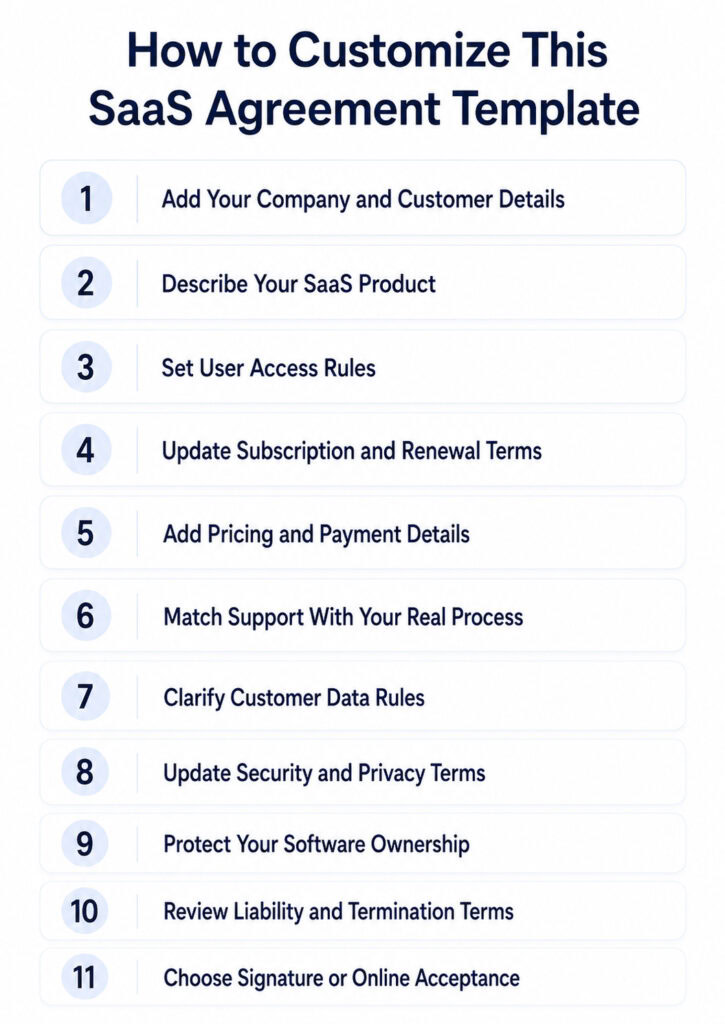
A SaaS agreement template gives you the structure, but you need to update it with your own business, product, pricing, support, data, and legal details before using it with customers.
1. Add Your Company and Customer Details
Replace the sample names with the legal names, addresses, contact details, agreement date, and effective date.
2. Describe Your SaaS Product
Write what your software does, what features are included, and whether onboarding, training, support, or documentation comes with the subscription.
3. Set User Access Rules
Add the number of allowed users, seats, accounts, or workspaces. Mention whether login sharing, contractors, or extra users are allowed.
4. Update Subscription and Renewal Terms
Add your billing period, such as monthly, yearly, or custom term. Clearly mention auto-renewal, cancellation notice, and upgrade or downgrade rules.
5. Add Pricing and Payment Details
Include subscription fees, billing frequency, payment methods, taxes, late fees, refunds, discounts, and extra charges for add-ons or additional users.
6. Match Support With Your Real Process
Add your support channels, business hours, response time, maintenance windows, and whether premium support or SLA terms apply.
7. Clarify Customer Data Rules
Explain that the customer owns their uploaded data. Add how data is stored, used, exported, retained, or deleted after cancellation.
8. Update Security and Privacy Terms
Mention the security measures you actually use, such as access control, encryption, backups, monitoring, and breach response.
9. Protect Your Software Ownership
Make it clear that your company owns the software, code, design, platform, documentation, trademarks, and product features.
10. Review Liability and Termination Terms
Update liability limits, indemnity language, suspension rules, cancellation rights, final payments, account closure, and data deletion terms.
11. Choose Signature or Online Acceptance
Use signature blocks for direct contracts, or use checkbox acceptance, order forms, account registration, or e-signature for online SaaS sales.
Common SaaS Agreement Mistakes to Avoid
Even a strong SaaS agreement template can create risk if important sections are vague, missing, or not matched to the real product.
Before using the template, watch for these common mistakes.
1. Vague SLA Terms: Avoid unclear uptime, support response times, maintenance windows, and service failure rules. Define exact service standards.
2. Weak Data Protection Clauses: Do not leave data ownership, breach response, security duties, export rights, or privacy compliance unclear.
3. Unclear Pricing and Renewal Rules: Avoid hidden fees, vague usage charges, surprise price changes, and automatic renewal terms without clear notice.
4. Missing IP and Usage Rights: Clearly state that the provider owns the software, code, platform, and documentation, while the customer owns their data.
5. Poor Termination and Exit Terms: Explain cancellation rules, suspension rights, final payments, data export, data deletion, and what happens after access ends.
Create a Free SaaS Agreement with OneSuite
OneSuite helps you prepare, send, sign, and store your SaaS agreement in one place. Instead of managing contracts through separate tools, you can upload your template, add signature fields, invite signers, and keep the signed agreement safely stored from a single dashboard.
Follow these steps to create and send your SaaS agreement with OneSuite.
1. Log In and Open Documents
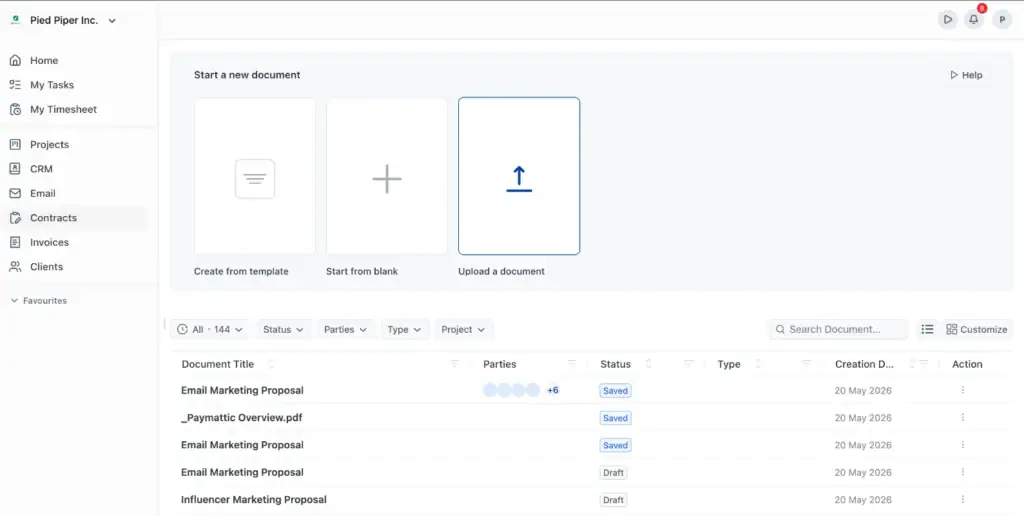
Sign in to your OneSuite account or create a free account. From the dashboard, go to the Documents section to start working with your contract file.
2. Upload Your SaaS Agreement Template
Click Upload Document and choose your SaaS agreement PDF. Review the file before uploading to make sure the contract is complete and ready for signature.
3. Add Signature Fields
Add yourself as one party and your client as the other party. Then place the required fields on the document, such as signature, date, initials, checkbox, or text fields.
Make sure each field is assigned to the correct signer.
4. Add and Confirm Signers
Select signers from your contacts or enter their name and email address manually. You can also customize the email message before sending the agreement.
Once everything looks correct, send the document for signature.
5. Complete the Online Signature Process
Your client receives a secure signing link. They can sign the agreement by typing, drawing, or uploading their signature.
After the client signs, you can complete your part. Once all parties have signed, the agreement becomes finalized, locked, and ready to download with signature proof.
Want a Quick Demo?
Watch how to send and sign your SaaS agreement in less than 3 minutes.
FAQs
Do I need a data processing agreement for SaaS?
Yes, if your SaaS handles personal or customer data. A DPA explains how data is collected, stored, protected, shared, and deleted. It is especially important if your customers need GDPR, CCPA, or other privacy compliance.
Can I use the same SaaS agreement template for multiple clients?
Yes, you can reuse the same template, but do not send it as-is. Update the client name, pricing, plan details, user limits, renewal terms, support level, and data requirements for each client.
Can a SaaS agreement be signed online?
Yes. You can sign a SaaS agreement using an e-signature tool, online order form, checkbox acceptance, or account signup process. For client contracts, it is best to keep a signed copy and proof of acceptance.
Start exploring OneSuite today
No credit card is required