
Best Moxo Alternatives: 7 Picks for 2026

August 27, 2026
Moxo gives you a branded client portal with a workflow engine polished enough for banks and corporates. It’s a capable platform. But no single tool fits every business, and the way you work changes over time.
Maybe your client roster has grown, maybe your processes don’t map neatly onto structured flows, or maybe you’d rather have your portal, CRM, and invoicing living in one place instead of three.
Whatever’s driving the search, you’ve got more options than ever. The client portal software market was worth $1.81 billion in 2024 and is projected to reach $3.38 billion by 2031, according to Verified Market Research, and the field of credible alternatives keeps widening. Some are flat-rate. Some are cheaper. Several bundle invoicing and CRM alongside the portal.
We compared seven of them on monthly-billed pricing (pulled from vendor pages in August 2026), portal depth, billing features, and verified user reviews. One pick, OneSuite, is ours, and we’re upfront about where it doesn’t fit.
Key Takeaways
- OneSuite is the flat-rate, all-in-one client portal, lead pipeline, invoicing, and time tracking, starting at $29/month for 5 members, with no usage meters on your workflows.
- Assembly (formerly Copilot) is the closest direct Moxo replacement, a slick branded portal with a free plan and paid tiers from $49/month, though customization limits are a recurring complaint.
- SuiteDash gives you the most features per dollar, from $19/month with unlimited users, if you can climb its learning curve.
- Clinked is the security pick for accountants, law firms, and finance teams, but the jump from its $11/user entry plan to $299/month flat is steep.
- FuseBase combines portals with a knowledge base, from $39/month, though reviewers flag performance and sync issues.
- HoneyBook is the freelancer favorite with a 4.7 rating across 685 Capterra reviews, but it only works in the US, Canada, UK, and Australia.
- Accelo covers the enterprise end that Moxo also serves, behind quote-only pricing.
Moxo Alternatives Compared: 7 Tools at a Glance
All prices are per month when billed monthly, pulled from vendor pricing pages in August 2026.
| Tool | Portal Type | Starting Price (monthly) | Best For | Standout Feature |
|---|---|---|---|---|
| OneSuite | Flat-rate all-in-one | $29/mo flat (5 members) | Freelancers and agencies running portal to invoice | Portal connects to project, client, and invoice |
| Assembly | Modern branded portal | Free, then $49/mo | Service firms that want a like-for-like Moxo swap | Messages, files, contracts, and billing in one portal |
| SuiteDash | White-label business suite | $19/mo flat (unlimited users) | Budget-conscious agencies | Unlimited users at every tier |
| Clinked | Secure white-label portal | $11/user/mo | Accounting, legal, and finance teams | Compliance-grade white labeling |
| FuseBase | Portal plus knowledge base | Free, then $39/mo | Consultants who deliver docs and dashboards | Client portals built on a knowledge hub |
| HoneyBook | Freelancer clientflow | $36/mo | Solo freelancers (US, Canada, UK, Australia) | Inquiry-to-payment flow in one tool |
| Accelo | Professional services automation | Quote only | Larger agencies and consultancies | Quote-to-cash visibility with retainers |
How We Evaluated These Tools
Every price in this post comes from the vendor’s own pricing page, pulled in August 2026, and we quote monthly-billed rates rather than the discounted annual ones vendors lead with. Where a vendor renders prices in JavaScript or hides them behind a sales form, we checked the page source directly or say so plainly. Review data comes from Capterra pages we fetched the same week, and every user quote is verbatim with attribution. OneSuite is our product, so we’ve disclosed that where it matters and kept the criticism honest for everyone, including us.
When Teams Start Looking Past Moxo
Moxo now leads with AI workflow automation and enterprise credentials like SOC 2 certification, and its flow builder gives regulated industries a genuinely advanced automation engine. When it works for you, it’s a serious platform. When it doesn’t, the reasons tend to be specific, and they say as much about your setup as about the product.
The first is how the pricing scales. Moxo meters accounts by flows and AI credits: 2 flows a month free, 10 flows on the $99/month Business plan. There’s nothing between $99 and $499. Hence, a firm that outgrows 10 monthly workflows ends up with a much larger bill, and questions about cost and pricing transparency come up repeatedly in Moxo’s Capterra reviews.
The second is the product’s edges. Capterra reviewers report a 90-day chat history limit on lower tiers, a learning curve for less technical clients, and lag and freezing. Moxo’s Capterra rating sits at 4.0 from 24 reviews as of August 2026, the lowest of any tool in this post.
The third is scope. Moxo focuses on portals, messaging, and workflow automation; your invoicing, CRM, and time tracking live elsewhere. For a freelancer or agency, that means Moxo is one more app in a stack the average company has already grown to 106 SaaS apps, per BetterCloud’s 2024 data. Most of the alternatives below close at least one of those gaps; the pure portal picks compete on price and focus instead.
1. OneSuite – Best for freelancers and agencies
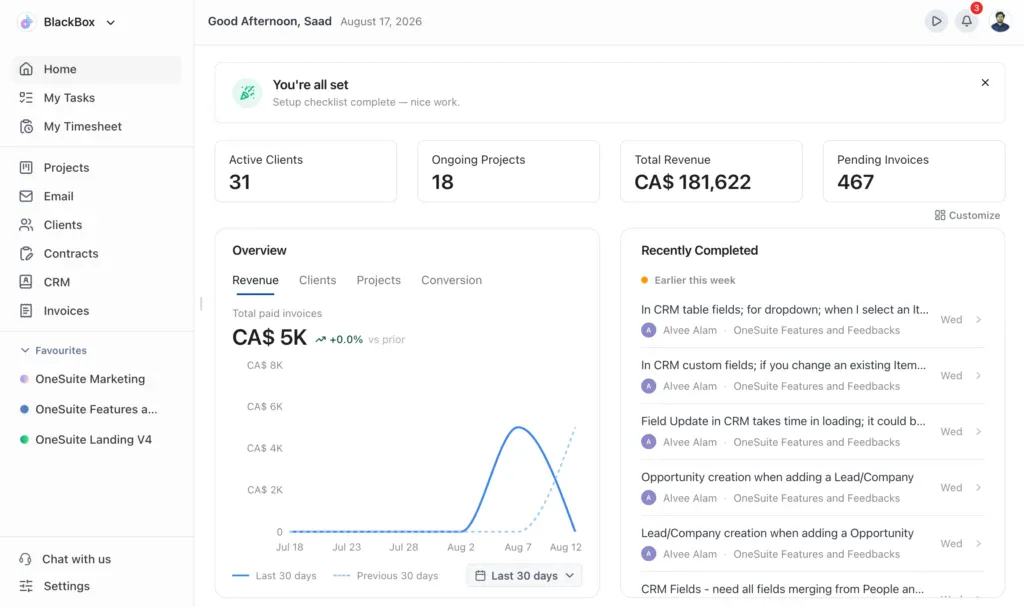
OneSuite covers the whole arc. A lead moves through the pipeline, becomes a client, gets a branded portal login where files, approvals, and eSignatures live, and the work flows into an invoice without re-typing anything. The portal connects to the project, which connects to the client, which connects to the invoice.
Pricing is flat rather than metered. There are no flow counts and no AI credit balances to watch, so a 5-person studio pays $29 a month, total. You can run your onboarding process 40 times in a week, and the bill doesn’t move.
Here’s where it doesn’t fit, stated plainly. OneSuite has no agentic workflow builder yet, so if Moxo’s branching, AI-driven process automation is the reason you bought it, OneSuite doesn’t replace that. But other client portal and client lifecycle features are so smooth that with a little help of api/webhook and third party automation you can easily get them going.
Key Features
- Branded client portal with file sharing, approvals, and eIDAS-compliant eSignatures
- Kanban lead pipeline with lead-to-client conversion straight from the board
- One-time and recurring invoicing with scheduled auto-send, integrated gateways, and multi-currency billing
- Native time tracking with billable and non-billable toggles that feed invoices
- Document hub for client files and deliverables
- Flat-rate pricing with no usage meters on workflows or automations
See how the client portal works
Pricing
- Freelancer: $29/mo for 5 members
- Growing Team: $59/mo for 12 members (most popular)
- Agency: $149/mo for 35 members
- Enterprise: custom
- Add-ons: extra members $7/user/mo, White Label $29/subdomain/mo
Pros
- Flat monthly price with no flow or credit meters
- Portal, CRM, invoicing, time tracking, and documents in one login
- eSignatures and client portal included at every tier
- 14-day free trial, no credit card required
Cons
- No AI workflow builder comparable to Moxo’s flows
- White label costs extra ($29/subdomain/month)
- Members beyond your tier’s cap cost $7/user/month
What users say:
“I have been using it for approximately 5 months to manage my clients’ projects and to assign tasks to my employees. I like how easy and intuitive it is, as you don’t need to explain to your employees where to find their assignments and documents. It is very functional.”
— Pedro C., G2 Review
OneSuite fits freelancers and agencies that want a Moxo alternative with billing built in. A 5-person team pays $29/month flat for client portal, CRM, invoicing, and time tracking, with no workflow meters. Moxo’s first paid tier runs $99/month and caps you at 10 flows. Teams that need Moxo’s AI process automation should look elsewhere.
Try OneSuite free, no credit card required
2. Assembly – Modern Branded Portal
If you want what Moxo promised, a clean branded portal your clients actually enjoy logging into, Assembly is the most direct swap on this list. The product rebranded from Copilot in September 2025, and as of August 2026 it sits at the top of G2’s Moxo alternatives page. Messaging, file sharing, contracts, forms, and payments all live inside the client-facing portal, and it holds a 4.8 rating across 35 Capterra reviews, a strong score on a still-small base.
The trade-offs show up in the details. Recurring complaints among G2 reviewers are portal customization limits and integration gaps, including payment integrations. And Assembly overhauled its pricing in 2026 around an AI app builder: plans now meter “active contacts” and monthly build credits, the page quotes annual-billed rates up front, and card payments carry a 2.9% + $0.30 processing fee on every plan.
Key Features
- Branded client portal with messaging, files, forms, and contracts
- Native invoicing and subscriptions with payment processing
- AI app builder with embeds for dashboards and third-party tools (3 to 5 apps included per plan)
- Custom domain, custom email, and Assembly badge removal from the Professional tier
- HIPAA/BAA support, audit logs, and enforced MFA on Advanced
Pricing
- Free: $0 forever, 5 active contacts, 1 internal user, no credit card
- Starter: $49/mo billed monthly, $29/mo billed annually, 50 active contacts, 1 internal user
- Professional: $99/mo billed annually, 500 active contacts, 3 internal users; the monthly-billed rate isn’t printed on the page
- Advanced: $499/mo billed annually, unlimited contacts, 5 internal users, demo-led
Pros
- Polished, modern client experience out of the box
- Contracts, invoicing, and payments inside the portal
- Free forever plan, no credit card required
Cons
- Portal customization limits are a recurring complaint on G2
- Integration gaps, including payment services
- The 2026 pricing overhaul meters build credits and leads with annual-billed rates
What users say:
“The portal gives off a super professional vibe, and having messages, invoices, forms, and file sharing, in one place has saved me a ton of back-and-forth emails.”
— Matthew F., Owner/CEO, Accounting, Capterra Review
Assembly, rebranded from Copilot in September 2025, is the most direct Moxo alternative for firms that mainly need a modern branded portal. It now runs a free plan plus paid tiers from $49/month billed monthly, with client billing built in; custom domains and badge removal start on the annual-billed $99/month Professional tier.
3. SuiteDash – Most features per dollar option
SuiteDash’s pitch is hard to ignore: CRM, client portals, invoicing, project management, file sharing, and even a learning management system, at a flat rate with unlimited internal users on every tier. Where Moxo meters your workflows and Assembly meters your seats, SuiteDash starts at $19 a month and never charges per user. It holds a 4.8 rating across 633 Capterra reviews, the largest review base of any portal-first tool in this comparison.
So what’s the catch? Time. The recurring theme in critical reviews is a steep learning curve and an interface that feels dated and occasionally sluggish. SuiteDash gives you nearly every feature Moxo has except the AI workflow engine, but you’ll spend real hours configuring it before it feels like yours.
Key Features
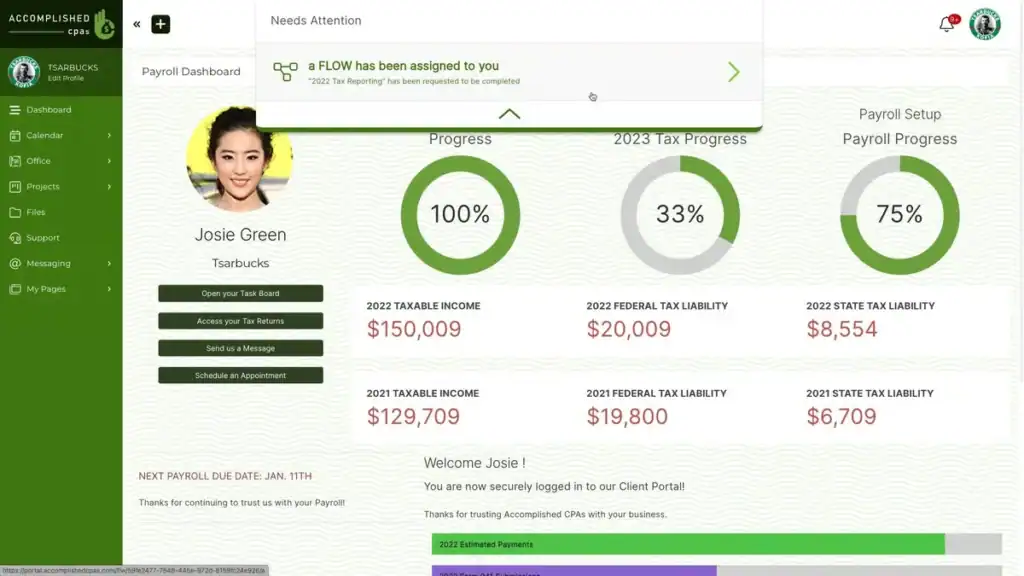
- Full white labeling, including a custom-domain client portal
- CRM with unlimited contacts, plus invoicing and subscriptions
- Project management, file exchange, and team chat
- Automation and proposal tools from the Thrive tier
- LMS and complete automation on Pinnacle
Pricing
- Start: $19/mo, unlimited users, 100 GB
- Thrive: $49/mo, adds automation and proposals, 500 GB
- Pinnacle: $99/mo, full automation and LMS, 2 TB
Pros
- Unlimited internal users at every price point
- White-label depth you’d normally pay far more for
- 14-day full-featured trial
Cons
- Steep learning curve; expect a real setup project
- Interface feels dated next to Assembly or Moxo
- Reviewers report occasional lag on large accounts
What users say
“The white-label feature is especially impressive.”
— Obinna A., Digital Marketing Consultant, Capterra Review
Budget-first buyers land on SuiteDash: flat pricing from $19/month with unlimited internal users, full white labeling, and a 4.8 rating across 633 Capterra reviews. Budget the setup hours too, because the learning curve is the complaint reviewers repeat most.
4. Clinked – Best for accounting, legal, and finance teams
Clinked plays in the same regulated-industry territory where Moxo built its base: accountants, law firms, and financial services teams that need bank-grade security and a portal carrying their own brand, down to a white-label mobile app on its Enterprise tier. It holds the highest Capterra rating of the tools compared here, 4.9 across 110 reviews, and reviewers single out its support.
The pricing structure needs a careful look, though. The Start Up plan is $11 per user per month, but the next step is a flat $299 a month for the Standard plan. That’s a hard jump for a 10-person firm. Reviewers also note the mobile app trails the desktop experience, and third-party integrations are limited, so if your stack depends on connecting many tools, test that first.
Key Features
- White-label portal, with a branded mobile app on Enterprise
- Secure file sharing with granular permissions and audit trails
- Client messaging, tasks, and shared calendars
- Virtual data room option for deal work
- Enforced 2FA and Kanban boards on Premium
Pricing
- Start Up: $11/user/mo
- Standard: $299/mo for 100 members, 1 TB
- Premium: $599/mo for 250 members, 3 TB
- Enterprise: custom, with SSO and white-label mobile app
Pros
- Highest Capterra rating in this comparison (4.9)
- Security and compliance depth that matches Moxo’s enterprise pitch
- White labeling that extends to a branded mobile app on Enterprise
Cons
- Steep gap between the $11/user entry plan and $299/month Standard
- Mobile app is less capable than desktop
- Limited third-party integrations
What users say
“The robust security and controlled access are perfect for sharing sensitive FDA submission documents and proprietary training materials.”
— Paul G., CEO, Medical Devices, Capterra Review
Regulated firms get the closest match to Moxo’s security pitch from Clinked, which holds the highest Capterra rating in this comparison at 4.9 across 110 reviews. Entry pricing starts at $11/user/month, and mid-size teams should budget for the jump to the $299/month flat plan.
5. FuseBase – Best for consultants who deliver documents and dashboards
FuseBase, formerly Nimbus, approaches the client portal from a different angle: it starts as a knowledge base. If your deliverables are strategy docs, reports, embedded dashboards, and structured project spaces, FuseBase turns them into branded client portals instead of email attachments. Reviewers like exactly that, and it carries a 4.7 rating across 176 Capterra reviews with same-day support responses drawing praise.
The honest caveats are mechanical. Critical reviews cite slowness, freezing, delayed syncing across devices, and a clunky Android app. And like several tools here, the headline price hides tiering: white labeling doesn’t arrive until the $399/month Advanced plan.
Key Features
- Client portals built on top of a full knowledge base
- Embeds for dashboards, decks, and third-party tools
- Free plan with 1 portal to test the model
- Automation runs and AI requests included per tier
- Granular permissions and white label on Advanced
Pricing
- Free: $0, 1 portal, 1 client
- Solo: $39/mo, 1 member
- Essentials: $99/mo, 5 members, 10 portals, 100 clients
- Advanced: $399/mo, 50 members, white label
- Unlimited: custom
Pros
- Knowledge-base foundation suits document-heavy client work
- Free plan to validate the workflow before paying
- Responsive support, frequently praised in reviews
Cons
- Performance complaints: lag, freezing, sync delays
- Android app feels clunky next to the desktop version
- White label locked to the $399/month tier
What users say:
“The ease of sharing campaign analytics and reports directly with clients through the portal has enhanced our transparency and accountability.”
— Alexey K., Co-founder, IT and Services, Capterra Review
Consultancies that deliver documents and dashboards get the most from FuseBase, which wraps a knowledge base in branded client portals from $39/month. Reviewers rate it 4.7 across 176 Capterra reviews and flag performance as the trade-off; white labeling waits at the $399/month Advanced tier.
6. HoneyBook – Best for solo freelancers
HoneyBook works in the US, Canada, and, since May 2026, the UK and Australia. Anywhere else, skip ahead to Accelo. For solo freelancers who qualify, it’s the smoothest ride in this post: inquiry, proposal, contract, invoice, and payment in one branded flow, rated 4.7 stars across 685 Capterra reviews, more than any other tool here. Its audience keeps growing too. In 2025, MBO Partners’ State of Independence study counted more than 72 million Americans working independently.
It isn’t a Moxo clone, though. Clients get a project-level view rather than the fully branded, white-label portal Moxo or Clinked provide. And reviewers on Capterra flag subscription price hikes and Google Calendar sync failures.
Key Features
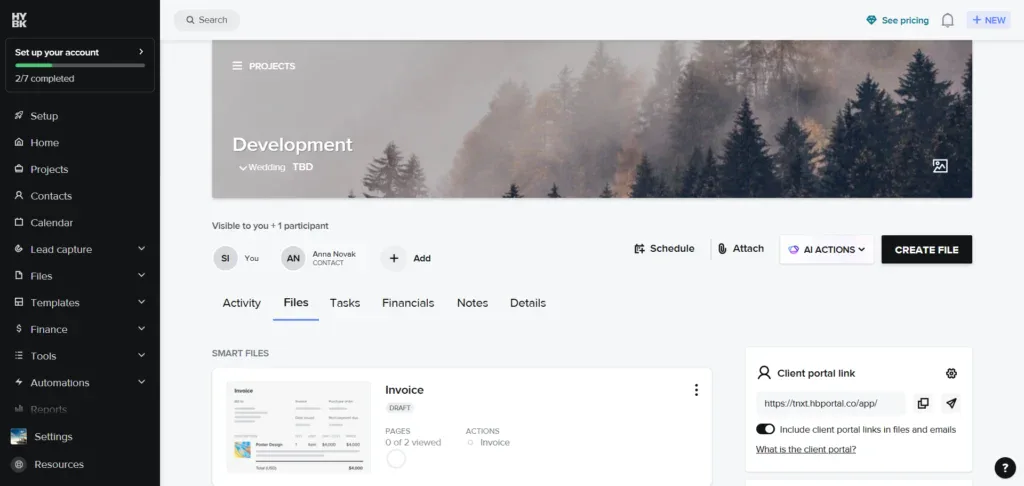
- Proposals, contracts, and invoices in one client-facing flow
- Online payments with cards from 2.7% + $0.10 and ACH at 1.5%
- Scheduler and automations from the Essentials tier
- Client portal view for files, payments, and project status
- QuickBooks integration
Pricing
- Starter: $36/mo, unlimited clients and projects
- Essentials: $59/mo, 2 team members, removes HoneyBook branding
- Premium: $129/mo, unlimited team members
Pros
- The smoothest inquiry-to-payment flow for solo service providers
- 4.7 average across 685 Capterra reviews
- 30-day free trial, no credit card
Cons
- Available only in the US, Canada, UK, and Australia
- Not a true white-label portal
- Reviewers report price hikes and calendar sync issues
What users say
“You can manage the entire client journey from inquiry to contract to payment and delivery in one place.”
— Ryan P., Graphic Designer, Capterra Review
HoneyBook, available in the US, Canada, UK, and Australia, covers the whole freelance client journey, inquiry through payment, from $36/month, backed by a 4.7 rating across 685 Capterra reviews. It offers a client project view rather than a white-label portal, so agencies that need deep branding should look elsewhere.
7. Accelo – Best for larger service operations
At the enterprise end of Moxo’s market sits Accelo, a professional services automation platform. The client portal is one component of a quote-to-cash system: sales, projects, retainers, time billing, and reporting for agencies and consultancies that need to know which clients actually generate revenue. Clients can collaborate on projects, accept quotes, and view invoices through the portal, and it averages 4.5 stars across 177 Capterra reviews.
Two things to weigh. First, Accelo no longer publishes prices; its pricing page says pricing “is based on your team size and growth goals” and routes you to a custom quote. Second, this is heavyweight software. One Capterra reviewer described 200+ hours getting an 8-person team fully onboarded, and others report slow page loads and a weak mobile app.
Key Features
- Client portal for quotes, invoices, and project collaboration
- Retainer management with automatic period billing
- Quote-to-cash workflow across sales, delivery, and billing
- Utilization and profitability reporting
- HubSpot, Salesforce, and accounting integrations
Pricing
- All plans: quote only; Accelo doesn’t publish prices, and pricing scales with team size
Pros
- End-to-end visibility from quote to cash
- Strong fit for retainer-based businesses
- Client portal included in a full PSA suite
Cons
- No published pricing; budgeting requires a sales conversation
- Steep learning curve and long onboarding
- Reviewers report slow page loads and a weak mobile app
What users say
“But the most impressive is there is a client portal feature for our clients to collaborate on projects, accept quotes and view invoices.”
— Granville W., CEO, IT and Services, Capterra Review
Teams that outgrow standalone portals move up to Accelo, which folds the client portal into a full professional services automation suite, rated 4.5 across 177 Capterra reviews. Pricing is quote-only, and reviewers describe onboarding as a serious time investment.
How to Choose a Moxo Alternative
Start with the reason you’re leaving. If it’s the flow meter, shortlist flat-rate tools: OneSuite, SuiteDash, or HoneyBook. If it’s cost alone, SuiteDash at $19/month and OneSuite at $29/month undercut Moxo’s $99 Business plan by two-thirds or more.
Then check what your clients will do in the portal. In 2024, Gartner found that only 14% of customer service issues get fully resolved in self-service, even though 73% of customers try it. Gartner was measuring customer service teams, not agencies, but the pattern carries over. A portal only cuts your inbox when it holds the three things clients ask about: files, status, and invoices. Pick the tool whose portal matches your deliverables, not the longest feature list.
Finally, count your apps before adding one. Harvard Business Review’s 2022 research found the average digital worker toggled between apps nearly 1,200 times a day, losing about four hours a week to reorienting, roughly five working weeks a year. If Moxo was app number six in your client stack, the best replacement is the one that lets you cancel two others. That’s the case for the all-in-one picks over the pure portals.
Frequently Asked Questions
Does Moxo have a free plan?
Yes. Moxo’s free plan includes 2 flows and 500 AI credits a month as of August 2026. The first paid tier, Business, is $99/month with 10 flows a month. There’s no plan between $99 and the $499/month Pro tier, which is the pricing gap that pushes many teams to alternatives.
What is the best Moxo alternative for freelancers?
OneSuite and HoneyBook fit best. OneSuite is $29/month flat for 5 members and adds CRM and invoicing to the portal. HoneyBook, rated 4.7 across 685 Capterra reviews, has the smoothest inquiry-to-payment flow but only operates in the US, Canada, UK, and Australia.
Does Moxo include invoicing?
No. Moxo focuses on portals, messaging, and workflow automation; billing happens in a separate tool. If invoicing matters, shortlist alternatives that build it in: OneSuite (see its invoicing), SuiteDash, Assembly, and HoneyBook all do, while Clinked and FuseBase stay portal-focused like Moxo.
What is the cheapest Moxo alternative?
SuiteDash’s Start plan at $19/month with unlimited internal users is the lowest flat-rate entry point in this comparison. OneSuite follows at $29/month for 5 members. Both cost less than a third of Moxo’s $99/month Business plan, and neither meters your workflows.
The Bottom Line
Moxo earned its enterprise reputation, and if AI-driven process automation is your core need, it may still be the right tool. But the client portal market was worth $1.81 billion in 2024 and is projected to nearly double by 2031 for a reason: teams want portals priced and shaped for how they work.
If you want the portal plus the CRM and the invoicing at one flat price, that’s the gap OneSuite was built for. Your clients get one login for files, approvals, and payments. You get one bill that doesn’t move when your workflows multiply.
Start your free 14-day OneSuite trial, no credit card required
Start exploring OneSuite today
No credit card is required