

Best CRM for Small Law Firms 2026: 7 Picks, Real Prices

July 17, 2026
According to Thomson Reuters, small law firms that spend more time practicing law, rather than on administrative work, are normally more optimistic about the future. And I guess it shouldn’t be a shocker, right? After all, that’s what people at law firms are supposed to do. But the question is: why do they end up spending so much time on admin work instead?
In most small law firms, the CRM is run by junior members or interns. Rarely is there a dedicated person hired for this. In a fast-paced, high-stakes environment like this, you need a system and people who can respond swiftly.
A CRM with a cluttered, complex UI can’t do that for you. It may have the functionality, but in the long run it becomes more of a liability for a small firm’s specific needs.
That’s the problem the best CRM for small law firms actually solves. And it has nothing to do with enterprise sales pipelines.
We studied 20+ tools and picked seven, ranking them based on functionality, features, affordability, and most importantly, ease of use.
- OneSuite is the flat-rate pick for solo attorneys and small firms that want intake, client portal, documents, time tracking, and invoicing in one login. It doesn’t do trust accounting, and we say so below.
- Clio has the deepest legal ecosystem, but it no longer publishes most of its pricing, and its intake CRM (Clio Grow) is a separate add-on.
- MyCase is the transparent all-in-one, though intake forms and the built-in CRM start on its $120/user Pro tier.
- PracticePanther is the fastest legal suite to set up; the features most firms shop for start at the $99/user Business tier.
- Lawmatics has the deepest intake and marketing automation in legal, behind quote-only pricing and a 3-user minimum.
- Smokeball wins on document automation and automatic time capture, but it requires an annual contract and runs best on Windows.
- HubSpot brings marketing automation no legal tool matches, and zero legal features. It’s an add-on to practice management, not a replacement.
Law Firm CRM Comparison: 7 Tools at a Glance
Here’s the short version before we get into each tool. All prices are per month when billed monthly.
| Tool | CRM Type | Starting Price (monthly) | Best For | Standout Feature |
|---|---|---|---|---|
| OneSuite | Flat-rate all-in-one | $29/mo flat (5 members) | Solo attorneys and small firms managing intake to invoice | Lead connects to the project, to the portal, to the invoice |
| Clio | Legal practice management | From $49/user (rest unpublished) | Firms buying into the biggest legal ecosystem | Largest add-on and integration ecosystem in legal |
| MyCase | Legal all-in-one | $60/user/mo | Firms that want everything priced on one page | Payments, texting, and e-signature built in |
| PracticePanther | Legal practice management | $59/user/mo | Firms that want to run this week | Intake-to-payment chain in one system |
| Lawmatics | Legal intake CRM | Quote only (3-user minimum) | High-volume consumer practices | Intake and drip automation depth |
| Smokeball | Legal practice management | From $149/mo (annual contract) | Document-heavy firms on Windows | AutoTime automatic time capture |
| HubSpot | Generalist CRM | Free, then $20/seat/mo | Firms investing in content marketing | Marketing automation at a scale legal tools don’t attempt |
Clio doesn’t state a billing period for its published $49 figure, and Smokeball doesn’t say whether $149 is per user or per firm. Both quirks are covered in their sections.
How We Evaluated These Tools
We searched different forums like Reddit and Quora to gather pain points small law firms have with CRMs, then researched the top market leaders along with the ones most people recommended. We created accounts, used demo data to test these tools, and reviewed them in terms of functionality, affordability, and ease of use.
Every price in this post comes from the vendor’s own pricing page, pulled in July 2026, and we quote monthly-billed rates rather than the discounted annual ones vendors lead with. Feature claims were cross-checked against vendor documentation and independent reviews from Lawyerist, LawSites, and Capterra. OneSuite is our product, so we’ve disclosed that where it matters and kept the criticism sections honest for everyone, including us.
Disclaimer: This is software guidance, not legal or accounting advice.
7 Best CRMs for Small Law Firms
1. OneSuite [FLAT-RATE ALL-IN-ONE]: Best for solo attorneys and small firms that want intake to invoice in one place
For a solo attorney or a small firm, most of what you need from a “law firm CRM” isn’t legal-specific at all. It’s a clean intake pipeline, organized client files, a professional portal, and invoices that go out on time without you rebuilding them from scratch.
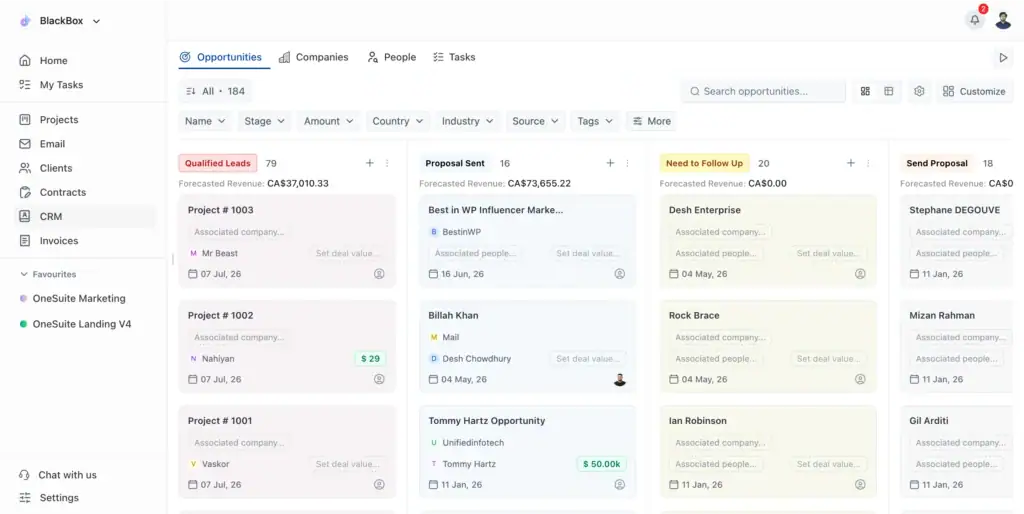
That’s the arc OneSuite covers. When a lead becomes a client in OneSuite, the pipeline record connects to the project you run the matter through, which connects to the client portal your client logs into, and to the invoice you send. Intake notes, engagement documents, logged hours, and billing everything live in one system instead of four, and nothing gets re-typed along the way.
Here’s where it doesn’t fit, stated plainly. OneSuite has no trust or IOLTA accounting, no conflict checking, and no court-rules calendaring yet. Though they are actively working towards it. But what OneSuite replaces is the stack of a CRM, a project tool, a portal, and an invoicing app, at one flat price.
Key Features
- Kanban lead pipeline with custom stages and one-click lead-to-client conversion
- Branded client portal with file sharing and eIDAS-compliant eSignatures
- One-time and recurring invoicing through integrated payment gateways, with multi-currency billing
- Native time tracking with a billable and non-billable toggle that feeds invoices directly
- Document hub with client-level organization
- Flat-rate pricing, so adding staff doesn’t raise your bill until you outgrow the tier
See how the lead pipeline works
Pricing
- Freelancer: $29/mo for 5 members
- Growing Team: $59/mo for 12 members (most popular)
- Agency: $149/mo for 35 members
- Enterprise: custom, quoted for larger firms
Pros
Cons
What users say
“I have been using it for approximately 5 months to manage my clients’ projects and to assign tasks to my employees. I like how easy and intuitive it is, as you don’t need to explain to your employees where to find their assignments and documents. It is very functional.”
— Pedro C., G2 Review
OneSuite fits solo attorneys and small firms that need intake, client portal, documents, and billing in one flat-rate system. A 5-person firm pays $29/month total; on legal suites, a tier that includes intake features runs $495 to $600 for the same headcount.
Try OneSuite free, no credit card required
2. Clio [LEGAL ECOSYSTEM]: The biggest name, behind a sales call
Ask around any bar association, and Clio is the legal software name you’ll hear first. It’s the most established cloud practice management platform in the market, with the largest integration directory and an add-on for nearly everything: document automation, accounting, AI, and even a personal injury module. If you want one vendor you’ll never outgrow, this is the strongest case for it.
Two things have changed about how you buy it. Clio has mostly stopped publishing prices: its pricing page shows a dollar figure for just one of four plans (“starting at $49/user” for EasyStart) and routes the rest through a “Get Pricing” sales form.
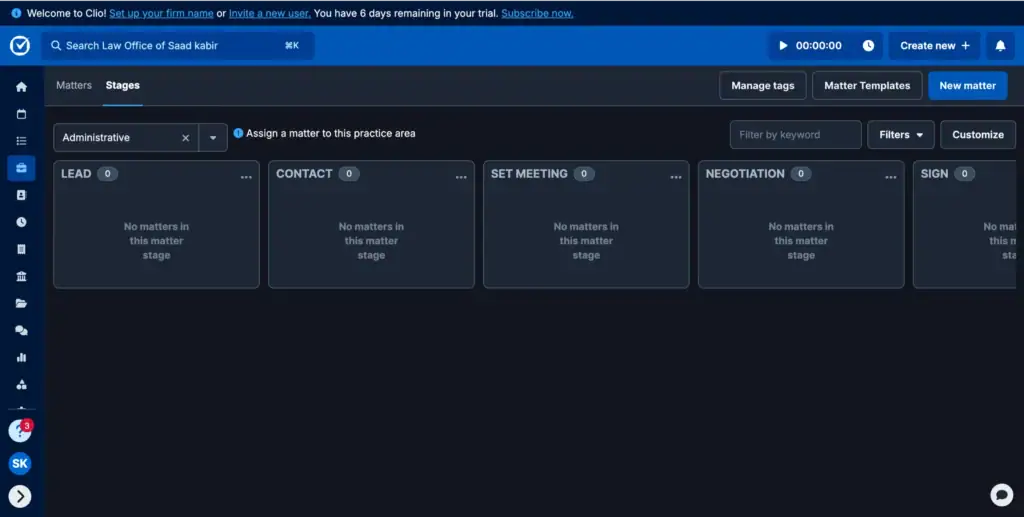
And the CRM part of this “law firm CRM” pick, Clio Grow, isn’t in the base product. It’s a separate intake product that runs about $59 per user per month, isn’t available on EasyStart at all, and only comes bundled on the top Expand tier.
Key Features
- Matter management, time tracking, billing, and document management on all plans
- E-signatures capped by tier: 3/month on EasyStart, 15 on Essentials, unlimited on Advanced and up
- Client portal and matter templates from the Essentials tier
- Clio Grow for intake pipelines and CRM (add-on, or bundled with Expand)
- Add-on ecosystem: Clio Draft, Clio Accounting, AI tools, and hundreds of integrations
Pricing
- EasyStart: starting at $49/user; the page doesn’t state whether that’s the monthly-billed rate
- Essentials and Advanced: undisclosed rate: not clearly stated in pricing page
Pros
Cons
What users say
“Overall having a CRM, email, builder, and billing all in one neat program was worth the extra cost.”
— William K., Capterra Review
Clio remains the default choice in legal practice management, with the largest ecosystem of add-ons and integrations in the category. Budget carefully: only the $49/user EasyStart figure is published, and the intake CRM, Clio Grow, is a roughly $59/user/month add-on unless you buy the top tier.
3. MyCase [TRANSPARENT ALL-IN-ONE]: Everything priced on one page
MyCase, now branded 8am MyCase, is the pick for firms that are tired of “book a demo to see a number.” Every plan and both billing modes are printed on its pricing page; there are no setup fees or long-term contracts, and the product itself is a genuine all-in-one: case management, billing, built-in payments through LawPay at no monthly cost, and two-way client texting.
The catch is where the features sit. The intake forms and built-in CRM that justify a “law firm CRM” purchase start on the Pro tier at $120 per user per month, billed monthly, and conflict checks, advanced document automation, and API access are available on the $150 Advanced tier.
Accounting is a further $39/user/month add-on, so a small firm speccing the full stack should do that math before comparing it against anything else here. And more on that, the Complex UI makes it really tough for people who starting
Key Features
- Trust accounting, calendaring, and document storage on every tier, including Basic
- Client intake forms and built-in legal CRM from the Pro tier
- Unlimited e-signature, automated workflows, and 2-way client texting on Pro and up
- Integrated payments via LawPay with no added subscription cost
- 8am IQ AI assistants for drafting and discovery on higher tiers

Pricing (monthly when paid monthly)
- Basic: $60/user/mo ($50 annual), limited client portal
- Pro: $120/user/mo ($100 annual), most popular
- Advanced: $150/user/mo ($130 annual)
- MyCase Accounting: $39/user/mo add-on
Pros
Cons
What users say
“Being able to keep track of emails, documents, notes, calls, and billing all within one app. I like the texting feature within the app.”
— Lindsay B., Capterra Review
MyCase is the transparency pick among legal all-in-ones: every price is public, from $60/user Basic to $150/user Advanced billed monthly, with payments and texting included. Just note that intake forms and the CRM start at the $120 Pro tier, so the headline price isn’t the CRM price.
4. PracticePanther [FAST SETUP]: The legal suite you can be running this week
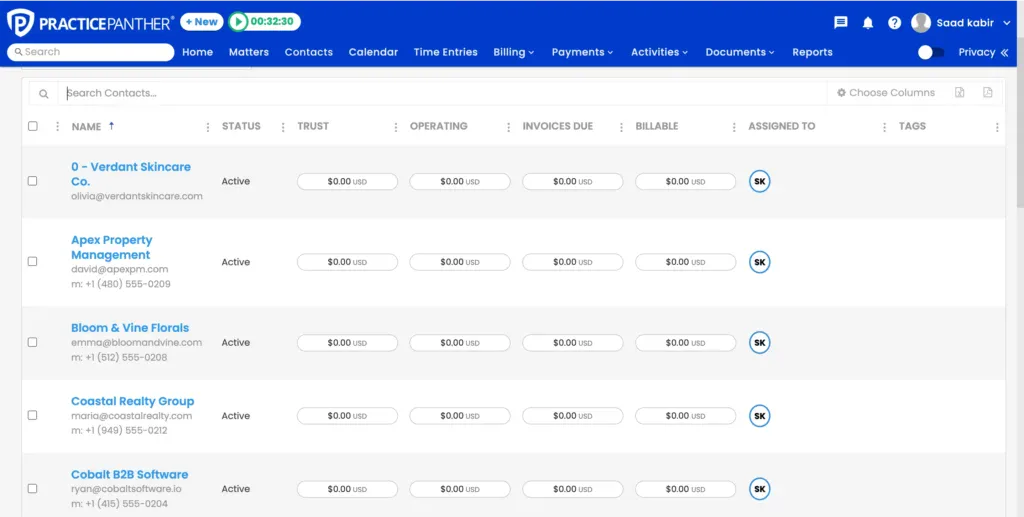
PracticePanther’s reputation is speed to value. Lawyerist’s review highlights intake forms you can deploy in under ten minutes, and the interface is consistently described as the easiest to learn among the legal suites. For a small firm without an office manager to run a software rollout, that matters more than any feature grid.
The tier structure deserves a closer look before you commit. Intake forms, native e-signature, and LEDES billing all start at the Business tier, $99 per user per month billed monthly, and the full trust and operating accounting suite (PantherAccounting Plus) is exclusive to the $124 Business Pro tier per LawSites’ April 2026 coverage. Even reviewers on Capterra flag weak reporting.
Key Features
- Embeddable intake forms that feed directly into contacts and matters (Business and up)
- Tag-based workflow automation for tasks and events on all tiers
- Trust ledger and reconciliation from the Business tier; full accounting suite on Business Pro
- Conflict checking via global search across matters, notes, emails, and custom fields
- Court deadlines through the LawToolBox integration; client portal on all plans
Pricing (monthly when paid monthly)
- Solo: $59/user/mo ($49 annual)
- Essential: $79/user/mo ($69 annual)
- Business: $99/user/mo ($89 annual), adds intake forms, eSignature, LEDES billing
- Business Pro: $124/user/mo ($114 annual), adds PantherAccounting Plus
Pros
Cons
What users say
“Its user-friendly interface allows for efficient time tracking, billing, and client communication, which saves valuable time.”
— Suleiman W., Capterra Review
PracticePanther is the legal suite a small firm can realistically deploy in a week, with intake forms Lawyerist clocked at under ten minutes to set up. Plan around the tiers: intake, e-signature, and LEDES billing start at $99/user/month billed monthly, and full trust accounting sits on the $124 Business Pro tier.
5. Lawmatics [INTAKE & MARKETING]: The specialist for high-volume client intake
Lawmatics is the only tool here that’s purely a legal CRM, in the strict sense: it handles everything before the retainer is signed. Intake forms, e-signature on engagement letters, drip email campaigns, round-robin consult scheduling, and pipeline analytics run deeper here than in any practice management suite. For consumer practices that live on lead volume, personal injury, family, immigration, that depth is the entire point.
Know exactly what you’re signing up for. Lawmatics publishes no pricing at all: every plan is quote-only, there’s a 3-user minimum, and the entry Essential plan starts you at 500 contacts, with additional contacts sold separately, an allowance a volume practice can burn through quickly. It also isn’t practice management. Time and billing is a separately sold add-on, trust support stops at a basic ledger inside that add-on, and so Lawmatics is a second subscription that sits in front of your case management system, not a replacement for it.
Key Features
- Custom intake forms with e-signature and SMS built in
- Visual intake pipeline with automated follow-up sequences
- Email marketing and drip campaigns from the Premium tier
- Advanced conflict checking on Premium and up
- Round-robin scheduling and custom analytics dashboards

Pricing
- Essential: quote only, 500-contact allowance, 3-user minimum
- Premium: quote only, 10,000-contact allowance
- Enterprise: custom
- Add-ons priced separately, including time and billing, and SMS/MMS bundles
Pros
Cons
What users say
“It has streamlined our intake process for PIP and BI cases, reduced manual tasks, and improved communication with clients.”
— Jannis M., Capterra Review
For firms that win or lose on intake speed, Lawmatics automates follow-up in ways practice management suites only gesture at, from drip campaigns to round-robin consult booking. You’ll budget blind: no prices are published, plans carry a 3-user minimum, and the entry tier starts at a 500-contact allowance.
6. Smokeball [DOCUMENT AUTOMATION]: Billable time you didn’t know you were losing
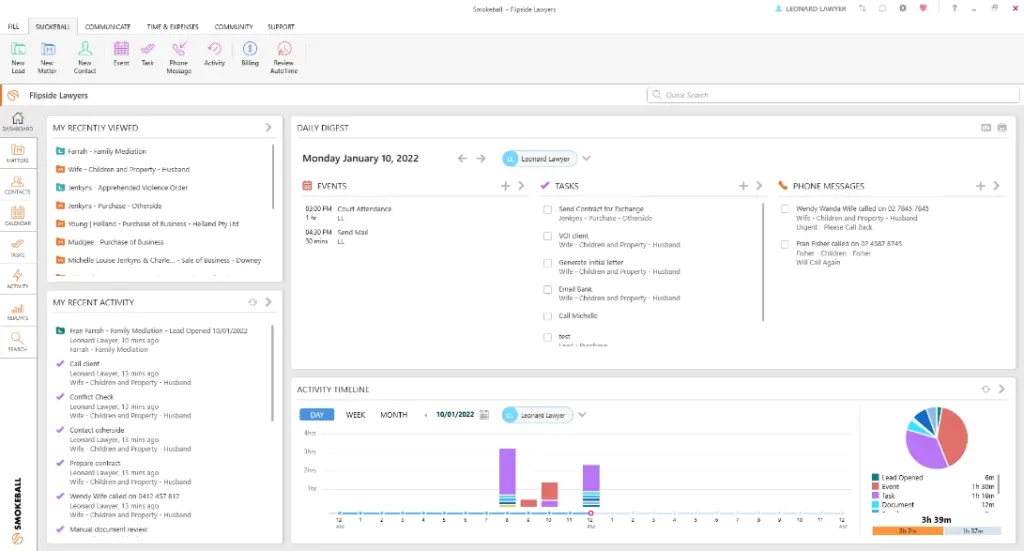
Smokeball’s pitch is different from everyone else’s here: it bills for you while you work. AutoTime watches what you actually do in Smokeball, Word, and Outlook and reconstructs your billable time automatically, no timers.
Pair that with a document automation library of 20,000+ legal forms covering 250+ matter types and the deepest Microsoft Word and Outlook integration in the category, and document-heavy firms tend to fall for it hard.
The commercial terms are where you should slow down. Smokeball doesn’t publish per-tier pricing, showing only “From $149/mo” with a quote flow, without saying whether that’s per user or per firm, and its own pricing page offers just 12-month and 36-month terms, so there’s no month-to-month option. It’s also Windows software: Lawyerist notes that Intel Macs need virtualization workarounds, and newer Apple Silicon Macs can’t run it at all. And AutoTime itself is only included on the top Prosper+ tier; it’s a paid add-on on Grow, and the two entry tiers track time manually.
Key Features
- AutoTime automatic time capture across Smokeball, Word, and Outlook
- Document automation with 20,000+ forms spanning federal, state, and county
- Trust accounting and retainer management are included on every tier
- One-click lead-to-matter conversion and client intake
- Client portal from the Boost tier; DocuSign and InfoTrack integrations
Pricing
- Bill, Boost, Grow, Prosper+: from $149/mo, individual tier prices unpublished, per-user or per-firm basis unstated
- Contract terms: 12 or 36 months only, no month-to-month
- AutoTime is included only on Prosper+; paid add-on on Grow; manual timers on Bill and Boost
Pros
Cons
What users say
“Overall good and I’m happy with how it’s set up. I like the search features because it helps me find exact documents. I also enjoy the auto capture features for billing.”
— Olga K., Capterra Review
Smokeball earns its following on AutoTime, which reconstructs billable hours from real activity in Word and Outlook, and a 20,000-form automation library. The trade-offs are contractual: pricing starts at $149/month and is otherwise unpublished, terms run 12 or 36 months with no monthly option, and Mac firms should look elsewhere.
7. HubSpot [GENERALIST]: The marketing engine that knows nothing about law
HubSpot is on this list for one reason: no legal tool comes close to its marketing automation. If your firm competes on content, search, and nurture sequences, the combination of forms, email sequences, meeting scheduling, and attribution in one platform is something Clio and MyCase don’t attempt. There’s a free tier (now capped at two users), and Sales Hub Starter runs $20 per seat per month.
Be clear about what you’re buying. HubSpot has no trust accounting, no conflict checks, no court calendaring, and no matter management, so for a law firm, it’s an addition to practice management software, never a replacement. And the price curve is steep past Starter: Professional jumps to $100 per seat per month plus a required one-time $1,500 onboarding fee, which is a hard sell for a three-lawyer firm.
Key Features
- Contact records and a visual deal pipeline you can repurpose for intake stages
- Email sequences included at Starter, with send caps
- Website forms, live chat, and meeting scheduler links for lead capture
- Calling minutes built in (500/month at Starter)
- Reporting and attribution that show which marketing actually produces clients
Pricing (monthly when paid monthly)
- Free tools: $0, up to 2 users
- Sales Hub Starter: $20/seat/mo, promotional rates sometimes lower
- Professional: $100/seat/mo, plus a required one-time $1,500 onboarding fee
- Enterprise: $150/seat/mo billed annually
Pros
Cons
What users say
“HubSpot CRM is incredibly easy to spin up and begin using. It is one of the fastest CRM tools to stand up and use from the get go. Its especially nice that there is a free tier to get you started.”
— Eric T., Capterra Review
HubSpot suits law firms that treat intake as a marketing funnel: forms, sequences, scheduling, and attribution in one system, free to try and $20/seat/month at Starter. It knows nothing about trust accounting, conflicts, or deadlines, so count it as a second system beside your practice management platform, not instead of it.
How to Choose the Right CRM for Your Small Law Firm
Start with what actually breaks in your firm, because these seven tools solve different problems.
- Choose Lawmatics if leads slip through the cracks and intake marketing is the game your practice wins or loses.
- Choose PracticePanther if you want to conduct intake within an easy-to-deploy legal suite that you can set up this week.
- Choose Smokeball if your pain is documents and unbilled hours, you’re on Windows, and an annual contract doesn’t scare you.
- Choose Clio if you want the legal ecosystem you’ll never outgrow, or MyCase for a similar breadth, with every price point published.
- Choose HubSpot if your marketing engine matters more than matter management; it feeds whatever practice management system you keep.
- Choose OneSuite if you’re a solo attorney or small firm whose real problem is scattered client management, intake notes here, files there, invoices somewhere else. It covers that whole arc at a flat rate through its lead pipeline, client portal, and invoicing.
Whatever you pick, don’t buy more legal tech than your firm will use. The adoption gap is real: the ABA’s 2024 Legal Technology Survey found 18% of solo practitioners were using AI-based tools, against 46% of firms with 100+ attorneys. Small firms routinely pay for tiers full of features nobody switches on. A tool your team actually opens every day beats a longer feature list.
Three cost traps to check before signing. First, per-user pricing compounds: a 5-person firm on MyCase Pro is $600 a month, and the same firm on PracticePanther Business is $495, before add-ons. Second, quote-only pricing (Lawmatics, Smokeball, most of Clio’s tiers) makes comparison shopping deliberately hard, so get numbers in writing, including renewal rates. Third, contract terms: Smokeball’s 12- and 36-month terms mean a mistake lasts a year minimum, while MyCase, PracticePanther, and OneSuite let you leave monthly.
Frequently Asked Questions
What’s the best CRM for a small law firm?
It depends on what’s broken. For scattered client management, OneSuite covers intake to invoice at $29 to $59 a month flat. For a legal all-in-one with trust accounting, MyCase and PracticePanther are the strongest transparent-pricing options. For high-volume consumer intake, Lawmatics is the specialist.
Do law firms need a legal-specific CRM?
Only if trust accounting, conflict checks, or court-rules deadlines need to live in the same system as your client data. If those live elsewhere (with your accountant, or in dedicated legal accounting software), a general client management platform handles intake, follow-up, documents, and billing perfectly well, usually at a fraction of per-user legal suite pricing.
What’s the difference between a legal CRM and practice management software?
Legal CRM software handles everything before the retainer: leads, intake forms, follow-up, consult scheduling. Practice management handles everything after: matters, deadlines, billing, trust accounting. Lawmatics is purely the former; Clio, MyCase, PracticePanther, and Smokeball are the latter with intake features added; OneSuite spans pipeline to invoice without the legal compliance layer.
How much does a law firm CRM cost in 2026?
Published monthly-billed prices run from $20/seat for HubSpot Starter to $150/user for MyCase Advanced, with PracticePanther at $59 to $124/user. Smokeball starts at $149/month on annual contracts, Lawmatics is quote-only, and OneSuite runs $29 to $149 flat per firm.
Can you run a law firm on a general-purpose CRM?
Many solo and small firms do, for the client-facing side: intake, communication, documents, and billing. The line is in compliance. Trust accounting and conflict checking are bar obligations, so they need purpose-built software or a careful manual process. Keep those where they belong, and a general platform can run everything else.
Start exploring OneSuite today
No credit card is required