

Harvest Price Increase 2026: What Changed, and Whether You Should Renew or Switch

September 13, 2026
Were you hit with Harvest’s insane price increase? If not, at the next renewal you might get it.
That’s what’s happening to most users right now. From last year, Harvest’s pricing has changed in ways that catch even long-time customers off guard. And their tricky pricing page is making it worse.
So we dug deep into the Harvest price increase. What we found is insane.
In this guide, you’ll see what’s actually happening with Harvest, why users are frustrated, what’s hidden behind their “simple and flexible” pricing page, and a few suggestions that might help.
Let’s start with what actually caused it.
What’s Actually Happening With Harvest’s Price Increase
Three major things cover the full picture:
- The Bending Spoons acquisition of Harvest
- The drop of the old flat pricing model in favor of usage-based billing
- The silent emails landing with outrageous bills and no upfront explanation
The Bending Spoons Acquisition
Everything started in July 2025, when Harvest came under the umbrella of Bending Spoons.
Bending Spoons, a Milan-based technology company, acquired Harvest that year. They didn’t just buy Harvest, though. Plenty of other established companies fall on that same list: Evernote, WeTransfer, Vimeo, Komoot, Eventbrite, Brightcove, and AOL.
Across all of them, a prominent pattern is visible. In several of these acquisitions, customers reported price increases in the months following the deal. It’s a strong enough pattern that Harvest users should factor it in before any renewal decision.
The New Usage-Based Billing Model
Before the acquisition, Harvest charged one flat rate per seat. That model is gone.
Harvest now runs two plans, Teams and Enterprise, and each one can be billed two ways:
- Flex: Your per-seat rate plus usage-based fees, calculated from your account’s activity in the prior billing period: active projects, active clients, active tasks, and invoices sent.
- Unlimited: A fixed usage fee on top of your seat rate, so your bill doesn’t move with account activity.
Each plan includes a free usage allowance before the extra charges kick in, and only items with time actually tracked against them count. On the yearly Flex plan, the free threshold sits around:
- Up to 12 projects
- Up to 7 tasks
- Up to 7 clients
- Up to 50 invoices
- Up to $50k invoiced
Go past any of those in a billing period, and the extra charges apply. A quiet month costs less. A busy month, the kind agencies actually want, costs more.
The Outrageous Billing Emails
The renewal notices are where this stopped being a policy footnote and became a story people share. Real examples from Harvest users:
- A single-seat account moved to Enterprise with unlimited usage billing: $12/month → $2,040.22/month
- A small account’s base fees: $130/year → $168/year, plus roughly $720 in estimated usage charges stacked on top
- A single-user account quoted for the Unlimited plan: $12/month → a proposed $1,900/month
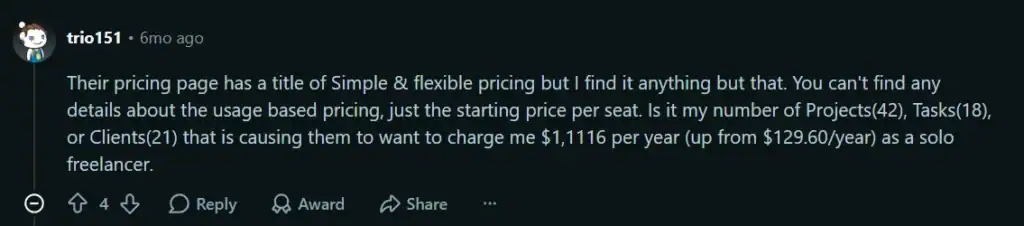
- A solo freelancer’s projected annual bill: $129.60/year → over $1,100/year
- A small team’s annual plan: $1,100/year → roughly $20,000/year
- An 18-person engineering and surveying team, per a validated G2 review: unlimited usage priced at $1,500/month minimum, plus $14/mo per user, pushing a 20-user team past $20,000/year
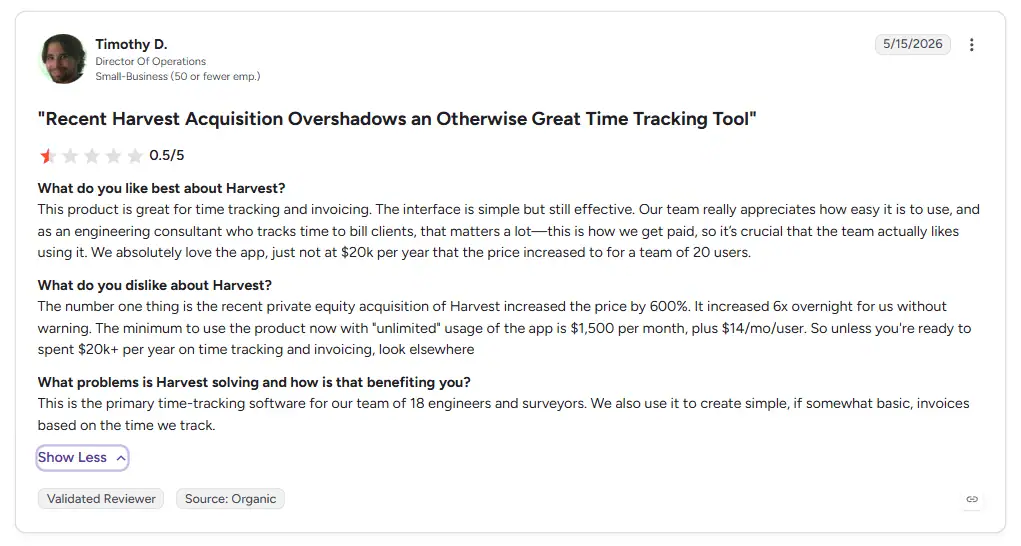
On G2, one validated reviewer, Timothy D., a Director of Operations at a small engineering consultancy, put a number directly on it: the price “increased by 600%,” going up sixfold overnight without warning. That review alone lines up almost exactly with the $20,000-a-year figure other teams have separately reported.
If your renewal email looked like this, the rest of this guide is for you.
What Harvest’s Pricing Used to Look Like
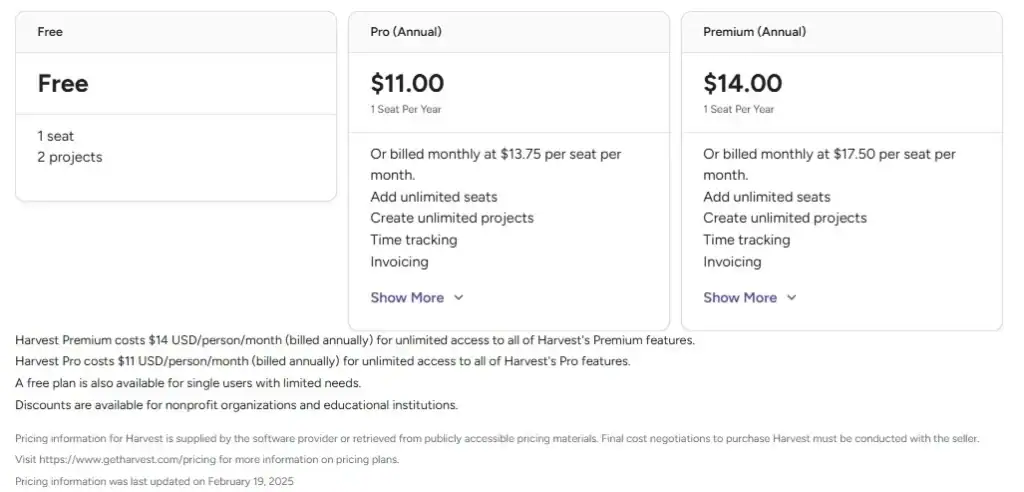
Things were simple before the restructuring: a flat pricing model covering three plans.
- Free plan: 1 seat, 2 projects
- Pro plan: $11/seat/month billed annually, or $13.75/seat/month billed monthly
- Premium plan: $14/seat/month billed annually, or $17.50/seat/month billed monthly
That was all. No separate charges, no hidden fees, no sky-high bills based on usage, which is exactly the predictability current customers say they’ve lost.
The Current Harvest Pricing Plans and What Each Includes
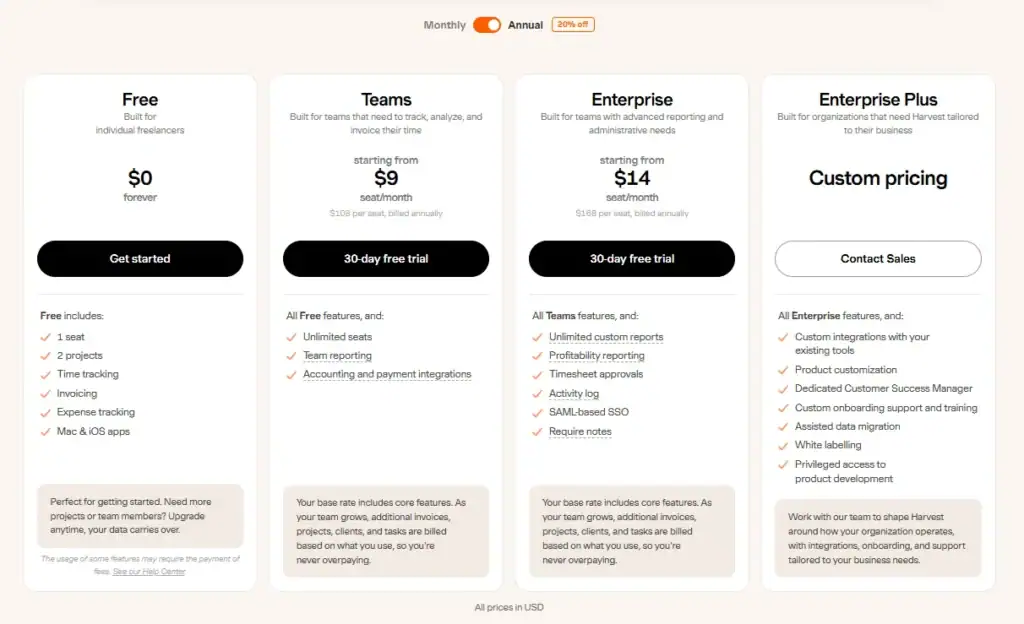
Land on Harvest’s pricing page today, and it looks clean. Four simple tiers, starting free, with a starting price sitting right under each name.
But what you see there isn’t the full picture. Billing now works differently too, seat price plus usage, not just seats. More on exactly how that works in the next section.
- Free: $0
- Teams: $9/seat/month billed annually, or $11/seat/month billed monthly
- Enterprise: $14/seat/month billed annually, or $17.50/seat/month billed monthly
- Enterprise Plus: Custom pricing, contact sales
| Plan | Features Included |
|---|---|
| Free | 1 seat, 2 projects, basic time tracking, basic invoicing |
| Teams | Unlimited seats, time tracking, team reporting, invoicing, accounting integrations, plus usage fees on Flex billing |
| Enterprise | Everything in Teams, plus profitability reporting, timesheet approvals, activity log, SAML SSO, custom reports, required notes on time entries, plus usage fees on Flex billing |
| Enterprise Plus | Everything in Enterprise, plus custom integrations, product customization, a dedicated Customer Success Manager, custom onboarding and training, assisted data migration, white labeling, and privileged access to product development |
Two gaps to flag here:
- Profitability reporting is locked to Enterprise and above. This is the feature agencies rely on most to see if a project is actually making money. Teams doesn’t include it.
- None of the prices above include the usage layer. What you see is the seat price alone. Usage fees are calculated and billed separately, and that’s the part the pricing page doesn’t put front and center.
What Changed in the New Harvest Billing System
The shift happened in stages through late 2025 and into 2026, with legacy plans closed to new signups and existing accounts migrated at renewal. Here’s what replaced the old flat rate.
Two billing modes per plan:
Flex charges usage on top of your seat rate. Unlimited charges one fixed usage fee instead, closer to the old flat-rate feel, just pricier.
Usage has a cost, and it stacks:
Active projects, clients, tasks, and invoices sent all count toward Flex billing. Each category is billed separately and adds up rather than the highest one applying alone. Full fee breakdown is in the next section.
Checkout defaults against you:
After a trial, checkout pre-selects Enterprise on annual billing. If you don’t manually switch the plan selector to Teams before confirming, you’ll be charged the higher $14/seat Enterprise rate instead of the $9 Teams rate.
Usage charges arrive with a delay, then all at once:
New accounts don’t see usage charges until the second paid renewal. Harvest’s own example: a $44 seats-only bill can jump to $404 once usage is added.
Legacy accounts get a grace period, not immunity:
If you signed up before November 7, 2024, Harvest is currently giving your account free access to Premium features like profitability reporting, even if you’re not paying for Premium. That grace period ends at your next renewal, when your account converts to the current Teams or Enterprise plans like everyone else’s.
Archived seats still bill you:
Archiving someone’s profile doesn’t lower your seat count. You have to manually reduce it in Settings > Billing, or you keep paying for it.
Harvest Usage Fees: The Pricing Breakdown They Don’t Publish
Harvest doesn’t publish an official rate card for this. What follows is what showed up on one real account’s billing screen, giving a solid sense of the shape of Flex pricing on monthly billing:
- Projects: free up to 4, then $15.00 (5–10), climbing to $1,000.00 (151+)
- Tasks: free up to 3, then $15.00 (4–10), climbing to $1,000.00 (151+)
- Clients: free up to 3, then $15.00 (4–10), climbing to $1,000.00 (151+)
- Invoices created: free up to 4, then $15.00 (5–10), climbing to $650.00 (51+)
- Amount invoiced: free up to $3k, then $15.00 ($3k–$20k), climbing to $650.00 ($200k+)
Treat these as illustrative, not guaranteed. Check Settings > Billing for what your account would actually be charged.
Each category stacks separately too. Go over on projects, tasks, and invoices in the same month, and you pay three overage fees, not one, on top of the seat rate.
What Each Plan Will Actually Cost You in Practice
A 10-person team on Teams:
$1,080/year in base seat fees at the published annual rate, before any usage charges. A normal month of invoicing, active projects, and task tracking past the free allowance adds more on top.
A 20-person team on Enterprise:
$3,360/year in seat fees before usage. Enterprise’s usage fees tend to bite harder too, since profitability reporting and approval workflows encourage more granular project and task tracking, exactly what usage billing counts against you.
Small and solo accounts see the sharpest jumps,
since they’re most likely to get swept into an automatic Enterprise or Unlimited upgrade at renewal. One real billing screen showed an Enterprise Monthly plan at $17.50/seat, Unlimited usage listed at $1,900/month (down from a $4,300 sticker price), against a Flex option that would have cost $0 that same month based on actual 30-day usage. The same account reportedly started at $12/month.
Add-ons stack on top of all this.
Harvest Forecast costs an extra $5/person/month on annual billing, billed separately. Some users have also reported a Stripe surcharge on invoice payments, on top of Stripe’s own standard fee, though Harvest doesn’t publish that number.
Put together, the plan fee you see at signup is rarely the number you pay at renewal, especially for agencies whose client and invoice volume grows month over month.
How to Decide: Renew or Switch
Renew if:
- Your usage stays within Flex’s free thresholds most periods, or Unlimited’s flat rate is genuinely reasonable for your seat count.
- Your project, client, and invoice volume is stable rather than growing.
- Downgrading from Enterprise to Teams (see below) closes most of the gap on its own.
Switch if:
- Your usage regularly exceeds the free thresholds, so usage fees will keep compounding every renewal, not just this one.
- The unpredictability itself is the problem, you want to know your bill in advance, not simulate it each cycle.
- You’ve already checked the downgrade option and it still doesn’t bring the price to where you need it.
First, figure out where you stand:
- Check your renewal date. Go to Settings > Billing. Legacy plans hold their rate until renewal, and notices tend to land about a month early, so a quiet inbox isn’t a guarantee.
- Model your actual usage. Use Simulate usage changes in Settings > Billing to see Flex vs. Unlimited on your real numbers. Rough free allowances: ~12 projects, 7 tasks, 7 clients, 50 invoices, $50k/year annually, or ~4/3/3/4/$3k monthly. Past those, expect usage fees every renewal.
If you’re leaning toward renewing, here’s how to lower the bill:
- Archive what you’re not using, seats included. Archiving old projects, tasks, and clients can pull you back under the free threshold. Archiving a seat doesn’t lower your seat count though, that still needs a manual reduction in billing.
- Watch the checkout toggle. Checkout defaults to Enterprise on annual billing. Confirm Teams if that’s what you actually want.
- Consider downgrading instead of leaving. Dropping Enterprise (Premium) to Teams (Pro) keeps you on Harvest at a lower rate, at the cost of the activity log, profitability report, approvals, SSO, required notes, and shared reports, plus a 4-report cap on custom reports. Takes effect at your next renewal, not immediately.
If you’re leaning toward switching:
Buy yourself export time first. Switch to Flex for a single month to get roughly 60 days to export your data before cancelling outright. One 14-year Harvest customer used exactly this approach.
A Few Harvest Alternatives to Narrow Down Your Search
This isn’t a full buyer’s guide, just three worth a serious look, and why.
1. OneSuite
OneSuite is a project management platform built for freelancers and agencies, bringing time tracking, invoicing, CRM, and a client portal into one workspace.
One plan, one price:
- $9/user/month billed monthly
- $7/user/month billed annually.
No tiers, no feature gates, no usage fees.
Where Harvest now charges extra as your projects, clients, and invoices grow, OneSuite includes unlimited projects, unlimited clients, and unlimited invoices on that single plan. No per-seat penalty for invoice count, no stacking usage fees, the price you sign up for is the price you pay at renewal.
If the new Harvest pricing means you’re now paying for separate tools for time tracking, CRM, project management, and invoicing, calculate whether consolidating into one platform would reduce your overall software spend.
2. Productive
Productive is an all-in-one agency platform covering budgeting, resource planning, and profitability reporting alongside time tracking and invoicing. It replaces Harvest’s usage-based model with flat per-seat pricing and unlimited projects, tasks, and clients on every plan.
3. Toggl Track
Toggl Track is a lightweight time tracker built around a simple start/stop timer and clean reporting. It swaps Harvest’s usage fees for flat per-seat pricing, with a free tier for small teams and QuickBooks Online integration built in.
FAQs
Why did my Harvest bill suddenly increase?
Harvest was acquired by Bending Spoons in July 2025, and the pricing model changed from a flat per-seat rate to a per-seat base plus usage-based fees for active projects, clients, tasks, and invoices. Your bill can increase at renewal even if your seat count hasn’t changed, because the usage layer now scales with account activity.
What’s the difference between Harvest’s Flex and Unlimited billing?
Flex charges your per-seat rate plus usage fees based on your prior billing period’s activity. Unlimited charges a fixed usage fee on top of your seat rate regardless of how much you use the account. Unlimited trades a potentially lower bill for a predictable one.
Is Harvest still worth using in 2026?
Harvest remains a functional time tracking and invoicing tool with a mature feature set. The core issue isn’t the product, it’s pricing predictability. If your account activity is stable and the Flex or Unlimited numbers work out reasonably in your usage simulation, renewing can still make sense. If your bill keeps moving in ways you can’t forecast, that unpredictability alone is a legitimate reason to compare alternatives.
What should I check before my next Harvest renewal?
Confirm your renewal date in Settings > Billing, run the usage simulation to see your projected Flex and Unlimited costs, clean up unused seats, and double-check the plan and billing toggle before completing any checkout, since the default selection is Enterprise on annual billing.
Do Harvest trials include every feature?
Yes, with one exception. Harvest trials include the full Premium feature set, except for SAML-based SSO, which is only available on a paid Premium subscription. That means the trial can make Harvest look more full-featured than the plan you actually end up buying, if you downgrade to Pro/Teams afterward.
Am I on a Legacy Harvest plan?
If you signed up or upgraded from a trial before November 7, 2024, you may be on a Legacy plan with different pricing and features from the current pricing page. Check Settings > Billing details to confirm, or contact Harvest support directly, since Legacy pricing isn’t published. Legacy status doesn’t last forever: at your next contract renewal, your account converts to the current Teams or Enterprise structure, on either Flex or Unlimited billing.
Start exploring OneSuite today
No credit card is required