

OneSuite July 2026 Update: Smarter CRM, Seamless Onboarding, and a Rebuilt Tasks Board

September 23, 2026
July was all about removing friction. We completely overhauled the signup and onboarding experience, rebuilt the My Tasks board for significant speed improvements, and added powerful new automations to the CRM, allowing you to spend less time on data entry and more time closing deals.
Here’s everything that shipped in OneSuite this July.
1. Seamless Onboarding & Billing
First impressions matter. We’ve completely redesigned how new users experience OneSuite from day one, and made it easier than ever to manage your subscription.
A Tailored Onboarding Experience
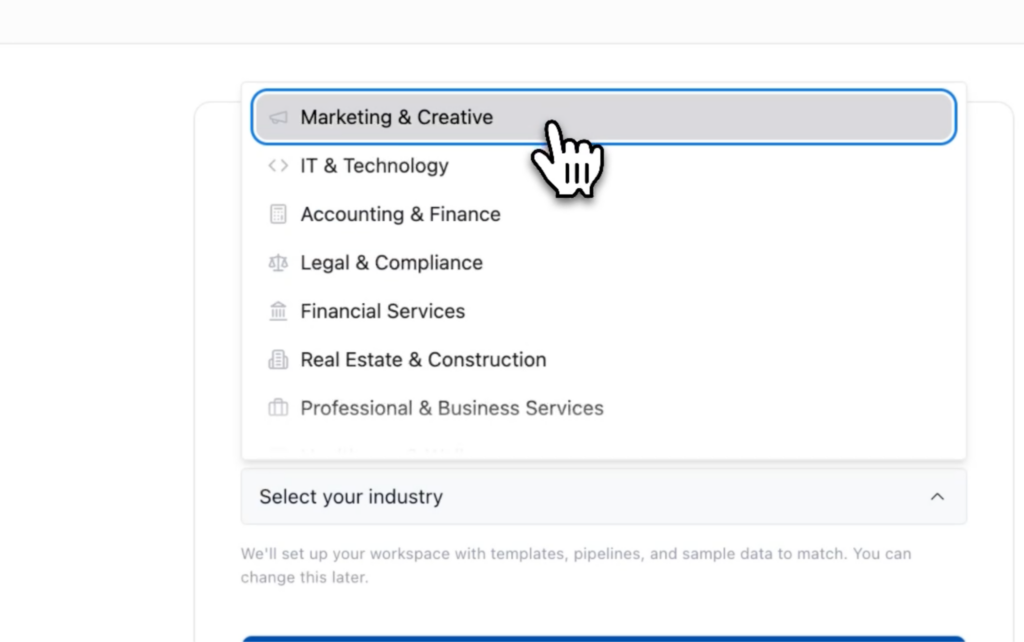
New users now pick their industry during signup, and their workspace comes pre-filled with relevant sample clients, projects, and invoices. It never looks empty on day one. A guided dashboard checklist guides you through the core features, directing you directly to the relevant screens.
Frictionless Purchases & Rebuilt Billing
You can now sign up and pay in one streamlined flow without creating an account first. First-time users get a 14-day Pro trial automatically. Inside the app, the billing area has been completely rebuilt. You can see your current plan, payment method, and billing details in one unified view. Buy add-ons, download past receipts, and manage your subscription directly without leaving the app.
2. A Smarter, Automated CRM
Your CRM should work for you, not the other way around. We’ve introduced major quality-of-life updates to how you manage leads and contacts.
Editable CRM Lists
Update a name, address, phone number, website, or custom field directly from the list view! No more opening individual records to make quick changes. Values can be easily cleared, and this works across Clients, Companies, and Opportunities.
Deals & Meetings on Autopilot
Set your naming rules once (complete with numbering and a live preview), and OneSuite will automatically create an opportunity whenever you add a contact or company.
Calendar meetings now feed your CRM: Once you add a meeting with someone who is not listed as a client or as an opportunity in the CRM. They are auto-listed as people with their company details with every meeting sync.
Address Autocomplete
Start typing an address on a client, company, contact, or business profile, and OneSuite instantly fills in the rest.
3. Rebuilt Project & Task Management
Managing your team’s workload just got significantly faster and more intuitive.
The All-New “My Tasks” Board
We’ve rebuilt the My Tasks board from the ground up. Tasks are now grouped by when they’re due (today, tomorrow, rest of the week) and include subtasks. The board loads lightning-fast even with massive lists, and clicking a task opens its details in a side panel right there.
Smoother Project Boards & Client Collaboration
Dragging tasks between columns feels buttery smooth. You can now bulk-select multiple tasks to assign or reschedule them together.
Want to bring clients into the loop? You can now add a client as a project collaborator, or assign them to specific tasks and subtasks without them needing a full portal account. If a project is connected to a company, you can assign multiple clients.
Better Organization (Archive & Notifications)
Instead of deleting tasks, you can now archive individual tasks or entire sections to clear your board without losing the data (with a simple toggle to bring them back). Also, whenever a task or subtask is completed, the creator, assignees, and the client all get an email and an in-app notification to keep everyone aligned.
4. Invoicing, Time Tracking, and Email
We’ve made tracking billable hours and communicating with clients much more professional.
Custom Email Domains
Invoices and documents now go out from your address instead of ours. Connect your own email service (SendGrid, Postmark, Brevo, Amazon SES, or SMTP2Go), verify your sender, and set a default sender. We’ve built step-by-step setup guides right into the app.
[IMAGE PLACEHOLDER: The Custom Email setup screen showing SMTP options]
Upgraded Time Tracking
Log time with precision (hours/minutes/seconds), see exactly how much time each team member spent on a task, and edit individual entries. Timesheets now support grouping, advanced filtering, and the ability to approve or submit many entries at once.
5. Platform-Wide UX, Client Portal & Security Enhancements
We polished the rest of the platform to ensure a cleaner, more reliable experience.
- Cleaner Page Layouts: Page titles and main actions have been moved into the top bar. We’ve added a view switcher and a “Customize” option, and filters no longer overflow on Clients, CRM, Projects, Documents, and Invoices.
- Client Portal Fixes: We added helpful empty state screens for invoices and documents, improved file-loading fallbacks, and made the “View as Client” feature show exactly what your client sees.
- Improved Invitations: A redesigned invite screen makes it clear if an invite has already been used, fixing previous acceptance issues.
- Security & Reliability: We fixed data-visibility issues, ensured deleting business profiles or team members works flawlessly, strengthened how credentials are stored, and updated all 18 languages with new wording.
Ready to streamline your agency?
Still not a member of the OneSuite family? Join today and see how easy managing your entire client lifecycle can be.
Start exploring OneSuite today
No credit card is required