
7 Best Project Management Software for Startups in 2026: Tools to Manage Teams, Projects & Growth

September 10, 2026
Are your startup projects becoming harder to manage as your team grows?
As startups scale, founders often face challenges like missed deadlines, unclear responsibilities, scattered communication, and difficulty tracking team productivity. What works with a small team can quickly become inefficient as projects, clients, and operations increase.
The right project management software helps startups organize work, improve collaboration, track progress, and create scalable workflows without adding unnecessary complexity.
But not every tool is built for startup needs. Some platforms are too complicated, while others only handle basic tasks. Startups need solutions that balance simplicity, affordability, flexibility, and growth.
After researching and comparing 20+ project management tools, we selected the 7 best options for startups in 2026 based on project features, team collaboration, client management, pricing, and scalability. Let’s explore which tool fits your startup best.
IN THIS ARTICLE, YOU WILL LEARN:
How to choose the right software based on your business needs
The key features that make a tool effective for growing teams
How different platforms compare in pricing, features, and usability
Which solution is the best fit for startups, agencies, and small teams
What to Look for in Project Management Software for Startups
The best project management software for startups should help teams move faster, stay organized, and scale operations without creating unnecessary complexity. Startups do not need the tool with the most features; they need a platform that fits their reality — small teams, limited resources, changing priorities, and the need to manage everything efficiently.
Unlike large organizations, startups need software that is easy to adopt, keeps everyone aligned, supports growth, and connects important workflows in one place.
Fast Adoption Without Administrative Overhead
Startups need to spend more time building products and serving customers, not configuring complicated software.
A good startup project management tool should make it easy for teams to create tasks, update progress, collaborate, and manage daily work without extensive training or setup.
A Single Source of Truth for Team Collaboration
As startups grow, work becomes scattered across emails, chat apps, documents, and meetings. This creates confusion around ownership, deadlines, and project status.
The right platform should keep everything connected, including:
- Task ownership
- Project progress
- Deadlines
- Team workload
- Client requirements
This gives founders and managers better visibility without constantly chasing updates.
Scalable Workflows for Growing Teams
A startup may begin with simple processes, but those systems often break as the company grows.
The right project management software should support:
- Multiple projects
- Growing teams
- Custom workflows
- User permissions
- Reporting and insights
This helps startups build processes that can scale without replacing their tools later.
More Than Basic Task Management
Startups often need more than task tracking. Using separate tools for projects, CRM, time tracking, and invoicing can increase costs and create disconnected workflows.
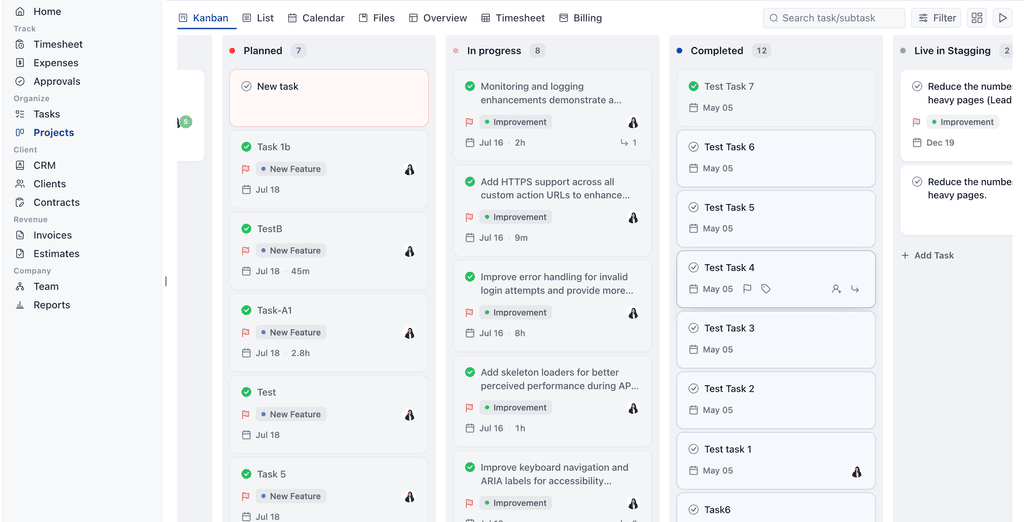
The best platforms combine essential business operations, such as:
- Project management
- Client collaboration
- CRM
- Time tracking
- Billing and invoicing
- Reporting
This reduces tool complexity and gives teams a complete view of their operations.
Easy Client Collaboration
For service-based startups, managing client relationships is just as important as managing internal work.
A strong project management platform should help teams share updates, manage approvals, organize files, and provide clients with better visibility into project progress.
Ultimately, the best project management software for startups is the one that helps founders manage their teams, deliver projects efficiently, and create a scalable workflow without unnecessary complexity.
Best Project Management Software for Startups: Comparison at a Glance
Compare the top project management tools for startups based on pricing, features, ratings, and the best use cases to find the right fit for your team.
| Tool | Starting Price | Rating | Best For |
|---|---|---|---|
| OneSuite | $9/user/month | ⭐ 4.8/5 | All-in-one startup operations |
| Teamwork | $13.99/user/month | ⭐ 4.5/5 Capterra | Client project management |
| Basecamp | $15/user/month | ⭐ 4.1/5 | Simple team collaboration |
| Wrike | $10/user/month | ⭐ 4.2/5 | Complex startup workflows |
| Airtable | $20/user/month | ⭐ 4.6/5 | Custom project workflows |
| Asana | $10.99/user/month | ⭐ 4.4/5 | Task management |
| ClickUp | $10/user/month | ⭐ 4.6/5 Capterra | Customizable all-in-one workspace |
In-Depth Reviews: 7 Best Project Management Tools for Startups in 2026
I explored and compared 20+ project management tools based on the needs of startups, including ease of use, pricing, collaboration, scalability, client management, time tracking, and workflow features.
The goal was to find tools that help startups save time, reduce operational complexity, improve team productivity, and manage projects more efficiently without unnecessary costs.
Below are the 7 best project management tools for startups in 2026, with detailed reviews to help you choose the right platform for your business.
1. OneSuite- All-in-one project management platform
OneSuite is an all-in-one project management platform built for startups that need to manage projects, teams, clients, and business operations without juggling multiple tools.
It brings project planning, task management, collaboration, time tracking, billing, and reporting into one connected workspace.
OneSuite helps startups stay organized by giving teams clear visibility into project progress, deadlines, workloads, and costs. With features like project management, timesheets, approvals, expenses, CRM, project billing, estimates, team management, and reports, startups can manage their complete workflow from planning to delivery.
It is ideal for early-stage startups, agencies, and service businesses that handle multiple client projects and need a scalable system to manage work, track productivity, improve collaboration, and grow operations efficiently.
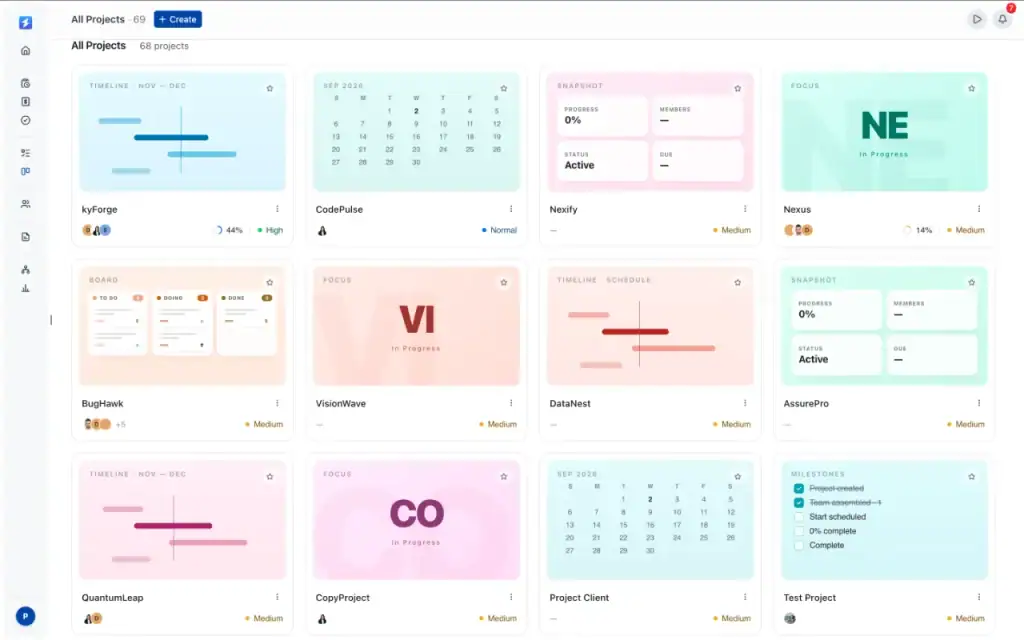
Key Features of OneSuite for Startup Project Management
- Project & Task Management: Plan projects, assign tasks, set deadlines, and track progress to keep teams organized.
- Team Collaboration: Manage communication, files, and updates in one place so teams stay aligned.
- Client Management: Keep client information, project updates, and collaboration organized for better client relationships.
- Time Tracking & Timesheets: Track working hours, manage billable time, and understand project effort accurately.
- Approvals & Expenses: Review work, approve timesheets, and control project costs.
- Project Billing: Connect project work with billing to create accurate invoices and improve cash flow.
- Reports & Insights: Monitor project performance, team productivity, and business growth with real-time data.
These features help startups manage projects efficiently, reduce tool complexity, and build scalable workflows from day one.
Pros and Cons
| Pros | Cons |
| Easy to use and quick setup | Pricing may be high for some small teams |
| Strong project and task management | Some advanced features may need improvement |
| Helpful dashboards and calendar views | Limited customization for complex workflows |
| Automation helps save time | |
| Manage projects, clients, and workflows in one place |
Pricing
- Starting Price: $9/user/month
- Best For: Startups, agencies, and service businesses
- Includes: Project management, time tracking, client management, billing, and reporting features
- Trial: Free trial available with no credit card required
User feedback
👍 I appreciate OneSuite for its excellent customer support and comprehensive features for a client portal. It helps save a lot of time by being a central place to access everything, like files, track tasks, and stay updated on project timelines. The responsiveness of the customer support is particularly valuable for handling custom requests. The initial setup was smooth as butter.
– Srikar V. G2
👎 Just that its a new product so not all of the features are complete yet and some of the UI has not been prioritized.
– Jude . G2
2. Teamwork
Brand hook of teamwork- Teamwork.com helps you run projects, resources, and financials in one place, so you can see what’s profitable and fix what’s not.
Teamwork is a client-focused project management platform designed to help startups and service businesses manage projects, teams, and customer relationships in one place. It provides tools for task management, project planning, time tracking, workload management, and client collaboration.
Unlike basic task management tools, Teamwork is built around client work. It helps startups organize multiple projects, keep teams aligned, track billable hours, manage resources, and maintain clear communication with clients throughout the project lifecycle.
A strong choice for startups, agencies, and service-based businesses that manage multiple client projects and need a structured way to plan work, track progress, balance team workloads, and deliver projects efficiently.
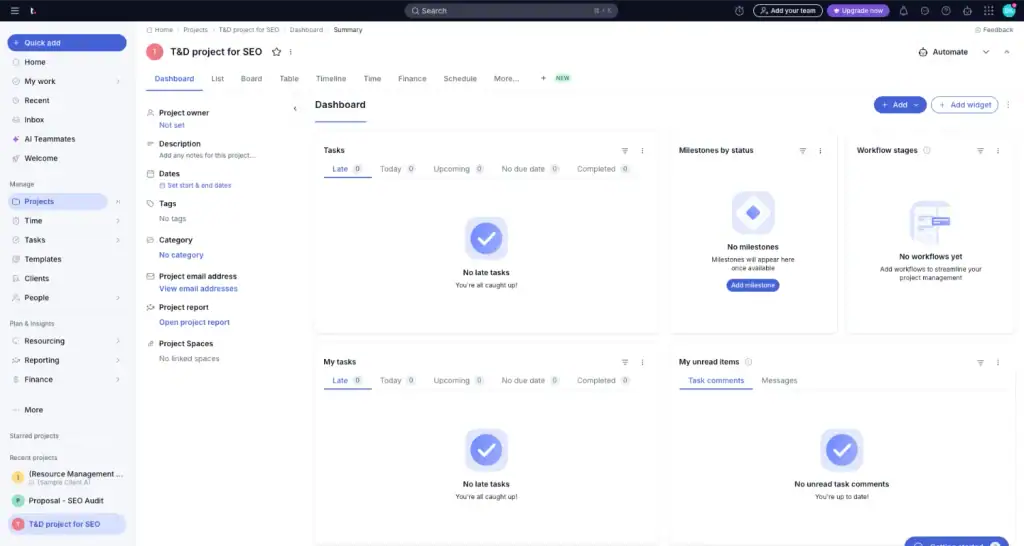
Key Features for Startup Project Management
- Project & Task Management: Create projects, assign tasks, set deadlines, and track progress across teams.
- Client Collaboration: Share project updates, communicate with clients, and keep all client work organized.
- Time Tracking & Billing: Track billable hours, manage timesheets, and improve billing accuracy.
- Resource Management: Monitor team workload, capacity, and project assignments to balance resources effectively.
- Project Templates: Create repeatable workflows and save time when launching new projects.
- Workload Management: See team availability and prevent overloading team members.
- Reports & Dashboards: Track project performance, productivity, budgets, and team progress.
- Integrations: Connect with popular tools to keep workflows efficient and reduce manual work.
Pros and Cons
| Pros | Cons |
| Strong client project management features | Higher pricing for small startups |
| Excellent task and project organization | Can feel complex for beginners |
| Good workload and resource management | Advanced features require higher plans |
| Built-in time tracking and reporting | Better suited for client-focused teams |
| Helps manage multiple projects efficiently | — |
Pricing
- Basic: $13.99/user/month (billed monthly)
- Accelerate: $29.99/user/month (billed monthly)
- Optimize: Custom pricing
- Enterprise: Custom pricing
- Free Trial: 14-day free trial available
User Feedback
👍“Best product management tool I’ve ever used. I’ve tried many platforms, and this one even outperforms Monday.com.”
– Producthunt
👎 “The Gantt chart feature is very weak. It offers almost no customization, and the print version is practically unusable.”
– Josh B.
3. Basecamp: Best Simple Project Management Software for Startups
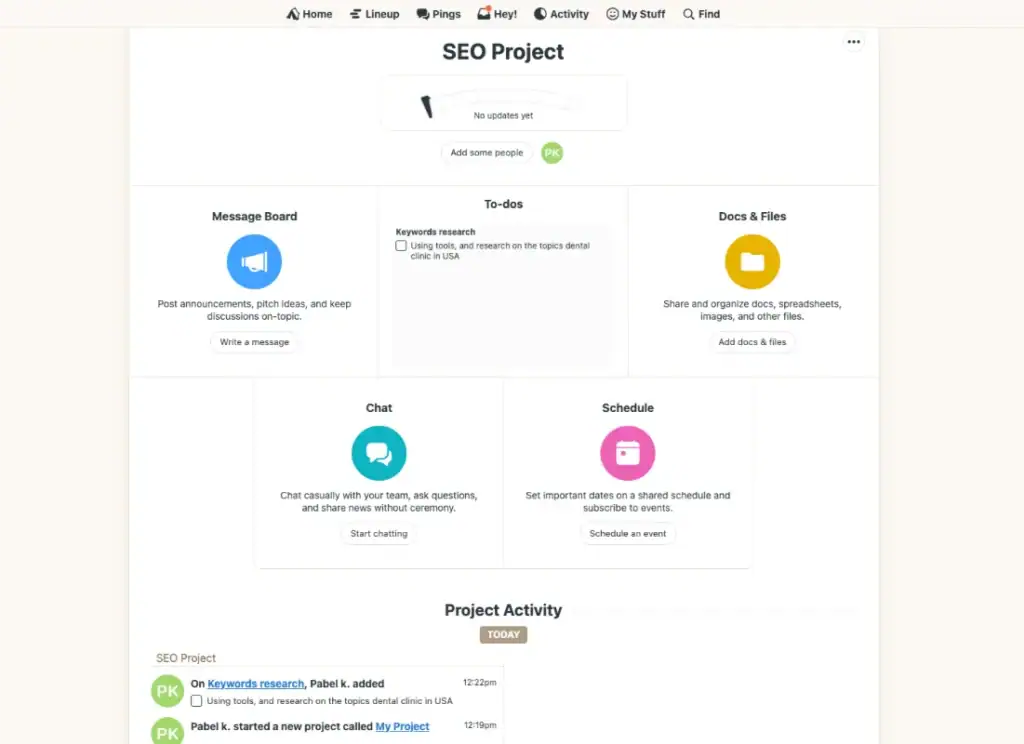
Basecamp is a simple project management and team collaboration platform that helps startups organize projects, communicate with teams, share files, and keep work updates in one place. It focuses on simplicity by replacing scattered emails, chats, and documents with a centralized workspace.
A good choice for startups that want an easy-to-use project management tool without complex workflows or a steep learning curve. It helps small teams stay organized, manage tasks, track project discussions, and maintain clear communication.
Basecamp works best for early-stage startups, small teams, and remote companies that need a simple way to manage projects, collaborate with teammates, and keep everyone aligned without advanced project management complexity.
It focuses on simplicity, which means startups that need advanced features like detailed reporting, resource planning, CRM, time tracking, or complex automation may require additional tools.
Key Features for Startup Project Management
- Project Organization: Create separate project spaces to manage tasks, discussions, files, and deadlines.
- To-Do Lists: Assign tasks, set responsibilities, and track project progress.
- Team Communication: Keep messages, announcements, and project discussions organized.
- File Sharing: Store and share project documents in one central location.
- Schedule Management: Track important deadlines, milestones, and project events.
- Automatic Check-ins: Collect team updates without unnecessary meetings.
- Client Collaboration: Invite clients to specific projects and share relevant updates.
Pros and Cons
| Pros | Cons |
| Simple and easy-to-use interface | Limited advanced project management features |
| Strong team communication and collaboration | Lacks advanced reporting and analytics |
| Keeps projects organized in one place | Limited customization options |
| Good for remote teams | Not ideal for complex workflows |
| Reduces email and communication clutter | Limited time tracking and resource management |
Pricing
- Basecamp Plus: $15/user/month
- Basecamp Pro Unlimited: $299/month (annual billing)
- Free Trial: 30-day free trial available
Best value for: Small startups that prioritize simple collaboration, communication, and project organization over advanced project management features.
Basecamp’s User Feedback
👍 It provides areas where I can make to-do lists as well as upload, save, and distribute files to other team members.“
– Trusted Review on Capterra
👎 The only annoying function is that it sent too many notifications to my inbox, and it was hard to ensure that I do not miss important information.
– Macaire Z
4. Wrike
Wrike is a flexible project management platform that helps startups manage projects, organize team workflows, track progress, and improve collaboration. It combines task management, dashboards, automation, reporting, and timeline views to give teams better control over their work.
It is a good option for startups that need more structured project management as they grow. Its customizable workflows, Gantt charts, and reporting tools help teams manage multiple projects, improve visibility, and create efficient processes.
A best for growing startups, product teams, and companies managing complex projects with multiple teams, deadlines, and dependencies. It helps teams improve planning, resource management, and project tracking.
Wrike may feel too complex for early-stage startups that only need simple task management. Some advanced features and customization options require higher-tier plans.
Key Features for Startup Project Management
- Project & Task Management: Create tasks, assign responsibilities, set deadlines, and track project progress.
- Custom Workflows: Build workflows that match your startup’s unique processes.
- Gantt Charts & Timeline Views: Plan schedules, manage dependencies, and visualize project timelines.
- Team Collaboration: Keep discussions, files, and project updates connected.
- Custom Dashboards: Create personalized views to monitor important project metrics.
- Automation: Reduce repetitive tasks with workflow automation.
- Resource Management: Track team workload and manage project capacity.
- Reports & Analytics: Monitor project performance, productivity, and business insights.
- Integrations: Connect with tools like Slack, Google Drive, and Microsoft Teams.
Pricing
- Free: $0/user/month
- Team: $10/user/month
- Business: $25/user/month
- Pinnacle & Enterprise: Custom pricing
Free trial: Available for paid plans.
Pros and Cons
| Pros | Cons |
| Highly customizable workflows | Steeper learning curve for beginners |
| Strong project tracking and reporting | Can feel complex for small teams |
| Excellent team collaboration features | Advanced features require higher plans |
| Powerful dashboards and automation | More expensive as teams grow |
| Good for managing complex projects |
User Reviews
Wrike feels like a complete package when it comes to project management and work collaboration tools. On top of that, it’s by far one of the most leading-edge options in terms of AI and innovation, helping revolutionize how we work every day.
– G2 review
👎 It can be a bit overwhelming to keep track of all the different windows and areas of the system. A little too complex when many different teams are involved.
– G2 review
5. Airtable: Best Flexible Project Management Tool for Startups
Airtable is a flexible project management and workflow platform that combines spreadsheet-style data organization with project views, automations, dashboards, and team collaboration.
It is useful for startups because teams can build project workflows around the way they already work. You can manage tasks, track milestones, organize project data, and create custom views without relying on a rigid project management structure.
Can become harder to manage when workflows rely heavily on complex formulas, automations, or large databases. Some users also report a learning curve when setting up more advanced systems.

Key Features for Startup Project Management
- Multiple Project Views: Manage work using List, Grid, Kanban, Calendar, Dashboard, and Timeline-style views.
- Task & Milestone Tracking: Organize responsibilities, deadlines, priorities, and project progress.
- Custom Workflows: Build project systems that match your startup’s own process.
- Automation: Automate repetitive updates, notifications, and workflow actions.
- Project Dashboards: Create visual dashboards to monitor progress and important project data.
- Team Collaboration: Share updates, comment on work, and keep project information centralized.
- Resource Management: Organize team assignments and improve visibility across projects.
- Integrations: Connect project workflows with popular business and productivity tools.
Pricing
- Free: $0
- Team: $20/user/month billed annually, or $24 billed monthly
- Business: $45/user/month billed annually, or $54 billed monthly
- Enterprise Scale: Custom pricing
Pros and Cons
| Pros | Cons |
| Highly flexible and customizable | Learning curve for advanced setups |
| Easy to create custom project workflows | Can become complex with formulas and large databases |
| Strong automation features | Some useful features require paid plans |
| Multiple project views | Limited compared with dedicated PM tools in some areas |
| Good for organizing project data | Advanced customization can take time to configure |
User Reviews
👍 Amazing tool! A lot of automations to spike your productivity.
– Giorgi Z
👎 Violating CAN‑SPAM Act. I have never had an account with this company and don’t even know who they are. They started sending me emails with no way to unsubscribe. I went to their website and they do not give an option to unsubscribe, which is in violation of the CAN‑SPAM Act.
– Unhappy
6. Asana: Best Task Management Software for Startups
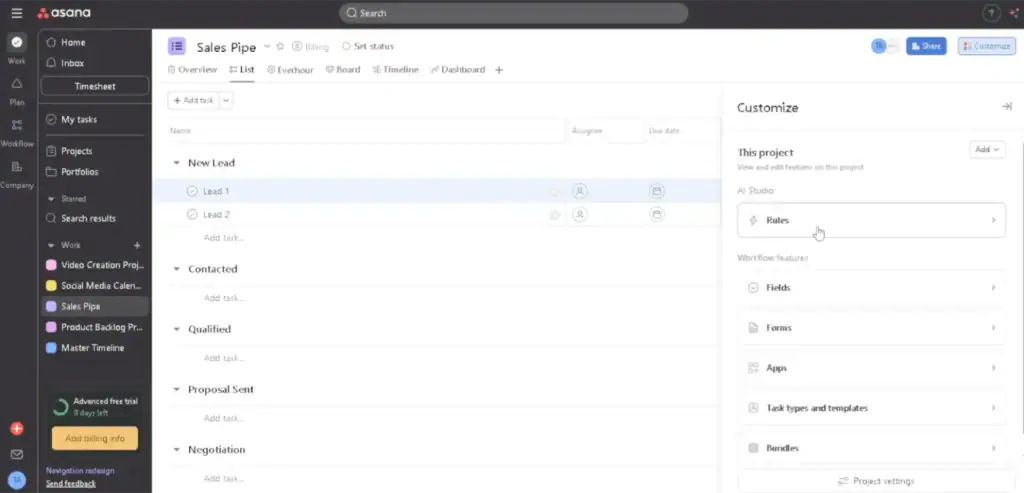
Asana is a popular project management platform that helps startups organize tasks, manage projects, track deadlines, and improve team collaboration. It provides flexible views like lists, boards, timelines, and calendars to help teams plan and manage work.
It is a strong choice for startups because it makes project planning simple and keeps teams aligned. Its intuitive interface helps small teams create workflows, assign responsibilities, track progress, and manage daily operations without complex setup.
Mainly focused on task and project management. Startups that need built-in CRM, advanced billing, time tracking, or client management features may need additional tools. Some advanced features are also limited to higher-tier plans.
Key Features for Startup Project Management
- Task Management: Create tasks, assign owners, set priorities, and track completion.
- Project Views: Manage projects using List, Board, Calendar, and Timeline views.
- Team Collaboration: Share updates, comment on tasks, and keep communication connected.
- Project Tracking: Monitor deadlines, milestones, and overall project progress.
- Workflow Management: Create repeatable processes with templates and custom workflows.
- Automation: Automate routine tasks, reminders, and project updates.
- Reporting Dashboards: Track project performance and team productivity.
- Integrations: Connect Asana with tools like Slack, Google Workspace, Microsoft Teams, and more.
Pricing
- Personal: Free
- Starter: $10.99/user/month (billed annually)
- Advanced: $24.99/user/month (billed annually)
- Enterprise: Custom pricing
Pros and Cons
| Pros | Cons |
| Easy-to-use interface | Limited built-in time tracking and billing |
| Strong task and project management | Advanced features require paid plans |
| Flexible project views | Can become complex for large projects |
| Good team collaboration features | Limited CRM and client management features |
| Helpful automation and templates | Too focused on tasks compared to all-in-one platforms |
Asana’s User Feedback:
✌️ I initially used this for just personal and team project tracking and collaboration. Has enough features and options for our needs. We later expanded usage to create project request forms and automated task assignment.
–Trusted Review on G2
✌️ Asana is ideal for remote teams looking for a structured, easy-to-use task management system. It offers automated workflows, collaboration tools, and intuitive project tracking, making it perfect for businesses that need to streamline remote work operations.
-Trusted Review on G2
7. ClickUp: Best All-in-One Project Management Software for Startups
ClickUp is an all-in-one project management platform that helps startups manage tasks, projects, documents, communication, goals, and team workflows in one place. It combines multiple project management tools into a single workspace.
It is a strong option for startups because it offers a wide range of features and customization options. Teams can create workflows that match their business needs, manage projects through different views, automate repetitive tasks, and improve collaboration without switching between multiple tools.
ClickUp’s large feature set can feel overwhelming for new users. Setting up the platform properly may require time, and some teams may find the interface complex compared to simpler project management tools.
A best for startups, remote teams, and growing companies that need a flexible platform to manage multiple projects, customize workflows, and keep different business operations connected in one workspace.
Key Features for Startup Project Management
- Task & Project Management: Create tasks, assign responsibilities, set priorities, and track project progress.
- Multiple Project Views: Manage work with List, Board, Calendar, Timeline, and Gantt chart views.
- Custom Workflows: Build workflows using custom statuses, fields, and task structures.
- Team Collaboration: Share comments, documents, updates, and communicate within projects.
- Goal & Milestone Tracking: Set company goals and track progress toward important milestones.
- Automation: Automate repetitive tasks, reminders, and workflow actions.
- Dashboards & Reporting: Monitor project performance, team productivity, and key metrics.
- Time Tracking: Track work hours and understand how teams spend their time.
- Integrations: Connect with tools like Slack, Google Drive, Microsoft Teams, and other business apps.
Pricing
- Free Forever: $0
- Unlimited: $10/user/month (billed monthly)
- Business: $19/user/month (billed monthly)
- Enterprise: Custom pricing
Pros and Cons
| Pros | Cons |
| Large feature set for managing all types of projects | Can feel overwhelming for beginners |
| Highly customizable workflows | Initial setup requires more time |
| Multiple views and powerful task management | Too many features for small simple teams |
| Strong collaboration and automation tools | Some users report performance issues |
| Good value compared with using multiple tools | Advanced features may require paid plans |
User Feedback
👍 Honestly, what I like most about ClickUp is that it doesn’t force my team into a rigid way of working, it adapts to us. The combination of Spaces, Folders and Lists with the different views (I switch between board and Gantt all the time) makes it easy to organize everything from a quick sprint to broader project planning.
– Pedro A.
👎 One thing you managed really well, but one problem is that you didn’t mention how to use it. I also faced an issue because I don’t know how to use some features. I suggest you make videos for every feature so people can easily learn how to use them. Also, please create a section where people can find and watch these videos to learn.
– Awais S.
Which Project Management Software Should Your Startup Choose?
The best project management software depends on your startup’s team size, workflow, project complexity, and budget. After reviewing and comparing multiple project management tools, these are the platforms that stand out for different startup needs.
Choose OneSuite if you
OneSuite is the best choice for startups that want to manage projects, clients, time tracking, billing, CRM, and reporting in one place. Instead of paying for multiple tools, startups can manage their complete workflow with a single platform.
With pricing starting at $9/user/month, OneSuite gives startups access to essential features like project management, client management, time tracking, invoicing, reports, and team collaboration. It is ideal for service-based startups that want a simple, scalable solution without unnecessary complexity.
Choose Teamwork if you
Teamwork is a great option for startups that manage multiple client projects and need better control over resources, workloads, and project delivery.
Its workload planning, time tracking, and client collaboration features help teams understand capacity, balance assignments, and deliver projects on schedule.
Choose Basecamp if you
Basecamp is best for startups that prefer a simple and easy-to-use workspace for communication, task organization, and project updates.
It removes unnecessary complexity and helps small teams keep discussions, files, and tasks organized in one place.
Choose Wrike if you
Wrike is designed for growing startups that need advanced project planning, customizable workflows, reporting, and resource management.
It works well for teams handling multiple departments, complex projects, and detailed processes.
Choose Airtable if you
Airtable is ideal for startups that want to create customized systems for managing projects, data, and operations.
Its database-style approach allows teams to build workflows around their unique processes.
Choose Asana if you
Asana is a strong choice for startups that want an intuitive platform to organize tasks, manage deadlines, and improve team collaboration.
It is easy to adopt and works well for teams that need clear project visibility without complex setups.
Choose ClickUp if you
ClickUp is best for startups that want an all-in-one workspace with extensive customization options, automation, dashboards, and project views.
It provides many features but may require more setup time compared to simpler tools.
Final Recommendation
Why OneSuite Is a Strong Choice for Startups ?
Tools like OneSuite, Teamwork, and Basecamp can help startups manage projects, but growing businesses need more than task tracking. They need a platform that connects project management, client communication, time tracking, billing, and reporting in one place.
OneSuite is built for startups that want a complete business workflow without managing multiple disconnected tools. From Kanban boards and task management to client portals, approvals, invoices, CRM, and reports, OneSuite helps teams manage the full project lifecycle.
With $9/user/month pricing, OneSuite gives startups an affordable way to organize projects, collaborate with clients, track productivity, and scale operations from one platform.
FAQs
What Is Project Management Software for Startups?
Project management software helps startups plan projects, organize tasks, collaborate with teams, track progress, and manage deadlines in one place. It gives founders and teams better visibility into their work without relying on spreadsheets or scattered tools.
Is free project management software enough for startups?
Free project management software can work for very early-stage startups with simple needs. However, growing startups often need advanced features like reporting, client management, time tracking, automation, and billing to scale efficiently.
Can project management software help remote startup teams?
Yes. Project management software helps remote teams stay connected by keeping tasks, deadlines, files, communication, and project updates in one centralized workspace.
Why All-in-One Project Management Platforms Are Better for Startups
All-in-one platforms help startups avoid managing multiple disconnected tools for projects, clients, time tracking, CRM, and billing. They reduce costs, simplify workflows, and give teams a complete view of their operations as they grow.
Start exploring OneSuite today
No credit card is required