
7 Best Teamwork Alternatives for Agencies in 2026

September 3, 2026
Teamwork is good for project management and team collaboration. But many teams start looking for alternatives when they need better automation, easier workflows, stronger reporting, or more features in one platform.
Some businesses want a cleaner project management system. Others need CRM, invoicing, client portals, or better resource planning.
In this guide, I compared the 7 best Teamwork alternatives to help you find the right platform based on your workflow, team size, and business needs.
Why Teams Look for a Teamwork Alternative
Teamwork.com is a strong project management platform for service teams. It brings projects, resources, time tracking, and financial visibility into one place, which makes it useful for agencies and client-based businesses.
Teamwork has a 4.4-star rating on G2, a 4.5-star rating on Capterra, and strong user feedback for project management, collaboration, and task organization.
When it comes to its downsides, users commonly mention the learning curve, interface complexity, limited workflow flexibility, and scaling costs for larger teams.
Let’s look at the most common Teamwork limitations based on real user reviews.
Key Limitations of Teamwork
That’s why many businesses start looking for a better-fitting alternative.
- Steep Learning Curve: The platform includes many features, which can overwhelm new users. Teams often need time and training before they can use it efficiently.
- Complex Navigation: As projects grow, it becomes harder to find tasks, files, or updates. Important items can get buried under multiple layers.
- Limited Workflow Flexibility: Custom workflows, Agile processes, and advanced task structures are not as flexible compared to modern tools.
- Not a Complete All-in-One Solution: While it covers project management and billing, it still lacks full CRM, sales pipeline, and end-to-end client management.
- Reporting Limitations: Reports and dashboards are available, but customization is limited. It can be difficult to create clear, high-level insights for decision-making.
- Performance Issues with Large Projects: Some users experience slow loading or lag when managing large or complex projects.
- Pricing Can Scale Quickly: Per-user pricing makes it more expensive as teams grow, especially when advanced features are needed.
- Interface Not Always Intuitive: The UI can feel cluttered, and some features are not easy to access without multiple clicks.
- Inconsistent Team Usage: Different team members may use the system differently, which can lead to disorganized workflows and communication gaps.
- Limited Client Experience: Client collaboration features exist, but they are not as smooth or centralized as in newer all-in-one platforms.
7 Best Teamwork Alternatives Compared
I researched and compared several tools to find the best Teamwork alternatives for different teams.
After reviewing features, pricing, user feedback, and common Teamwork limitations, I shortlisted 7 tools that offer better options for agencies, freelancers, service teams, and growing businesses.
Let’s see
1. OneSuite — Best Teamwork Alternative for Agencies
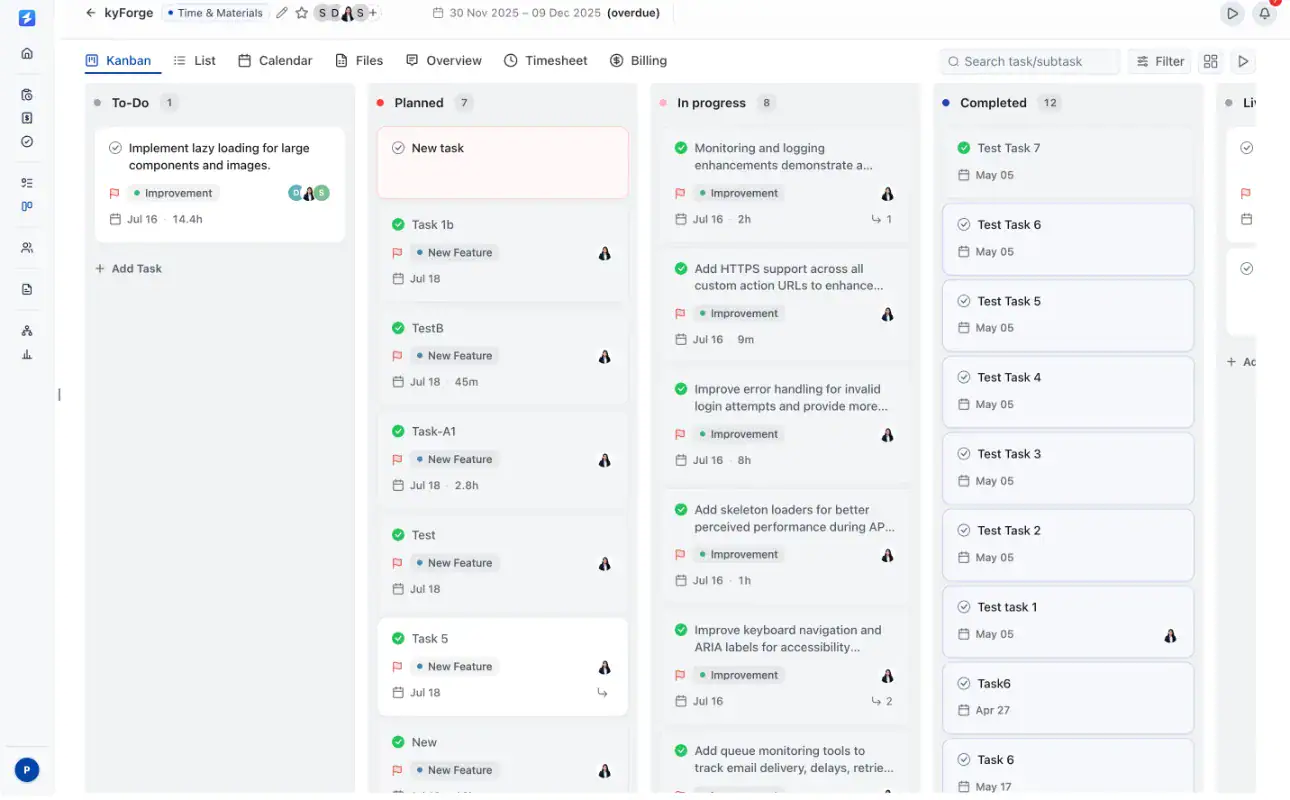
OneSuite is an all-in-one agency platform designed to manage clients, projects, billing, documents, and communication from one place. It works as a strong Teamwork alternative by covering the full client lifecycle, not just project management.
OneSuite helps agencies run their entire workflow in one system. You can manage leads, clients, tasks, invoices, documents, and communication without switching between multiple tools. It is built for agencies, freelancers, and service teams that want a simpler and more connected setup.
Teamwork focuses on project execution, time tracking, and financial visibility. OneSuite goes further by combining CRM, client portal, billing, and automation into one platform. This allows teams to manage everything from lead to payment without relying on extra tools.
Key Features That Make OneSuite Stand Out
- Branded client portal: White-label portal with your own domain, logo, and client dashboard
- Built-in email inbox: Manage client communication without switching tools
- Project and task management: Assign tasks, track progress, and manage delivery in one place
- Invoicing and payments: Create invoices, track payments, and manage billing easily
- CRM for agencies: Manage leads, clients, and pipelines in a structured workflow
- Time tracking and timesheets: Track billable hours without external apps
- Approval and feedback system: Keep client approvals and feedback organized
- Documents and e-signatures: Send proposals, contracts, and collect signatures
- Workflow automation: Automate onboarding, emails, and task assignments
Pricing
- Monthly billing: $9 per user per month
- Annual billing: $7 per user per month
Every plan includes a 14-day free trial, white-glove onboarding, unlimited clients and projects, and a 30-day money-back guarantee. Annual billing saves 20%.
👉 Compared to Teamwork’s per-user pricing, OneSuite is more cost-efficient for growing teams.
Pros and Cons
| Pros | Cons |
| Easy to use and clean interface | Some features still evolving |
| All-in-one system (CRM + PM + Billing) | No forever free plan |
| Great for managing multiple client projects | All-in-one tools take time to fully adopt |
| Built-in automation saves time | |
| Cost-effective for teams (multi-user plans) |
OneSuite’s User Feedback 🌟 4.8/5
👍 Always improving; Great support! Thank you!
– Jacquelyn L.. G2
👎 As any app that is in their early phase of development, Onesuite has some bugs that needs to be ironed out. But none of that them were breaking the operations. They are mostly UI related and I am already seeing them fixing them one be one.
– Raabit H.
2. Asana — Structured Teamwork Alternative for Cross-Functional Teams
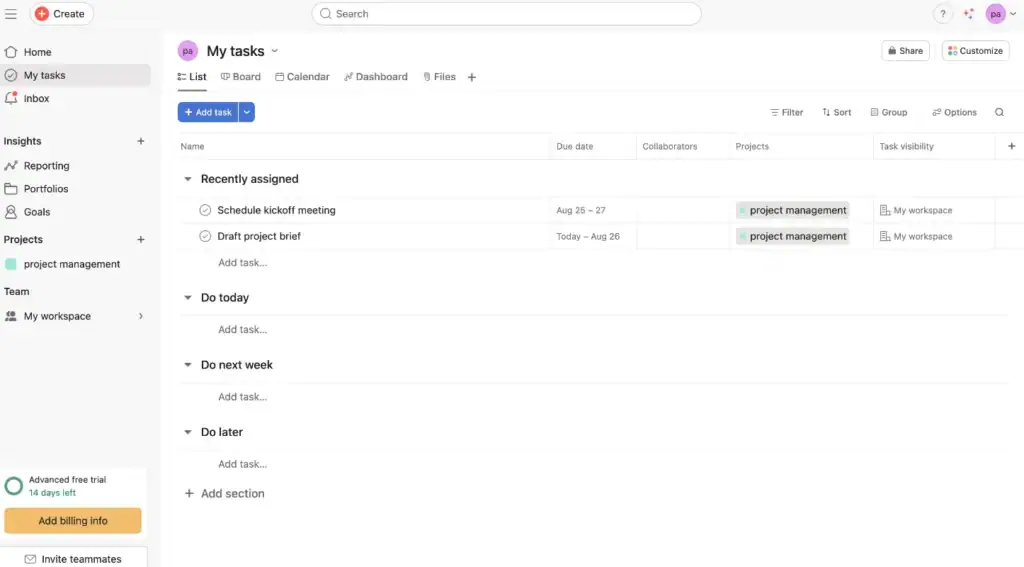
After reviewing Asana as a Teamwork alternative, it stands out as a strong option for teams that need structured project management, clear task ownership, and smooth cross-functional collaboration.
Asana helps teams organize work through lists, boards, timelines, calendars, subtasks, and dependencies. It is especially useful for marketing, product, operations, and growing teams that manage multiple projects across different departments.
Compared to Teamwork, Asana feels cleaner and easier to navigate. Teamwork has stronger financial and resource planning features, but Asana is better for teams that want simple task tracking, visual workflows, and better day-to-day project clarity.
Key Features That Make Asana Stand Out
- Multi-project timelines: Track deadlines across multiple projects in one view
- Multiple views: Kanban boards, lists, timelines, and calendar views
- Task dependencies: Manage subtasks and track task relationships
- Custom dashboards: Monitor project progress with visual insights
- Team collaboration: Assign tasks, comment, and share updates easily
- Workflow automation: Automate repetitive tasks and processes
- Basic workload tracking: Available in higher plans
Pricing
- Free Plan: Basic features for individuals and small teams
- Starter: $10.99/user/month
- Advanced: $24.99/user/month
- Enterprise: Custom pricing
👉 Compared to Teamwork, Asana follows a per-user pricing model, which can become expensive as teams scale.
Pros & Cons
| Pros | Cons |
| Clear, visual project timelines | Resource planning is limited |
| Flexible views for different team roles | Workload view needs add-ons for full capacity tracking |
| Easy to organize subtasks and dependencies | Advanced features can get pricey |
| Customizable dashboards for quick insights | Large teams may need extra tools for big-picture scheduling |
User Review🌟 4.4/5 G2
👍“I like the user-friendly interface, ease of use, and pleasant ‘social network style’ flow. One of my favorite feature is the project templates.”
“Asana is a great software—it keeps things easy and clear to follow… the way it has listings and timeline helps to navigate through the activities. I also like how it tracks milestones of a project.”
– Software Advice
👎 “I strongly advise against using Asana. Their pricing model is deceptive, and their customer service is completely unhelpful. … I was charged an outrageous amount … they refused to give any refund … their support team offers nothing but copy-paste responses.”
– A user at Reddit
3. Wrike — Advanced Teamwork Alternative for Complex Workflows
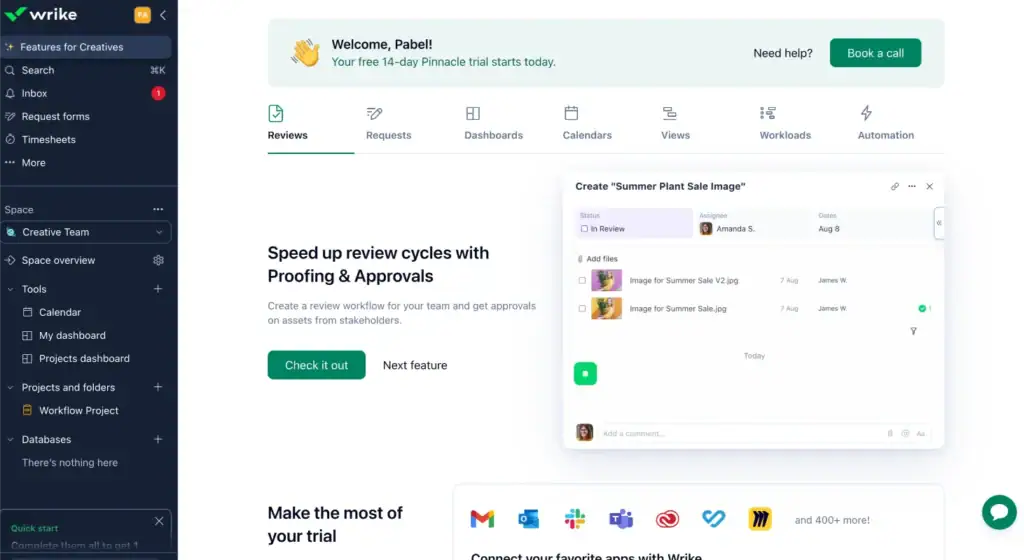
While researching Wrike as a Teamwork alternative, I found it works best for teams that need more control over complex projects. It gives teams a detailed way to manage tasks, workflows, approvals, dashboards, and reporting in one place.
Compared to Teamwork, Wrike feels more flexible for custom workflows and large-scale project visibility.
Teamwork is still strong for project tracking and financial management, but Wrike is a better fit for teams that want deeper customization, stronger automation, and more control over how work moves across departments.
Key Features That Make Wrike Stand Out
- Advanced project and task management: Manage complex workflows with tasks, subtasks, and dependencies
- Custom workflows: Build workflows based on team processes
- Multiple project views: Gantt charts, Kanban boards, tables, and calendars
- Resource and workload management: Track team capacity and assign work efficiently
- Real-time dashboards and reporting: Monitor project performance and KPIs
- Automation and AI tools: Automate tasks and reduce manual work
- Strong integrations: Connect with tools like Slack, Google Drive, Salesforce, and more
- Collaboration tools: Comments, file sharing, approvals, and feedback system
Pricing
- Free Plan: Basic task management
- Team Plan: ~$10/user/month
- Business Plan: ~$25/user/month
- Enterprise & Pinnacle: Custom pricing
👉 Compared to Teamwork, Wrike offers similar per-user pricing but becomes expensive as teams scale.
Pros and Cons
| Pros | Cons |
|---|---|
| Strong project and task management | Steep learning curve for new users |
| Powerful team collaboration features | Interface can feel complex |
| Flexible and customizable workflows | Some missing built-in features |
| Advanced dashboards and reporting | Limited templates in some workflows |
| Good for managing large projects | Higher pricing for advanced features |
User Review 🌟4.2/5 G2
👍 Wrike feels like a complete package when it comes to project management and work collaboration tools. On top of that, it’s by far one of the most leading-edge options in terms of AI and innovation, helping revolutionize how we work every day.
– G2 review
👎 It can be a bit overwhelming to keep track of all the different windows and areas of the system. A little too complex when many different teams are involved.
– G2 review
4. Productive.io — Finance-Focused Teamwork Alternative for Agencies
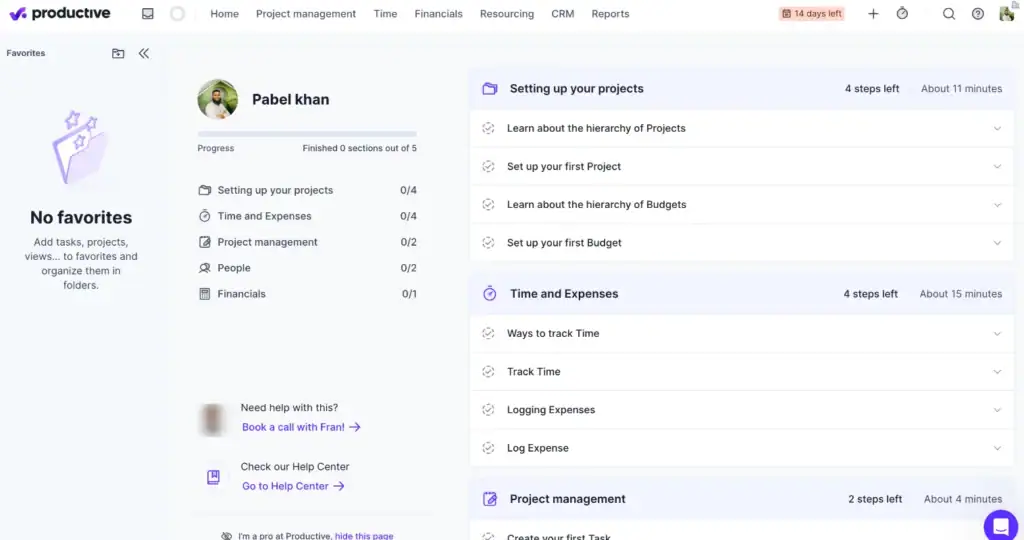
Productive is an all-in-one platform built for agencies and service teams that need more than just project management. It combines projects, resources, time tracking, budgeting, and profitability into one system.
As a Teamwork alternative, Productive stands out for its strong focus on financial visibility and resource planning. While Teamwork handles project tracking and collaboration well, Productive goes deeper into budgeting, forecasting, and profit tracking.
This makes it a better choice for teams that want to manage not only project delivery, but also how profitable each project and client actually is.
Key Features That Make Productive Stand Out
- Workload & timeline views: See team capacity and adjust workloads instantly
- Forecasting tools: Predict timelines, budgets, and resource availability
- Smart scheduling: Plan work based on team capacity and dependencies
- Time tracking & billing: Track hours and generate accurate invoices
- Budget & profitability tracking: Monitor project costs and margins in real time
- Integrations: Works with Slack, Jira, QuickBooks, Xero, Zapier, and more
Pros and cons
| Pros | Cons |
| Strong financial and budget tracking | Reporting flexibility could be better |
| All-in-one for projects, time, and resources | Some advanced features need higher plans |
| Good resource planning and forecasting | Limited flexibility in roles/permissions |
| Easy to manage client work and profitability | Learning curve for new users |
| Free guest access for clients | Integration depth could improve |
Pricing
- Essential: $9/user/month
- Professional: $24/user/month
- Ultimate: $32/user/month
👉 Compared to Teamwork, Productive is a better fit for agencies that prioritize profit tracking and resource planning, not just task management.
User Review 🌟4.7/5 G2
👍 I like that Productive suits my personal preferences on how I want to register my hours and set up my home screen. I know my colleagues prefer to use it differently than me, so the amount of customizability is enjoyable.
–Harald B.
👎 Configuring particular reports can be difficult, especially when you have to think about what specific data field is going to give you the answers you need.
–Jess T.
5. Basecamp — Simple Teamwork Alternative for Message-First Teams
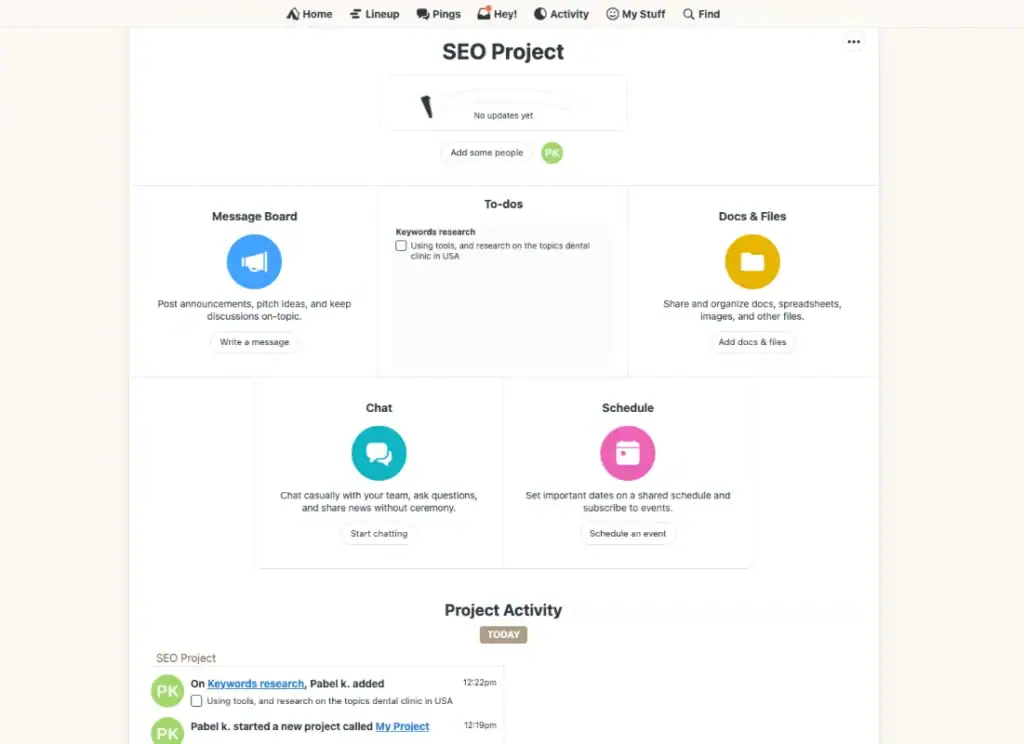
Basecamp is a simple project management and team collaboration tool built around communication, task organization, and file sharing. It works best for teams that want a clean place to manage discussions, to-dos, documents, schedules, and client updates without a complex setup.
As a Teamwork alternative, Basecamp is a good fit for small teams, freelancers, and businesses that care more about simple collaboration than advanced project tracking. Teamwork offers stronger resource planning, time tracking, and financial visibility, while Basecamp keeps things lighter and easier to manage.
Basecamp is useful for teams that want fewer meetings, fewer scattered messages, and a central space for project communication. But for larger teams that need detailed reporting, workload planning, automation, or advanced project controls, Basecamp can feel limited.
Key Features That Make Basecamp Stand Out
- Project tracking: Organize tasks, to-dos, and deadlines in one place
- Group chat & messaging: Built-in team communication with message boards and real-time chat
- Client collaboration: Invite clients to projects and keep communication centralized
- Document management: Store files, share documents, and keep everything organized
- Simple interface: Easy to use with minimal setup and learning curve
- All-in-one workspace: Combines tasks, discussions, files, and schedules
Pricing
- Free Plan: Basic features for small teams (limited to one project)
- Basecamp Plus: $15/user/month
- Basecamp Pro Unlimited: $299/month (flat pricing for unlimited users)
👉 Compared to Teamwork, Basecamp offers a unique flat pricing model, which can be cost-effective for larger teams.
Pros and cons
| Pros | Cons |
| Very easy to use and beginner-friendly | Lacks advanced project management features |
| Strong team communication tools | Limited customization options |
| Flat pricing for unlimited users (Pro plan) | Not ideal for complex workflows |
| Good for client collaboration | No advanced reporting or analytics |
| Clean and simple interface | Task management features are basic |
Basecamp’s User Feedback 🌟4.3/5
👍 It provides areas where I can make to-do lists as well as upload, save, and distribute files to other team members.“
– Trusted Review on Capterra
👎 The only annoying function is that it sent too many notifications to my inbox, and it was hard to ensure that I do not miss important information.
– Macaire Z
6. Nifty — All-in-One Teamwork Alternative for Simple Collaboration
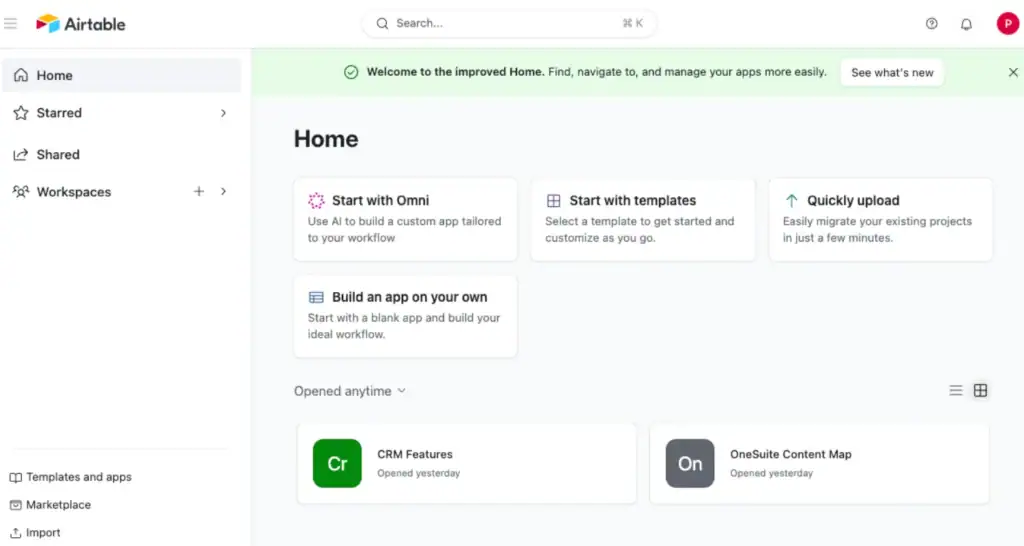
Nifty is an all-in-one project management platform designed to help teams plan, track, and collaborate without switching between multiple tools. It combines tasks, timelines, documents, discussions, and automation into a single workspace.
As a Teamwork alternative, Nifty is a strong option for teams that want a simple, centralized system for managing projects and communication. While Teamwork focuses more on structured project tracking and financial features, Nifty focuses on ease of use and combining collaboration tools into one platform.
It works best for small to mid-sized teams that want to keep everything—tasks, chat, files, and progress—organized in one place.
Key Features That Make Nifty Stand Out
- All-in-one workspace: Tasks, discussions, docs, and files in one platform
- Project timelines & milestones: Track progress with visual roadmaps
- Multiple task views: Kanban, list, calendar, and timeline views
- Team collaboration tools: Built-in chat and discussions
- Automation workflows: Automate task updates and assignments
- Document & file sharing: Keep project files and notes organized
- Integrations: Connect with Slack, Google Drive, Zoom, GitHub, and more
- Custom dashboards & reporting: Track progress across projects
Pricing
- Free Plan: $0 (basic features, unlimited members)
- Starter: ~$39/month
- Business: ~$124/month
- Unlimited: ~$399/month
👉 Compared to Teamwork, Nifty offers flat-style pricing options, which can be more predictable for growing teams.
Pros and Cons
| Pros | Cons |
| Easy to use and clean interface | Some missing advanced features |
| All-in-one collaboration system | Reporting flexibility can be limited |
| Strong task and project tracking | Notification system can be unreliable |
| Built-in chat and document sharing | App functionality issues reported |
| Good for small to mid-sized teams | Can become expensive at higher tiers |
User Feadback 🌟 4.7/5
👍 Clean and simple interface, with great tutorials and customer support. The implementation is amazing and the day to day usage saves me so much time with my team.
– Nancy S.
👎 It didnt not provide us with voice notes, it would be great if they start adding voice notes in it as it will become easier to convey the task easily to all group members altogether
–Gunjan B.
7. Bonsai — Teamwork Alternative for Freelancers and Small Service Teams
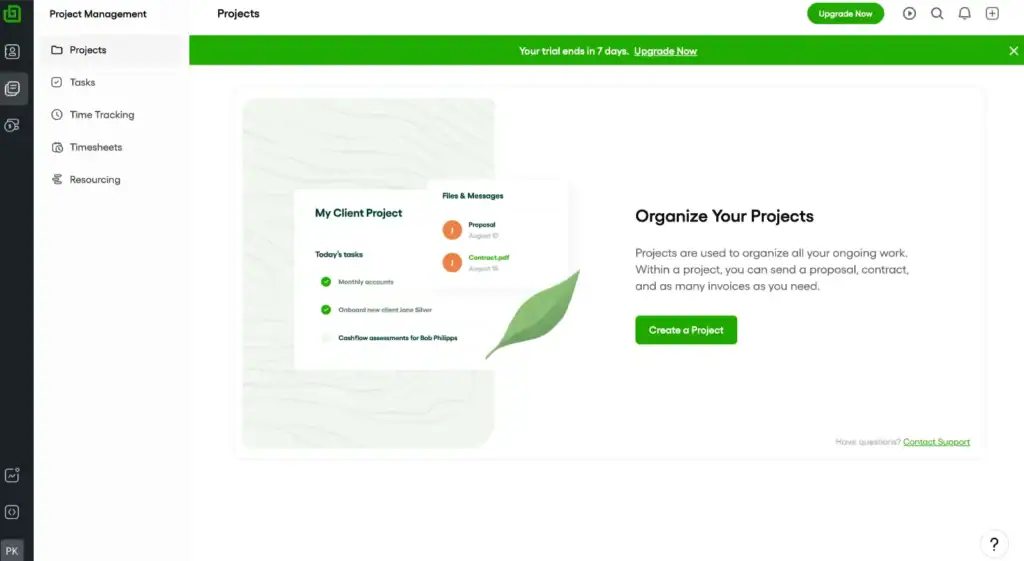
Bonsai is a business management platform built for freelancers, consultants, and small service teams. It helps users manage projects, proposals, contracts, invoices, payments, time tracking, and clients from one place.
As a Teamwork alternative, Bonsai is a good fit for smaller teams that want more control over client work and billing without using separate tools. Teamwork is stronger for larger project teams, resource planning, and structured collaboration, while Bonsai focuses more on the freelance and client-service workflow.
It works best for users who need simple project management with built-in invoicing, contracts, and payment tracking.
Key Features That Make Bonsai Stand Out
- Proposals and contracts: Create, send, and manage client agreements
- Invoicing and payments: Send invoices, track payments, and manage billing
- Time tracking: Track billable hours and connect them with invoices
- Client CRM: Manage client details, projects, and communication
- Task management: Organize client work and project tasks
- Client portal: Give clients access to project updates and files
- Forms and questionnaires: Collect client details before starting work
- Expense tracking: Track income, expenses, and project costs
Pricing
- Basic: $9/user/month
- Essentials: $19/user/month
- Premium: $29/user/month
- Elite: $49/user/month
👉 Compared to Teamwork, Bonsai is better for freelancers and small service teams that need contracts, invoices, and payments built into their workflow.
Pros and Cons
| Pros | Cons |
| Very affordable and simple | Limited advanced automation |
| Strong for freelancers and small teams | Not ideal for scaling agencies |
| Built-in time tracking | Reporting and analytics are basic |
| Clean, easy-to-use interface |
User Feadback 🌟4.6/5
👍 “Pain-free experience all around. Easy to log in, easy to find, easy to access the tools and products I need. In a matter of a few clicks. I had one issue with accessing Bonsai on the desktop app, contacted support and received a response and a solution in less than 30 minutes.
— Jonathan H. Capterra Review
👎 “As any app that is in their early phase of development, Onesuite has some bugs that need to be ironed out. But none of them were breaking the operations. They are mostly UI related and I am already seeing them fixing them one by one.”
— Katie S. Capterra Review
Choosing the Best Teamwork Alternative
After researching and comparing the best Teamwork alternatives, one thing became clear: the right tool depends on how your team works and what problems you want to solve.
Here are some strong options depending on your needs:
- Asana is best for cross-functional collaboration and visual project tracking
- Wrike works well for enterprise-level workflow and reporting needs
- Productive is ideal for agency finance and resource management
- Basecamp fits teams that value communication-focused collaboration
- Nifty offers a balanced all-in-one collaboration workspace
- Bonsai is designed for freelancers and smaller client-service teams
But if you want a modern platform that combines client management, projects, billing, automation, and communication into one system, then OneSuite stands out as the best overall Teamwork alternative.
On top of that, pricing starts at just $9/month for user, making it far more cost-efficient for growing teams compared to many per-user platforms.
With OneSuite, you can manage everything from client onboarding to project delivery and offboarding from one centralized platform.
That’s what makes OneSuite one of the best Teamwork alternatives for modern agencies and growing businesses.
👉 Book a demo with OneSuite today and see how much simpler your workflow can become.
Start exploring OneSuite today
No credit card is required