
The 9 Best Time Tracking Software for Freelancers in 2026

September 8, 2026
You finished the project. You logged what you remembered. And somewhere between the two, a few hours just vanished.
Those hours don’t disappear quietly. They show up as undercharging, late invoices, and clients who question your hours and you cave just to close it.
Here’s what that actually looks like week to week:
- A client asks for a detailed breakdown. You buy yourself 24 hours to piece one together.
- You undercharge once to avoid a dispute. Then you do it again. Then it becomes the rate.
- The client thinks the project took 10 hours. It took 22. You have no way to prove it.
All of this is lost income you’ll never get back.
That’s why I’ve put together the 9 best time tracking tools for freelancers in 2026. Every tool on this list logs what you’d otherwise forget, invoices what you’d otherwise underbill, and gives you proof when a client pushes back. Let’s find yours.
Quick Comparison: Best Time Tracking Software for Freelancers
Before you read nine full reviews, spend sixty seconds here. This table shows you what each tool does best, what it costs, and whether it covers the full loop of tracking, invoicing, and client reporting or stops halfway.
What to Look for in a Time Tracker as a Freelancer
The right time tracker should do more than record hours. Freelancers need a tool that helps them track work accurately, manage clients, create invoices, and understand where their time is going. Before choosing a time tracking tool, look for these essential features:
One-click timer with manual time entry
A good time tracker should make logging work effortless. Start and stop timers instantly while having the option to manually add hours for tasks you forgot to track.
Time tracking connected with projects
Your tracked hours should connect directly with specific projects, tasks, and clients. This helps freelancers understand how much time each project takes and whether they are working profitably.
Automatic timesheets and approvals
Instead of creating reports manually, a good tool should organize tracked hours into timesheets. Approval features help review and confirm logged work before billing clients.
Time-to-invoice conversion
Tracked hours should easily turn into invoice-ready information. This reduces manual work and helps freelancers bill clients accurately based on actual time spent.
Client and project-based hourly rates
Freelancers often charge different rates for different clients or projects. Look for tools that support custom billing rates to keep invoices accurate.
Billable and non-billable reporting
A useful time tracker should show how much time is spent on paid work versus internal tasks. Reports help freelancers improve productivity and make better business decisions.
Workflow and billing integrations
Choose a tool that connects time tracking with project management, expenses, invoicing, and reporting. This keeps your workflow connected and eliminates repetitive data entry.
The 9 Best Time Tracking Software for Freelancers in 2026
I have tested and compared the best time tracking software for freelancers based on timer accuracy, invoicing, reporting, and integrations. Here’s how each one stacks up, starting with the tool built specifically to close the gap between tracked time and getting paid.
1. OneSuite: Best All-in-one Client Portal for freelancers and solopreneurs
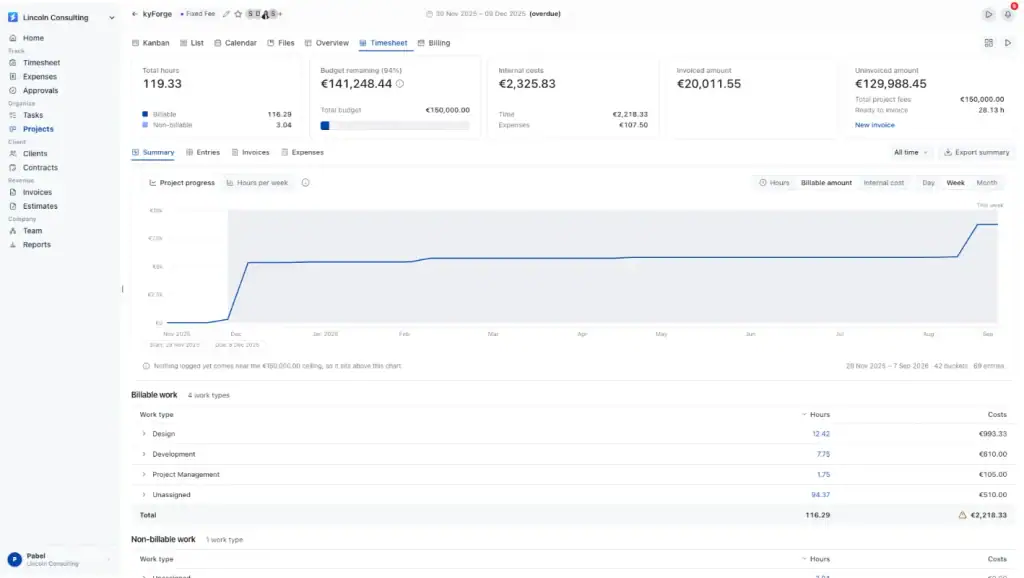
OneSuite is an all-in-one time tracking and project management platform built for freelancers and service businesses that need accurate billing, better project visibility, and complete control over their work hours.
Freelancers often lose revenue because tracked hours, project updates, approvals, and invoices are managed separately. Manual exports, missed entries, and unclear billing records can make it difficult to know how much time was actually spent on client work.
OneSuite solves this by connecting the entire workflow in one place. You can track time against projects and tasks, organize hours into timesheets, review approvals, and turn approved work into accurate invoices without repetitive manual steps.
With features like Time Tracking, Timesheets, Project Billing, Expenses, Approvals, and Reports, OneSuite helps freelancers understand where their time goes, manage billable hours, and maintain transparent records for every client.
Clients can easily review project progress, approved work, and billing details through a centralized workflow, reducing questions and improving trust.
With OneSuite, every hour is captured, every project stays organized, and every invoice is backed by clear work records, helping freelancers spend less time managing admin work and more time delivering valuable client work.
Key Features of OneSuite
- Start a timer from any task or the app workspace with one click.
- Log hours manually for work sessions you forgot to track in real time.
- Track time directly against projects, tasks, and clients to keep every hour organized.
- Set different hourly rates per client or project so every invoice reflects the correct billing terms.
- Add notes to time entries to provide clear details about completed work.
- Review all tracked hours across projects in a centralized timesheet view.
- Mark entries as Billable or Non-Billable to separate client work from internal activities.
- Submit and approve timesheets before hours are used for billing, ensuring accuracy and accountability.
- Convert approved hours into invoice-ready billing records with clear project details.
- Track project expenses alongside working hours to understand total project costs.
- Monitor billable hours, project performance, and team productivity with detailed reports.
- Give clients better visibility into project progress, approved work, and billing information.
- Manage client, project, and billing workflows from one connected platform without switching between multiple tools.
Pricings:
- Monthly billing: $9 per user per month
- Annual billing: $7 per user per month
All plans include a 14-day free trial. The pricing page also mentions white-glove onboarding, a 30-day money-back guarantee, and annual savings.
Pros and cons:
User feedback: G2 Ratings 4.8
👍
— Pedro C. | G2 Review
“I have been using it for approximately 5 months to manage my clients’ projects and to assign tasks to my employees. I like how easy and intuitive it is, as you don’t need to explain to your employees where to find their assignments and documents. It is very functional.”
👎
— Jacquelyn L. | G2 Review
“Always improving; Great support! Thank you!”
2. Everhour: Best for Project Budgets and Integrations
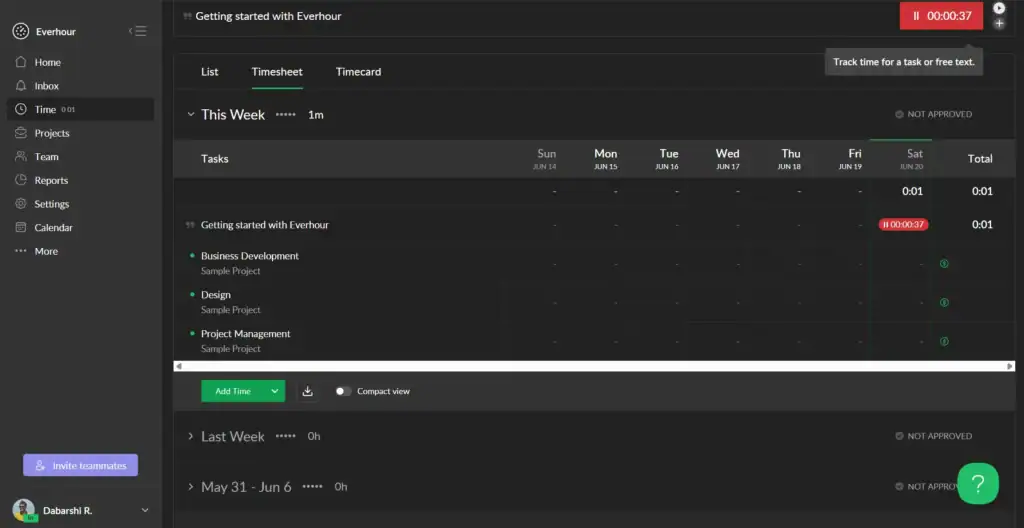
Everhour is worth it if Asana, ClickUp, Notion, Jira, or Trello is where your work lives. The timer sits inside those tools, so tracking is frictionless.
The problem starts at billing. Everhour tracks the time, QuickBooks or Xero handles the invoice, and you chase the client manually.
Three tools to finish one task. And if a client disputes the hours, there’s no portal to point them to. You pull a report, send it, and take it from there.
Key Features
- Timer and manual entry synced directly inside Asana, Trello, Basecamp, and other PM tools
- Real-time project budget tracking against estimates
- Seamless reporting on hours by client, project, or task
- iPhone app for tracking on the go
Pricing:
Pros and Cons:
User Feedback: G2 Ratings 4.7
👍
— Timothy B. | G2 Review
“As a freelancer its important to track your time that you working on any project. Everhour is a tool for just this. Its a simple extension to your browser that you can click and start tracking time.”
👎
— Timothy B. | G2 Review
“With everhour you need to stay on the page of the project your working on or make sure you remember to stop the timer if your doing something else. This can be problematic, sometimes you might be doing something like using a CRM that is updating plugins or something for the job, but it wont track that time on that page. So you need to make sure your time is correct in the end.”
3. Productive.io: Best for Agency-Style Profitability Tracking
Productive does everything this list covers and then some. Time tracking, invoicing, budgeting, resource planning, CRM, proposals, and e-signatures: it’s all there.
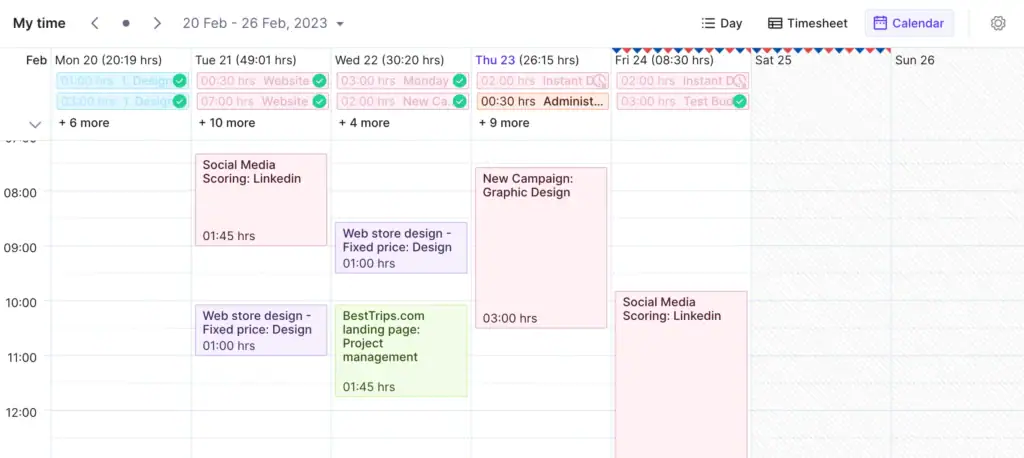
But it’s built for agencies managing multiple clients and larger teams, not a freelancer closing out a week.
The feature depth is impressive until you realize you’re paying for capabilities you’ll never open. The entry plan starts at $10 per user per month, which adds up fast when you’re a team of one.
Key Features
- Time tracking tied to project budgets and profitability margins
- Resource forecasting to see capacity before overcommitting
- Built-in reporting on billable vs. non-billable hours
- Integrations with accounting and invoicing tools
Pricing:
Pros and Cons:
User Feedback: G2 Ratings 4.6
👍
— Oliver W. | G2 Review
“I really like the budgeting system. It lets me organise my projects in a simple, easy-to-navigate way.”
👎
— Adelina T. | G2 Review
“We have trouble with the resourcing tool. It’s a little too messy and hard to read at the moment. I would like an icon for each project like clients, so it’s easy to get an overview without having to read the name of the project. It’s hard to get into everything and start using all the features at once since there are many features.”
4. Toggl Track: Best For Pure Time Tracking
Toggl Track is the tool most freelancers try first, and for good reason. Start a timer, tag the client, and stop the timer. That’s the entire workflow. It’s clean, fast, and reliable enough that over five million people use it daily.
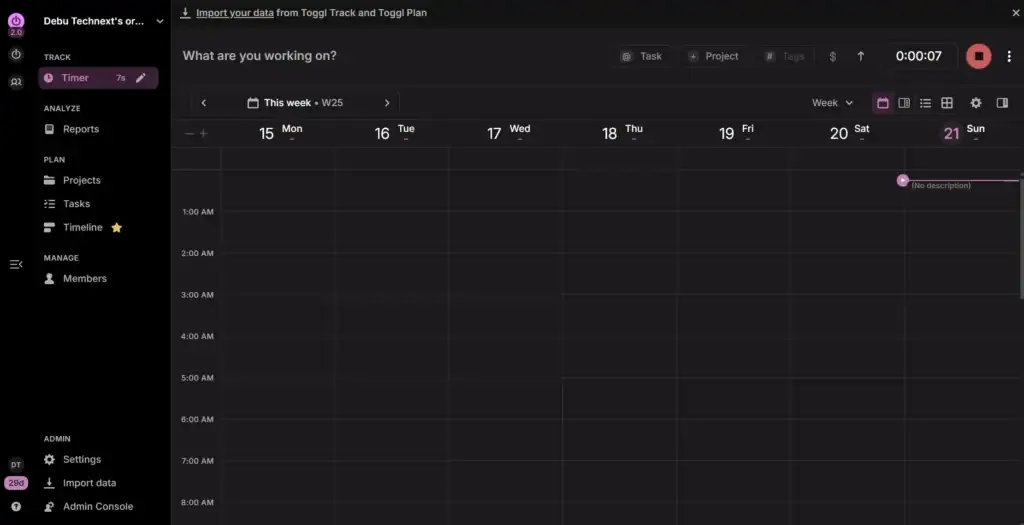
Where it stops is exactly there. There’s no invoicing, no client portal, and no way to turn tracked hours into a bill without moving to another tool.
If you’re just starting out and need to understand where your time goes before you figure out how to bill for it, Toggl Track is a solid first step.
If you’re already past that, it’s half a solution.
Key Features
- One-click timer across web, desktop, mobile, and browser extension
- Idle time detection and tracking reminders
- Detailed, exportable reports by client and project
- 100+ integrations including Asana, Trello, and Jira
Pricing:
Pros and Cons:
User Feedback: G2 Rating 4.6
👍
— Mariana V. | G2 Review
“It makes time tracking simple and easy without feeling intrusive. It’s quick to use and very straightforward. The interface is the part I like most compared to other tools: it’s clean, and you can start tracking in seconds.”
👎
— VINAY P. | G2 Review
“One limitation I’ve noticed is that some useful features, like detailed reporting or billable tracking, are only available in paid plans. For basic tracking it works well, but for deeper analysis, upgrading becomes necessary.”
5. Teamwork.com: Best for Project-Management-First Freelancers
Teamwork is a project management platform with time tracking built in, not the other way around. If you’re running a small agency or managing several client projects at once, that distinction works in your favor.
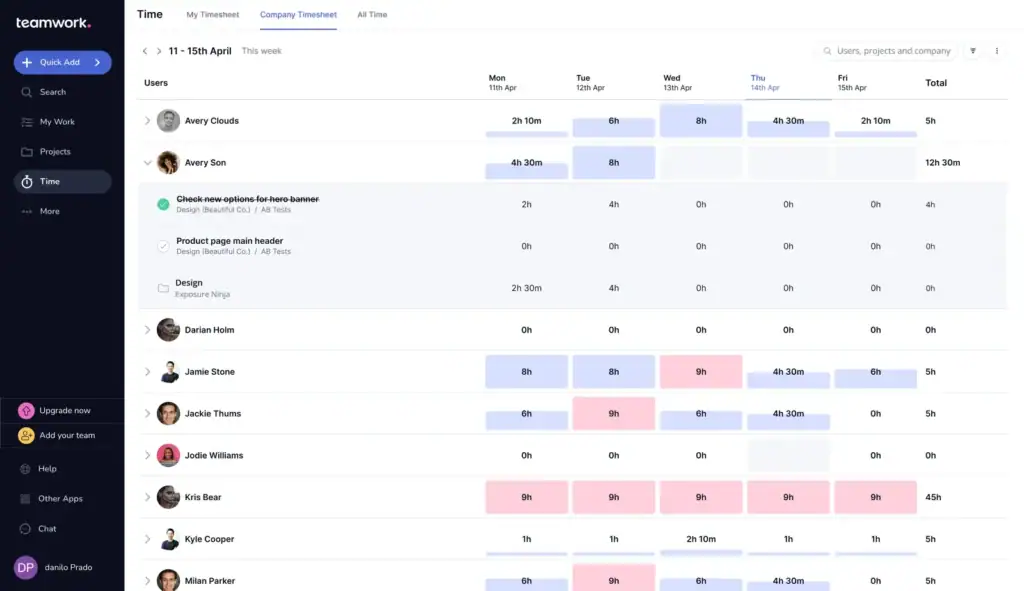
Billable hours tie directly to project budgets, clients get their own access to check progress without emailing you, and profitability reporting shows which engagements are actually worth taking.
For a solo freelancer it’s a different story. The timer is manual and task-by-task, which breaks down fast when you’re switching between clients mid-day.
The free plan caps you at two projects, and the paid entry plan starts at $13.99 per user per month.
Key Features
- Time tracking tied to tasks, milestones, and project timelines
- Built-in invoicing as part of the broader platform
- Team workload and capacity views
- Client-facing project boards
Pricing:
Pros and Cons:
User Feedback: G2 Rating 4.4
👍
— Soumyajit B. | G2 Review
“The integrations with other tools and the customizable workflows make it flexible enough to adapt to different business needs. Overall, Teamwork.com helps improve productivity, transparency, and team coordination in a very streamlined way.”
👎
— Jordan D. | G2 Review
“The built-in time tracking tool creates some performance friction for our workflow. When I am context-switching rapidly, having to manually toggle a timer on and off inside Teamwork.com for every micro-task slows us down. Because of this UI friction, my team sometimes forgets to log their hours accurately, which throws off our resource reporting.”
6. Dubsado: Best for CRM and Proposals-First Freelancers
Dubsado is a CRM that added a time tracker, not the other way around. Its strength is the intake flow: branded proposals, e-signature contracts, automated follow-ups, and invoicing, all connected in one sequence.
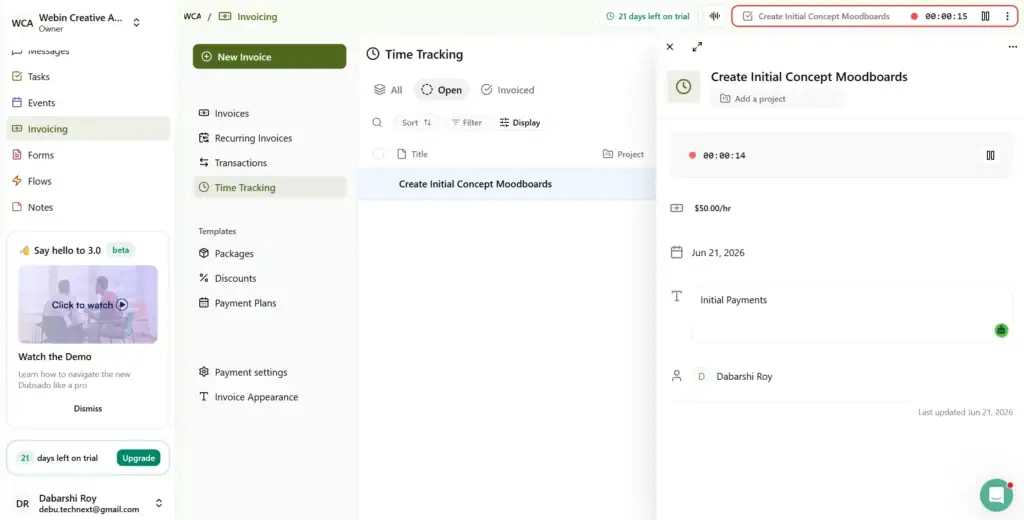
For creative freelancers who lose hours to client admin rather than untracked billable time, that’s exactly the problem it solves.
The gap is that time tracking only comes with the Premier plan at $55 a month, setup takes most freelancers 15 to 25 hours to configure, and once a client is onboarded, the project management side thins out quickly.
Key Features
- Lead capture, proposals, and contracts in one workflow
- Time tracking tied to projects for billing
- Client portal for forms, contracts, and invoices
- Automated workflows for onboarding new clients
Pricing:
Pros and Cons:
User Feedback: G2 Ratings 4.3
👍
— Haruka K. | G2 Review
“I switched from honeybook and it’s easy to use. The function is straightforward and they have a free course that can help you learn about the tool. I liked that they upload up to 10 forms for you.”
👎
— Haruka K. | G2 Review
“I had my first health coaching client and I issued an invoice using stripe on Dubsado. My client was almost charged 100 times more than what I sent invoice for. I contacted to stripe but stripe asked me to contact Dubsado and Dubsado never admitted or was able to explain their fault. So I’m considering of switching to a different CRM system”
7. Harvest: Best Long-Standing Freelancer Favorite
Harvest is a time tracking and invoicing tool. Log hours, generate an invoice, collect payment via Stripe or PayPal, sync to QuickBooks or Xero. The workflow is straightforward and reliable.
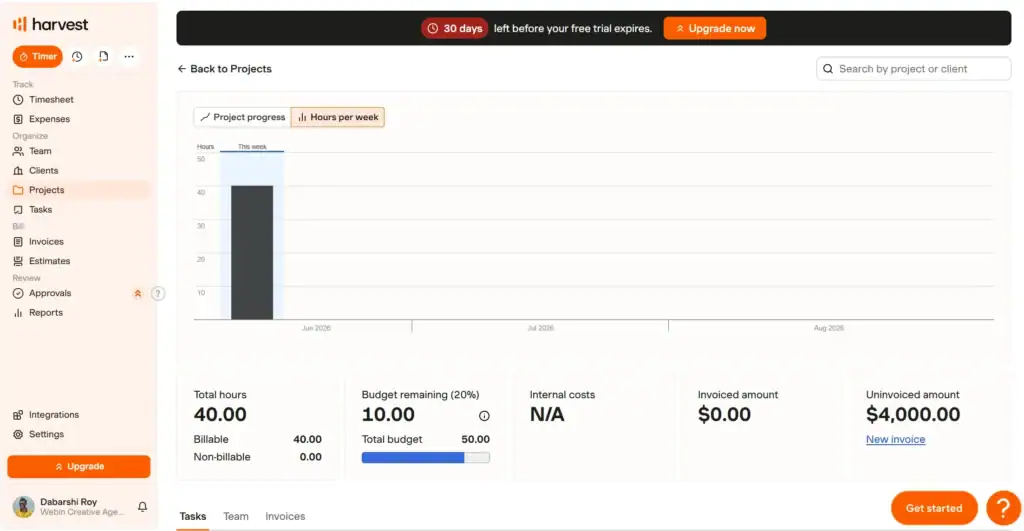
The problems start at the edges. No client portal means no place to send a client who questions your bill. No project management means you still need another tool for the actual work.
And since the Bending Spoons acquisition in 2025, pricing has become unpredictable, with some users seeing renewal increases of ten times their original bill with no warning.
Key Features
- Timer and manual entry with project-level tracking
- Automatic invoice generation from tracked hours
- Expense tracking alongside time
- Integrations with QuickBooks, Asana, Trello, and PayPal
Pricing:
Pros and Cons: G2 Rating 4.3
User Feedback:
👍
— Timothy D. | G2 Review
“This product is great for time tracking and invoicing. The interface is simple but still effective”
👎
— Timothy D. | G2 Review
“The number one thing is the recent private equity acquisition of Harvest increased the price by 600%. It increased 6x overnight for us without warning. The minimum to use the product now with “unlimited” usage of the app is $1,500 per month, plus $14/mo/user. So unless you’re ready to spent $20k+ per year on time tracking and invoicing, look elsewhere”
8. Bonsai: Best Contracts + Invoicing + Time Tracking Bundle
Bonsai handles the full client lifecycle from first proposal to paid invoice. Track time against a project, convert hours to an invoice in one click, and give clients a branded portal to view work and pay without chasing you for updates.
It’s a clean workflow for solo freelancers who bill by the hour.

The weak points are payment processing and scale.
Initial payouts can take 7 to 10 business days and some users have reported funds held without explanation.
And while the entry price is reasonable solo, the per-user model gets expensive quickly once you bring in a collaborator or subcontractor.
Key Features
- Timer with automatic time-to-invoice conversion
- Built-in contracts and proposal templates
- Client CRM and project tracking
- Tax and expense tracking for freelancers
Pricing:
Pros and Cons:
User Feedback: G2 Rating 4.3
👍
— Chelise B. | G2 Review
“It’s incredible to send contracts, proposals, invoices, and forms to clients all in the same platform. I love that Bonsai is a one-stop shop for freelancers and small businesses.”
👎
— Chelise B. | G2 Review
“Some features seem messily put together and poorly thought out for the end user. I hope Bonsai will continue to improve these.”
9. Hubstaff: Best for Managing Subcontractors
Hubstaff is built for teams that need to prove where their hours went, not just log them. Screenshots, activity rates, app and URL tracking, and keystroke monitoring give managers visibility over remote workers.
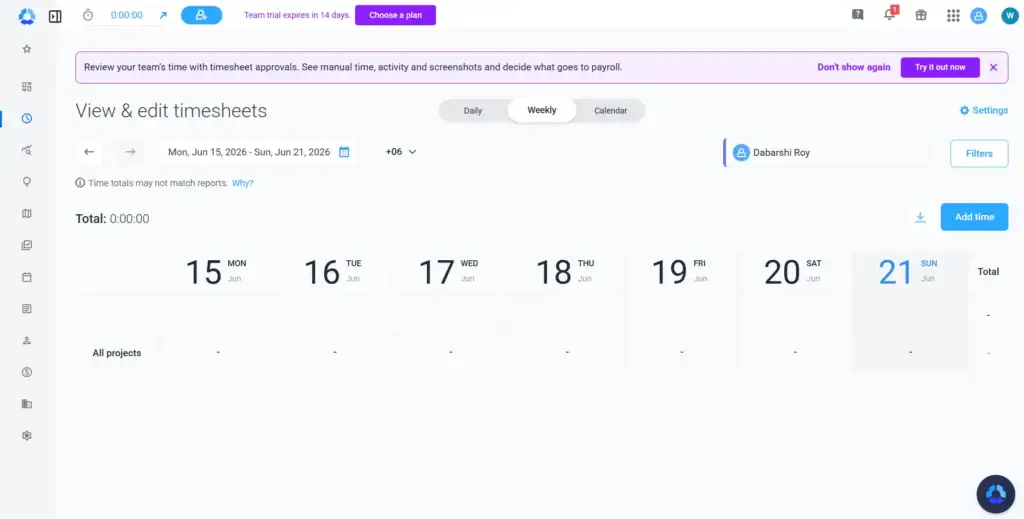
It also handles time-to-invoice, project budgets, and payroll from the same platform.
For a freelancer, that monitoring layer is excess. You’re not managing a team and your client isn’t your employer.
The two seat minimum on paid plans means you’re paying for a ghost seat from the start, and there’s no client portal to close the loop when someone questions a bill.
Key Features
- Timer and manual entry with offline mode and automatic sync
- GPS and location tracking for field-based work
- Activity monitoring and optional screenshots for accountability
- Invoice generation and project budgeting built in
Pricing:
Pros and Cons:
User Feedback: G2 Ratings 4.4
👍
— Kate | Account Manager R. | G2 Review
“The monitoring features and analytics are really helpful for us since our company is made up entirely of remote workers. I also really like the smart notifications, along with the real-time shift and schedule tracking.”
👎
— Kate | Account Manager R. | G2 Review
“The bugs can be really frustrating sometimes. Also, I find the PTO feature a bit difficult to understand. I don’t like that late notifications sometimes come through late, and when I refresh the calendar page it still won’t show as on time, even if they clocked in on time. I’d prefer something more responsive and real-time, if Hubstaff could be that quick.”
Common Time Tracking Mistakes Freelancers Make
Even with the right tool, it’s easy to fall into habits that quietly cost you money.
Not tracking non-billable time.
If you only track time you intend to bill, you lose visibility into how much of your week actually goes to admin, proposals, or unpaid revisions, which makes it harder to price future work accurately.
Inconsistent rates across clients.
Charging different clients different rates without tracking which rate applies where leads to invoicing errors and makes it harder to spot which clients are actually profitable.
Manual invoice re-entry.
Re-typing tracked hours into separate invoicing software is where billable time most often goes missing, whether from rounding errors, forgotten entries, or simple copy-paste mistakes.
Ignoring reports until tax season.
Reporting only matters if you look at it. Freelancers who check their time data monthly catch scope creep and underpricing early; freelancers who wait until tax season just get a stressful audit of the year that already happened.
Which time tracking software should you pick?
If you’ve made it this far, you already know what you need. But here’s a clear breakdown for when each tool makes sense.
If you just need a timer, Toggl Track is free and gets out of your way. If your work lives inside Asana or ClickUp, Everhour tracks hours without breaking your existing workflow. If profitability and resource forecasting matter more than a simple timer, Productive.io is built for that.
If you’re managing multiple client projects and need project management and time tracking under one roof, Teamwork.com handles that better than most. If client onboarding, proposals, and contracts eat more of your week than untracked billable hours, Dubsado is the right fit.
If you want a proven no-fuss time-to-invoice workflow without the extras, Harvest still holds up. If you need contracts, proposals, and invoicing bundled at an entry price, Bonsai covers the solo freelancer lifecycle cleanly.
And if you’re managing subcontractors or a small remote team, Hubstaff has the activity tracking and payroll to match.
But if the problem is the gap between logging time and actually getting paid, and for most freelancers, that’s exactly the problem, none of those tools close the loop.
OneSuite does. Hours flow from a task to an invoice without a manual handoff. Clients check their own project status and invoices through a built-in portal instead of emailing you for updates. And nothing bills without a deliberate sign-off, so disputes start from a position of proof, not memory.
The Freelancer plan is $29/mo for up to 5 users. No feature locks, no free plan, 14-day trial to test the full workflow before you commit.
FAQ
Do I need separate invoicing software if I use a time tracker?
Only if your tracker doesn’t have invoicing built in. Tools like OneSuite, Harvest, and Bonsai handle both in one place.
How do freelancers track billable vs. non-billable hours?
By tagging each time entry as billable or non-billable as they log it, so reports can break down the split.
Start exploring OneSuite today
No credit card is required