7 Best Clockify Alternatives for Teams in 2026

November 4, 2026
Clockify earned its reputation as the time tracker you never had to pay for. Unlimited users, unlimited projects, a timer that just worked. That changed on April 21, 2026, when parent company CAKE.com announced the Free plan would be capped at 5 users, with billable hours, project time estimates, shared reports, and CSV/Excel exports moved behind a paywall. If you’re reading this, there’s a fair chance that announcement is why.
The paid tiers Clockify is nudging you toward aren’t the only option. Several tools now bundle time tracking with the pieces Clockify never had: budgets you can trust, estimates a client can approve online, and invoices that collect payment. The time tracking software market was valued at $6.1 billion in 2025 and is projected to reach $17.3 billion by 2033, according to Grand View Research, and the field has never been more crowded.
We compared seven Clockify alternatives on monthly-billed pricing (pulled from vendor pages in October 2026), budgeting and estimating depth, invoicing, timesheet approvals, and verified reviews. One of them, OneSuite, is ours. We’ve said so where it matters and kept the criticism honest for everyone, including us.
- Clockify’s free plan now caps at 5 users, and billable hours, estimates, and CSV exports moved to paid tiers in April 2026. Budgets and estimates require Pro at $9.99 per seat per month.
- OneSuite bundles time tracking, five budget types, client-approvable estimates, invoicing with online payments, and project management for $9 per user per month, with no feature tiers, making it the best value-for-money option in the world right now.
- Harvest is the closest like-for-like replacement, but per-seat pricing now comes with usage-based charges for projects, clients, tasks, and invoices.
- Toggl (formerly Toggl Track) is the best pure timer, but budgets, approvals, and profitability sit on Premium at $24 per user per month.
- Everhour has the best in-app tracking for Asana, Jira, and ClickUp, with a 5-seat minimum on its only paid plan.
- TimeCamp still offers unlimited users free, but approvals and cost rates need the $13.99 Ultimate tier. Paymo and My Hours round out the list for creative studios and small teams.
Clockify Alternatives Compared: 7 Tools at a Glance
All prices are per month when billed monthly, pulled from vendor pricing pages in October 2026.
| Tool | Time Tracking + Budgeting | Starting Price (monthly) | Best For | Standout Feature |
|---|---|---|---|---|
| OneSuite | Timer, timesheets, 5 budget types, estimates, invoicing with payments | $9/user/mo (one plan) | Agencies and service teams of 5 to 30 | Hours connect to project, budget, and invoice |
| Harvest | Timer, 5 budget types, estimates, invoicing | $11/seat/mo + usage fees | Teams that want the most familiar switch | Stripe and PayPal payments on invoices |
| Toggl (formerly Toggl Track) | Timer, estimates, budgets on Premium | Free (3 users), then $12/user/mo | Freelancers who want the cleanest timer | Idle detection and calendar-based tracking |
| Everhour | In-app tracking, recurring budgets, invoicing | $10/seat/mo (5-seat minimum) | Teams inside Asana, Jira, or ClickUp | Budgets that auto-stop timers when exceeded |
| TimeCamp | Automatic tracking, budgets on Premium | Free (unlimited users), then $5.49/user/mo | Budget-conscious teams that want automation | Keyword-based automatic time capture |
| Paymo | Timer, time budgets, estimates, invoicing | Free (1 user), then $9.90/user/mo | Creative studios billing by project | Estimates pre-filled from project tasks |
| My Hours | Timer, budgets, basic invoicing | Free (5 users), then $5/user/mo | Small teams that want budgets cheaply | Budgets and alerts from $5 per user |
How We Evaluated These Tools
Every price comes from the vendor’s own pricing page, pulled in October 2026, quoted at the monthly-billed rate rather than the discounted annual one vendors lead with. Where a vendor shows a promotional price, we quote the regular one. Feature claims link to vendor help centers so you can check them. Review scores come from Capterra and Trustpilot as shown the same week, and every user quote is verbatim with attribution.
We weighted five things: the timer and timesheet experience, whether budgets and estimates are real features or a report column, whether invoicing collects money or produces a PDF, which tier unlocks approvals, and what a 10-person team pays.
Why Teams Are Looking for Clockify Alternatives in 2026
Clockify is still a good timer. Its Capterra rating sits at 4.8 from more than 9,000 reviews, and the remaining free tier still includes unlimited tracking and apps on every platform. When it works for you, it works. The reasons people leave in 2026 are specific.
The first is the free plan. The April 2026 announcement capped it at 5 users and moved kiosk mode, billable hours, shared reports, project time estimates, and CSV/Excel exports to paid plans. Clockify’s help center adds that free workspaces can filter reports to one month at a time and that once a trial ends, “the Free plan will only keep your first 4 invitees + owner active.” Users noticed.
The second is what the paid tiers unlock. The Clockify pricing page puts invoicing and approvals on Standard at $6.99 per seat monthly, and budgets, estimates, expenses, and labor cost reports on Pro at $9.99. A 10-person team that needs budgets pays $99.90 a month for a timer with a budgeting layer. Every tool below either includes those features at a lower tier or bundles them with something Clockify doesn’t offer at all.
The third is scope. Clockify tracks time. It doesn’t manage the project, hold the client’s files, or let a client approve an estimate. The average company now runs 118 SaaS apps, up from 106 a year earlier, per BetterCloud’s 2026 data, and a timer that needs three companion tools is part of that number.
So what should a replacement keep? The five things Clockify got right: a one-click timer, a fast weekly timesheet, a billable toggle on every entry, reports by client and project, and room for the whole team. And what should it add? The things Clockify charged extra for or never did well: budgets with alerts before you overrun, estimates a client accepts in one click, invoices that collect payment, approvals that lock entries, and cost rates beside billable rates. We scored every tool below on both lists.
1. OneSuite [ALL-IN-ONE]: Best for agencies and service teams that want time, budgets, and invoicing at one price
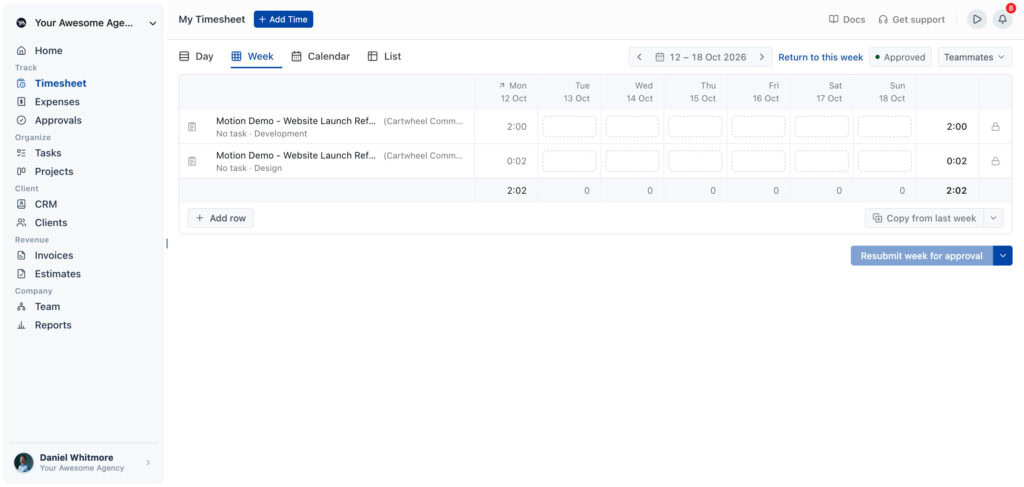
When you log hours in OneSuite, they connect to the task, which connects to the project, which connects to the budget, which connects to the invoice. Start a timer from the top bar or fill in the week grid, mark the entry billable, and the project’s budget-remaining card updates. At month-end, you generate the invoice from approved billable hours and the client pays it through their portal.
Budgeting is where it pulls ahead of most tools here. OneSuite supports Time and Materials, Fixed Fee, and Non-Billable projects with five budget types: total fees, fees per work type, total hours, hours per work type, or hours per person. Set an email alert at any threshold (80% by default), reset hourly budgets monthly for retainers, and count expenses against fee budgets. Cost rates sit beside billable rates, so the project’s Internal costs card shows what the work cost you.
Key Features
- One-click timer with Day, Week grid, Calendar, and List views
- Five budget types with percentage alerts and monthly resets for retainer work
- Billable rates per project, person, or work type, with cost rates for profitability
- Estimates clients accept or decline from a link, converting to an invoice in one click
- Weekly timesheet approvals with a send-back-with-reason workflow
- Invoicing with online payments, recurring invoices, and retainers
- Expense tracking per project, counted against fee budgets
- Project boards, tasks, and a branded client portal included, with CRM there when you need it
Start your free 14-day OneSuite trial, no credit card required
Pricing (monthly when paid monthly)
- Pro: $9/user/mo, or $7/user/mo billed annually. Unlimited clients, projects, and invoices.
- Add-ons: White Label $29/mo, Email Inbox $5/inbox/mo, extra storage $29 per 100 GB
A 10-person team pays $90 a month for everything above, against $99.90 on Clockify Pro for the timer, budgets, and estimates alone.
Pros
- One plan, no feature gates: budgets, estimates, approvals, and invoicing from day one
- Among the deepest budgeting on this list, with per-person and per-work-type modes Clockify doesn’t offer
- Free, hands-on migration: the team imports your Clockify export for you
Cons
- No desktop or mobile app yet, and no browser extension; tracking happens in the web app
- No idle detection; the timer auto-stops around the 8-hour mark rather than prompting you
- No scheduling or capacity forecasting, so Harvest’s separate Forecast product and Toggl’s capacity add-on cover ground OneSuite doesn’t
See how OneSuite handles time tracking and budgets
2. Harvest [TIME + INVOICING]: Best for teams that want the most familiar switch
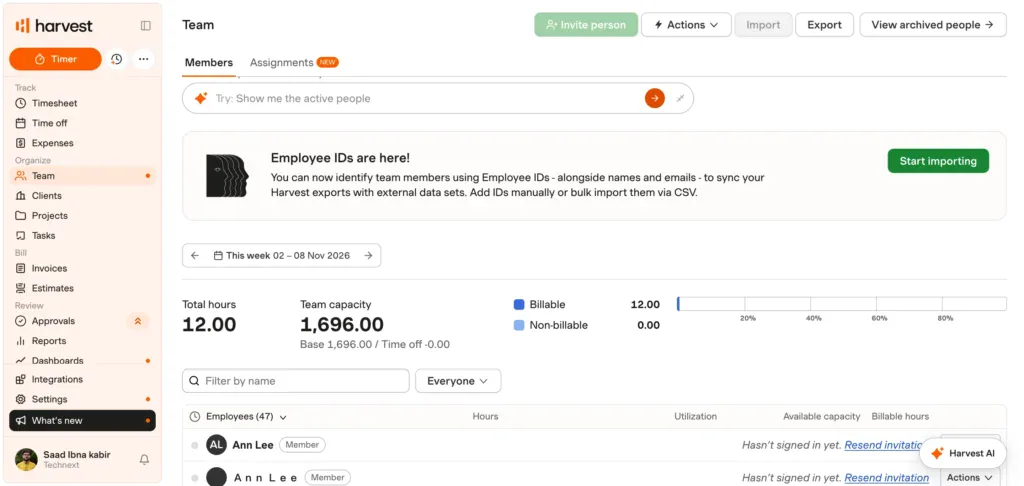
Harvest is the tool most Clockify users already know, and functionally it’s the closest match here: a timer, a weekly timesheet, estimates, and real invoicing. It’s also the tool whose pricing has changed most. After Bending Spoons acquired Harvest in July 2025, it moved to per-seat plus usage fees, and some customers found out at renewal. More on that below.
The product itself is solid. Harvest’s five budget types come with percentage-based email alerts. Clients accept or decline estimates on the web, and accepted estimates become invoices that take Stripe and PayPal.
Key Features
- Time and Materials, Fixed Fee, and Non-Billable projects with five budget modes
- Estimates with web-based client acceptance that convert to invoices
- Invoicing with Stripe and PayPal, recurring invoices, late payment reminders
- Timesheet approvals that lock the submitted week (Enterprise)
Pricing (monthly when paid monthly)
- Free: $0, 1 seat, 2 projects
- Teams: $11/seat/mo ($9 billed annually), billable and cost rates, team reporting
- Enterprise: $17.50/seat/mo ($14 billed annually), adds approvals, profitability, SSO
Both paid tiers add usage-based charges for “additional invoices, projects, clients, and tasks.” Harvest’s help center says these begin at your second paid renewal and gives an example bill but does not publish the allowances or overage rates.
Pros
- The most complete time-to-invoice flow of any pure time tracker here, with payments built in and mature mobile apps
- Budgets and estimates on every plan, including Free
Cons
- Per-seat price plus usage fees you can’t calculate from the pricing page
- Approvals and profitability locked to Enterprise at $17.50 per seat monthly
- Reviewers on Capterra (4.6 from 645 reviews) cite syncing delays and limited lower-tier reporting
3. Toggl (formerly Toggl Track) [PURE TIMER]: Best for freelancers and teams that want the cleanest timer
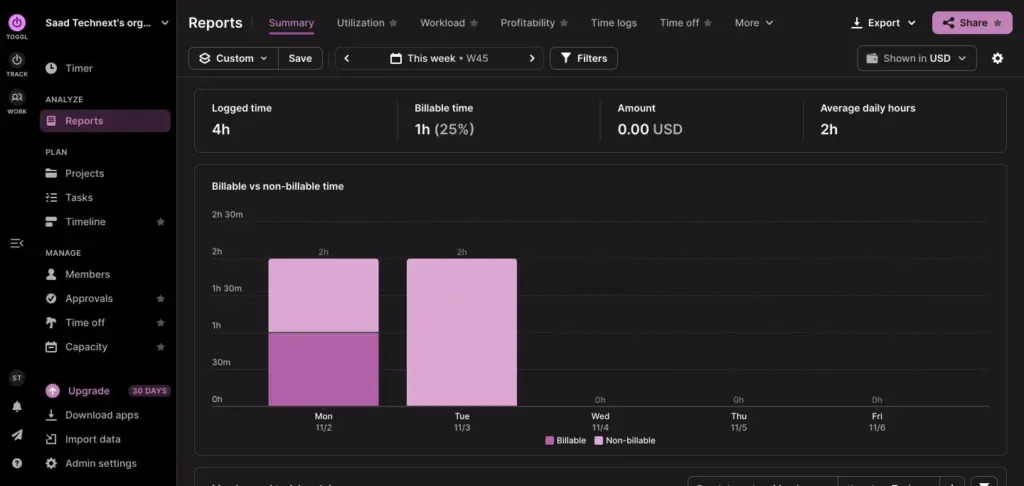
Toggl has been Clockify’s closest rival for a decade. In October 2026 it made the rebuilt “Toggl” its flagship product, with Toggl Track still supported for existing users. The timer is still the best in the category: one click, idle detection when the machine goes quiet, Pomodoro mode, and calendar sync. If the timer was the only thing you liked about Clockify, Toggl does that part better.
The billing story is thinner. Project time estimates and billable rates arrive on Starter, but budget alerts, fixed fee, labor costs, and timesheet approvals sit on Premium. Invoicing is an export: Toggl’s help center states that generated invoices are not saved within the Track app.
Key Features
- One-click timer with idle detection, Pomodoro, and Google or Outlook calendar sync
- Billable rates at five levels, from workspace down to task
- Budget alerts, fixed-fee projects, labor cost and profitability reports (Premium)
- Timesheet approvals with a request-changes flow (Premium)
Pricing (monthly when paid monthly)
- Free: $0, up to 3 users for new accounts
- Starter: $12/user/mo ($9 billed annually), billable rates, project estimates
- Premium: $24/user/mo ($16 billed annually), budgets, fixed fee, approvals, profitability
- Add-ons: Time Off $2/user/mo, Capacity Management $6/user/mo
Pros
- Best timer experience on this list, with idle detection Clockify users will miss elsewhere
- Granular billable rates and strong desktop, mobile, and browser coverage
Cons
- Budgets, approvals, and profitability need Premium at $24 per user monthly, the highest tier price on this list
- Invoicing is a PDF export with no payment tracking; expenses live in a separate Toggl product
- New free organizations are limited to 30 report views a month, per Toggl’s support team
4. Everhour [IN-APP TRACKING]: Best for teams working inside Asana, Jira, or ClickUp
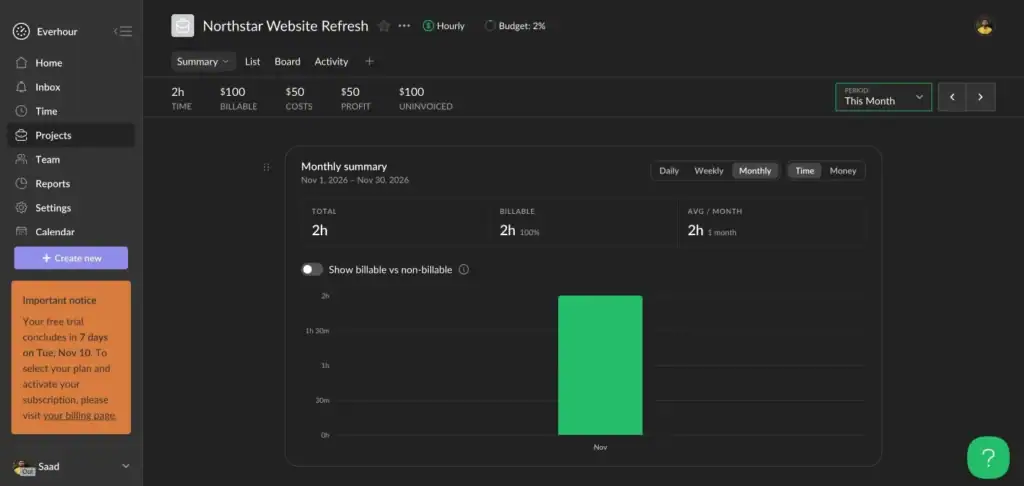
Everhour’s pitch is that you shouldn’t leave your project tool to track time. Its timer sits inside Asana, Jira, ClickUp, Trello, Notion, Basecamp, and 40+ other tools, with estimates and budgets showing next to task titles. For teams living in one of those apps, it’s the lowest-friction switch.
The budgeting is more capable than most. Everhour’s project budgeting supports hours or dollars, recurring resets, client-level budgets, alerts at 75%, 90%, 100% or custom thresholds, and timers that auto-stop when a budget is exceeded. The catch is the floor: the only paid plan carries a 5-seat minimum, and the pricing FAQ is explicit that “even if you have 2 or 3 users, you’ll be charged for a minimum of 5 seats.”
Key Features
- Native tracking inside Asana, Jira, ClickUp, Trello, Notion, monday, and GitHub
- Budgets in hours or money with recurring resets, client-level budgets, and timer auto-stop
- Cost rates alongside billable rates, with custom rates per task
- Invoicing from uninvoiced time and expenses, copied to QuickBooks Online, Xero, or FreshBooks
- Weekly timesheet approvals that lock approved time
Pricing (monthly when paid monthly)
- Free: $0, up to 5 seats, no integrations, no financial metrics
- Team: $10/seat/mo ($8.50 billed annually), all features, 5-seat minimum ($50/mo floor)
- Custom: contact sales, 50-seat minimum
Pros
- The best in-app tracking experience on this list
- Budgets that enforce limits, and one paid tier with everything included
Cons
- The 5-seat minimum makes it $50 a month even for a two-person team
- Invoicing exports to accounting tools rather than collecting payment online
- The Android app shipped only in February 2026, so mobile is still catching up
5. TimeCamp [AUTOMATIC TRACKING]: Best for budget-conscious teams that want automation
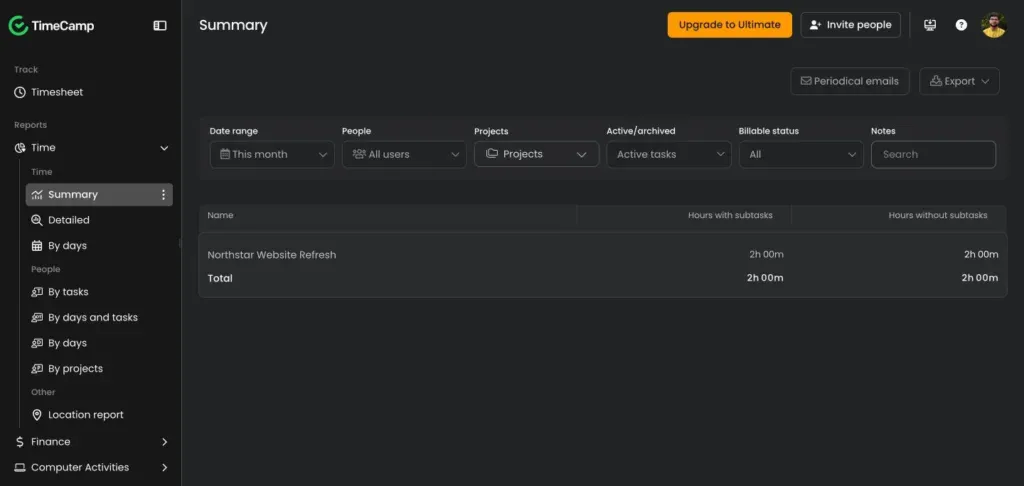
TimeCamp is where Clockify’s former free users look first, because its free plan still allows unlimited users and projects. It also does something Clockify never did well: keyword-based automatic tracking that assigns computer activity to the right project without a timer.
The billing layers are gated harder than the headline price suggests. Invoicing arrives on Starter at $5.49, but budgets and estimates need Premium, and approvals, expenses, cost rates, and granular billing rates sit on Ultimate at $13.99. TimeCamp’s help center also notes it is “not possible to set a periodical (daily/weekly/monthly) or recurring budget,” which matters for retainers.
Key Features
- Automatic time tracking by keyword across apps and websites
- Budgets by estimated hours or fee with alerts at 80% (Premium)
- Invoicing with draft, pending, and paid statuses, multi-currency, Xero or QuickBooks export
- Timesheet approvals with locking (Ultimate)
Pricing (monthly when paid monthly)
- Free: $0, unlimited users and projects, no invoicing or budgets
- Starter: $5.49/user/mo ($3.99 billed annually), invoicing, attendance
- Premium: $9.99/user/mo ($6.99 billed annually), budgets and estimates, billing rates
- Ultimate: $13.99/user/mo ($9.99 billed annually), approvals, expenses, labor costs
Pros
- The most generous free plan left among major time trackers
- Automatic tracking rescues teams that never remember the timer, and invoicing starts at $5.49
Cons
- Approvals, expenses, and cost rates need Ultimate at $13.99, more than Everhour’s everything-included $10
- No recurring budgets for retainers
- Reviewers on Capterra (4.7 from 599 reviews) repeatedly mention desktop app reliability and sync issues
6. Paymo [STUDIO BILLING]: Best for creative studios billing by project
Paymo sits closer to an all-in-one work platform than to a pure timer: time tracking, task management, and invoicing for design studios and small agencies. Its estimates can be built from a project’s tasks and costs, sent for approval, and turned into an invoice with one click. Invoicing handles 85+ currencies, recurring schedules, down payments, and a client portal.
The trade-off is the pricing ladder. Paymo’s pricing page leads with a three-month promotional discount, so the regular rates matter. Solo at $9.90 is one user only, Plus at $15.90 unlocks estimates and profitability, and approvals are reserved for Pro at $23.90 per user monthly, one of the two steepest approval gates here alongside Toggl Premium.
Key Features
- Web timer, desktop apps for Windows, macOS, and Linux, iOS and Android apps
- Project and task time budgets with threshold email alerts
- Hourly vs. cost rate profitability at client, project, and employee level (Plus)
- Estimates pre-filled from projects, converting to invoices on acceptance (Plus)
[Image placeholder: Paymo estimate to invoice flow]
Pricing (monthly when paid monthly, regular rate)
- Free: $0, 1 user, 1 client, 2 projects
- Solo: $9.90/user/mo ($5.90 billed annually), 1 user, 3 clients, 5 projects
- Plus: $15.90/user/mo ($10.90 billed annually), unlimited, estimates, expenses, profitability
- Pro: $23.90/user/mo ($16.90 billed annually), adds timesheet approvals
Pros
- Estimates and invoicing are integrated with the project, not bolted on
- Broadest app coverage here, with profitability down to employee level
Cons
- Approvals at $23.90 per user, matched only by Toggl Premium for the steepest approval gate here
- Reviewers on Capterra (4.7 from 686 reviews) describe the mobile app as limited to timekeeping and note past price increases
- Free and Solo are capped at one user, so there’s no free team option
7. My Hours [BUDGET PICK]: Best for small teams that want budgets without the price
My Hours is the quiet one. It has the highest Capterra score of the tools rated here, 4.8 from 986 reviews. Its pricing page reads like a direct answer to Clockify’s April changes: a free plan for up to 5 users, then budgets with email alerts and per-project billable rates from $5 per user monthly. For a small team that lost billable rates in the free plan change, that’s the cheapest way to get them back.
It stays small on purpose. Invoicing arrives on Pro at $9 and is basic: My Hours’ help center confirms no custom templates, no online payment collection, and no QuickBooks sync. There are no client-facing estimates at all.
Key Features
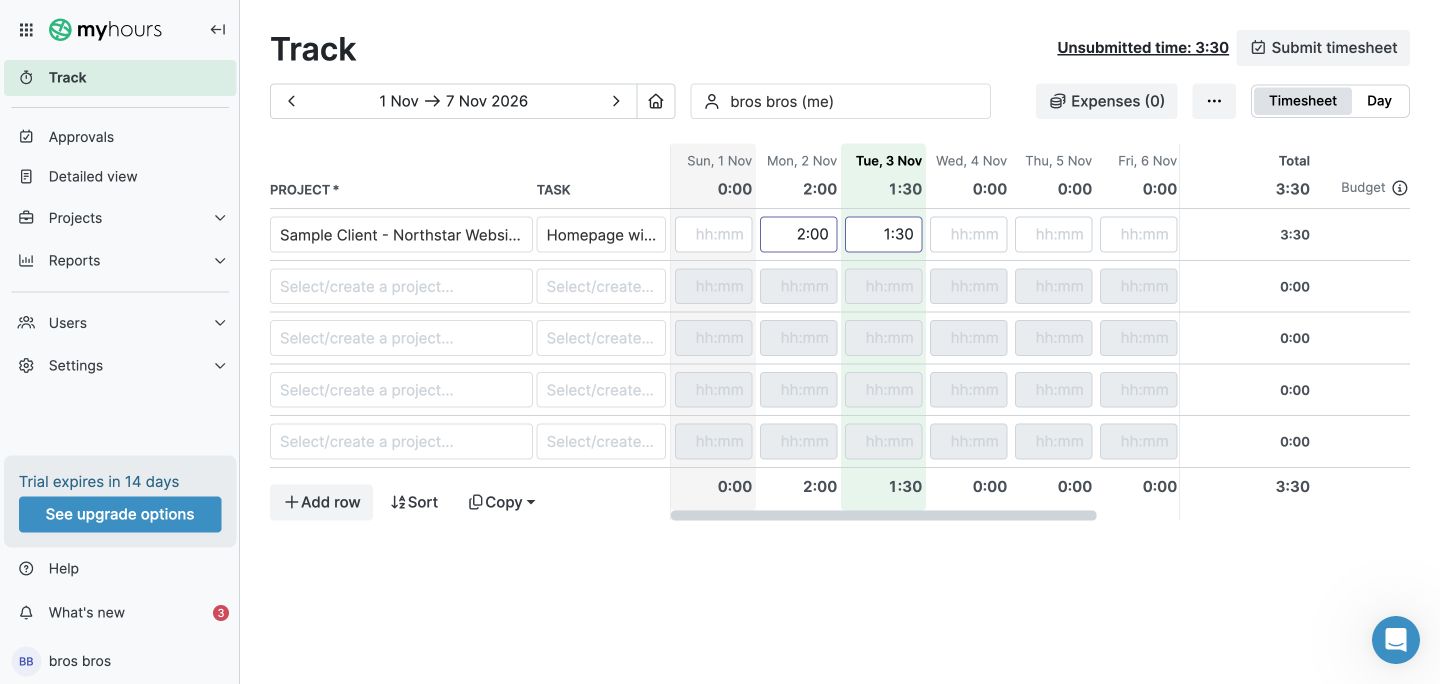
- Timer and weekly timesheet with copy-last-week, bulk edit, and Excel import
- Project budgets by hours, billable amount, or cost, with monthly restart and alerts from 50% to 90%
- Billable rate per project (Basic), per user or task plus labor costs and profit and loss (Pro)
- Timesheet approvals with auto-lock after each period (Pro)
Pricing (monthly when paid monthly)
- Free: $0, up to 5 active users, unlimited projects and clients
- Basic: $5/user/mo ($4 billed annually), budgets, alerts, per-project billable rates
- Pro: $9/user/mo ($8 billed annually), invoicing, approvals, labor costs, profit and loss
Pros
- Budgets and billable rates at $5 per user is the lowest paid entry on this list
- Monthly-restarting budgets handle retainers, and it holds the highest Capterra rating of the tools rated here
Cons
- Invoicing can’t be customized and doesn’t collect payment
- No estimates or quotes
- Reviewers mention a dated interface and slow sync between devices
Switching From Clockify: What to Export and What Breaks
Leaving Clockify is easier than it looks, with one timing issue. If you’re still on the free plan, CSV and Excel report exports are now paid-only; PDF remains free. So export before you downgrade, pay one month of Basic at $4.99 per seat to pull the CSV, or ask your new vendor to handle it.
Export time entries first (Detailed report, in 31-day chunks on Free), then projects with clients and billable rates, then users. Tags won’t map cleanly to any other tool, so decide what they become before import. Expect to rebuild running timers, kiosk PINs, and scheduled report emails by hand.
Toggl imports time and projects but not invoices, because it doesn’t save them. Everhour, Harvest, Paymo, and OneSuite import clients and projects and let you rebuild rates. OneSuite’s team does the migration for you at no cost from your Clockify export. Whatever you choose, run both tools for one billing cycle so the first new invoice matches the last old one.
Harvest Users Are Switching Too
The Clockify change isn’t the only reason teams are shopping in 2026. After Bending Spoons acquired Harvest in July 2025, Harvest added usage-based charges on top of seats. Subscription Insider reported in August 2026 that UK consultancy Salentis saw its average monthly bill rise from about $130 to $2,110, roughly 1,500%. Harvest’s own help center gives an example of a bill moving from $44 to $404 once usage is added.
We’ve watched this up close. An office manager at a 9-person architecture firm told our team that Harvest “just changed their whole pricing system… It like tripled in price.” More than 20 businesses have migrated from Harvest to OneSuite since the change, per our LinkedIn update in October 2026, and we built the features they asked for: timesheet approvals, project budgets, billable and cost rates, and expense tracking.
If your Harvest renewal just landed, the same shortlist applies. Our OneSuite vs Harvest comparison and Harvest price increase guide cover what changed in detail.
How to Choose the Right Clockify Alternative
Start with the feature that made you leave. If it was the 5-user cap alone, TimeCamp’s free plan or My Hours’ $5 Basic tier restores what you had for the least money. If it was losing billable rates and estimates, you’re shopping for budgeting, which puts OneSuite, Harvest, and Everhour at the top.
Then count your team. A 10-person team pays $99.90 a month on Clockify Pro, $110 plus usage fees on Harvest Teams, $100 on Everhour, $240 on Toggl Premium, and $90 on OneSuite. Only OneSuite and Harvest collect payment on invoices with built-in gateways. And check where approvals live before you commit: Enterprise on Harvest, Premium on Toggl, Ultimate on TimeCamp, Pro on Paymo and My Hours. On OneSuite and Everhour, they’re in the only plan.
Frequently Asked Questions
What is the best Clockify alternative in 2026?
For teams of 5 to 30 that need budgets, estimates, and invoicing with time tracking, OneSuite is the strongest Clockify alternative in 2026 at $9 per user monthly with no feature tiers. For a pure timer, Toggl is the closest match. For unlimited free users, TimeCamp is the only major option left.
What changed in Clockify’s free plan in April 2026?
CAKE.com announced on April 21, 2026 that Clockify’s Free plan would support up to 5 users and that kiosk, billable hours, shared reports, project time estimates, and CSV/Excel export would move to paid plans. Existing paid users are unaffected. Clockify’s help center adds a 31-day report range and 30 API requests per hour on Free.
Is there a free Clockify alternative with unlimited users?
Yes. TimeCamp’s free plan includes unlimited users and projects with timesheets and automatic tracking, though invoicing and budgets need paid tiers. My Hours and Everhour cap free plans at 5 users, and Toggl’s free plan allows 3 users for new accounts.
Which Clockify alternative has the best project budgeting?
OneSuite and Everhour. OneSuite offers five budget types including hours per person and fees per work type, with percentage alerts and monthly resets. Everhour’s budgets auto-stop timers when exceeded and reset on a schedule. Harvest offers five budget types but locks profitability to Enterprise.
Which Clockify alternatives include invoicing with online payments?
OneSuite and Harvest. Harvest invoices accept Stripe and PayPal. OneSuite invoices are paid through the client portal via Stripe or PayPal and support recurring billing and retainers. Paymo offers payments through its PM Payments option. Toggl, Everhour, TimeCamp, and My Hours generate invoices but don’t collect payment.
Does OneSuite have a mobile app for time tracking?
Not yet. OneSuite’s timer, timesheets, and approvals run in the web app, and there’s no idle detection; the timer auto-stops around the 8-hour mark. If mobile tracking is a daily need, Toggl, Harvest, and Paymo have mature iOS and Android apps, and Everhour added Android in February 2026.
The Bottom Line
Clockify’s April 2026 change pushed a lot of teams to ask a question they’d skipped for years: what should the hours we track actually do? If the answer is “feed a budget, become an estimate, turn into an invoice that gets paid,” a timer alone won’t get you there, and $9.99 per seat for Clockify Pro buys a better timer and little else.
OneSuite is our answer, and we’ve been clear that it’s ours. One price per user, budgets, estimates, approvals, and invoicing in the same plan, and a project layer so the hours have somewhere to live. It doesn’t have a mobile app yet, and we’ve said so. Harvest is the strongest alternative if you can model its usage fees, Toggl the best timer, and the rest each win a specific case. Pick the Clockify alternative that closes the gap you left over, and run both for one billing cycle.
Start exploring OneSuite today
No credit card is required