

Dubsado Pricing (2026): Plans, Features, Hidden Costs & Best Alternatives

December 5, 2024
Managing your business efficiently requires the right tools, but finding one that fits your needs and budget can feel overwhelming. Dubsado is a popular choice for freelancers and small businesses, and it is known for its client management and automation features.
But is dubsado pricing truly worth it for what you get?
This blog breaks down the pricing plans of Dubsado, uncovers hidden costs, and compares its features with alternatives like OneSuite—a more versatile and cost-effective project management tool.
This guide will help you make an informed choice that aligns with your budget and business goals. Let’s dive in!
Key Takeaways
- Dubsado offers two plans: Starter at $35/month and Premier at $55/month.
- Starter covers the basics, while Premier adds automation, scheduling, and integrations.
- Extra brands and team members cost more.
- For better value, OneSuite, HoneyBook, ClickUp, and 17hats are worth comparing.
What Is Dubsado?
Let’s take a quick look at Dubsado before exploring its updated pricing plans.
Dubsado is an all-in-one client management and business management platform designed to simplify workflows and organize daily operations.
It helps businesses manage contracts, proposals, invoices, payment plans, forms, client portals, appointments, emails, and lead capture from one place. Its Premier plan also includes automated workflows, scheduling, public proposals, bookkeeping integrations, and Zapier integration.
Dubsado is best suited for freelancers, solopreneurs, consultants, coaches, photographers, creative professionals, and small service-based businesses. With unlimited projects and clients on paid plans, it helps users reduce administrative work, improve client communication, and create a more organized client experience..
Dubsado Pricing Overview (2026)
Dubsado has basically 2 pricing plans: Starter and Premier. Also, it offers a free version for its users and add-on options for customization facilities.
Let’s see this breakdown,
Dubsado Free Trial
Dubsado allows new users to start for free and upgrade when they are ready. This gives freelancers and small business owners an opportunity to explore the platform before committing to a monthly or annual subscription.
During the trial, you can evaluate important parts of the client-management process, including forms, invoices, contracts, client communication, and project organization. It is a practical way to see whether Dubsado fits your existing workflow and feels comfortable enough for daily use.
However, the free trial should be treated as a testing environment rather than a permanent free plan. Businesses that need full automation, advanced scheduling, team access, or a larger client-management setup will eventually need a paid subscription.
Who should use the free trial?
The trial is best suited to:
- Freelancers comparing CRM platforms
- Solopreneurs moving away from spreadsheets
- Service providers testing a client portal
- Small teams evaluating Dubsado before migration
Before signing up, check Dubsado’s current trial terms because trial limits and available features may change.
Dubsado Starter Plan
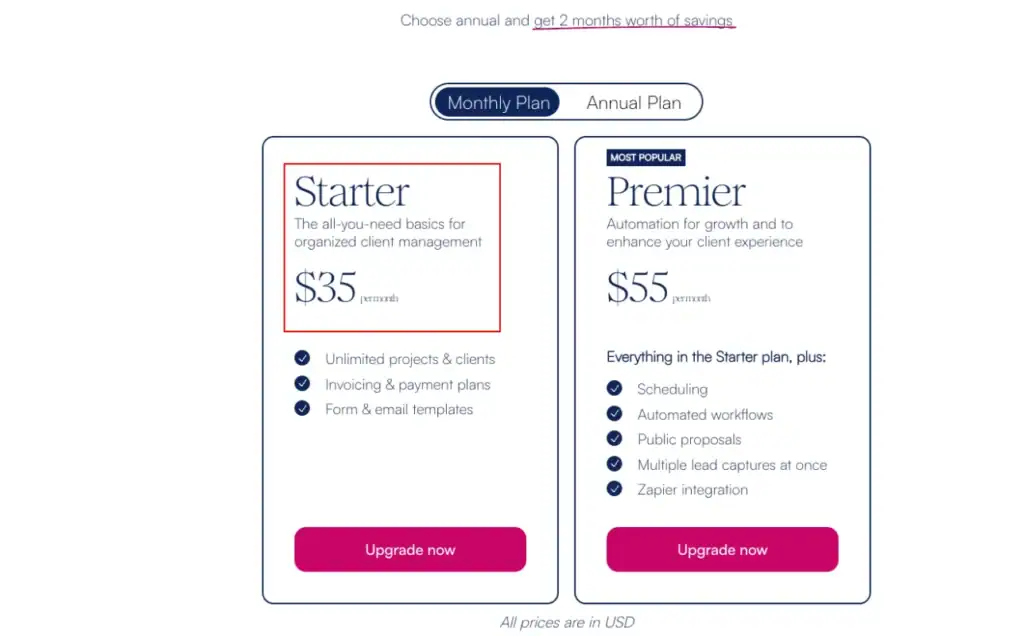
The Dubsado Starter Plan costs $35 per month or $335 per year.
Choosing annual billing saves approximately $85 compared with paying monthly for 12 months. Dubsado describes this as roughly two months of savings.
The Starter plan provides the core tools needed to organize clients, send invoices, manage forms, and keep project information in one system. It is designed for businesses that need a professional client-management setup but are not yet dependent on advanced automation.
Who is the Starter Plan best for?
The Starter plan is a practical choice for:
- Freelancers
- Consultants
- Coaches
- Photographers
- Virtual assistants
- New service-based businesses
- Solopreneurs with simple client workflows
It works particularly well when one person handles most client communication and does not need complex booking or workflow automation.
What is included?
The Starter plan includes:
✅ Email integration
✅ Unlimited projects and clients
✅ Invoicing and payment plans
✅ Form and email templates
✅ Client portals
✅ Calendar connection
✅ Email and live-chat support
✅ Mobile app access
✅ One active lead-capture form
These features cover the main stages of basic client management, from collecting information and sending invoices to keeping documents and conversations organized.
What is missing?
The Starter plan does not include several features that growing businesses may need:
❌ Automated workflows
❌ Advanced scheduling
❌ Zapier integration
❌ Public proposals
❌ Bookkeeping integration
❌ Unlimited active lead-capture forms
The biggest limitation is automation. You can manage clients and projects effectively, but more repetitive tasks may still require manual work.
Is the Starter Plan worth it?
The Starter plan offers solid value for solo professionals who mainly need invoicing, forms, templates, and client portals. However, the $35 monthly price may feel high for businesses that only need basic invoicing or simple project tracking.
It becomes more valuable when you actively use several included tools and replace separate subscriptions for forms, invoicing, contracts, and client portals.
Dubsado Premier Plan
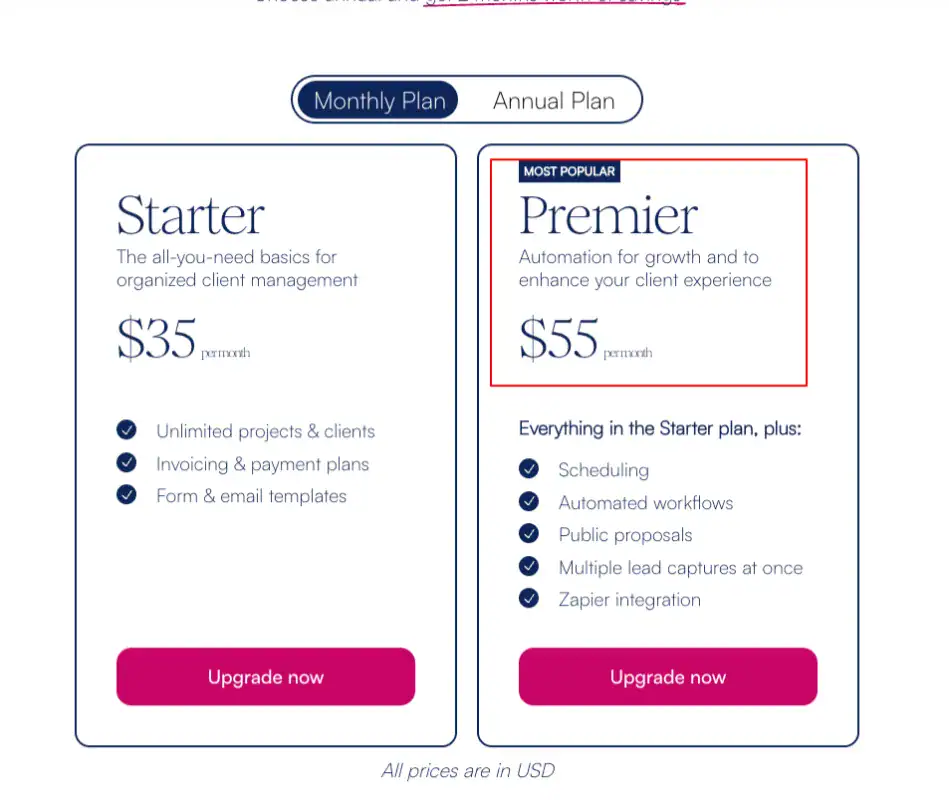
The Dubsado Premier Plan costs $55 per month or $525 per year.
Paying annually saves approximately $135 compared with 12 monthly payments. Premier includes everything available in Starter, along with Dubsado’s main automation, scheduling, and integration features.
This plan is designed for businesses that manage a higher volume of leads and clients or want to reduce the amount of time spent on repetitive administrative work.
Who is the Premier Plan best for?
Premier is better suited to:
- Established freelancers
- Growing service businesses
- Creative agencies
- Consultants managing multiple leads
- Photographers with frequent bookings
- Coaches running structured onboarding
- Businesses using automated client journeys
It is especially useful when your workflow includes repeated steps such as sending forms, scheduling appointments, following up with leads, creating proposals, and onboarding new clients.
What is included?
Premier includes everything in Starter, plus:
✅ Unlimited active lead-capture forms
✅ Scheduling and appointment booking
✅ Automated workflows
✅ Public proposals
✅ Bookkeeping integration
✅ Zapier integration
The main advantage is not simply having more features. It is the ability to connect several client-management steps and reduce repetitive manual work.
For example, a completed lead form can trigger follow-up communication, send a proposal, schedule the next step, and move the client through a more organized onboarding process.
What are the limitations?
Although Premier includes Dubsado’s strongest features, there are still a few points to consider:
❌ Larger teams may require paid user add-ons
❌ Advanced setup can take time to learn and configure
❌ Reporting may be limited for businesses requiring detailed performance analytics
❌ Some external automations may depend on Zapier and create another subscription cost
❌ Businesses with multiple brands must pay separately for each additional brand
Premier delivers more automation, but its value depends on whether you will actually build and use those workflows. Businesses with very simple processes may not benefit enough to justify the higher price.
Is the Premier Plan worth it?
Premier is worth considering when automation can save several hours of administrative work each month. The additional $20 per month over Starter may be reasonable for businesses that rely on appointment scheduling, automated workflows, public proposals, and multiple lead forms.
For a solo professional with a straightforward workflow, Starter may be enough. For a growing business managing frequent inquiries and repeated onboarding tasks, Premier is usually the more practical option.
Pay as you grow – Plan
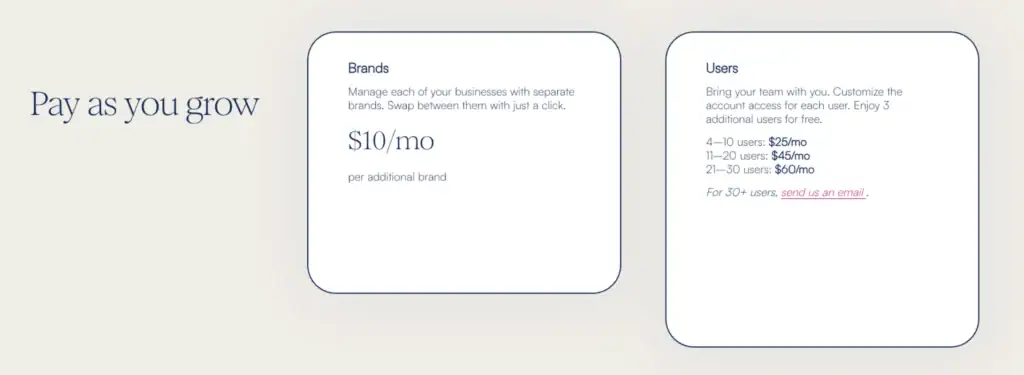
Dubsado uses a pay-as-you-grow model for businesses that need multiple brands or additional team access.
These add-ons make the platform more flexible, but they can also increase the total subscription cost significantly. Businesses should calculate the full price before choosing a plan rather than looking only at the advertised Starter or Premier rate.
Additional brands
Dubsado allows users to manage multiple businesses through individual brand accounts.
Each additional brand costs:
$10 per month per brand
This can be useful for entrepreneurs running multiple businesses that require separate:
- Branding
- Client portals
- Forms
- Templates
- Workflows
- Business information
For example, a user managing three additional brands would pay another $30 per month on top of the selected Dubsado plan.
Additional users
Dubsado states that businesses can include three additional users at no extra charge. Larger teams are charged according to the following tiers:
| Team size | Additional monthly cost |
|---|---|
| 4–10 users | $25 per month |
| 11–20 users | $45 per month |
| 21–30 users | $60 per month |
| More than 30 users | Custom quote |
Dubsado also allows account owners to customize access for different users, which is helpful when team members need different levels of control.
How Much Can Dubsado Really Cost?
The base subscription is not always the final price. Your actual monthly cost depends on your plan, team size, number of brands, and any third-party tools used alongside Dubsado.
Here are a few practical examples:
| Business setup | Estimated monthly cost |
|---|---|
| Solo freelancer on Starter | $35 |
| Solo business on Premier | $55 |
| Premier with two additional brands | $75 |
| Premier with 4–10 users | $80 |
| Premier with two brands and 4–10 users | $100 |
These examples do not include possible payment-processing charges, Zapier subscriptions, bookkeeping tools, or other external services.
Are Dubsado Add-Ons Worth It?
Dubsado’s add-ons are useful when a business has outgrown a basic solo setup. Separate brand accounts can keep multiple businesses organized, while user permissions make team collaboration easier.
However, the total cost can rise quickly. A growing agency using Premier, several brands, and additional users may pay much more than the advertised $55 monthly fee.
Before upgrading, consider three questions:
- Will the extra users actively work inside Dubsado?
- Do your brands genuinely require separate accounts?
- Will the automation save enough time to justify the higher cost?
For established businesses that use Dubsado as a central operating system, the add-ons may provide strong value. For budget-conscious teams, comparing the full cost with alternatives such as OneSuite, HoneyBook, Bonsai, or SuiteDash is a sensible next step.
Similarities Between Starter vs Premier Plan
The Dubsado Starter and Premier plans are designed for different stages of business growth, but both include the core tools needed to manage clients and projects in one place.
With either plan, you can organize client communication, create invoices, use reusable templates, manage unlimited projects, and provide clients with a dedicated portal. This makes both options suitable for freelancers and service-based businesses that want to replace scattered emails, documents, and payment tools with a more organized system.
The main difference is that Premier adds advanced automation, scheduling, and integrations. Before comparing those upgrades, here are the essential features included in both plans.
💡 Learn, How to Create a Client Portal in 4 Easy Steps
Dubsado Starter vs Premier: The Main Differences
The biggest difference between Dubsado Starter and Premier isn’t simply the price—it’s the level of automation and scalability.
The Starter plan focuses on the essentials for managing clients, invoices, and projects. Premier builds on those fundamentals by adding workflow automation, appointment scheduling, bookkeeping integration, public proposals, and advanced lead management.
If your business still relies on manual administrative tasks, Premier can significantly reduce repetitive work and improve operational efficiency.
Starter vs Premier Comparison
| Feature | Starter | Premier |
|---|---|---|
| Monthly Price | $35/month | $55/month |
| Annual Price | $335/year | $525/year |
| Email Integration | ✅ | ✅ |
| Unlimited Clients | ✅ | ✅ |
| Unlimited Projects | ✅ | ✅ |
| Client Portal | ✅ | ✅ |
| Forms & Email Templates | ✅ | ✅ |
| Calendar Connection | ✅ | ✅ |
| Mobile App | ✅ | ✅ |
| Email & Live Chat Support | ✅ | ✅ |
| Active Lead Capture Forms | 1 | Unlimited |
| Automated Workflows | ❌ | ✅ |
| Scheduling | ❌ | ✅ |
| Public Proposals | ❌ | ✅ |
| Zapier Integration | ❌ | ✅ |
| Bookkeeping Integration | ❌ | ✅ |
Which Plan Should You Choose?
Choosing between Starter and Premier depends on how your business operates today and where you expect it to grow.
Choose the Starter Plan if you:
- Work independently
- Have a straightforward client workflow
- Don’t need advanced automation
- Want an affordable CRM to manage clients, invoices, and forms
- Are just getting started with client management software
Choose the Premier Plan if you:
- Manage a growing client base
- Want to automate repetitive tasks
- Frequently schedule appointments
- Need unlimited lead capture forms
- Use third-party tools through Zapier
- Want to reduce administrative work and improve efficiency
Dubsado Alternatives: Better Pricing Deals
OneSuite, HoneyBook, ClickUp, and 17hats offer different pricing structures, team limits, and business-management features. The table below compares their main costs and capabilities to help you find the best value for your workflow.
| Pricing & Features | Dubsado | OneSuite | HoneyBook | ClickUp | 17hats |
|---|---|---|---|---|---|
| Free Plan | No | No | No | Yes | No |
| Free Trial | Start free | 14 days | Available | Free plan available | 7 days |
| Money-Back Guarantee | Not clearly stated | 30 days | 60 days | 100% guarantee | Not stated |
| Starting Price | $35/month | $29/month | $29/month, billed yearly | Free | $60/month |
| Highest Standard Plan | $55/month | $149/month | $109/month, billed yearly | $12/user/month, billed yearly | $800 for two years |
| Annual Savings | About 2 months | 20% | Up to 18% | Up to 30% | $120 on yearly billing |
| Best For | Freelancers and small service businesses | Freelancers, agencies, and growing teams | Independent businesses and creative professionals | Project-focused teams of all sizes | Small service businesses |
| Included Members | 3 additional users free | 5 to 35, depending on plan | Up to unlimited, depending on plan | Unlimited on Free; paid per user | Not clearly listed |
| Unlimited Projects | Yes | Yes | Yes | Yes | Yes |
| Unlimited Clients | Yes | Yes | Yes | Not client-focused | Yes |
| Invoices | Yes | Unlimited | Yes | Limited compared with CRM tools | Yes |
| Documents & E-Signatures | Forms and contracts | Unlimited documents | Yes | Collaborative docs | Yes |
| Client Portal | Yes | Yes | Yes | No dedicated client portal | Yes |
| White Label | No dedicated white-label option | $29/subdomain/month | Custom branding available | Enterprise custom branding | Limited branding |
| Main Advantage | Client workflow automation | Client portal, CRM, projects, and billing in one platform | Strong proposals, payments, and client experience | Flexible project and task management | Simple all-inclusive business management |
Dubsado vs OneSuite: Save 27%
Both Dubsado and OneSuite are designed to help service-based businesses manage clients, projects, invoices, and workflows. However, they take different approaches to pricing and scalability.
Dubsado focuses on client management and automation for freelancers and small businesses, while OneSuite combines CRM, project management, billing, documents, and a white-labeled client portal into a single platform. For businesses that would otherwise pay for multiple separate tools, OneSuite can offer better overall value.
Quick Pricing Comparison
| Feature | Dubsado | OneSuite |
|---|---|---|
| Starting Price | $35/month | $29/month |
| Highest Standard Plan | $55/month | $149/month |
| Free Trial | Start free | 14-day free trial |
| Money-Back Guarantee | Not listed | 30 days |
| Unlimited Clients | ✅ | ✅ |
| Unlimited Projects | ✅ | ✅ |
| Client Portal | ✅ | ✅ |
| White Label | ❌ | ✅ (Add-on) |
| Included Team Members | 3 additional users included | 5 members on Freelancer plan |
| Best For | Freelancers & small businesses | Freelancers, agencies & growing teams |
How Much Can You Save?
Looking only at the entry-level subscription, OneSuite starts at $29/month, while Dubsado Starter costs $35/month.
That’s a direct saving of:
- $6 per month
- $72 per year
The difference becomes even more noticeable if your business needs project management, document sharing, CRM, invoicing, and client collaboration in one platform. Instead of paying for several separate SaaS tools, OneSuite bundles these features together, which may reduce your overall software costs.
Example: A freelancer using Dubsado may still need separate tools for project management or document collaboration. OneSuite includes many of these features in a single subscription, potentially replacing multiple monthly software expenses.
Dubsado vs Honeybook Pricing
If you’re after flexibility as you grow, HoneyBook has you covered. You can start small and scale up when needed. It’s all about ease of use and a smooth, all-in-one experience.
The Essentials Plan is great for solo entrepreneurs or small teams. At the same time, the Premium Plan is perfect if you’re managing larger projects or need more advanced tools.
On the other hand, Dubsado is ideal if you’re budget-conscious or love automation. It’s more affordable, with solid client management basics in its Starter Plan.
It’s simple but effective with just 2 pricing options (Starter and Premier), especially if you’re working solo or with a small team.
💡HoneyBook vs Dubsado: Which One is Best for Your Agency?
Dubsado vs Click Up Pricing
When comparing Dubsado and ClickUp, the biggest difference is their focus. Dubsado is built for client management and business automation, while ClickUp is designed for project management and team collaboration.
Dubsado offers two paid plans: Starter at $35/month ($335/year) and Premier at $55/month ($525/year). It doesn’t have a free plan, but you can start for free and upgrade when you’re ready.
ClickUp, on the other hand, offers a Free Forever plan, followed by Unlimited at $7/user/month and Business at $12/user/month when billed annually. Enterprise pricing is available for larger organizations, and annual billing can save up to 30%.
If your business mainly needs client onboarding, contracts, invoices, and workflow automation, Dubsado is the better choice. However, if you’re managing larger teams, multiple projects, and need a flexible collaboration platform with a generous free plan, ClickUp offers better value and scalability.
Dubsado vs 17hats
Both Dubsado and 17hats are built for freelancers and small service-based businesses, but they take different approaches to pricing and business management.
Dubsado offers two paid plans: Starter at $35/month ($335/year) and Premier at $55/month ($525/year). You can start for free and upgrade when your business needs more advanced automation and scheduling features.
17hats keeps pricing simple with a single all-inclusive plan at $60/month, $600/year, or $800 for two years. It also includes a 7-day free trial, making it easy to test the platform before subscribing.
If you’re looking for a lower starting price and the flexibility to upgrade as your business grows, Dubsado is the better option. However, if you prefer an all-in-one plan with every feature included from the start and don’t mind paying a higher monthly fee, 17hats is a solid alternative for small business owners.
Read Also: 9 Easy-to-Use Alternatives to 17hats
Dubsado Reviews on Pricing Plan
For more realistic info, here’s some real customer reviews from G2 that will give you a better understanding of whether to move into Dubsado or somewhere else,
- Their payment schedules are slightly complicated as well. – Sachin N.
- I also found their price reasonable considering all their customization capabilities, from workflows, to payment plans. – Karen B.
Why OneSuite Offers Better Value
When pricing is the main concern, OneSuite gives growing businesses more for the money. Its Freelancer plan starts at $29 per month and includes 5 team members, while Dubsado Starter costs $35 per month and is more focused on basic client management.
The value difference becomes clearer when you compare what is included. OneSuite combines CRM, project management, invoicing, documents, e-signatures, client portals, and team collaboration in one subscription. With Dubsado, businesses may still need separate tools for project management, internal collaboration, or document workflows.
For teams, OneSuite is also easier to scale. Its plans include 5, 12, or 35 members, while Dubsado charges additional fees as team size increases.
The only extra cost to consider is white labeling, which is available as a $29 monthly add-on. Even with that add-on, OneSuite can still be a strong value for agencies that want a branded client portal and fewer software subscriptions.
FAQs on Dubsado Pricing
1. How Much Does Dubsado Cost?
Dubsado costs you depending on your needs and chosen plan. Plans start as low as $20 per month and go as high as $400 per year. It increases based on the features and services.
2. How Many Users do Dubsado Plans Include?
1 to 3 users included in plans.
But if you want to add 4 to 30+ members, Dubsado offers an add-on option where you can pay as you go.
3. How Much Do Additional Users & Brands in Dubsado Cost?
Additional Users & Brands in Dubsado Cost $10 to $60 per month plus a customized quote.
Additional brands in Dubsado cost $10, and additional users from 4 to 30 cost $25 to $60 monthly. For 30+ users, dubsado offers customized quotes.
4. Is There a Free Trial in Dubsado?
Yes, there is a free trial in Dubsado.
Dubsado offers a lifetime free trial for its users, so you can upgrade whenever you are ready.
5. Is Dubsado Worth the Price?
Yes, Dubsado is worth it for managing projects efficiently with features like automation and client portals.
Its tools save time and simplify business operations, making it a wise investment.
6. Is Dubsado Good for Small Businesses?
Yes, Dubsado is suitable for small businesses.
Also, Dubsado can be considered a good CRM tool for some businesses.
Start exploring OneSuite today
No credit card is required