

Moxie vs HoneyBook Comparison 2026: Features, Pricing, Pros & Cons

Imagine reducing your agency’s administrative workload in half—saving time and money and freeing up resources for growth.
This is where agency management software like moxie and honeybook come in. Both are popular all-in-one business management platforms, but choosing the right one depends on your needs.
This article will help you determine which software suits your business best in the Moxie vs HoneyBook comparison and explore whether there might be even better alternatives for your specific needs.
Moxie vs HoneyBook: Overview
From a general perspective, Moxie vs Honeybook are similar and alternative to each other. But after my detailed research of these 2 agency management software, it is clear that they have huge differences.
Let’s start with the overview to clarify the statement I came across after my research.
What is Moxie?
Moxie is better if you are a freelancer. They believe that creative owners need tools that are stupid good. It solves the main pain points of freelancers: keeping track of client information, managing projects, and tracking time spent on projects.

What is Honeybook?
HoneyBook is an all-in-one client flow management platform designed to provide a variety of small business tools. It ensures overall business management for independent businesses to support their client relationships.
It offers features like customizable templates, project tracking, and invoicing, making it particularly popular among creative professionals and event planners.

⚡️ HoneyBook vs Dubsado: Which One is Best for Your Agency?
Moxie vs Honeybook: Feature Comparison
To help you decide which platform suits your business needs, the following chart highlights the key features of Moxie and Honeybook.
|
Features |
Moxie |
HoneyBook |
|---|---|---|
|
✔ Multiple Businesses Manage multiple businesses from a single platform. |
❌ |
❌ |
|
✔ Project Management Comprehensive tools for managing all aspects of your projects. |
✅ |
❌ |
|
☑ My Task |
❌ |
✅ |
|
☑ Task Template |
✅ |
✅ |
|
☑ Subtasks |
✅ |
❌ |
|
☑ List View |
❌ |
✅ |
|
☑ Kanban View |
✅ |
❌ |
|
☑ Calendar View |
❌ |
❌ |
|
☑ Table View |
✅ |
✅ |
|
☑ Timeline View |
✅ |
❌ |
|
☑ Files View |
❌ |
❌ |
|
☑ Task Labels |
❌ |
❌ |
|
☑ Custom Fields |
❌ |
❌ |
|
☑ Import Project from Trello |
❌ |
❌ |
|
✔ Lead Management Tools to streamline your lead nurturing and conversion processes. |
✅ |
Limited |
|
☑ Lead Pipeline |
✅ |
Limited |
|
☑ Custom Lead Stages |
❌ |
✅ |
|
☑ Lead Segmentation |
❌ |
✅ |
|
☑ Lead Import /Export |
✅ |
Limited |
|
☑ Chrome Extension for Gmail |
❌ |
✅ |
|
☑ Forecast |
✅ |
✅ |
|
☑ Lead Source Tracking |
❌ |
Limited |
|
☑ Convert leads into clients |
✅ |
✅ |
|
✔ Team Management Tools for managing teams and collaboration. |
✅ |
❌ |
|
☑ Assign tasks |
✅ |
✅ |
|
☑ View Tasks Across Projects |
✅ |
Limited |
|
☑ Completed Tasks Tab |
❌ |
✅ |
|
☑ Departments |
❌ |
❌ |
|
✔ Document Management |
✅ |
✅ |
|
☑ Online Signatures |
✅ |
✅ |
|
☑ Rich text editor |
✅ |
✅ |
|
☑ Template hub |
✅ |
✅ |
|
☑ Document storage |
✅ |
✅ |
|
☑ PDF Export |
✅ |
✅ |
|
✔ Invoice Management Comprehensive tools for creating and managing invoices. |
✅ |
✅ |
|
☑ Create /Manage Invoices |
✅ |
✅ |
|
☑ Auto-populate Client Info |
✅ |
✅ |
|
☑ Project Selection |
❌ |
✅ |
|
☑ Invoice Activity Log |
✅ |
❌ |
|
☑ Paid/unpaid status |
❌ |
✅ |
|
☑ Payment Integration |
✅ |
✅ |
|
☑ Email Invoice to Client |
✅ |
✅ |
|
☑ Email & Copy Payment Links |
✅ |
✅ |
|
☑ Invoice Memo / Transcript |
❌ |
❌ |
|
☑ Service Assign |
✅ |
❌ |
|
☑ Multiple Currency |
✅ |
❌ |
|
☑ Recurring Invoices |
✅ |
✅ |
|
☑ Integration with Accounting Software |
✅ |
✅ |
|
☑ Invoice Due Date Setting |
✅ |
✅ |
|
✔ Client Portal Provide clients with a seamless and interactive portal. |
✅ |
❌ |
|
☑ Secure Login |
✅ |
✅ |
|
☑ Project collaboration |
✅ |
✅ |
|
☑ Self-service Options |
Limited |
✅ |
|
☑ Document Management |
✅ |
✅ |
|
☑ Access & Download Invoices |
✅ |
Limited |
|
☑ Real-time Collaboration |
✅ |
✅ |
|
☑ Client Activity Log |
❌ |
✅ |
|
☑ Customize client access and actions |
❌ |
❌ |
|
✔ Custom Roles & Permissions Define custom roles and set permissions for users. |
❌ |
❌ |
|
✔ White Label Customize the platform with your branding. |
❌ |
✅ |
|
✔ Time Tracking Track time spent on tasks and projects. |
Limited |
✅ |
|
✔ Email Inbox Manage emails directly within the platform. |
Limited |
✅ |
|
✔ Meeting Scheduler Schedule meetings and appointments within the platform. |
✅ |
✅ |
|
✔ Forms Create and manage forms for data collection and surveys. |
Limited |
✅ |
|
✔ Mobile App Access the platform via a mobile app for on-the-go management. |
Limited |
✅ |
|
✔ Accounting Access the platform via a mobile app for on-the-go management. |
✅ |
Limited |
|
✔ Multiple Language Support Support for multiple languages to cater to a global audience. |
✅ |
❌ |
|
✔ Module Customization Customize modules to fit specific business needs. |
❌ |
✅ |
|
✔ Email and Live Chat Support Access to support via email and live chat. |
✅ |
✅ |
Note: Based on the features of both tools, HoneyBook offers dynamic capabilities but falls slightly behind in the competition.
👑 Moxie takes the lead.
Moxie vs Honeybook Cost Comparison
Moxie vs Honeybook both have features and facilities that impact their pricing points. For detailed information, let’s compare them side by side.
|
Pricing |
Moxie |
HoneyBook |
|
Trial Period |
14-days |
7-days |
|
Free Plan |
N/A |
N/A |
|
Monthly Payment |
Available |
Available |
|
Yearly Payment |
Available |
Available (2 months free) |
|
Pricing Tiers |
3 |
3 |
|
Starter Plan |
$12/month |
$36/month |
|
Premium Plan |
$25/month |
$59/month |
|
Essentials Plan |
$40/month |
$130/month |
|
Money Back Guarantee |
N/A |
Within 60 Days |
|
Add Ons |
N/A |
N/A |
Note: From the perspective of pricing, we see, moxie offers more reasonable deals than honeybook. But on the other hand, besides pricing deals, honeybook offers convenient solutions related to pricing that moxie failed to provide. So, it is a win-win situation!
💡HoneyBook Pricing Explained: Alternatives You’ll Love!
Customer Review: Moxie Vs Honeybook
One thing that you will find especially impressive is the client directory. It makes keeping all client information organized and readily available much easier.
Customer review of Moxie
Here are some moxie users, who speak about moxie around the network. Let’s catch up on these.
- Its.Kate.Martin wrote on thread that, “I haven’t used Honeybook but I love Moxie. The ONLY complaint I have right now is that I can’t save a color palette as a default.”

- Soroguemedia has written on the thread, “Love Moxie… Moxie has a phenomenal community. I find it powerful yet silent. I recommend a free trial to play around and see for yourself.”

- Another thread by firestorm finance, “Moxie is amazing! I used to use it but I switched to Honeybook mainly because of some of the additional features and UI!”

Customer Review of HoneyBook
Now, let’s see some HoneyBook reviews from real users.
- Thewallflowercreative said on thread, “I’d love to use Honeybook but they aren’t available for us UK businesses yet 🥲 but one day I’d like to try it.”

- Bohannon Virtual Solutions wrote on the thread, “I think HoneyBook is pretty, but the forms and scheduling is not as intuitive as I’d like.”

- Sindy V. wrote on G2 that, “Limited for Advanced Needs”.

Note: based on the customer ready we came by shows clearly that moxie is reliable enough than HoneyBook.
Moxie vs HoneyBook: Pros and Cons
Moxie offers affordable pricing with helpful tools like time tracking, automation, and project management, making it great for small teams. HoneyBook focuses on client experience with strong proposals, contracts, and invoicing features. Still, Moxie’s interface and onboarding tools are limited, while HoneyBook lacks advanced project management, time tracking, and comes at a higher cost.
Moxie Pros and Cons
| ✅ Pros | ❌ Cons |
|---|---|
| Customizable projects & strong client portal | Occasional bugs/quirks |
| Excellent support & active updates | Learning curve |
| Built-in time tracking & automation | CRM depth limitations |
HoneyBook Pros and Cons
| ✅ Pros | ❌ Cons |
|---|---|
| User-Friendly Interface | Limited Mobile Functionality |
| Strong Automation | Lacks Employee Scheduling |
| Excellent Customer Support | Some features require additional payments. |
Better Alternatives to Moxie and HoneyBook
Moxie vs HoneyBook are great for managing projects, especially when it comes to client management. However, as a project manager, you also need to focus on your agency and team. Unfortunately, both tools fall a bit short in this area.
That’s where alternatives come in. While there are many options out there, I recommend OneSuite after some neutral research.
Why is OneSuite the best alternative to Moxie and HoneyBook?
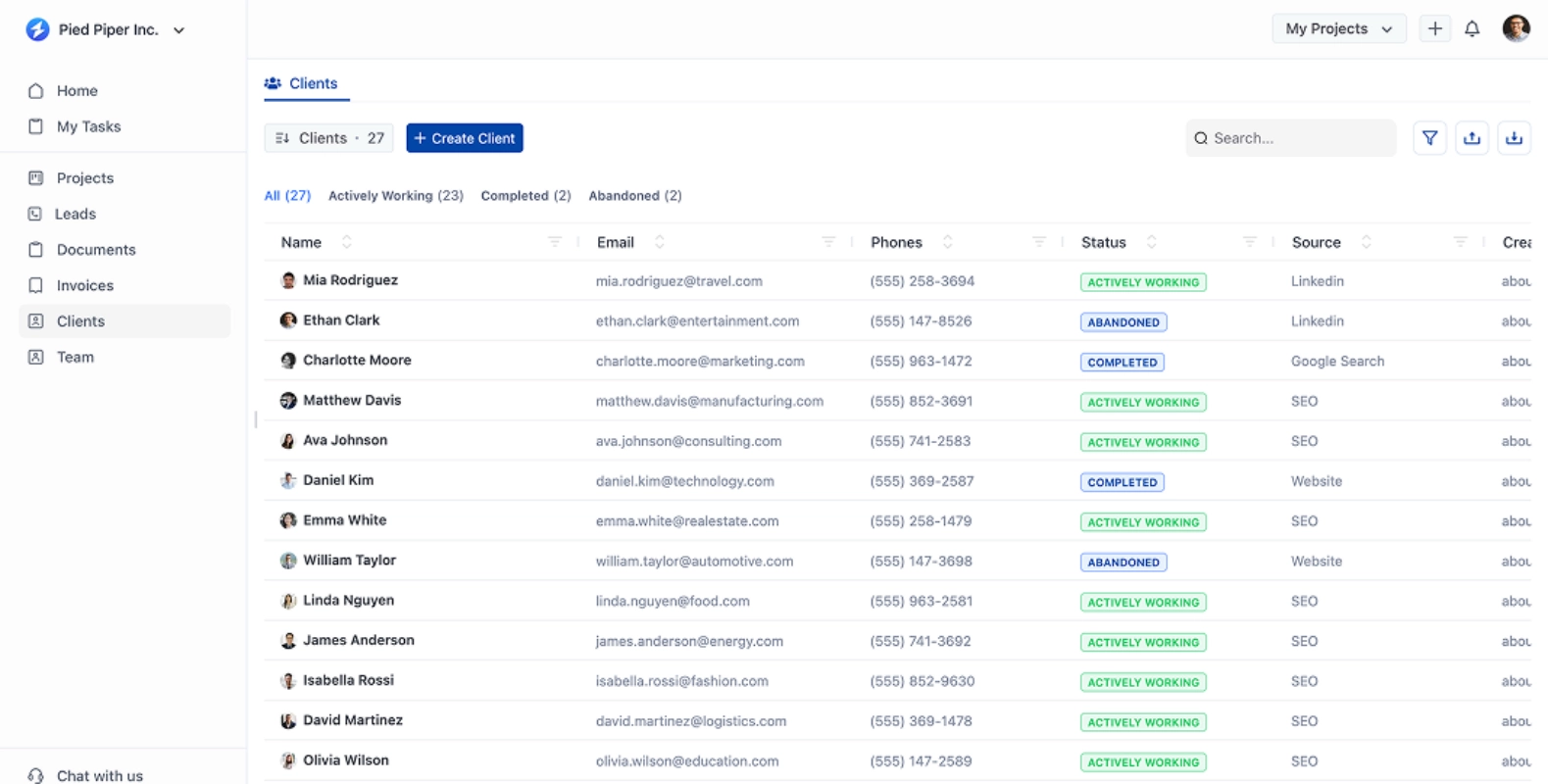
OneSuite stands out by offering features designed to improve agency management. It combines ease of use with powerful tools, making it a top choice for those seeking a more complete solution.
💡 A More Manageable Solution than Moxie
Check out the quick comparison table below to see why I recommend OneSuite over HoneyBook and Moxie.
|
Featuresx |
OneSuite |
Moxie |
HoneyBook |
|---|---|---|---|
|
✔ Multiple Businesses Support |
✅ |
❌ |
❌ |
|
✔ My Task |
✅ |
❌ |
✅ |
|
✔ Subtasks |
✅ |
✅ |
❌ |
|
✔ List View |
✅ |
❌ |
✅ |
|
✔ Kanban View |
✅ |
✅ |
❌ |
|
✔ Files View |
✅ |
❌ |
❌ |
|
✔ Task Labels |
✅ |
❌ |
❌ |
|
✔ Import Project from Trello |
✅ |
❌ |
❌ |
|
✔ Custom Lead Stages |
✅ |
❌ |
✅ |
|
✔ Lead Segmentation |
✅ |
❌ |
✅ |
|
✔ Chrome Extension for Gmail |
✅ |
❌ |
✅ |
|
✔ Lead Source Tracking |
✅ |
❌ |
✅ |
|
✔ Completed Tasks Tab |
✅ |
❌ |
✅ |
|
✔ Departments |
✅ |
❌ |
❌ |
|
✔ Project Selection |
✅ |
❌ |
✅ |
|
✔ Invoice Activity Log |
✅ |
✅ |
❌ |
|
✔ Paid/unpaid status |
✅ |
❌ |
✅ |
|
✔ Multiple Currency |
✅ |
✅ |
❌ |
|
✔ Client Portal |
✅ |
✅ |
❌ |
|
✔ Customize client access and actions |
✅ |
❌ |
❌ |
|
✔ Custom Roles & Permissions |
✅ |
❌ |
❌ |
|
✔ White Label |
✅ |
❌ |
✅ |
|
✔ Multiple Language Support |
✅ |
✅ |
❌ |
|
✔ Module Customization |
✅ |
❌ |
✅ |
So, after the quick comparison table, wasn’t I right?
The above features seem very tiny, but they make a significant difference in project management. You can not deny that without these features, the productivity of a project manager and your team members would be down.
OneSuite pricing
Mothly Plans
- Freelancer – $29/Month (5 user )
- Solopreneur – $59/Month (10 user )
- Growing Agency – $1,49/Moth (30 user )
- Large Agency – $2,39/Month ( 70 user )
Yearly Plans (Save More)
- Freelancer – $290/year (~$24/month, save $60)
- Solopreneur – $590/year (~$49/month, save $120)
- Growing Agency – $1,490/year (~$124/month, save $300)
- Large Agency – $2,390/year (~$199/month, save $480)
(All yearly plans include the same features as their monthly counterparts.)
Ready to elevate your productivity? OneSuite is your answer. And the best part is?
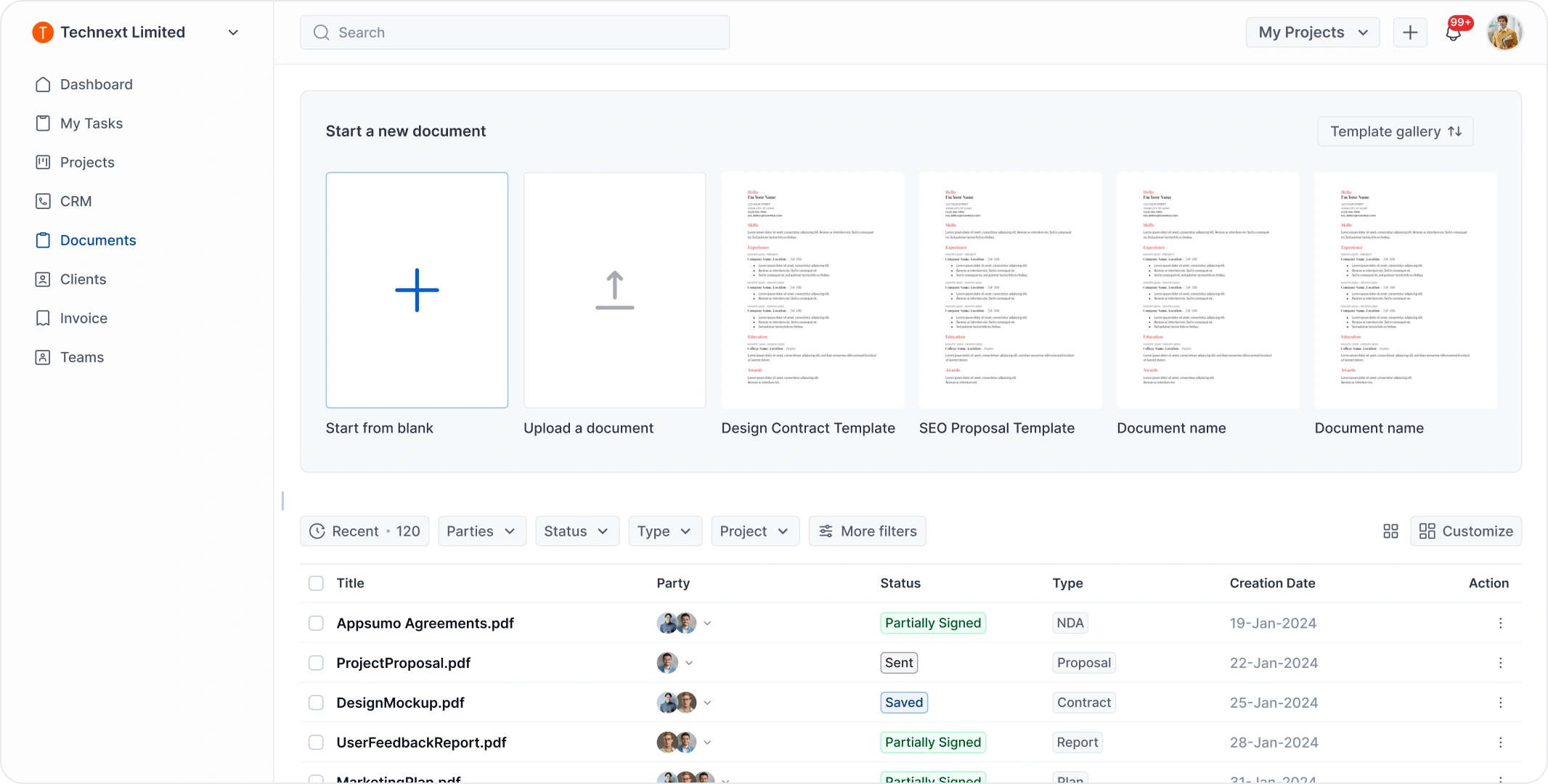
Pick the best one!
In conclusion, the choice between HoneyBook vs Moxie depends on your agency’s needs. HoneyBook is best for simplicity and ease of use, while Moxie is best for freelancers. Consider your specific requirements to determine the best fit.
If neither fits your needs, OneSuite is a great alternative to explore. Because it offers a comprehensive suite of tools to streamline client management, project tracking, and invoicing. This makes it a perfect option for those seeking more functionality and flexibility in their business management software.
Find a Better Way to Grow
OneSuite streamlines projects, clients, and payments in one place, making growth hassle-free.