
Best Toggl Alternatives in 2026: 9 Options for Freelancers and Agencies

October 19, 2026
Toggl Track handles basic time tracking well. But as work grows, many freelancers, agencies, consultants and small teams need more: invoices built from approved hours, project budgets, timesheet approvals or monitoring for remote staff. Switching tools costs time, so it helps to compare before you commit.
This guide compares nine Toggl Track alternatives by features, pricing, strengths, limitations and real user reviews, so you can find the best Toggl alternative for how you actually work.
In a hurry? Start with the quick picks below.
Quick Picks: The Best Toggl Alternative for Your Situation
Find the row that sounds most like your week, then read that tool’s review below.
| Situation | Look at first |
| Agency billing and client workflows | OneSuite or Bonsai |
| Free tracking for small teams | Clockify or TimeCamp |
| Freelancers billing hourly | Harvest or OneSuite |
| Tracking inside your existing project tools | Everhour |
| Project management with time tracking | OneSuite or Paymo |
| Automatic time tracking | Timely or TimeCamp |
| Remote team activity monitoring | Hubstaff |
| A basic timer that already works | Stay with Toggl Track |
Why People Look for a Toggl Track Alternative (and When to Stay)
Reviewers on Capterra and G2 often mention how easy Toggl Track is to use, and some like its reports. The reasons to look elsewhere usually fall into six groups: pricing and plan limits, timesheet approvals, billing, project and team workflows, tracking style, and free-plan limits.
What Toggl’s own pages say
- Pricing and approvals: Billable rates and project estimates start on Starter. Timesheet approvals with locked periods, profitability reports and fixed-fee projects need Premium
- Billing: Every plan can create a PDF invoice from a Summary or Detailed report. Free adds Toggl’s logo, and sending invoices to QuickBooks needs Starter .
- Free plan: Toggl lists Free for up to 3 users, and older accounts may differ. In May 2026, Toggl Support said new Free organizations get 30 report views per month, and that the limit does not lift over time.
- Tracking style: Toggl documents idle detection, a Timeline and calendar auto-track, so you are not limited to a manual timer .
- Project and team workflows: If you want task planning or client-facing work in the same tool as your hours, you need a different type of product. The next section explains the options.
What users say (opinions, not verified by us; links go to each site’s review page)
- Free users complained on Toggl’s community forum about the report-view limit, and a July 2026 Capterra review says custom reporting and deeper filtering are locked behind paid plans.
- A December 2024 Capterra review says Toggl gets expensive for a team of more than five.
Toggl Track is still a good fit if:
- You mainly need a timer and reports, and invoicing happens somewhere else.
- Your team fits the free plan, or Starter covers the billable rates you use.
- You are on Premium and its approvals and profitability reports already answer your questions.
- Your team relies on the Timeline or calendar auto-track and you do not want to retrain anyone.
- You do not need a client portal, proposals or contracts in the same tool.
What Kind of Tool Do You Need? Four Types of Toggl Alternative
“Toggl alternative” covers very different products. Choosing the type first saves you from comparing tools built for different jobs.
1. Timer-first tools: Clockify, Everhour, Harvest
These work much like Toggl Track. You start a timer or log hours against a client and project, then run reports. Clockify starts with a free plan, Everhour tracks inside your project management app, and Harvest ties hours to invoices. Choose this type if your current workflow is fine and you mainly want different pricing, limits or integrations.
2. Project and billing suites: OneSuite, Bonsai, Paymo
Here time tracking is one feature in a wider workspace that also holds clients, projects and invoices, so tracked hours reach an invoice without retyping. OneSuite and Bonsai add a client portal and contracts, while Paymo centers on project planning. Choose this type if you bill clients and can plan a bigger switch. Our guide to project management software with time tracking goes deeper.
3. Automatic time capture: Timely, TimeCamp
These tools record the apps and websites you use in the background and help turn that activity into time entries. Choose this type if you forget to start timers or switch tasks all day. Toggl Track already offers some of this through its Timeline and calendar auto-track, so compare how far each tool goes and how much review entries need before you bill them.
4. Team monitoring: Hubstaff
Built for managers of remote teams, monitoring tools record activity levels and, when switched on, screenshots. They show whether paid hours are being worked, not what to invoice. Choose this type for employee teams, and agree a clear monitoring policy with your staff first.
Eight things to check before you compare tools: tracking style; invoicing from tracked hours; approvals and locked timesheets; budgets and profitability; client-facing features; pricing basis (annual or monthly, minimum seats, who counts as a seat); free-plan limits; and integrations.
How We Chose and Compared These Tools
OneSuite publishes this guide, so OneSuite is listed first and the other eight tools are grouped by type. The order is not a ranking. Each tool documents time tracking, publishes US pricing, fits one of the four types above, and is regularly compared with Toggl Track or relevant to client work. We compared features, plans and limits using each vendor’s own pricing pages and help documents (for OneSuite, its help docs), and read public reviews on G2, Capterra and Trustpilot.
We did not test any tool hands-on. Prices, plans and G2 ratings were checked on October 15, 2026. Hubstaff’s prices come from its undated pricing guide, so confirm them on its site. In tables, “Not verified” means we could not find a feature in the vendor’s documentation, not that the tool lacks it. In Pros and Cons, plan limits, user-reported problems and unverified points are labeled.
Toggl Alternatives Comparison: Pricing, Ratings and Key Limitations
This table puts starting prices, G2 ratings and the main limitation of each tool side by side. Prices are US dollars per user per month for the lowest paid plan. G2 ratings and review counts were read on October 15, 2026, and each rating links to the tool’s G2 page.
| Software | Best for | Starting price | G2 rating | Key limitation |
| OneSuite | Agencies managing clients, projects, time and billing | $9 monthly or $7 annual, current offer (regular $15 or $10); one plan, no free plan | 4.8 (17 reviews) | No mobile app yet |
| Clockify | Free time tracking for small teams | Free for up to 5 users; paid from $4.99 monthly or $3.99 annual | 4.5 (204 reviews) | Free plan was narrowed in 2026 |
| Everhour | Tracking inside project management tools | Free for up to 5 seats; Team $8.50 billed yearly | 4.7 (183 reviews) | Team plan needs at least 5 seats |
| Harvest | Freelancers who invoice from tracked hours | Free for 1 seat; paid from $11 monthly or $9 annual (annual mapping inferred) | 4.3 (843 reviews) | Approvals only on Enterprise; usage-based charges |
| Bonsai | Solo consultants and small service businesses | From $15 monthly or $9 annual (no free plan) | 4.3 (101 reviews) | Invoicing and portal need Essentials or above |
| Paymo | Small teams combining project management and time tracking | Free for 1 user; paid from 9.90monthly(5.90 for the first 3 months under the current offer) | 4.6 (594 reviews) | Approvals need Pro; Free and Solo are single-user |
| Timely | Automatic time capture without timers | From $11 monthly or $9 annual (no free plan) | 4.8 (497 reviews) | Starter capped at 5 users and 20 projects |
| TimeCamp | Free automatic tracking with optional billing tools | Free plan; paid from $5.49 monthly or $3.99 annual | 4.7 (392 reviews) | AI Time Tracker is billed separately |
| Hubstaff | Remote teams that want activity monitoring | From $7 monthly or $4.99 annual (per Hubstaff’s pricing guide) | 4.4 (2,314 reviews) | Owners, managers and non-trackers take paid seats |
| Toggl Track (baseline) | A basic timer that already works | Free for up to 3 users; Starter $9 or $12 (billing period not labeled) | 4.6 (1,589 reviews) | Approvals and profitability need Premiu |
The 9 Best Toggl Alternatives, Reviewed
Each review covers what the tool is, key features, pricing, pros and cons, and real user reviews. Reviews are third-party opinions: the most recent public ones we found, one positive and one negative or mixed per tool, with incentivized reviews flagged.
A linked reviewer name opens that exact review. A linked platform name opens the product’s review page.
Let’s start
1. OneSuite — Best for Agencies Managing Clients, Projects, Time and Billing
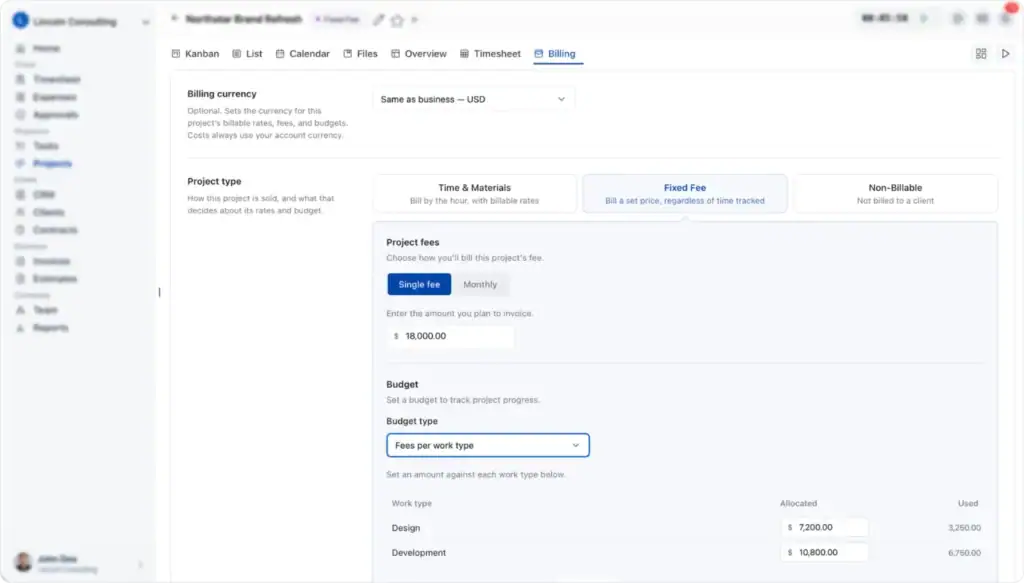
OneSuite is a connected client-work platform that brings projects, time tracking, approvals, invoicing, contracts and a client portal into one account. As a Toggl alternative, it focuses on what happens after hours are logged: a manager approves the time, and the approved hours can feed an invoice the client sees. It suits agencies, consultants and service businesses that want clients, work and billing in one place rather than a standalone timer.
Key Features
- Timer and timesheets: Run a timer on a task or enter hours in Day, Week, Calendar and List views, so people can log time the way they prefer (time tracking guide).
- Approvals: A reviewer approves submitted time or sends it back with a required reason, and a locked period can no longer be edited, which keeps billed hours stable.
- Invoices from tracked work: Build invoices from billable hours, expenses and project fees, optionally from approved hours only, so the invoice matches what the team signed off. Clients can pay through Stripe or PayPal.
- Budgets and profitability: Project budgets in money or hours send alerts, and a Profitability report charts revenue, costs and profit, so overruns show before a project closes.
- Client portal, contracts and CRM: Clients see their projects and files, view and pay invoices and sign documents (up to 10 signers). The CRM tracks opportunities, companies and people, so client details sit next to the work.
Pricing
- Trial: Free trial available with no credit card required
- Starting Price: $9/user/month
- Best For: Startups, agencies, and service businesses
- Includes: Project management, time tracking, client management, billing, and reporting features
Pros and Cons
| Pros | Cons |
| Approved hours can feed invoices, so billing follows what managers signed off | No free plan; 14-day trial only |
| Clients, projects, contracts and the portal sit in one account, which reduces re-entry between tools | Not documented: automatic tracking, idle detection and screenshots |
| Send-back reasons and period locks help managers check billable work before invoicing | No mobile app yet; time tracking was announced only in March 2026 |
| One per-user plan, and portal users need no paid seat | Plan limit: 10 GB storage and 3,000 leads, with paid add-ons |
Real User Reviews
OneSuite has about 17 G2 reviews, some of them incentivized, and none on Trustpilot.
👍 A small-business founder praises the support and client portal and wishes for more integrations, such as accounting and automation tools.
– Srikar V. (G2)
👎 Liked the onboarding but said tasks had no time tracking option. This incentivized review (G2 invite) predates OneSuite’s March 2026 time tracking announcement, so it describes an older version.
– Ashokkumar K. (G2):
2. Clockify — Best for Free Time Tracking for Small Teams
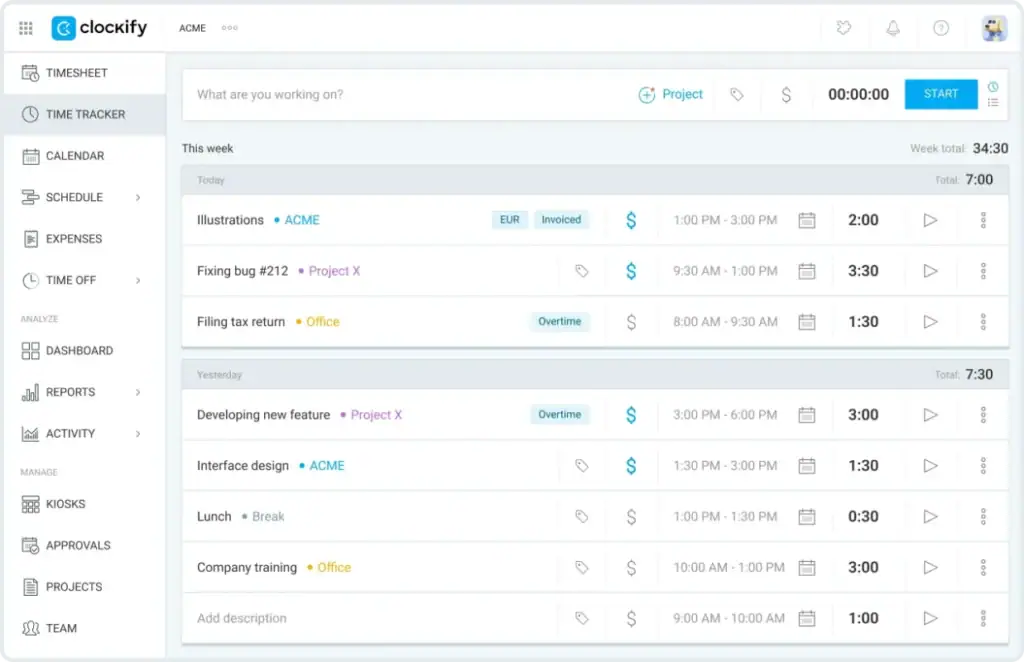
Clockify, from CAKE.com, is a timer-first tracker with a free plan for up to 5 users. Starting a timer, filling a weekly timesheet and running reports will feel familiar to Toggl users, and paid tiers add billable rates, approvals, invoicing and profitability step by step. It suits small teams that want to start free and pay only for the extra layers they need.
Key Features
- Timer, timesheet and Auto tracker: Track from web, desktop, mobile or the browser extension. The desktop Auto tracker records programs, window titles and websites, visible only to you, which helps you rebuild a day you did not time.
- Billable rates from Basic: Set hourly rates for activities so reports show billable amounts.
- Approvals on Standard: Managers approve timesheets and expenses, and approved timesheets cannot be changed, which protects the data you bill from.
- Invoicing on Standard: Issue invoices from tracked time, including recurring invoices, or send time entries one way to QuickBooks Online.
- Pro for cost control: Expenses, budgets and estimates, profitability analysis and scheduled email reports show whether projects stay on budget.
Clockify Pricing
- Free: $0/month.
- Basic: $3.99/user/month, billed annually.
- Standard: $5.49/user/month, billed annually.
- Pro: $7.99/user/month, billed annually.
- Enterprise: $11.99/user/month, billed annually.
- CAKE.com Bundle: $12.99/user/month, billed annually.
Note: These are annual-billing rates, not month-to-month prices.
Pros and Cons
| Pros | Cons |
| Free plan for up to 5 users lets a small team start at no cost | Plan limit: free plan was cut back in 2026 |
| Approvals and invoicing start at Standard, so billing tools do not need the top tier | Plan limit: expenses, budgets and profitability need Pro |
| Auto tracker helps people who forget to start timers | Every active or invited user takes a paid seat |
| Low per-seat prices across three paid tiers | Auto tracker is missing from the Mac App Store version |
Real User Reviews
Switched from Harvest and valued reaching a real person during onboarding.
– Loulita Gill Design (Trustpilot)
A freelancer says hourly rate tracking and Excel and CSV exports were removed from the free plan and report history was cut to one month.
– D.T. (Trustpilot)
4. Everhour — Best for Tracking Time Inside Project Management Tools
Everhour is a time tracking and project management tool that helps teams track hours directly within Asana, ClickUp, Jira, Trello, and other project management platforms. As a Toggl alternative, it eliminates the need to switch between separate tools while offering timesheets, reporting, and invoicing.
It’s best for teams that already use project management software and want time tracking built into their existing workflow.
Key Features
- Native integrations: 21 tools including Asana, Basecamp, ClickUp, Jira, Monday, Notion and Trello, plus a browser extension that adds a timer to 21 more apps such as Figma and HubSpot. Integrations need the Team plan, and they let people track where they already work.
- Timesheet approvals: People submit weekly hours, and managers approve, reject or partially approve them. Approved time is protected from regular edits, so reviewed hours stay put.
- Invoicing: The Team plan turns billable, uninvoiced time into invoices that can be copied to QuickBooks, Xero or FreshBooks, so billing starts from tracked hours.
- Reports and export: Included even on the free plan, so you can judge the reporting before paying.
Everhour Pricing Plans
- Free: $0/month for up to 5 users, with limited features.
- Team: $8.50/user/month, billed annually. Minimum 5 seats.
- Custom: Custom pricing for larger organizations, with a minimum of 50 seats. Contact sales for a quote.
Free Trial: 14 days with access to all features, no credit card required.
Pros and Cons
| Pros | Cons |
| Time is logged inside the project tool your team already uses, so there is one less app to open | Plan limit: Team needs at least 5 seats |
| Free plan covers up to 5 seats, with reports and export | Plan limit: the free plan has no integrations |
| Approve, reject or partially approve gives managers flexible review | Monthly price not published |
| Invoices copy to accounting software, which cuts re-entry | Not verified: which plan includes approvals |
Real User Reviews
👍 Says the move from Tempo went smoothly and would like monthly pay periods and label filtering.
– Dale I. (Capterra)
👎 Liked the ClickUp integration but could not drop back to the free plan after the trial. Everhour replied that the free plan excludes integrations.
– Bashir A. (Capterra)
4. Harvest — Best for Freelancers Who Invoice From Tracked Hours
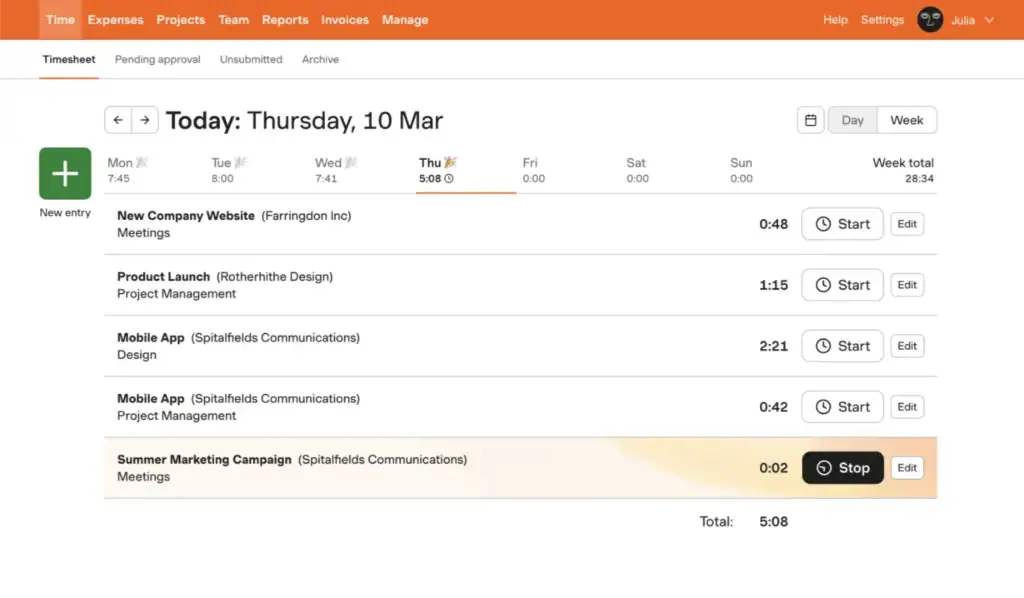
Harvest is a timer and invoicing tool for freelancers and small teams. Time and expenses logged in Harvest feed straight into invoices, and even the Free plan includes invoicing for one person on two projects. Compared with Toggl Track, it puts billing at the center of the workflow, which suits freelancers and small teams whose main job after tracking is getting paid.
Key Features
- Timers and direct entries: Add time as you work or afterward, import calendar events and get reminders. Timers start from the browser, desktop or mobile app, and Harvest says its approach avoids screenshots and app tracking, which suits people who dislike monitoring.
- Invoices from time and expenses: Create, send and track invoices on every plan, including Free, so billing starts from the work you logged.
- Approvals and profitability on Enterprise: Approving locks the whole week, timesheets cannot be rejected, and margin reports run by client, project, task or team.
- Accounting and payments: Invoices and payments copy one way to QuickBooks Online or Xero, and clients can pay through Stripe, which cuts bookkeeping re-entry.
Harvest Pricing Plans
- Free: $0/month, free forever for individual freelancers.
- Teams: Starts at $11/seat/month.
- Enterprise: Starts at $17.50/seat/month.
- Enterprise Plus: Custom pricing. Contact sales for a quote.
Free Trial: 30 days for Teams and Enterprise.
Pros and Cons
| Pros | Cons |
| Invoicing and expenses on every plan, including Free, so freelancers can bill without upgrading | Plan limit: approvals and profitability only on Enterprise |
| Simple timers with calendar imports keep entry quick | Usage-based charges above an allowance |
| Clients can pay invoices through Stripe, which shortens the wait for payment | Free plan is one seat and two projects |
| 30-day trial with no card | Timesheets cannot be rejected |
Real User Reviews
👍 Calls Harvest dependable over five years of use, with easy timesheets and project dropdowns.
– James C. (Capterra)
👎 A long-time customer says her 10-person team’s monthly bill rose sharply and support would not discuss it. Harvest’s help center describes usage-based charges on its plans, and we did not find a detailed explanation of any 2026 price change from Harvest.
– Judy Swajger (Trustpilot)
5. Bonsai — Best for Solo Consultants and Small Service Businesses Billing Clients
Bonsai is a client-work suite for freelancers and consultants. It pairs a start-and-stop timer with a CRM, proposals, contracts, a client portal and invoicing, so you can run a client from first proposal to final invoice in one place. Solo consultants and small service businesses that want client paperwork and billing in one subscription, and do not need a free plan, get the most from it.

Key Features
- Timer and weekly timesheets: Start and stop timers, add entries manually and separate billable from non-billable time. Owners, partners and project managers can lock a weekly timesheet, which the pricing page lists under Elite, so reviewed weeks stay fixed.
- Invoices from tracked time: Generate an invoice from billable time on Essentials and above, with payments handled through Stripe, which shortens the path from hours to payment.
- Client paperwork: Proposals, contracts, forms, scheduling and a client portal start on Essentials, so clients get documents and updates in one place.
- Reporting and integrations on Premium: Profit and productivity reports, a workload view, a Gantt view and connections to QuickBooks, Xero, Zapier, Calendly and Google show profitability and link your accounting.
- Apps: iPhone, Android and a Mac menu bar app let you track away from your desk.
Bonsai Pricing Plans
- Basic: $15/user/month, or $9/user/month billed annually.
- Essentials: $25/user/month, or $19/user/month billed annually.
- Premium: $39/user/month, or $29/user/month billed annually.
- Elite: $59/user/month, or $49/user/month billed annually. Minimum 3 users.
Free Trial: 7 days, with payment details required to activate the trial.
Pros and Cons
| Pros | Cons |
| Proposals, contracts, portal and invoices cover a client from first proposal to final invoice in one tool | No free plan; 7-day trial |
| Invoices are built from billable time in one click | Plan limit: invoicing and the portal need Essentials; accounting integrations and profit reports need Premium |
| iPhone and Android apps on every plan | Not verified: timesheet approvals (locking is listed under Elite) |
| Annual billing lowers the price of every tier | Plan limit: Elite requires at least 3 users |
Real User Reviews
👍 Finds it easy to manage several projects and likes that the timer can start before every detail is filled in.
– Travis, US (Trustpilot)
👎 Says an unused test account kept being billed for months; four months were refunded and the rest refused. This is one customer’s account of a billing dispute.
– Aga Bajer, GR (Trustpilot)
6. Paymo — Best for Small Teams Combining Project Management and Time Tracking
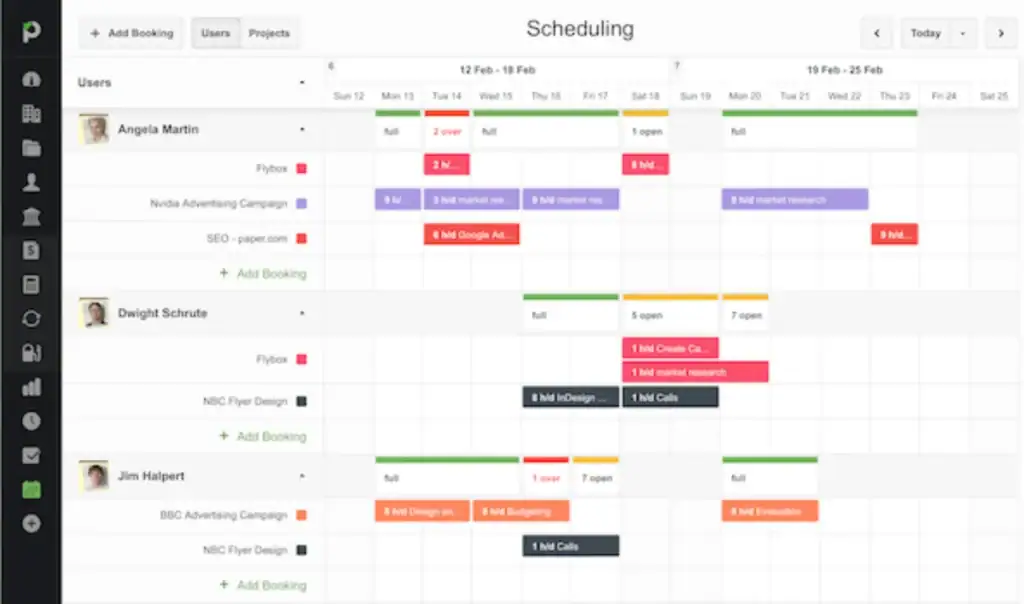
Paymo is project management software with time tracking and invoicing built in. Tasks, timesheets, invoices and guest access live in one app, from a task list on the free plan up to Gantt charts on Pro. Instead of pairing a timer with a separate project tool, small teams and freelancers can plan work, track it and bill for it in one place.
Key Features
- Paymo Track: A desktop app for Windows, Mac and Linux that runs in the background and records time spent in desktop apps. Data stays on the computer and no screenshots are taken, so you get a record without monitoring.
- Invoicing: Convert unbilled time into invoices. The free plan includes unlimited invoices, and recurring invoices start on Plus.
- Timesheet approvals on Pro: Admins approve or reject timesheets and can add a reason for a rejection, which gives managers a review step before billing.
- Guest and client portal from Solo: Guests view and comment on tasks marked visible and can receive invoices, estimates and time reports, without seeing internal data such as time worked.
Paymo Pricing Plans
- Free: $0/month for 1 user, 1 client, and 2 projects.
- Solo: $9.90/month, or $5.90/month billed annually.
- Plus: $15.90/user/month, or $10.90/user/month billed annually.
- Pro: $23.90/user/month, or $16.90/user/month billed annually.
Free Trial: 15 days, no credit card required.
Pros and Cons
| Pros | Cons |
| Projects, tasks, time and invoices in one app, so planning and billing share data | Plan limit: approvals need Pro |
| Free plan includes unlimited invoices | Free and Solo are limited to one user |
| Background desktop tracking gives a time record without the feel of screenshot monitoring | Annual prices not published |
| Guest and client access from Solo | Not verified: contracts and e-signatures |
Real User Reviews
👍 Praises precise time tracking and customizable invoices.
– Verified User in Marketing and Advertising (G2)
👎 Finds the software intuitive but cites missing features, limited customization and unhelpful support replies.
– Verified User in Consulting (G2)
7. Timely — Best for Automatic Time Capture Without Timers
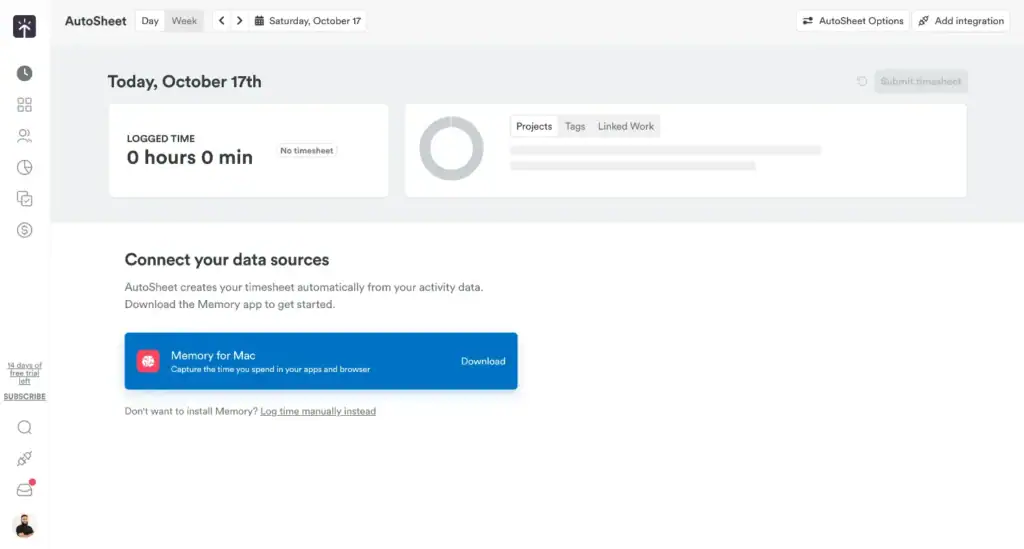
Timely is built for people who forget to start timers. It records time spent in web and desktop apps in the background, then uses AI to suggest timesheet entries that you review and confirm. Instead of a start-and-stop habit, it gives you a daily record to check, which suits consultants and agency teams who would rather review their day than log it as they go.
Key Features
- Automatic tracking: Captures activity across thousands of apps and websites on every paid plan, so little time slips through unrecorded.
- AI-suggested entries: Timely drafts entries from that activity for the person who did the work to confirm. Timely’s help center says this is rolling out to select workspaces.
- Manual timer: Start a timer from a phone, tablet or computer on all paid plans, for the times you want one.
- Billable rates and budgets: User-specific hourly rates and project budgets are on every paid plan, with recurring budgets and internal cost rates on Premium and Unlimited, so you can watch margins.
- Invoicing on Premium and Unlimited: Invoices pull in unbilled hours that carry a rate and can go to QuickBooks Online as drafts, with status syncing back.
Timely Pricing Plans
- Starter: $11/user/month, or $9/user/month billed annually.
- Premium: $20/user/month, or $16/user/month billed annually.
- Unlimited: $28/user/month, or $22/user/month billed annually.
- Enterprise: Custom pricing. Contact sales for a quote.
Free Trial: 14 days with access to all features. No permanent free plan.
Pros and Cons
| Pros | Cons |
| Automatic capture helps people who forget to start timers | No free plan |
| A manual timer is still available on every paid plan | Plan limit: Starter is capped at 5 users and 20 projects, and invoicing needs Premium |
| Billing can start in Timely and finish in QuickBooks Online, which suits teams that keep their accounts there | Not verified: manager approvals and expense tracking |
| Every feature is available during the trial | User-reported: the AI missed short time blocks |
Real User Reviews
👍 Says the AI tracking makes recalling the day easy and her agency team finds tracking simple, though she prefers the Classic version.
– Hannah M. (Capterra)
👎 Says the AI features let him down, short time blocks were missed and integrations disconnected, and he objected to being charged for a full year upfront. He had used it for under six months.
– David G. (Capterra)
8. TimeCamp — Best for Free Automatic Tracking With Optional Billing Tools
TimeCamp combines automatic tracking with a free plan that has no user limit. Its desktop app assigns time to projects by spotting keywords in app and website titles, and paid tiers add invoicing, approvals and screenshots. It fits teams that want automatic capture at no cost to start, plus billing tools they can add later when clients start asking for invoices.

Key Features
- Timer and keyword tracking on every plan: Use a timer, or let automatic mode log time when keywords appear in window titles. In automatic mode the timer cannot be started manually. Full app and website tracking starts on Premium.
- AI Time Tracker: Prepares entry suggestions in the background on every plan, billed separately by usage, which saves manual sorting but adds cost.
- Invoicing from Starter: Bill from tracked time, with invoice export to QuickBooks and Xero from Premium.
- Approvals on Ultimate: An administrator or supervisor approves or rejects timesheets with comments, and approved timesheets are locked, so billed hours cannot drift.
- Ultimate extras: Expenses, billable rates and optional screenshots every 10 minutes, enabled by an administrator, for teams that need them.
TimeCamp Pricing Plans
- Free: $0/month, with unlimited users and projects.
- Starter: $3.49/user/month, or $2.49/user/month billed annually.
- Premium: $4.99/user/month, or $3.99/user/month billed annually.
- Ultimate: $6.99/user/month, or $4.99/user/month billed annually.
- Enterprise: Custom pricing. Contact sales for a quote.
Note: The screenshot shows discounted annual prices compared with the crossed-out regular annual rates. AI Time Tracker usage is billed separately.
Pros and Cons
| Pros | Cons |
| Free plan with unlimited users and projects suits growing teams | Plan limit: approvals, expenses and billable rates only on Ultimate; app and website tracking needs Premium |
| Keyword-based automatic tracking on every plan | Separately billed: the AI Time Tracker adds usage charges to the subscription |
| Invoicing from Starter keeps billing tools affordable | Automatic mode does not allow a manual timer start |
| Billed hours can move into QuickBooks or Xero as invoices instead of being rebuilt by hand | User-reported: setup took time and felt unintuitive |
Real User Reviews
👍 A travel business owner says TimeCamp showed where the team’s hours went, including where someone had too much on their plate, with the AI app preparing entries in the background. Notes that setup takes some time.
– Wojciech L. (G2)
👎 Likes the automatic capture and recategorizing but finds setup unintuitive, calls the AI add-on unaffordable on top of the subscription and found support limited as a solo user. TimeCamp replied.
–Verified User in Publishing (G2)
9. Hubstaff — Best for Remote Teams That Want Activity Monitoring
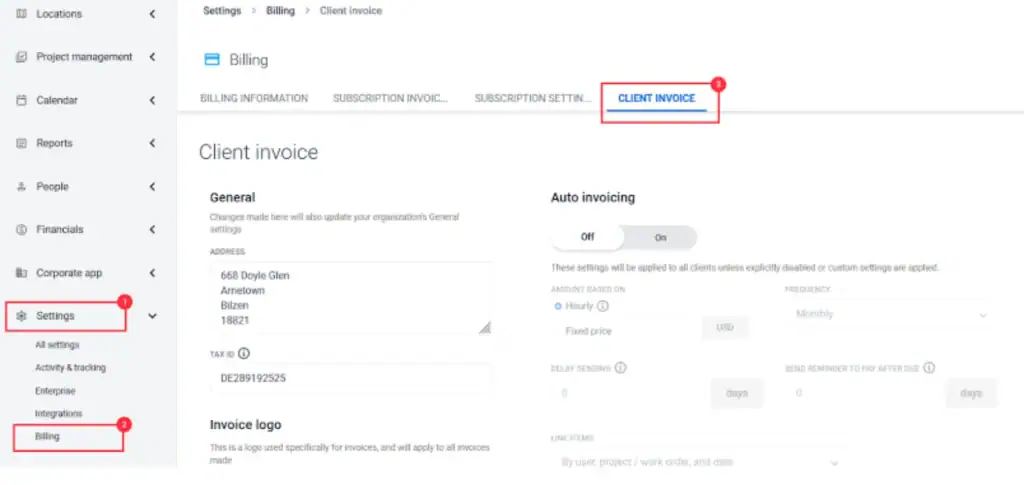
Hubstaff is workforce time tracking for remote and distributed teams. Alongside timers and timesheets it records activity levels, app and website use and optional screenshots, then connects hours to invoices and payroll. Its focus is managers who need visibility into how a remote team spends paid hours, rather than freelancers whose main job is billing clients, so it is a narrower swap for Toggl Track.
Key Features
- Timer and manual entries: A start-and-stop timer, plus manual entries with notes. With approval switched on, added or edited time needs a manager’s approval before it reaches the timesheet.
- Activity data: Activity levels, app and website use and idle time, with optional screenshots capped per seat (500 a month on Starter, 1,500 on Grow, unlimited on Team), give managers context for hours worked.
- Invoices: Client invoices from Starter (5 clients on Starter), with team invoices and payroll on Team, linking hours to pay.
- Approvals on Team and Enterprise: Managers approve submitted timesheets before payroll runs or clients are billed.
- Free Project Viewer role: Read-only access to assigned projects for people who do not track time. No client portal is documented.
Hubstaff Pricing Plans
- Starter: $7/user/month, or $4.99/user/month billed annually.
- Grow: $9/user/month, or $7.50/user/month billed annually.
- Team: $12/user/month, or $10/user/month billed annually.
- Enterprise: $25/user/month, billed annually.
Free Trial: 14 days, no credit card required.
Real User Reviews
👍 Credits Hubstaff with a clear view of hours across client projects, easy categorization and useful weekly email reports.
– Holly P. (G2)
👎 Likes seeing hours in her own time zone and discarding idle time, but says screenshot capture and automated productivity scoring raise privacy concerns.
– Faye D. (G2)
How to Choose Your Toggl Alternative
Three steps turn this list into a decision:
- Pick the tool type first. Timer-first tracker, project and billing suite, automatic capture or team monitoring: that one choice removes most of the list.
- Shortlist two tools. Two trials tell you more than skimming nine.
- Run one real client project through each trial. Track the hours, approve them and turn them into an invoice. If any step needs a workaround or a plan upgrade, you find out before you pay.
Then recheck prices on the vendor’s own page the day you buy.
OneSuite fits agencies, consultants and service businesses that need projects, clients, time and billing connected, so the hours your team approves can become the invoice your client sees. If a simple timer, automatic tracking or employee monitoring is what you need, one of the specialist tools reviewed above will serve you better.
If OneSuite matches how you work, start the 14-day free trial, no credit card needed, and use it for your test project. For questions about seats, billing and setup, see OneSuite’s FAQ.
FAQs About Toggl Alternatives
Can I set different billable rates for clients in Toggl Track?
Yes, you can manage different rates through projects in Toggl Track. Toggl supports billable rates at the workspace, team member, project, project member, and task levels on paid plans. For client-specific billing, you can assign separate projects and rates to each client.
Does Toggl Track take employee screenshots?
No. Toggl Track does not support employee screenshots or screen monitoring. If you need activity monitoring, Hubstaff and TimeCamp offer optional screenshot features. For teams that prefer tracking without screenshots, Toggl Track and Harvest are suitable options.
Do free time tracking tools have API limitations?
Yes. Free plans often limit API requests and integrations. Toggl Track allows 30 API requests per hour per user per organization on its Free plan, while Clockify allows 30 requests per hour and up to three active webhooks per workspace. Paid plans may provide higher limits.
Is Clockify completely free?
Clockify offers a free plan for up to five users with basic time tracking features. However, advanced features such as billable rates, timesheet approvals, invoicing, and CSV or Excel exports require paid plans. It’s suitable for small teams that primarily need a free timer and basic timesheets.
Start exploring OneSuite today
No credit card is required